1. Introducció
Thank you for choosing the iKF Solo Pro Wireless Bluetooth Headphones. This manual provides essential information for setting up, operating, and maintaining your headphones to ensure optimal performance and longevity. Please read this manual thoroughly before use and retain it for future reference.
2. Informació de seguretat
- No exposeu els auriculars a temperatures extremes, humitat ni substàncies corrosives.
- Eviteu deixar caure els auriculars ni sotmetre'ls a impactes forts.
- Do not disassemble or attempt to repair the headphones yourself. This may void the warranty and cause damage.
- Netegeu els auriculars amb un drap suau i sec. No utilitzeu netejadors líquids.
- Escoltar durant molt de temps a volums alts pot causar danys auditius. Ajusteu el volum a un nivell segur.
- Mantenir fora de l'abast dels nens.
3. Contingut del paquet
Verifiqueu que tots els elements siguin presents al paquet:
- iKF Solo Pro Wireless Bluetooth Headphones
- Cable de càrrega USB-C
- Cable d'àudio de 3.5 mm
- Manual d'usuari (aquest document)
4. Producte acabatview
Familiarize yourself with the components and controls of your iKF Solo Pro headphones.

Un angle frontal view of the iKF Solo Pro wireless headphones in BlackRed, showcasinels auriculars i la diadema.
Controls i ports:
- Botó d'encesa: Manteniu premut per encendre/apagar.
- Botó Pujar volum/Pista següent: Premeu curt per pujar el volum, premeu llargament per passar a la següent pista.
- Botó per baixar el volum/pista anterior: Premeu curt per baixar el volum, premeu llargament per anar a la pista anterior.
- Botó multifunció (MFB): Reproduir/pausa, respondre/finalitzar trucades, activar l'assistent de veu.
- ANC/Transparent Mode Button: Toggle between Active Noise Cancellation, Transparent Mode, and Normal Mode.
- Port de càrrega USB-C: Per carregar els auriculars.
- Conector d'àudio de 3.5 mm: Per a connexió amb cable.
- Indicador LED: Mostra l'estat d'energia, emparellament i càrrega.
5. Configuració
5.1 Càrrega dels auriculars
Abans del primer ús, carregueu completament els auriculars.
- Connecteu el cable de càrrega USB-C al port USB-C dels auriculars.
- Connecteu l'altre extrem del cable a un adaptador de corrent USB (no inclòs) o al port USB d'un ordinador.
- L'indicador LED mostrarà l'estat de càrrega (per exemple, vermell per a la càrrega, blau per a la càrrega completa).
- Una càrrega completa sol trigar aproximadament 2 hores.
5.2 Vinculació Bluetooth
Per connectar els auriculars a un dispositiu:
- Assegureu-vos que els auriculars estiguin carregats i apagats.
- Premeu i manteniu premut el botó d'engegada fins que l'indicador LED parpellegi en blau i vermell alternativament, cosa que indica el mode d'emparellament.
- Al dispositiu (telèfon intel·ligent, tauleta, ordinador portàtil), activeu el Bluetooth i cerqueu dispositius nous.
- Select "iKF Solo Pro" from the list of available devices.
- Un cop connectat, l'indicador LED parpellejarà lentament en blau o romandrà en blau fix.
5.3 iKF-APP Installation and Customization
Enhance your listening experience by downloading the iKF-APP.
- Scan the QR code in the quick start guide or search for "iKF" in your device's app store.
- Install the iKF-APP and open it.
- Ensure your headphones are paired via Bluetooth to your device. The app should automatically detect them.
- Within the app, you can adjust noise cancellation levels, EQ settings, sound modes (Pop, Rock, Classical), monitor battery, and customize button functions.
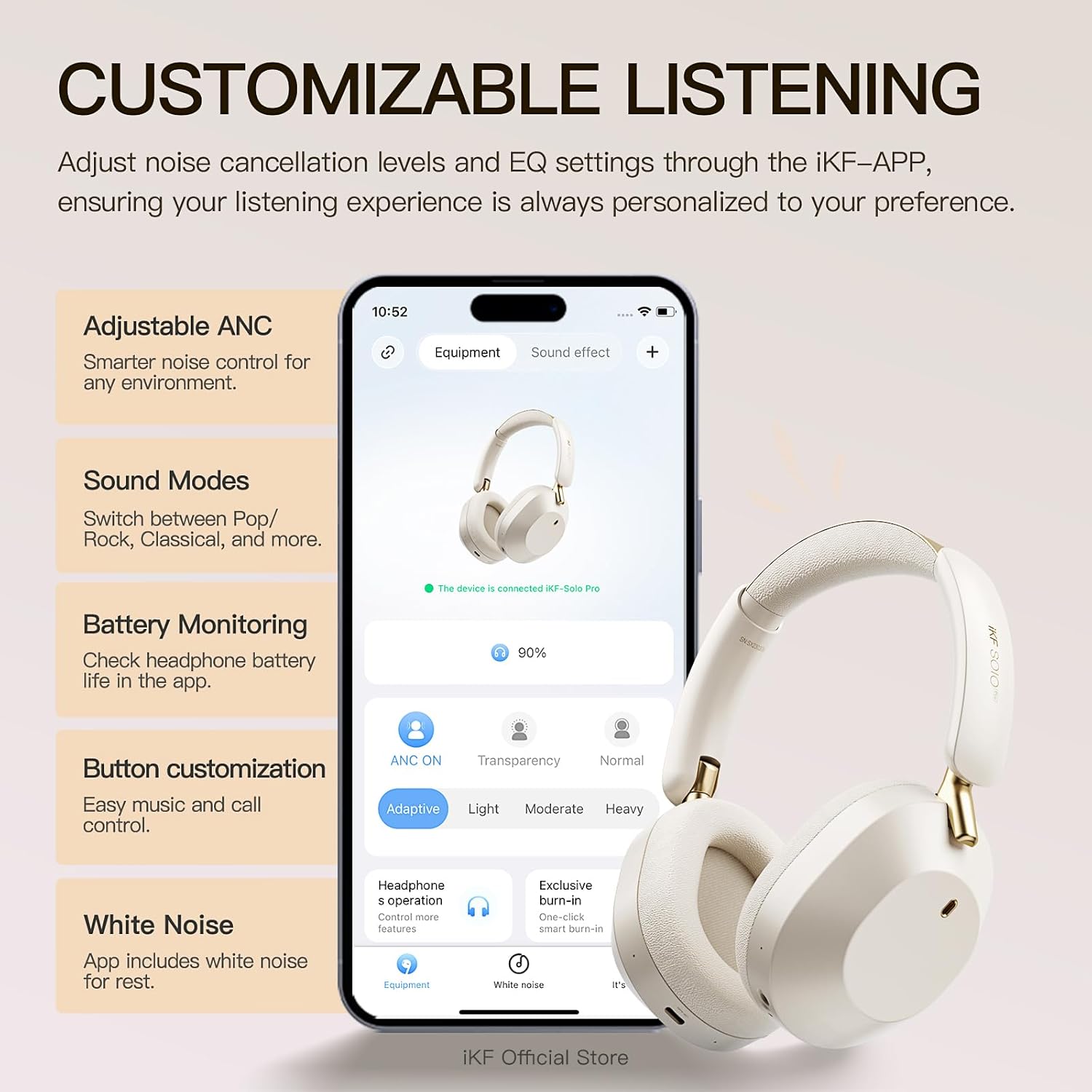
A visual showing the iKF Solo Pro headphones alongside a smartphone displaying the iKF-APP interface, illustrating options for adjusting ANC levels, sound modes, and button customization.
5.4 Connexió multipunt
The iKF Solo Pro supports simultaneous connection to two devices.
- Emparelleu els auriculars amb el primer dispositiu tal com es descriu a la secció 5.2.
- Desactiveu el Bluetooth al primer dispositiu.
- Torneu a posar els auriculars en mode d'emparellament i emparelleu-los amb el segon dispositiu.
- Torneu a activar el Bluetooth al primer dispositiu. Els auriculars s'haurien de connectar automàticament als dos dispositius.
- Audio will switch between devices based on which one is actively playing content or receiving a call.

A composite image detailing the comfort fit with soft earcups, the Type-C port for wired connection, and the capability for simultaneous connection to two devices.
6. Instruccions de funcionament
6.1 Encès/Apagat
- Encès: Premeu i manteniu premut el botó d'engegada durant aproximadament 3 segons fins que l'indicador LED s'encengui.
- Apagar: Premeu i manteniu premut el botó d'engegada durant aproximadament 3 segons fins que l'indicador LED s'apagui.
6.2 Reproducció de música
- Reproduir/pausa: Premeu breument el MFB.
- Pujar el volum: Premeu breument el botó de pujar el volum.
- Baixar el volum: Premeu breument el botó per baixar el volum.
- Pista següent: Premeu llargament el botó de pujar el volum.
- Pista anterior: Premeu llargament el botó per baixar el volum.
6.3 Gestió de trucades
- Respondre/Finalitzar la trucada: Premeu breument el MFB.
- Rebutja la trucada: Premeu llargament la tecla MFB.
- Activa l'Assistent de veu: Premeu dues vegades el MFB.
6.4 Modes de control de soroll
The iKF Solo Pro features Adaptive Active Noise Cancellation (ANC) and Transparent Mode.

An image illustrating the iKF Solo Pro headphones with a visual representation of 54dB noise reduction, highlighting the Adaptive Noise Cancellation feature.
- Modes d'activació/desactivació: Short press the ANC/Transparent Mode button to cycle through: Cancel·lació activa de soroll (ANC) → Mode transparent → Mode normal.
- Cancel·lació activa del soroll: Redueix el soroll ambiental extern per a una experiència auditiva immersiva.
- Mode transparent: Allows you to hear your surroundings clearly without removing the headphones, facilitating conversations or awareness of your environment.

A person wearing iKF Solo Pro headphones, with sound waves indicating the transparent mode for easy conversations without removing the headphones.
Àudio espacial 6.5 amb seguiment del cap
Experience immersive audio that adapts to your head movements.
- Spatial Audio provides a three-dimensional sound experience, ideal for movies, games, and music.
- Head tracking technology ensures the sound stage remains fixed relative to your device, creating a more realistic and engaging audio environment.
- This feature is typically enabled and managed through the iKF-APP or your connected device's audio settings.

A graphic depicting the iKF Solo Pro headphones on a head, with concentric circles indicating 360-degree head tracking technology for spatial audio.
6.6 Connexió per cable
Podeu fer servir els auriculars amb una connexió per cable fins i tot si la bateria està esgotada.
- Connect one end of the 3.5mm audio cable to the 3.5mm audio jack on the headphones.
- Connecteu l'altre extrem a la sortida d'àudio de 3.5 mm del vostre dispositiu.
- Note that some advanced features like ANC or Spatial Audio may be limited or unavailable in wired mode without power.
7. Manteniment
7.1 Neteja
- Netegeu els auriculars amb un drap suau, sec i sense borrissol.
- No utilitzeu netejadors abrasius, alcohol ni dissolvents químics.
- Eviteu que entri humitat a cap obertura.
7.2 Emmagatzematge
- Guardeu els auriculars en un lloc fresc i sec, allunyat de la llum solar directa i de temperatures extremes.
- If storing for an extended period, charge the headphones periodically to maintain battery health.
8. Solució De Problemes
If you encounter issues with your iKF Solo Pro headphones, refer to the following common problems and solutions:
| Problema | Possible solució |
|---|---|
| Els auriculars no s'engeguen. | Assegureu-vos que els auriculars estiguin completament carregats. Connecteu-los a una font d'alimentació i torneu-ho a provar. |
| No es pot emparellar amb el dispositiu. | Ensure headphones are in pairing mode (flashing blue/red). Turn off and on Bluetooth on your device. Forget previous pairings and try again. Ensure headphones are within range. |
| Sense so o amb un volum baix. | Check volume levels on both headphones and connected device. Ensure headphones are properly paired. Try another audio source. |
| L'ANC no funciona eficaçment. | Assegureu-vos que el mode ANC estigui activat. Ajusteu els auriculars per garantir un bon segellat al voltant de les orelles. |
| Connexió intermitent. | Ensure no obstructions between headphones and device. Move closer to the device. Avoid strong electromagnetic interference. |
| Els auriculars no es carreguen. | Check the USB-C cable and power adapter. Try a different cable or power source. Ensure the charging port is clean. |
Si el problema persisteix després de provar aquestes solucions, poseu-vos en contacte amb l'atenció al client.
9. Especificacions
Technical specifications for the iKF Solo Pro Wireless Bluetooth Headphones:
| Característica | Detall |
|---|---|
| Nom del model | iKF Solo Pro |
| Control de soroll | Adaptive Active Noise Cancellation (up to 54dB) |
| Tecnologia de connectivitat | Bluetooth 5.0, Wired (3.5mm) |
| Tipus de controlador d'àudio | 40mm Silk Diaphragm Dynamic Driver |
| Interval de freqüència | 20 Hz a 20,000 Hz |
| Impedància | 16 ohms |
| Durada de la bateria (ANC desactivat) | Fins a 140 hores |
| Durada de la bateria (ANC activat) | Fins a 95 hores |
| Temps de càrrega | Aproximadament 2 hores |
| Port de càrrega | USB-C |
| Mètode de control | Button Control, Touch Control |
| Dispositius compatibles | Android devices, Laptops, Smart Watch, Tablets, iPhone/iPad/Macbook |
| Material | Metall, plàstic |
| Pes de l'article | 1.6 lliures (aprox. 0.73 kg) |

An image highlighting the extended battery life of the iKF Solo Pro headphones, indicating 140 hours of playback with ANC off and 95 hours with ANC on.
10. Garantia i Suport
10.1 Informació de la garantia
Your iKF Solo Pro headphones are covered by a manufacturer's warranty against defects in materials and workmanship. The specific terms and duration of the warranty may vary by region and retailer. Please refer to the warranty card included with your product or contact your point of purchase for detailed information.
La garantia no cobreix els danys causats per:
- Accident, abuse, misuse, or improper operation.
- Reparació o modificació no autoritzada.
- No seguir les instruccions de funcionament.
- Desgast normal.
10.2 Atenció al client
For technical assistance, warranty claims, or general inquiries, please contact iKF customer support through the following channels:
- Weblloc: Visit the official iKF weblloc web per a recursos de suport i formularis de contacte.
- Correu electrònic: Refer to your product packaging or the iKF weblloc web per a l'adreça de correu electrònic d'atenció al client.
- iKF-APP: The iKF-APP may include a direct support feature.
When contacting support, please have your product model (iKF Solo Pro) and proof of purchase readily available.