Introducció
This manual provides detailed instructions for the AULA F99 Pro Wireless Mechanical Keyboard. It covers setup, operation, maintenance, and troubleshooting to ensure optimal performance and user experience. The AULA F99 Pro is a versatile mechanical keyboard designed for various applications, including work, gaming, and general use, offering multiple connectivity options and customizable features.
Contingut del paquet
Verifiqueu que tots els elements siguin presents al paquet:
- Teclat mecànic sense fil AULA F99 Pro
- Extractor de tecles
- Cable USB (tipus C)
- Manual d'usuari
- Extra 2 Switches
Configuració
Modes de connexió
The AULA F99 Pro keyboard supports three connection methods: Bluetooth 5.0 (BT5.0), 2.4GHz wireless, and USB-C wired mode. A switch located on the back of the keyboard allows selection between these modes.
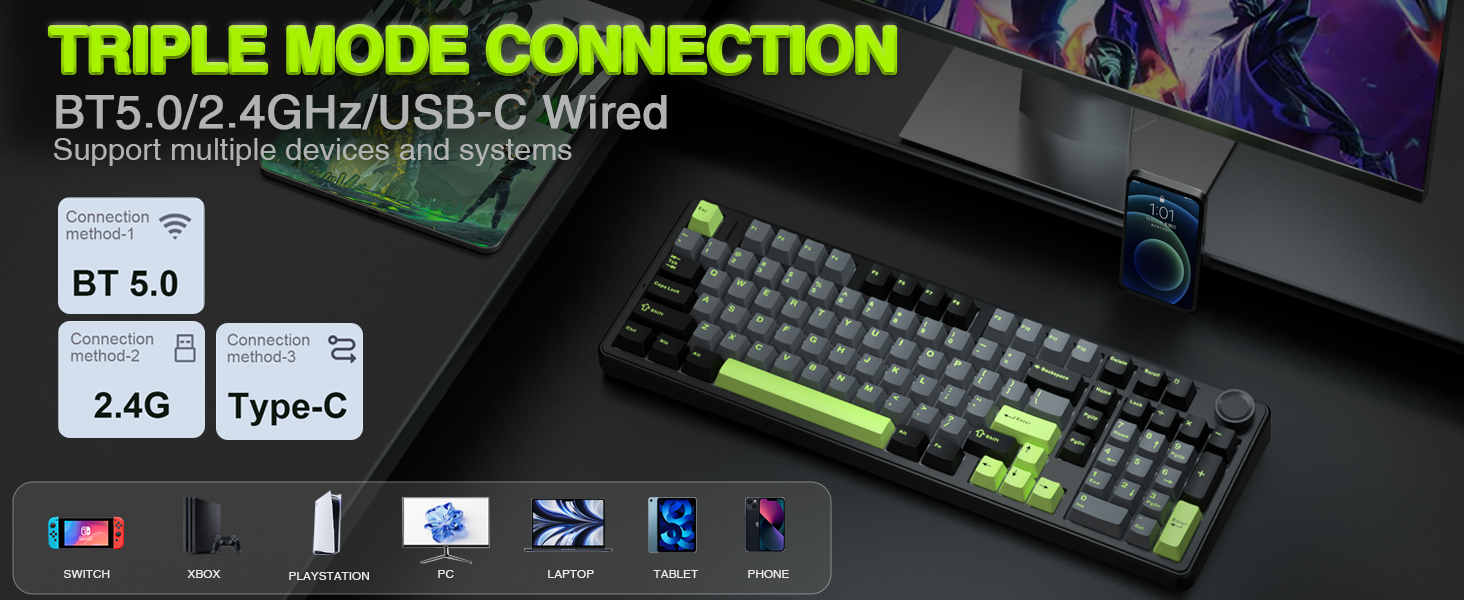
Image: The AULA F99 Pro keyboard highlighting its triple mode connection capabilities (BT5.0, 2.4GHz, USB-C wired) and compatibility with multiple devices and systems.

Imatge: Un primer pla view of the mode switch keys and ports on the side of the keyboard, indicating USB, BT/Wired/2.4G, and Type-C connections.
Mode amb cable (USB-C)
- Connecteu el cable USB-C proporcionat al teclat i a l'ordinador.
- Ensure the mode switch on the keyboard is set to 'USB'.
- El sistema reconeixerà automàticament el teclat.
Mode sense fil de 2.4 GHz
- Locate the 2.4GHz USB receiver, typically stored in a compartment on the keyboard.
- Connecteu el receptor USB a un port USB disponible de l'ordinador.
- Ajusteu el selector de mode del teclat a "2.4G".
- The keyboard should connect automatically. If not, press and hold FN + R for approximately 5 seconds to initiate pairing. The indicator light will flash and then turn solid upon successful connection.
Mode Bluetooth 5.0
- Poseu el selector de mode del teclat a "BT".
- To pair with a new device, press and hold FN + 1, FN + 2, or FN + 3 for approximately 5 seconds. The indicator light for the selected channel will flash rapidly, indicating pairing mode.
- On your device (PC, laptop, tablet, smartphone), search for Bluetooth devices and select 'AULA F99 Pro'.
- The indicator light will turn solid upon successful connection.
- To switch between paired Bluetooth devices, press FN + 1, FN + 2, or FN + 3 briefly.
Instruccions de funcionament
Multi-function Control Knob
The keyboard features a multi-function knob for quick adjustments. Long press the knob for approximately 5 seconds to switch between Backlit Control Mode and Multimedia Mode.

Image: A visual guide to the multi-function control knob, detailing its use for lighting adjustments and multimedia control.
Backlit Control Mode
- Girar el botó: Ajusta la brillantor de la retroiluminació.
- Click Knob: Switches between different lighting effects.
Mode multimèdia
- Girar el botó: Adjusts system volume.
- Click Knob: Plays or pauses media.
RGB Backlight Adjustment
The keyboard offers 16 RGB lighting effects. Use the following key combinations to control the backlight:
- FN + Shift (right): Switches between light bar mode or turns off the light bar.
- FN + \|: Switches between 15 RGB light effects or turns off the backlight.
- FN + Tab: Switches lighting color.
- FN + ↑: Increases lighting brightness.
- FN + ↓: Decreases lighting brightness.
- FN + ←: Increases lighting speed.
- FN + →: Decreases lighting speed.

Image: The AULA F99 Pro keyboard illuminated with 16.8 million RGB backlighting, demonstrating various lighting effects and controls.
Macro Customization
The F99 Pro supports macro customization for keys, allowing users to record and edit macros, customize key functions, and select from 16.8 million light colors. It also supports music rhythm lighting effects via the driver software. The driver is compatible with Windows systems and functions in wired mode.
Image: A visual representation of the custom software interface for the AULA F99 Pro, showing options for light effects, color customization, and macro recording.
Manteniment
Disseny intercanviable en calent
The AULA F99 Pro features a hot-swappable PCB, allowing users to easily replace 3-pin or 5-pin switches without soldering. The package includes a keycap/switch puller for convenience.

Image: An illustration detailing the hot-swappable PCB socket and the pre-lubed switches (LEOBOG Greywood V3) of the F99 Pro keyboard.
Tecles PBT
The keyboard is equipped with double-shot PBT keycaps. These keycaps are made from two colors of material molded into each other, ensuring that the characters remain vibrant, saturated, clear, and resistant to fading over time.

Imatge: Un primer pla view of a durable PBT keycap, illustrating its construction and resistance to wear.
Resolució de problemes
- El teclat no respon: Check the connection mode switch (USB, 2.4G, BT). Ensure the USB cable is securely connected or the wireless receiver is properly inserted. For Bluetooth, verify pairing status.
- La retroiluminació no funciona: Ensure the keyboard is powered on. Adjust brightness using the control knob or FN key combinations.
- Connexió intermitent: For wireless modes, ensure the keyboard is within range of the receiver/device and there are no significant obstructions. Check for interference from other wireless devices.
- Claus que no es registren: If specific keys are not working, try replacing the switch using the provided tools and extra switches.
- Problemes de programari: Ensure the driver software is installed correctly and is the latest version. Run the software in wired mode for full functionality.
Especificacions
| Número de model | F99 Pro |
| Tecnologia de connectivitat | BT5.0, 2.4GHz Wireless, USB-C Wired |
| Descripció del teclat | Mecànica |
| Disseny de claus | 99 keys (96% layout with Numpad) |
| Taps de claus | PBT de doble injecció |
| Interruptors | Pre-lubed Linear Switches (LEOBOG Greywood V3) |
| Intercanviable en calent | Sí (interruptors de 3/5 pins) |
| Il·luminació de fons | RGB (16 effects, 16.8 million colors via driver) |
| Característiques especials | Gasket Structure, Programmable Keys, Multi-function Knob, N-key Rollover |
| Dispositius compatibles | Consola de jocs, ordinador portàtil, PC, telèfon intel·ligent, tauleta |
| Dimensions | 17.04 x 6.69 x 2.09 polzades |
| Pes de l'article | 3.23 lliures |
Informació de la bateria
The AULA F99 Pro is equipped with an 8000mAh high-capacity rechargeable battery. This battery provides extended usage times:
- Approximately 53 hours with backlight ON.
- Approximately 400 hours with backlight OFF.

Image: A visual representation emphasizing the 8000mAh high-capacity battery of the keyboard.
Vídeos de productes
AULA F99 Pro Gasket Mechanical Keyboard with Creamy Sound
Video: This video demonstrates the typing sound and feel of the AULA F99 Pro Gasket Mechanical Keyboard, highlighting its creamy sound profile.
Garantia i Suport
For warranty information, technical support, or service inquiries, please refer to the official AULA website or the contact information provided in your product packaging. Keep your purchase receipt for warranty claims.


