1. Introducció
This manual provides essential information for using your Xiaomi Redmi Note 14 5G smartphone. It covers setup, operation, maintenance, and troubleshooting to ensure you get the most out of your device. The Redmi Note 14 5G features a powerful 108MP AI camera system, a long-lasting 5110mAh battery with 45W turbo-charging, a vibrant 120Hz Eye-Care display, and is powered by the MediaTek Dimensity 7025-Ultra processor.

Figure 1: Xiaomi Redmi Note 14 5G Smartphone
This image shows the front and back of the black Xiaomi Redmi Note 14 5G smartphone, highlighting its sleek design and camera module.
2. Què hi ha a la caixa
En desempaquetar el Xiaomi Redmi Note 14 5G, comproveu que hi hagi tots els elements següents:
- Telèfon intel·ligent Xiaomi Redmi Note 14 5G
- Cable USB-C
- Funda de telèfon
- Porta anell
- Eina expulsora de SIM
- Guia d'inici ràpid

Figura 2: Contingut del paquet
This image illustrates the items typically found in the Redmi Note 14 5G box, including the smartphone, USB-C charging cable, and a ring holder accessory.
3. Configuració
3.1. Càrrega del dispositiu
Before first use, it is recommended to fully charge your Redmi Note 14 5G. Connect the provided USB-C cable to the phone's charging port and the other end to a compatible 45W turbo-charger (charger not included).

Figure 3: Charging the Smartphone
This image shows the Redmi Note 14 5G being charged via its USB-C port, illustrating the turbo-charging capability.
3.2. Encès / apagat
- Per encendre: Premeu i manteniu premut el botó d'engegada (situat al costat dret del dispositiu) fins que aparegui el logotip de Xiaomi.
- Per apagar: Mantingueu premut el botó d'engegada fins que aparegui el menú d'engegada i, a continuació, seleccioneu "Apagar".
- Per reiniciar: Mantingueu premut el botó d'engegada fins que aparegui el menú d'engegada i, a continuació, seleccioneu "Reiniciar".
3.3. Instal·lació de la targeta SIM
Locate the SIM card tray on the side of your device. Use the provided SIM ejector tool to open the tray. Insert your Nano-SIM card(s) into the designated slots, ensuring the gold contacts face downwards. Gently push the tray back into the device until it clicks into place. The Redmi Note 14 5G supports dual SIM functionality.
3.4. Configuració Inicial
Upon first power-on, follow the on-screen prompts to complete the initial setup. This includes selecting your language, connecting to a Wi-Fi network, signing in with your Google account, and setting up security features like the in-display fingerprint sensor.

Figure 4: In-Display Fingerprint Sensor
This image highlights the convenient in-display fingerprint sensor for secure and quick unlocking of your device.
4. Funcionament del vostre dispositiu
4.1. Característiques de la pantalla
The Redmi Note 14 5G boasts a 6.67-inch AMOLED display with a 120Hz refresh rate, providing a smooth and immersive visual experience. It features Eye-Care technology to reduce eye strain and a peak brightness of 2100 nits for clear visibility even in bright conditions. The display resolution is 1080 x 2400 pixels.
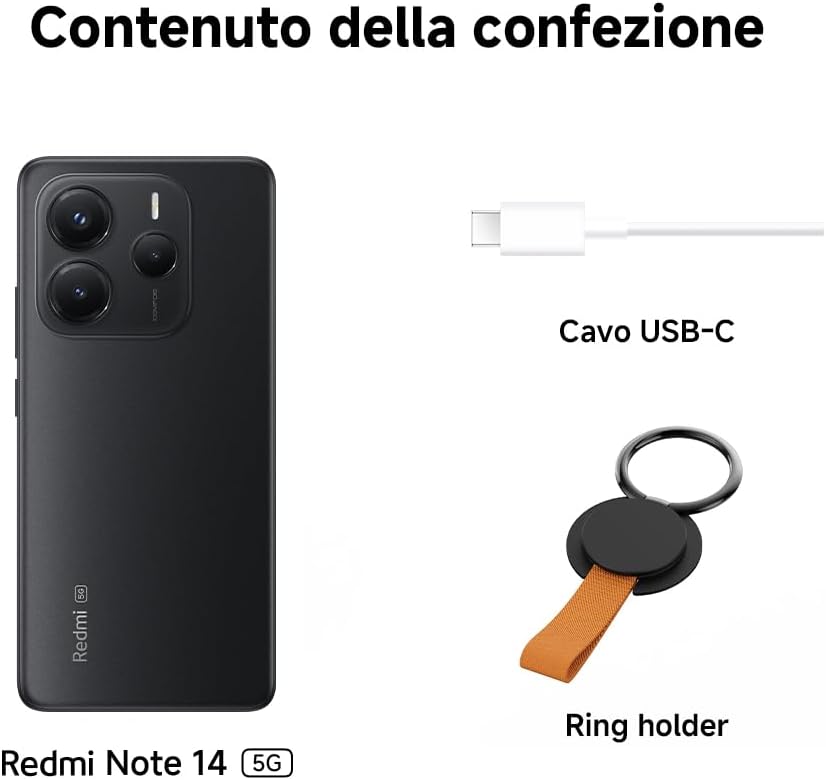
Figure 5: 120Hz Eye-Care Display
This visual demonstrates the smooth motion and eye comfort provided by the 120Hz Eye-Care display.
4.2. Sistema de càmeres
Capture stunning photos with the 108MP AI camera system, equipped with Optical Image Stabilization (OIS). The triple camera setup includes a 108MP main sensor, an 8MP ultra-wide lens, and a 2MP macro lens, allowing for versatile photography.

Figure 6: 108MP AI Camera System
Aquesta imatge ofereix un detall view of the advanced 108MP AI camera setup on the Redmi Note 14 5G.
The AI features enhance your photography by optimizing settings and processing for various scenes.

Figure 7: AI-Powered Photography
This image illustrates the integration of artificial intelligence to enhance photographic capabilities on the device.
4.3. Rendiment
Powered by the MediaTek Dimensity 7025-Ultra processor, built on a 6nm process, the Redmi Note 14 5G delivers robust performance for daily tasks, gaming, and multitasking. The CPU speed reaches up to 2.5 GHz, ensuring smooth operation.

Figure 8: MediaTek Dimensity 7025-Ultra Processor
This image highlights the powerful MediaTek Dimensity 7025-Ultra processor, which provides the smartphone with its high performance and 5G capabilities.
4.4. Durada de la bateria
The device is equipped with a large 5110mAh battery, providing extended usage time. With 45W turbo-charging support, you can quickly recharge your phone and get back to your activities.

Figure 9: 5110mAh Battery
Aquesta imatge proporciona una imatge interna view of the smartphone, showcasing its large capacity 5110mAh battery.
5. Manteniment
To ensure the longevity and optimal performance of your Xiaomi Redmi Note 14 5G, follow these maintenance guidelines:
- Neteja: Feu servir un drap suau i sense borrissol per netejar la pantalla i la carcassa del telèfon. Eviteu utilitzar productes químics agressius o materials abrasius.
- Protecció: The device features Corning Gorilla Glass 5 for enhanced durability and an IP64 rating for dust and splash resistance. While it offers protection against splashes, it is not fully waterproof. Avoid submerging the device in water.
- Temperatura: Eviteu exposar el telèfon a temperatures extremes (molt caloroses o molt fredes), ja que això pot afectar la durada de la bateria i els components interns.
- Actualitzacions de programari: Comproveu i instal·leu regularment si hi ha actualitzacions del sistema per assegurar-vos que el vostre dispositiu tingui els pegats de seguretat i les millores de rendiment més recents.

Figure 10: Corning Gorilla Glass 5 Protection
This image illustrates the durable Corning Gorilla Glass 5 protecting the display of the Redmi Note 14 5G.

Figura 11: Resistència a l'aigua i a la pols IP64
This image visually represents the IP64 rating, showing the phone's resistance to dust and splashes.
6. Solució De Problemes
If you encounter issues with your Redmi Note 14 5G, refer to the following common problems and their solutions:
| Problema | Possible causa/solució |
|---|---|
| El dispositiu no s'encén | Battery is drained. Charge the device for at least 30 minutes. If still unresponsive, perform a forced restart by holding the Power button for 10-15 seconds. |
| Slow performance / Freezing | Too many apps running in the background. Close unused apps. Clear cache. Restart the device. Check for system updates. |
| Camera issues (blurry photos, app crash) | Ensure camera lens is clean. Restart the camera app or the phone. Check for software updates, as camera performance can be improved via updates. |
| La bateria s'esgota ràpidament | High screen brightness, background app activity, or network issues. Adjust brightness, close background apps, disable unnecessary features (GPS, Bluetooth, Wi-Fi when not in use). |
| Connectivity problems (Wi-Fi, Bluetooth, Mobile Data) | Toggle Wi-Fi/Bluetooth/Mobile Data off and on. Restart the phone. Forget and reconnect to Wi-Fi networks. Check SIM card insertion. |
| El sensor d'empremtes dactilars no funciona | Ensure your finger is clean and dry. Re-register your fingerprint. Ensure the screen protector (if any) does not interfere with the sensor. |
For persistent issues, consider performing a factory reset (Nota: Això esborrarà totes les dades del dispositiu. Fes una còpia de seguretat de les dades importants abans de continuar.) o contactant amb l'atenció al client de Xiaomi.
7. Especificacions
Key technical specifications for the Xiaomi Redmi Note 14 5G:
| Característica | Detall |
|---|---|
| Nom del model | Redmi Note 14 5G |
| Marca | XIAOMI |
| Sistema operatiu | Xiaomi HyperOS |
| Mida de la memòria RAM | 8 GB |
| Velocitat de la CPU | 2.5 GHz |
| Capacitat de memòria | 256 GB |
| Mida de la pantalla | 6.67 polzades |
| Resolució | 1080 x 2400 |
| Freqüència d'actualització | 120 Hz |
| Proveïdor de sense fil | Desbloquejat |
| Bateria | 5110mAh (1 A battery included) |
| Dimensions del producte | 18.1 x 9.3 x 4.1 cm; 380 grams |
| País d'origen | Xina |
8. Garantia i Suport
Your Xiaomi Redmi Note 14 5G is covered by a standard manufacturer's warranty. For specific warranty terms and conditions, please refer to the warranty card included in your product packaging or visit the official Xiaomi support weblloc.
For technical support, service, or further inquiries, please visit the official Xiaomi support page or contact their customer service. You can find more information and contact details on the Suport global de Xiaomi Weblloc.


