1. Introducció
This manual provides essential information for the safe and efficient operation of your THOMSON 55QG7C14 55-inch QLED Pro 144Hz Google Smart TV. Please read this manual thoroughly before using the product and retain it for future reference. This television combines QLED technology with 4K Ultra HD resolution, a 144Hz refresh rate, and the Google TV platform for an enhanced viewexperiència.
2. Informació de seguretat
Observeu les següents precaucions de seguretat per evitar danys i garantir un funcionament segur:
- Font d'alimentació: Connecteu el televisor només a una presa de corrent de CA amb el volum correctetage tal com s'indica a l'etiqueta del producte.
- Ventilació: Assegureu-vos que hi hagi una ventilació adequada al voltant del televisor. No bloquegeu les obertures de ventilació.
- Aigua i humitat: No exposeu el televisor a la pluja ni a la humitat. No col·loqueu objectes plens de líquids, com ara gerros, a sobre del televisor.
- Neteja: Desendolleu el televisor abans de netejar-lo. Feu servir un drap suau i sec. No utilitzeu netejadors líquids ni en aerosol.
- Col·locació: Col·loqueu el televisor sobre una superfície estable i plana. Eviteu exposar-lo a la llum solar directa o a prop de fonts de calor.
- Nens: Supervise children to ensure they do not climb on the TV or stand.
- Manteniment: No intenteu fer la reparació del televisor vosaltres mateixos. Envieu totes les tasques de manteniment a personal de servei qualificat.
3. Contingut del paquet
Verifiqueu que tots els elements siguin presents al paquet:
- THOMSON 55QG7C14 55-inch QLED Pro 144Hz Google Smart TV
- Remote Control (with backlight)
- Cable d'alimentació
- Central Stand and Screws
- Guia d'inici ràpid
- Targeta de garantia
4. Sobrecàrrega físicaview
The THOMSON 55QG7C14 features a sleek design with narrow bezels and a central swivel stand for flexible viewangles d'ajust.
Imatge 4.1: Davant view of the THOMSON 55QG7C14 TV, showcasing its narrow bezels and central stand.

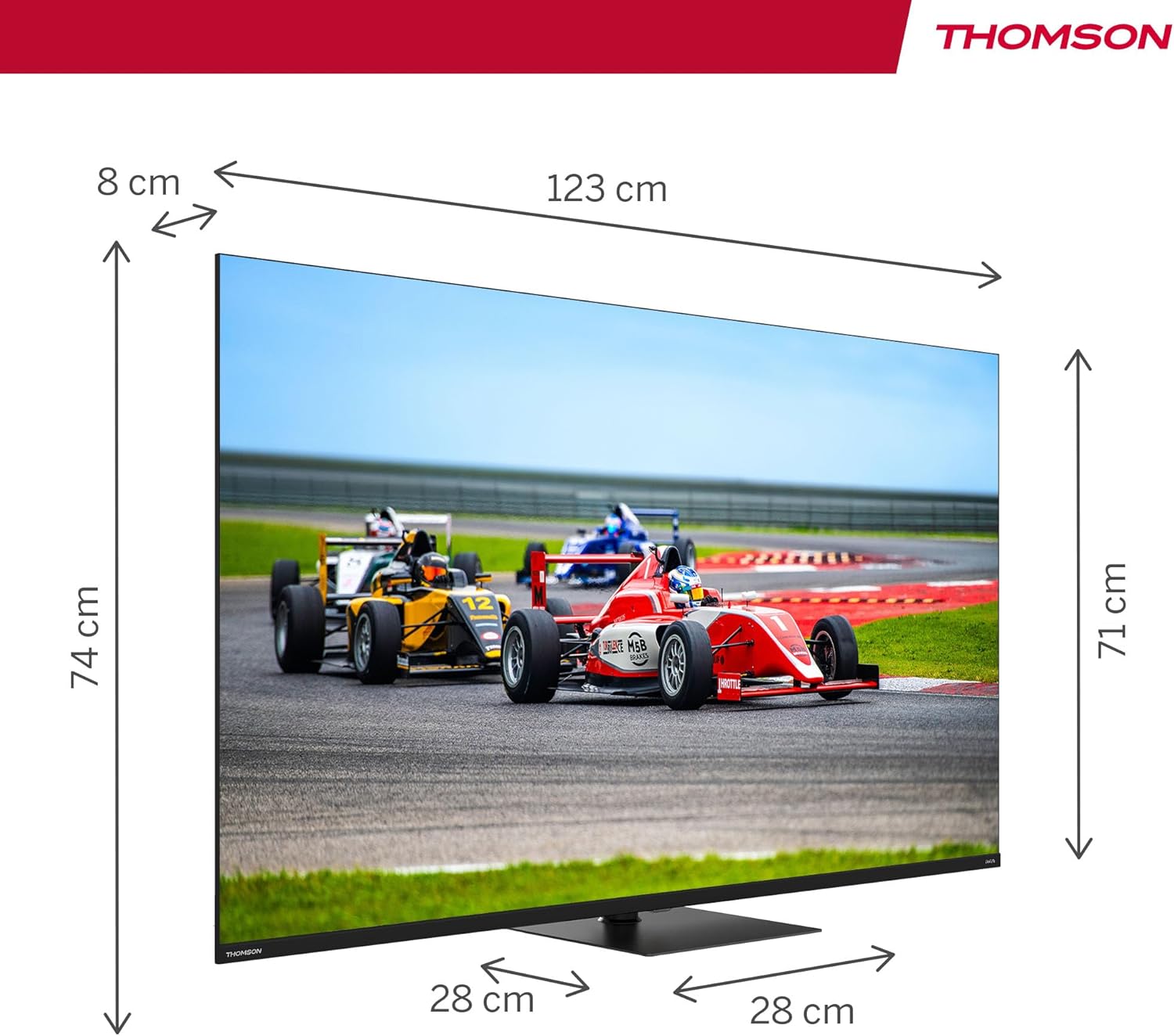
Imatge 4.2: Diagram illustrating the dimensions of the 55-inch THOMSON TV, including width, height, and depth.

Imatge 4.3: Visual representation of the TV's swivel stand, allowing for adjustable viewangles d'ajust.
5. Configuració
5.1. Muntatge de l'estand
- Col·loqueu amb cura el televisor cara avall sobre una superfície suau i plana per evitar que es facin malbé la pantalla.
- Attach the central stand to the designated slots on the bottom of the TV.
- Fixeu el suport amb els cargols proporcionats. Assegureu-vos que el suport estigui ben fixat abans de continuar.
5.2. Connexions
Connect your external devices to the TV using the appropriate ports. Refer to the diagram below for port locations.

Imatge 5.1: Detailed diagram of the TV's rear panel, highlighting all available connection ports.
- HDMI (x4): Connect Blu-ray players, game consoles, and other HDMI-enabled devices. HDMI 2.1 with eARC is supported.
- USB (x3): Connect USB storage devices for media playback. One USB 3.0 port is available.
- LAN: Connecteu un cable Ethernet per a una connexió a Internet per cable.
- AV IN: Connecteu dispositius antics mitjançant cables de vídeo compost i àudio estèreo.
- Digital Optical Out: Connecteu-lo a un sistema d'àudio extern per obtenir so digital.
- Ranura CI+: Insert a Conditional Access Module (CAM) for encrypted digital TV services.
- Antenna/Satellite Inputs: Connect your terrestrial antenna (DVB-T2/C) or satellite dish (DVB-S2).
6. Configuració inicial
After connecting all necessary cables and powering on the TV for the first time, you will be guided through the initial setup process:
- Selecció d'idioma: Trieu el vostre idioma preferit.
- Connexió de xarxa: Connecteu-vos a la vostra xarxa Wi-Fi o utilitzeu una connexió Ethernet amb cable.
- Inici de sessió al compte de Google: Inicia la sessió amb el teu compte de Google per accedir a les funcions, aplicacions i recomanacions personalitzades de Google TV.
- Escaneig de canals: The TV will scan for available channels via your antenna or satellite connection.
- Configuració de privadesa: Review and adjust privacy settings as desired.
7. Funcionament del televisor
7.1. Interfície de Google TV
Your THOMSON TV runs on Google TV, which organizes content from your various streaming services and apps into a unified interface. You can create multiple user profiles for personalized recommendations.

Imatge 7.1: The Google TV home screen, displaying content from various streaming applications and options for user profiles.
7.2. Control remot
The ergonomic remote control features backlighting for easy use in low-light conditions and dedicated buttons for popular streaming services. It also includes a microphone for voice commands.

Imatge 7.2: The TV's remote control, highlighting its backlit buttons and integrated microphone for voice commands.
7.3. Control per veu amb l'Assistent de Google
Press the Google Assistant button on your remote and speak into the microphone to control your TV, search for content, get recommendations, and manage smart home devices.
7.4. Chromecast integrat
Wirelessly cast movies, music, and videos from compatible devices (smartphones, tablets, computers) directly to your TV screen.
7.5. Millores d'imatge i so
- Tecnologia QLED: Quantum Dot technology delivers vibrant and realistic colors with balanced brightness and striking contrasts.
- Resolució 4K UHD: Enjoy crystal-clear images with four times the detail of Full HD.
- Freqüència de refresc de 144 Hz: Experience smoother motion, especially beneficial for fast-paced content and gaming.
- Dolby Vision & HDR10: Enhanced brightness, contrast, and color accuracy for a more immersive visual experience.
- Dolby Atmos & Dolby Audio: Dynamic, room-filling sound for an immersive audio experience.

Imatge 7.3: Visual comparison demonstrating the difference in motion clarity between a 60Hz and a 144Hz refresh rate display.

Imatge 7.4: Representation of the Dolby Atmos audio experience, showing sound moving in three-dimensional space around viewers
8. Manteniment
Proper maintenance ensures the longevity of your TV.
- Neteja de pantalla: Netegeu suaument la pantalla amb un drap suau i sense borrissol. Per a marques difícils, netegeu lleugerament.ampNetegeu el drap amb aigua o un netejador de pantalles especialitzat (apliqueu-lo al drap, no directament a la pantalla).
- Neteja d'armaris: Netegeu el moble del televisor amb un drap suau i sec.
- Eliminació de pols: Feu servir un raspall suau o un aspirador amb un accessori de raspall per treure la pols de les obertures de ventilació.
- Cable d'alimentació: Reviseu regularment el cable d'alimentació per detectar qualsevol dany. Si està danyat, poseu-vos en contacte amb el personal de servei.
9. Solució De Problemes
Si teniu problemes amb el televisor, consulteu els problemes i solucions més comuns següents:
| Problema | Possible solució |
|---|---|
| Sense poder | Check if the power cord is securely plugged into the TV and the wall outlet. Press the power button on the remote or TV. |
| No hi ha imatge, però hi ha so | Assegureu-vos que heu seleccionat la font d'entrada correcta. Comproveu les connexions dels cables als dispositius externs. |
| No hi ha so, però hi ha imatge | Check the volume level. Ensure mute is not activated. Check audio cable connections. If using external audio, ensure it is powered on and correctly configured. |
| El comandament a distància no funciona | Canvieu les piles. Assegureu-vos que no hi hagi cap obstacle entre el comandament a distància i el sensor d'infrarojos del televisor. |
| Problemes de connexió de xarxa | Restart your router/modem. Check Wi-Fi password. Try a wired Ethernet connection if Wi-Fi fails. |
| Problemes de qualitat d'imatge (per exemple, borrosa, distorsionada) | Check the source resolution. Adjust picture settings (brightness, contrast, sharpness). Ensure the input cable is not damaged. |
Si el problema persisteix després de provar aquestes solucions, poseu-vos en contacte amb l'atenció al client.
10. Especificacions
Key technical specifications for the THOMSON 55QG7C14 TV:
- Número de model: 55QG7C14
- Mida de la pantalla: 55 polzades (139 cm)
- Tecnologia de visualització: QLED
- Resolució: 3840 x 2160 píxels (4K UHD)
- Freqüència d'actualització: 144 Hz
- Suport HDR: HDR10, Dolby Vision
- Tecnologia d'àudio: Dolby Audio, Dolby Atmos
- Sistema operatiu: Google Smart TV
- Connectivitat: Wi-Fi, Bluetooth 5.1, 4x HDMI (HDMI 2.1 with eARC), 3x USB (1x USB 3.0), LAN, AV In, Digital Optical Out, CI+
- Sintonitzador: Triple-Tuner (DVB-T2/C/S2)
- Dimensions (L x A x A): 123 cm x 8 cm x 74 cm (amb suport)
- Pes: 12.4 kg
- Classe d'eficiència energètica: F

Imatge 10.1: The EU energy efficiency label for the THOMSON 55QG7C14 television.
11. Garantia i Suport
Your THOMSON 55QG7C14 TV comes with a Garantia del fabricant de 3 anys, ensuring reliability and peace of mind. For warranty claims, technical assistance, or further support, please contact your retailer or the official THOMSON customer service. Refer to the warranty card included in your package for detailed terms and conditions.


