Introducció
Welcome to the user manual for your new XIAOMI Redmi 14C 4G LTE smartphone. This guide provides essential information on setting up, operating, maintaining, and troubleshooting your device. The Redmi 14C combines a sleek design with powerful features, offering an immersive visual experience and reliable performance for your daily needs.
Its rounded design and Sage Green finish are inspired by nature, providing a visually harmonious and elegant aesthetic. The device features an ultra-slim body, making it comfortable to hold and use.
Característiques clau
- Pantalla immersiva: Enjoy a 6.88-inch Dot Drop Display with 1640x720 resolution and a smooth 120Hz refresh rate. Features include low blue light, flicker-free technology, and DC dimming for eye comfort.
- Rendiment potent: Equipped with a MediaTek Helio G81-Ultra processor (Cortex-A75+Cortex-A55, up to 2.0GHz) and Mali-G52 MC2 GPU, paired with 4GB RAM for efficient multitasking.
- Sistema de càmera avançat: Capture stunning photos with the 50MP main camera, featuring a 5P lens, f/1.8 aperture, and an auxiliary lens. Includes modes like filmCamera, HDR, Night, Portrait, 50MP, and Time-lapse. Supports 1080P and 720P video recording.
- Bateria de llarga durada: A 5160mAh (typical) battery provides extended usage, supported by 18W fast charging via USB Type-C.
- Seguretat millorada: Features a rear-mounted fingerprint sensor and AI face unlock for convenient and secure access.
- Connectivitat global: Supports Dual Nano SIM and Micro SD card. Compatible with 4G VoLTE networks globally, including specific bands for T-Mobile and Mint in the USA.
Què hi ha a la caixa
Upon unboxing your Redmi 14C, you should find the following items:
- Telèfon intel·ligent XIAOMI Redmi 14C
- Carregador de paret de 18 W
- Carregador de cotxe de 33 W
- Adaptador
- Carregador de cotxes ràpid
- Funda de telèfon
Guia de configuració
1. Inserció de targetes SIM i MicroSD
Locate the SIM tray on the side of your device. Use the provided SIM ejector tool to open the tray. Insert your Nano-SIM card(s) and/or MicroSD card into the designated slots. Ensure the cards are correctly oriented before reinserting the tray firmly into the phone.
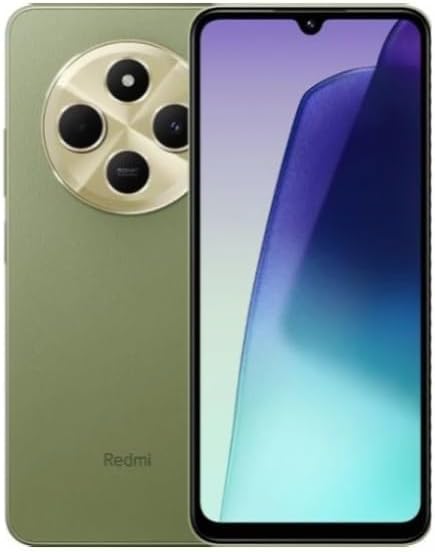
Imatge: Anvers i revers view of the Redmi 14C smartphone, showcasinel seu disseny i el mòdul de càmera.
2. Engegada i configuració inicials
Press and hold the Power button on the side of the phone until the XIAOMI logo appears. Follow the on-screen instructions to select your language, connect to a Wi-Fi network, and sign in with your Google account. You will also be guided through setting up security features like fingerprint unlock and AI face unlock.
3. Compatibilitat de xarxa (usuaris dels EUA)
For users in the USA, the Redmi 14C 4G LTE is designed to work specifically with T-Mobile and Mint Mobile networks. Ensure your SIM card is activated with one of these carriers for optimal service. For global use, the device supports 4G VoLTE worldwide with various 3G and 2G bands.
Funcionament del vostre dispositiu
Visualització i navegació
The 6.88-inch display offers intuitive touch navigation. Swipe up from the bottom to access the app drawer, swipe down from the top for notifications and quick settings. Use gestures or the traditional navigation buttons (back, home, recent apps) at the bottom of the screen.
Ús de la càmera
Open the Camera app to access various photography and videography modes. The 50MP main camera delivers high-resolution images. Tap on the screen to focus, and use the zoom gestures (pinch in/out) to adjust magnification. Explore modes like Portrait for depth effects, Night mode for low-light conditions, and filmCamera for creative filters.
Vídeo: Un overview of the Redmi 14C 4G LTE, demonstrating its design, camera features, and user interface. This video provides a visual guide to the phone's key functionalities.
Gestió de la bateria
La bateria de 5160 mAh proporciona ample power for daily use. To optimize battery life, adjust screen brightness, disable unnecessary background apps, and utilize power-saving modes available in the Settings menu. Charge your device using the provided 18W wall charger or 33W car charger for efficient power delivery.
Manteniment
Actualitzacions de programari
Regularly check for system updates to ensure your device has the latest features, security patches, and performance improvements. Navigate to Settings > About phone > System apps updater per comprovar i instal·lar les actualitzacions disponibles.
Neteja del teu dispositiu
Use a soft, lint-free cloth to clean the screen and body of your phone. Avoid using harsh chemicals or abrasive materials that could damage the display or finish. For stubborn smudges, a slightly damp es pot utilitzar un drap, seguit d'assecat immediat.
Cura de la bateria
To prolong the lifespan of your battery, avoid extreme temperatures. Do not leave your phone in direct sunlight or in very cold environments for extended periods. It is generally recommended to keep the battery charge between 20% and 80% for long-term health, though occasional full charges/discharges are acceptable.
Resolució de problemes comuns
- El dispositiu no s'encén: Assegureu-vos que la bateria estigui carregada. Connecteu el telèfon al carregador i espereu uns minuts abans d'intentar engegar-lo de nou.
- Les aplicacions es bloquegen/es bloquegen: Close and reopen the app. If the issue persists, clear the app's cache (Settings > Apps > [App Name] > Storage > Clear cache) or reinstall the app.
- Senyal de xarxa deficient: Check your SIM card insertion. Ensure you are within network coverage. If in the USA, confirm your carrier is T-Mobile or Mint Mobile. Restarting the device can often resolve temporary network issues.
- Rendiment lent: Close unused background applications. Clear cache regularly. Consider uninstalling apps you no longer use to free up RAM and storage.
- El sensor d'empremtes dactilars no funciona: Ensure your finger is clean and dry. Re-register your fingerprints in the security settings if the problem continues.
Especificacions
| Característica | Detall |
|---|---|
| Nom del model | Redmi 14C |
| Marca | XIAOMI |
| Sistema operatiu | Xiaomi HyperOS basat en Android 14 |
| Mida de la pantalla | 6.88 polzades |
| Resolució | 1640 x 720 |
| Freqüència d'actualització | 120 Hz |
| Processador | MediaTek Helio G81-Ultra (CPU Speed: 2000 MHz) |
| RAM | 4 GB |
| Capacitat d'emmagatzematge de memòria | 256 GB |
| Càmera principal | 50MP Dual back with AUX lens |
| Capacitat de la bateria | 5160 mAh |
| Carregant | Càrrega ràpida de 18 W (USB tipus C) |
| Connectivitat | 4G LTE, Wi-Fi, Bluetooth, GPS |
| Jack d'àudio | 3.5 mm |
| Característiques de seguretat | Sensor d'empremtes dactilars posterior, desbloqueig facial amb IA |
| Pes de l'article | 6 unces |
| Color | Sage Green Global Version |

Image: Certification labels displayed on the Redmi 14C screen, including FCC ID for the U.S. market.
Garantia i Suport
Your XIAOMI Redmi 14C 4G LTE is covered by a standard manufacturer's warranty. Please refer to the warranty card included in your product packaging for specific terms and conditions, including warranty period and coverage details. For technical support, service, or further inquiries, please visit the official XIAOMI support weblloc o poseu-vos en contacte amb el seu servei d'atenció al client.
Per obtenir informació i recursos addicionals, podeu visitar el Botiga XIAOMI a Amazon.


