1. Introducció
Thank you for choosing the BenQ GW2491 Eye-Care Monitor. This monitor is designed to provide a superior visual experience with advanced eye-care technologies, vibrant color reproduction, and smooth performance. This manual will guide you through the setup, operation, and maintenance of your new monitor to ensure optimal performance and longevity.

Figure 1: BenQ GW2491 Monitor Front View
The GW2491 features an IPS panel for wide viewing angles and 99% sRGB color space for accurate and vivid visuals. Its 100Hz refresh rate ensures a smoother user experience, reducing motion blur in fast-paced content. Integrated eye-care technologies, including Flicker-Free and Low Blue Light Plus, are TUV-Certified to minimize eye strain during extended use.
2. Què hi ha a la caixa
Please check the contents of the package. If any items are missing or damaged, contact your retailer.
- BenQ GW2491 Monitor
- Suport de monitor (base i coll)
- Cable d'alimentació
- Cable HDMI
- Cable DisplayPort
- Guia d'inici ràpid
- Targeta de garantia
3. Configuració
3.1. Muntatge del suport del monitor
- Traieu amb cura els components del monitor i del suport de l'embalatge.
- Fixeu el coll del suport al panell del monitor alineant les pestanyes i prement-lo fins que encaixi al seu lloc.
- Secure the stand base to the neck using the captive screw on the underside of the base.

Figure 2: Monitor with Stand Assembled (Side View)
3.2. Cables de connexió
Connect the necessary cables to the monitor and your computer. Ensure the monitor is placed on a stable, flat surface.
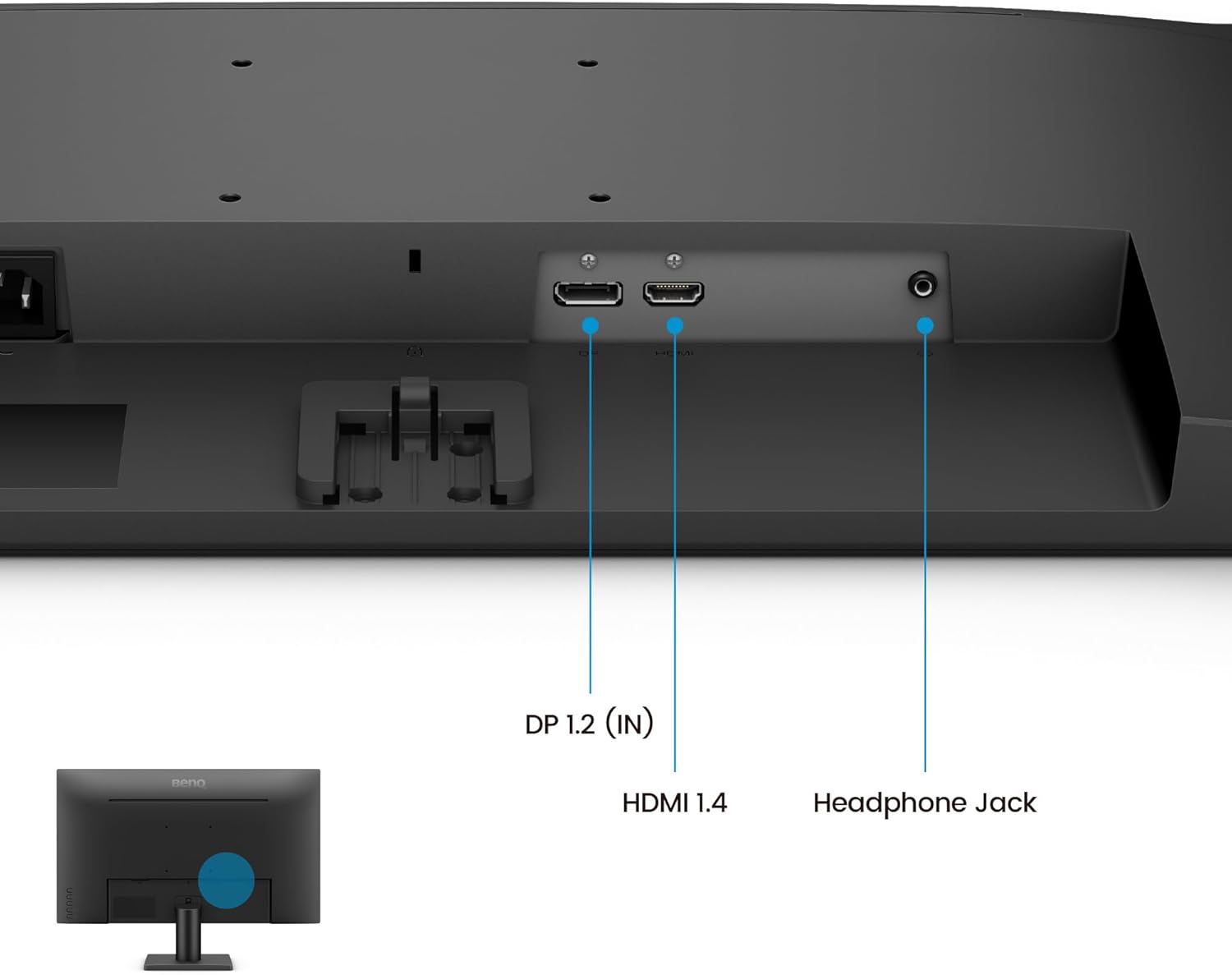
Figura 3: Ports de connectivitat del monitor
- Potència: Connecteu el cable d'alimentació a l'entrada d'alimentació del monitor i després a una presa de corrent.
- Entrada de vídeo: Connect either the HDMI cable to the HDMI 1.4 port or the DisplayPort cable to the DP 1.2 (IN) port on the monitor, and the other end to the corresponding port on your computer.
- Sortida d'àudio: For external speakers or headphones, connect them to the Headphone Jack.
3.3. Encès
Press the power button located on the bottom right side of the monitor to turn it on. The BenQ logo will appear, and the monitor will automatically detect the active input source.
4. Característiques operatives
4.1. Visual Performance
The BenQ GW2491 monitor delivers stunning visuals with its advanced display technologies:
- Panell IPS: Provides accurate color and image reproduction from any viewangle de ing.
- 99% sRGB: Ensures vibrant and true-to-life colors for an immersive visual experience.
- Freqüència de refresc de 100 Hz: Reacts more quickly to changes, resulting in smoother motion for everyday use, video streaming, and casual gaming.

Figure 4: 100Hz Smooth Motion for various activities
4.2. Eye-Care Technologies
BenQ's commitment to eye health is integrated into the GW2491 with TUV-Certified eye-care features:
- Sense parpelleig: Eliminates harmful flicker that can cause eye strain and fatigue during prolonged use.
- Llum blava baixa més: Filters out harmful blue-violet light while maintaining vivid colors, reducing eye discomfort.
- Programari Eye-CareU: Allows easy access and customization of eye-care features directly from your computer.

Figure 5: Eye-Care Technology for user comfort
4.3. Modes de color
Utilize various color modes to optimize your viewing experience for different content types:
- ePaper Mode: Simulates the look of e-paper, providing a comfortable reading experience for long sessions by adjusting brightness and color temperature.
- Other modes may include Standard, Game, Movie, Photo, etc., accessible via the On-Screen Display (OSD) menu.

Figure 6: ePaper Mode for comfortable reading
4.4. Navegació en pantalla (OSD)
The OSD menu allows you to adjust various monitor settings. Use the buttons located on the bottom right of the monitor to navigate:
- Premeu qualsevol botó per obrir el menú ràpid.
- Use the arrow buttons to navigate through options.
- Premeu el botó «D'acord» o «Enter» per seleccionar una opció o confirmar una configuració.
- Press the 'Exit' or 'Back' button to return to the previous menu or exit the OSD.
5. Manteniment
Proper maintenance ensures the longevity and optimal performance of your BenQ monitor.
- Neteja de la pantalla: Netegeu suaument la pantalla amb un drap suau i sense borrissol. Per a marques difícils, netegeu suaument.ampen the cloth with water or a screen-cleaning solution specifically designed for LCD/LED displays. Do not spray liquid directly onto the screen.
- Neteja de la Casing: Feu servir un drap suau i sec per netejar el monitor casing. Eviteu utilitzar productes de neteja o dissolvents abrasius.
- Ventilació: Assegureu-vos que les obertures de ventilació del monitor no estiguin bloquejades per evitar el sobreescalfament.
- Emmagatzematge: Quan no l'utilitzeu durant períodes prolongats, guardeu el monitor en un lloc fresc i sec, preferiblement en el seu embalatge original.
6. Solució De Problemes
If you encounter any issues with your monitor, try the following solutions before contacting support:
| Problema | Possible solució |
|---|---|
| No hi ha imatge a la pantalla | Check if the power cord is securely connected. Ensure the video cable (HDMI/DisplayPort) is properly connected to both the monitor and the computer. Verify the correct input source is selected via the OSD menu. |
| La imatge és borrosa o distorsionada | Adjust the display resolution on your computer to the monitor's native resolution (1920x1080). Check the video cable for damage or loose connections. |
| No sound from headphones/external speakers | Ensure the audio cable is correctly connected to the Headphone Jack. Check the volume settings on both the monitor (via OSD) and your computer. |
| Parpelleig del monitor | Ensure Flicker-Free technology is enabled (if applicable via OSD or Eye-CareU software). Check for external interference from other electronic devices. |
7. Especificacions
| Característica | Detall |
|---|---|
| Número de model | GW2491 |
| Mida de la pantalla | 23.8 polzades |
| Tipus de panell | IPS |
| Resolució | 1920 x 1080 (FHD) |
| Freqüència d'actualització | 100 Hz |
| Gamma de colors | 99% sRGB |
| Connectivitat | HDMI 1.4, DisplayPort 1.2, Headphone Jack |
| Característiques de la cura dels ulls | Flicker-Free, Low Blue Light Plus, Eye-CareU |
| Dimensions (LxWxH) | 16 x 7 x 21 polzades |
| Pes | 9.53 lliures |
8. Garantia i Suport
Your BenQ GW2491 monitor comes with a standard manufacturer's warranty. Please refer to the warranty card included in your package for specific terms and conditions. For technical support, troubleshooting assistance, or warranty claims, please visit the official BenQ support weblloc web o contacteu amb la seva línia directa d'atenció al client.
For the latest drivers, firmware updates, and additional support resources, please visit the BenQ support page for your specific model.


