1. Producte acabatview
The ETOE Seal Pro A1363 is a 1080P Google TV projector designed for home entertainment. It features a built-in Google TV system, native 1080P resolution with 4K UHD decoding, auto-focus, auto-keystone correction, dual 10W speakers, and dual-band Wi-Fi connectivity. Its fully-sealed optical engine ensures a long, maintenance-free lifespan.
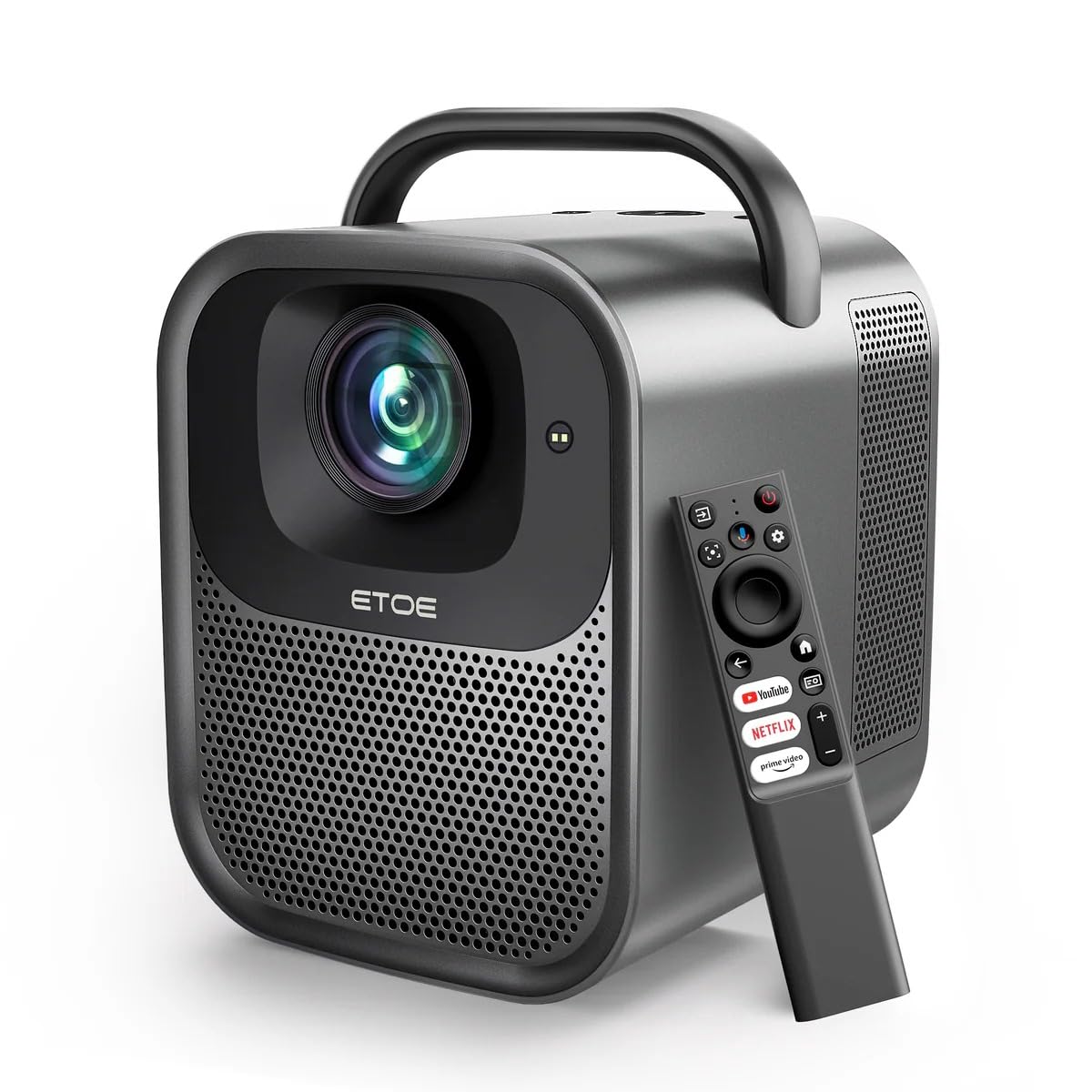
Figura 1.1: ETOE Seal Pro A1363 Projector. This image shows the front and side view of the projector, highlighting its compact design and lens.
Característiques principals:
- Built-in Google TV System: Access streaming services like Netflix, YouTube, Prime Video, Disney+, and HBO directly.
- Native 1080P & 4K UHD Decoding: Delivers sharp visuals with 1920x1080 resolution and HDR enhancement.
- Auto-Focus and Keystone Correction: Ensures perfectly square and stable images from various angles.
- So immersiu: Equipped with powerful 2x10W dual speakers and multiple audio modes.
- Wi-Fi de doble banda: Supports 2.4G & 5G for stable wireless projection from Android, iOS, and PC devices.
- Disseny durador: Features a dust-proof, fully-sealed optical engine for extended lifespan.
Vídeo del producteview:
Vídeo 1.1: ETOE Seal Pro Projector Features. This video provides a visual overview of the projector's main features and capabilities, including its Google TV integration, auto-focus, and sound system.
2. Què hi ha a la caixa
Please check the contents of your package upon unboxing:
- ETOE Seal Pro A1363 Projector
- Adaptador d'alimentació
- Cable d'alimentació
- Control remot
- Manual d'usuari (aquest document)
3. Guia de configuració
3.1 Col·locació inicial
Col·loqueu el projector sobre una superfície estable i plana. Assegureu-vos que hi hagi una ventilació adequada al voltant del dispositiu. Per a una òptima viewing, position the projector directly in front of the screen or wall.
3.2 Connexió de potència
- Connect the power adaptor to the DC IN port on the projector.
- Plug the power cord into the power adaptor.
- Inseriu el cable d'alimentació a una presa de corrent.
3.3 Connexió de dispositius externs
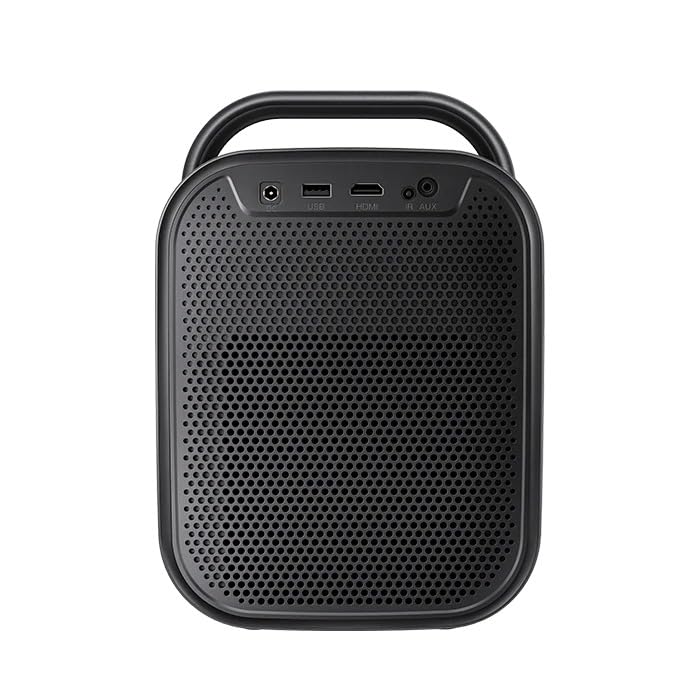
Figura 3.1: posterior view of the ETOE Seal Pro A1363 Projector, showing the DC IN, USB, HDMI, and AUX ports.
El projector ofereix diverses opcions de connectivitat:
- HDMI: Connect Blu-ray players, gaming consoles, laptops, or other HDMI-enabled devices.
- USB: Connecteu unitats USB per a la reproducció de contingut multimèdia.
- AUX: Connect external audio devices or headphones.
- Bluetooth: Emparella-ho amb altaveus o auriculars Bluetooth per a àudio sense fil.
- Wi-Fi: Connect to your home network for online streaming and wireless projection.
4. Instruccions de funcionament
4.1 Encès/Apagat
- Press the Power button on the projector or the remote control to turn the device on.
- To turn off, press the Power button again and confirm the shutdown prompt on the screen.
4.2 Controlsview
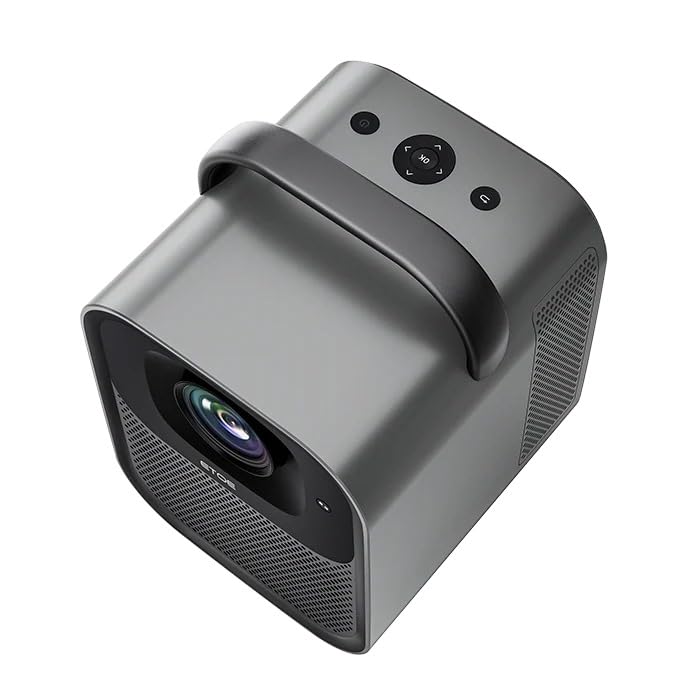
Figura 4.1: A dalt view of the ETOE Seal Pro A1363 Projector, showing the power button, navigation controls, and back button.
The projector can be controlled using the buttons on the top panel or the included remote control.
- Botó d'encesa: Encén o apaga el projector.
- Botons de navegació (amunt/avall/esquerra/dreta): S'utilitza per navegar pels menús i seleccionar opcions.
- Botó D'acord: Confirma les seleccions.
- Botó enrere: Torna a la pantalla o menú anterior.
4.3 Interfície de Google TV
Upon powering on, the projector will display the Google TV home screen. You will need to log in with your Google account to access personalized content and streaming services.
- Segueix les instruccions que apareixen a la pantalla per connectar-te a la teva xarxa Wi-Fi.
- Inicieu la sessió amb el vostre compte de Google.
- Install or access your preferred streaming applications (Netflix, YouTube, Prime Video, etc.).
- Use the remote control's navigation buttons and OK button to browse content.
- Utilize Google Assistant for voice commands by pressing the dedicated button on the remote.
4.4 Image Adjustment (Auto-Focus & Keystone)
The ETOE Seal Pro A1363 features automatic focus and keystone correction for a clear and properly shaped image.
- Enfocament automàtic: The projector automatically adjusts the image focus when powered on or moved.
- Correcció trapezoidal automàtica: The projector automatically corrects distorted images to a rectangular shape, even if placed at an angle.
- Zoom digital: If further adjustments are needed, navigate to the image settings in the Google TV menu to use the digital zoom feature (50% to 100%) to fine-tune screen size.
5. Manteniment
Un manteniment adequat garanteix la longevitat i el rendiment òptim del vostre projector.
5.1 Neteja del projector
- Assegureu-vos que el projector estigui apagat i desendollat abans de netejar-lo.
- Feu servir un drap suau i sec per netejar l'exterior del projector.
- Per a la lent, feu servir un drap de neteja de lents i una solució especialitzada per netejar lents. Eviteu materials abrasius.
- Do not spray cleaning liquids directly onto the projector.
5.2 Dust-Free Optical Engine
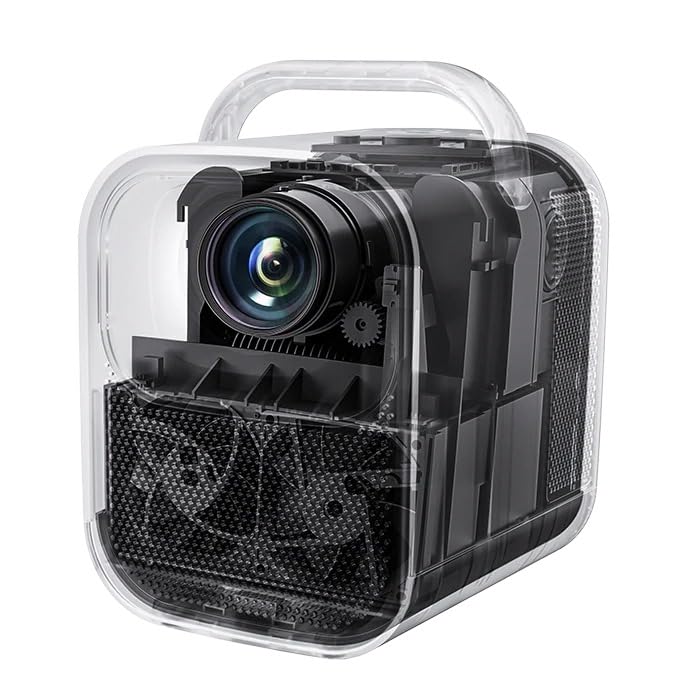
Figura 5.1: Interna view of the ETOE Seal Pro A1363 Projector, highlighting the fully-sealed optical engine designed to prevent dust accumulation.
The ETOE Seal Pro A1363 features a fully-sealed optical engine, which significantly reduces dust accumulation and minimizes the need for internal cleaning. This design contributes to a maintenance-free lifespan of over 30,000 hours.
6. Solució De Problemes
Si teniu problemes amb el projector, consulteu els problemes i solucions més comuns següents:
- Sense energia:
- Ensure the power cord is securely connected to the projector and the wall outlet.
- Verifiqueu que la presa de corrent de paret funciona.
- Comproveu si l'adaptador d'alimentació està connectat correctament.
- Sense imatge:
- Check the input source selection. Ensure it matches the connected device (e.g., HDMI).
- Verify the external device is powered on and sending a signal.
- Assegureu-vos que la tapa de l'objectiu estigui treta.
- Imatge borrosa:
- The projector has auto-focus. If the image is blurry, try moving the projector slightly or restarting it to trigger auto-focus.
- Assegureu-vos que la superfície de projecció sigui plana i llisa.
- Distorted Image (Not Rectangular):
- The projector has auto-keystone correction. If distortion persists, try repositioning the projector or restarting it.
- Check for any manual keystone settings in the menu that might override auto-correction.
- Sense so:
- Augmenteu el volum del projector i del dispositiu font connectat.
- Check audio output settings on the source device.
- Si feu servir altaveus externs, assegureu-vos que estiguin connectats i encesos correctament.
- Problemes de connectivitat Wi-Fi:
- Ensure the projector is within range of your Wi-Fi router.
- Verifiqueu que la contrasenya del Wi-Fi s'hagi introduït correctament.
- Restart your router and the projector.
7. Especificacions
| Característica | Especificació |
|---|---|
| Marca | etoe |
| Model | A1363 |
| Resolució nativa | 1920 x 1080 (1080 P) |
| Resolució de descodificació | Fins a 4K UHD |
| Brillantor de la imatge | 1000 lúmens ANSI |
| Relació de contrast de la imatge | 3000:1 |
| Tecnologia de visualització | LCD |
| Relació d'aspecte | 16:9 |
| Connectivitat | Dual-Band Wi-Fi (2.4G & 5G), Bluetooth, USB, HDMI, AUX |
| Característiques especials | Auto Focus, Auto Keystone Correction, Portable, Wireless |
| Altaveus | 2 x 10W Dual Speakers |
| Optical Engine Lifespan | Més de 30,000 hores |
| Dimensions del producte | 53 x 34 x 59 cm |
| Pes de l'article | 3 kg |
| Voltage | 240 Volts |
| Wattage | 20 watts |
| Freqüència d'actualització | 60 Hz |
8. Garantia i Suport
For warranty information and customer support, please refer to the warranty card included with your product or contact the manufacturer directly.
Fabricant: JVDN International
Informació de contacte: JVDN International (OPC) Private Limited, B-1122 Sun Westbank, Ashram Road, Ahmedabad, Gujarat, India, 380009. Contact person: JAYESH KUMAR JAGETIYA. Tel: +91 91361 87951. Email: jayesh@jvdninternational.com
Conserveu el vostre comprovant de compra per a reclamacions de garantia.


