1. Introducció
Gràcies per la compraasing the Jazmm Model 213 Portable Multi-Band Radio. This device is designed to provide versatile audio entertainment and essential weather information. It features AM, FM, Shortwave (SW), and NOAA Weather Band (WB) reception, Bluetooth 5.4 connectivity, TF card playback, a powerful 5W speaker, and a built-in rechargeable battery with flashlight functionality. This manual provides detailed instructions for the proper use and maintenance of your radio.
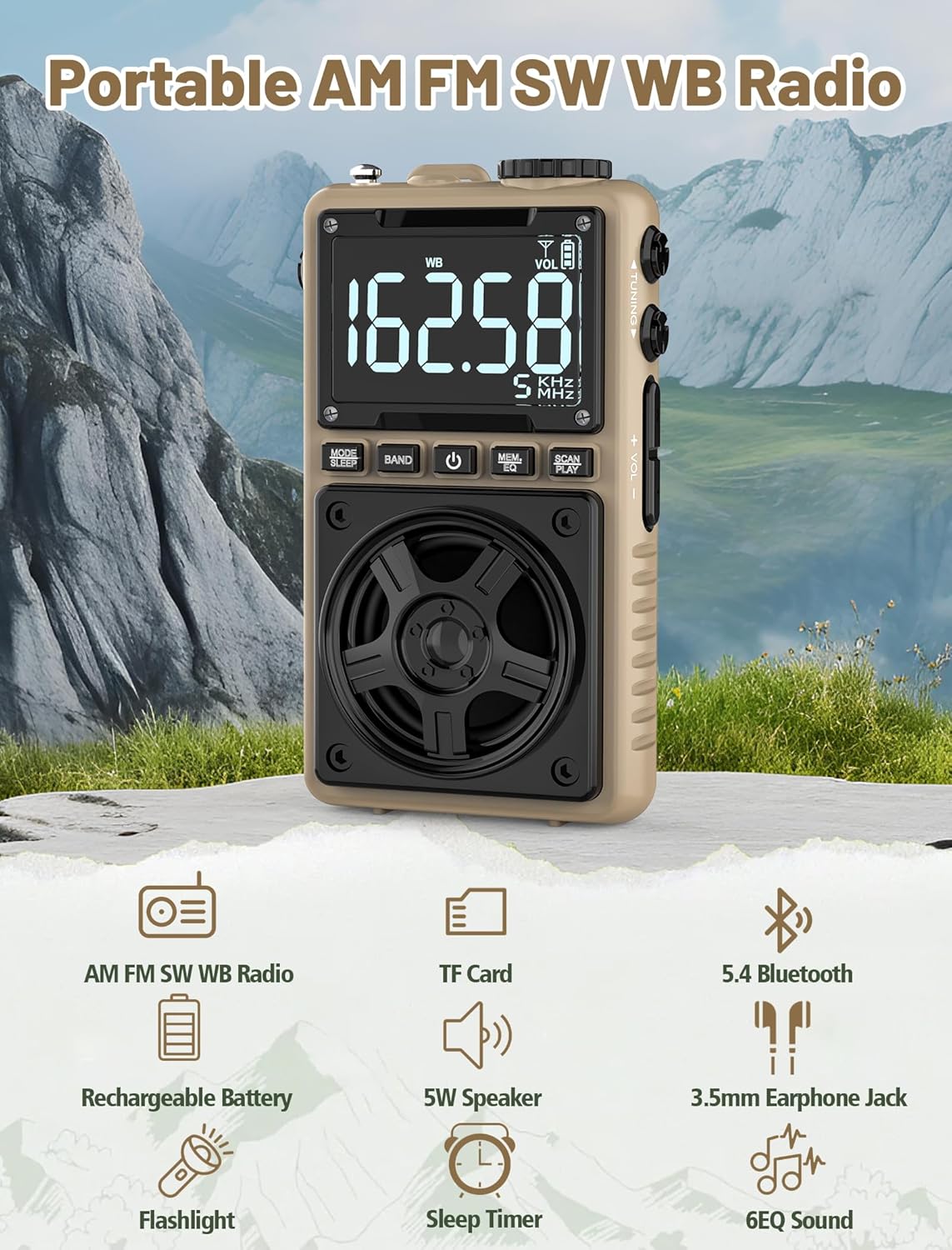
Image 1.1: The Jazmm Model 213 Portable Multi-Band Radio highlighting its key features including AM/FM/SW/WB radio, TF card support, Bluetooth 5.4, 5W speaker, rechargeable battery, flashlight, sleep timer, and 6 EQ sound effects.
2. Informació de seguretat
Si us plau, llegiu i comprengui totes les instruccions de seguretat abans d'utilitzar aquest producte. Conservi aquestes instruccions per a futures consultes.
- No exposeu el dispositiu a temperatures extremes, llum solar directa ni humitat elevada.
- Eviteu deixar caure o sotmetre el dispositiu a forts impactes.
- No desmunteu, repareu ni modifiqueu el dispositiu vosaltres mateixos. Envieu totes les tasques de manteniment a personal qualificat.
- Mantingueu el dispositiu allunyat de l'aigua i altres líquids.
- Feu servir només el cable de càrrega proporcionat o un cable de tipus C certificat per carregar.
- Desfeu-vos de la bateria d'acord amb la normativa local. No la incinereu.
- Escoltar durant molt de temps a nivells de volum alts pot causar danys auditius. Ajusteu el volum a un nivell moderat.
3. Contingut del paquet
Verifiqueu que tots els elements siguin presents al paquet:
- Jazmm Model 213 AM FM SW WB Radio
- Manual del propietari (aquest document)
- Cable d'alimentació USB tipus C
4. Producte acabatview
Familiaritzeu-vos amb els components i els controls de la ràdio.

Imatge 4.1: Frontal i lateral view of the Jazmm Model 213 radio. The front features a large digital display, speaker, and control buttons (MODE/SLEEP, BAND, Power, MEM/EQ, SCAN/PLAY). The side shows the LOCK/LIGHT switch, TF card slot, DC 5V Type-C charging port, and a 1250mAh battery indicator.
Controls i ports:
- Pantalla digital: Shows frequency, band, volume, battery level, and other indicators.
- Ponent: Sortida de 5 W per a un àudio nítid.
- MODE/SLEEP Button: Switches between modes (Radio, Bluetooth, TF Card) and activates sleep timer.
- Botó BAND: Selects radio bands (FM, AM, SW, WB).
- Botó d'encesa: Encén/apaga la ràdio.
- MEM/EQ Button: Accesses memory functions and cycles through EQ sound effects.
- SCAN/PLAY Button: Initiates auto-scan for radio stations or plays/pauses in Bluetooth/TF card mode.
- Pom d'afinació: Adjusts frequency.
- Botons de volum +/-: Ajusta el volum de l'àudio.
- LOCK/LIGHT Switch: Locks buttons or activates the flashlight.
- Ranura per a targetes TF: For Micro SD card playback (up to 128GB).
- DC 5V Type-C Charging Port: Per carregar la bateria interna.
- Presa d'auriculars de 3.5 mm: Per a una escolta privada.
- Antena telescòpica: Per a una millor recepció de ràdio.
- Back Clip & Wrist Strap: For portability and secure carrying.
5. Configuració
5.1 Càrrega inicial
Before first use, fully charge the radio's internal 1250mAh lithium polymer battery. Connect the provided USB Type-C power cord to the DC 5V charging port on the side of the radio and plug the other end into a compatible USB power adapter (not included) or a computer USB port. The charging indicator on the display will show charging status. A full charge typically takes approximately 1.5 hours and provides 10-12 hours of usage.

Image 5.1: The Jazmm Model 213 radio connected to a power adapter via its Type-C charging port, illustrating the charging process for its 1250mAh rechargeable battery.
5.2 Ajust de l'antena
For optimal radio reception, extend the telescopic antenna fully when listening to FM, SW, or WB bands. For AM reception, the internal antenna is generally sufficient, but adjusting the radio's orientation may improve signal strength.
6. Instruccions de funcionament
6.1 Encès/Apagat
Manteniu premut el botó Botó d'engegada ( ) for approximately 2 seconds to turn the radio on or off.
6.2 Selecció del mode
Premeu el botó MODE/SLEEP Button to cycle through available modes: Radio (FM/AM/SW/WB), Bluetooth, and TF Card (if a card is inserted).
6.3 Radio Band Selection and Tuning
En el mode Ràdio, premeu la tecla Botó BAND to switch between FM, AM, Shortwave (SW), and NOAA Weather Band (WB).
- FM: 87-108 MHz
- AM: 520-1710 KHz
- SW: 4.75-21.85 MHz
- WB: 162.400-162.550 MHz

Image 6.1: The radio displaying different frequencies across FM, AM, SW, and WB bands, illustrating its multi-band reception capability with an extended antenna.
Sintonització manual:
Gira el Pom de sintonització on the side of the radio to manually adjust the frequency.
Escaneig automàtic:
Premeu el botó SCAN/PLAY Button to automatically scan for and save available stations. The radio can store up to 100 preset stations.
6.4 estacions preseleccionades
After an automatic scan, use the Pom de sintonització o el MEM/EQ Button to navigate through saved preset stations. Refer to the display for preset numbers (e.g., P01, P02).

Image 6.2: The radio positioned on a nightstand, illustrating the sleep timer function and the display of preset station numbers (P01, P05, P19, etc.).
6.5 Control de volum
Utilitza el Volum +/- Botons on the side of the radio to increase or decrease the audio output.
6.6 Mode Bluetooth
Canvieu al mode Bluetooth mitjançant el MODE/SLEEP Button. The radio will enter pairing mode, indicated by a blinking Bluetooth icon on the display. On your smartphone, tablet, or laptop, search for Bluetooth devices and select "Jazmm 213" to connect. The radio acts as a Bluetooth speaker. Note: This radio does not support connection to Bluetooth earphones.
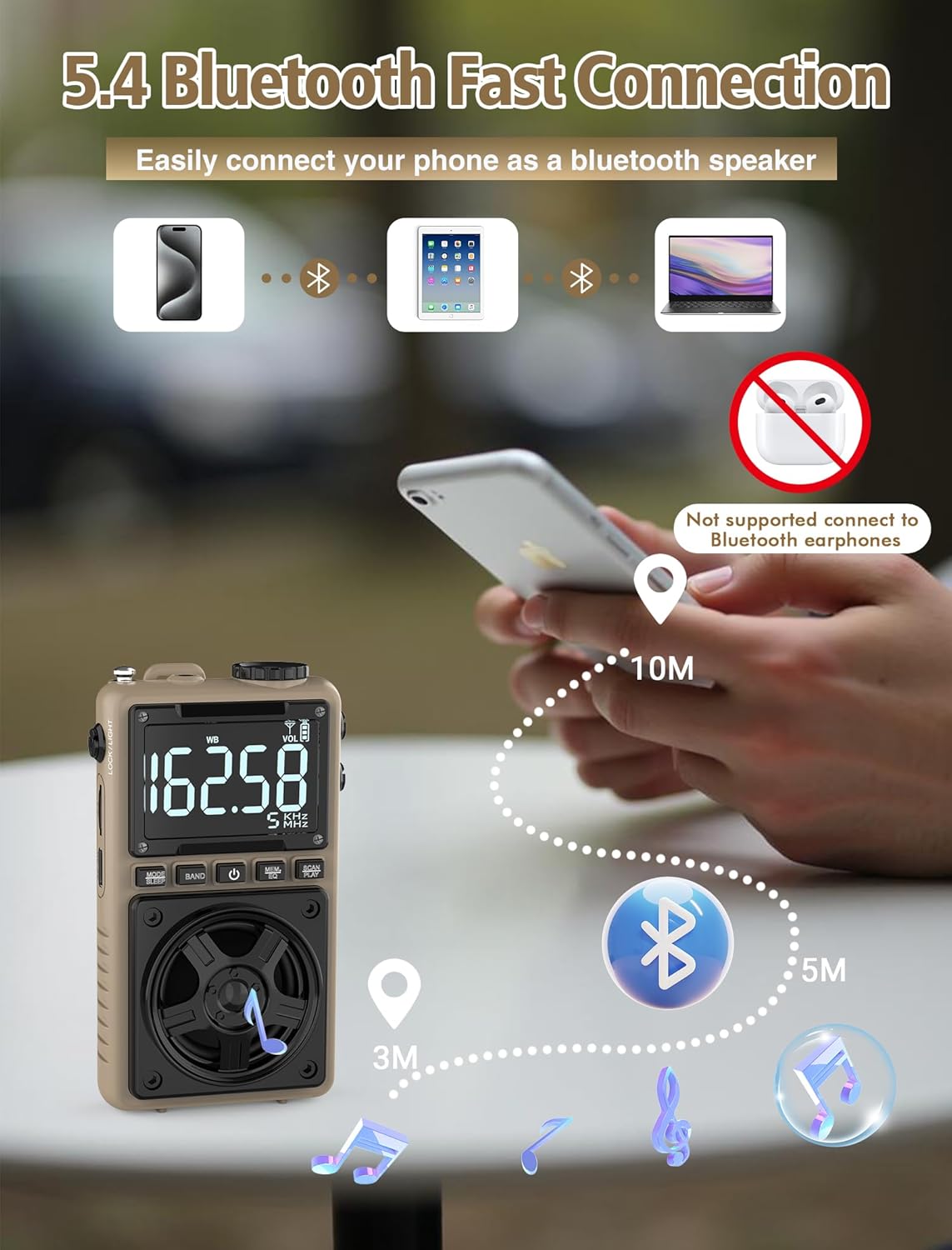
Image 6.3: A visual representation of the Jazmm Model 213 radio establishing a Bluetooth connection with various devices like smartphones, tablets, and laptops, functioning as a Bluetooth speaker.
6.7 TF Card Playback (MP3 Player)
Insert a Micro SD card (up to 128GB) with MP3 audio files a la Ranura per a targetes TF. Switch to TF Card mode using the MODE/SLEEP Button. The radio will automatically begin playing music from the card. Use the SCAN/PLAY Button to play/pause and the Pom de sintonització per saltar pistes.

Image 6.4: A user enjoying music through headphones connected to the Jazmm Model 213 radio, with an inset showing the TF card slot for Micro SD card insertion.
6.8 Ús d'auriculars
Plug standard 3.5mm headphones into the Conector d'auriculars de 3.5 mm for private listening. The radio's speaker will automatically mute when headphones are connected.
6.9 Alerta meteorològica de la NOAA
In WB (Weather Band) mode, the radio is capable of receiving real-time weather alerts and updates from the National Oceanic and Atmospheric Administration. This feature helps you prepare for potential weather hazards. Ensure the antenna is extended for best reception.

Image 6.5: The radio displaying a NOAA weather alert, with a flashlight beam illuminating the foreground and a stormy sky in the background, emphasizing its emergency preparedness features.
6.10 Funció de llanterna
Feu lliscar el LOCK/LIGHT Switch to activate the built-in LED flashlight. This can be useful in low-light conditions or emergencies.
6.11 Temporitzador de repòs
Manteniu premut el botó MODE/SLEEP Button to activate the sleep timer. Repeated presses will cycle through available durations (e.g., 10, 60, 90, 120 minutes). The radio will automatically turn off after the selected time.
6.12 Tecla de bloqueig
Feu lliscar el LOCK/LIGHT Switch to the 'LOCK' position to prevent accidental button presses. This is useful when carrying the radio in a pocket or bag.
6.13 EQ Efectes de so
Premeu el botó MEM/EQ Button (short press) to cycle through 6 preset EQ sound effects: Normal, Rock, Pop, Jazz, Class, and Village. Select the effect that best suits your audio preference.

Image 6.6: The radio's 5W speaker is highlighted, surrounded by icons representing the six available EQ stereo sound effects: Normal, Rock, Pop, Jazz, Class, and Village.
7. Especificacions
| Característica | Detall |
|---|---|
| Número de model | 213 |
| Dimensions del producte | 2.3 x 4 x 1.3 polzades (5.84 x 10.16 x 3.3 cm) |
| Pes de l'article | 4.6 unces (130 grams) |
| Bandes de ràdio compatibles | FM (87-108MHz), AM (520-1710KHz), SW (4.75-21.85MHz), WB (162.400-162.550MHz) |
| Tecnologia de connectivitat | Bluetooth 5.4 |
| Sortida de l'altaveu | 5W |
| Bateria | 1250mAh Lithium Polymer (Rechargeable, included) |
| Port de càrrega | USB tipus C (5 V CC) |
| Temps de càrrega | Aprox. 1.5 hores |
| Temps d'ús | Aproximadament 10-12 hores (segons l'ús) |
| Suport per a targetes de memòria | Micro SD (TF Card) up to 128GB |
| Característiques especials | NOAA Weather Alert, Built-In Flashlight, SOS Alarm, Sleep Timer, 100 Preset Stations, Digital Backlight Screen, Back Clip, Wrist Strap |
8. Solució De Problemes
| Problema | Possible causa/solució |
|---|---|
| La ràdio no s'encén. |
|
| Mala recepció de ràdio. |
|
| El Bluetooth no es connecta. |
|
| La targeta TF no funciona. |
|
| No hi ha so dels altaveus/auriculars. |
|
9. Manteniment
- Neteja: Feu servir un drap suau i sec per netejar l'exterior de la ràdio. No utilitzeu productes de neteja abrasius ni dissolvents.
- Emmagatzematge: Quan no la feu servir durant períodes prolongats, guardeu la ràdio en un lloc fresc i sec.
- Cura de la bateria: To prolong battery life, avoid fully discharging the battery frequently. Recharge the radio periodically even if not in use.
- Antena: Manipuleu l'antena telescòpica amb cura per evitar que es doblegui o es trenqui. Retreieu-la quan no estigui en ús.
10. Garantia i Suport
Jazmm products are designed for reliability and performance. For warranty information, please refer to the documentation provided at the time of purchase or contact your retailer. If you encounter any issues or require technical assistance, please contact Jazmm customer support through the retailer's platform or the official Jazmm weblloc.
Si us plau, tingueu a mà el número de model del producte (213) i els detalls de compra quan us poseu en contacte amb el servei d'assistència.


