Introducció
Gràcies per la compraasing the Rockville K-GO Portable Karaoke Bluetooth Speaker and IPS20 Tablet/Phone Tripod Stand package. This manual provides important information regarding the setup, operation, and maintenance of your devices. Please read it thoroughly to ensure proper use and to maximize the performance of your speaker, microphone, and stand.
The Rockville K-GO is a versatile, waterproof portable Bluetooth speaker with a wireless microphone, designed for karaoke, music playback, and hands-free communication. It features voice-changing effects, Bluetooth 5.3 connectivity, and various mounting options for convenience. The included IPS20 stand provides a stable platform for your tablet or smartphone, enhancing your karaoke experience.
Contingut del paquet
- Rockville K-GO Portable Bluetooth Speaker
- Wireless Microphone with Voice Changer
- Rockville IPS20 Tablet/Phone Tripod Stand
- Cable de càrrega USB-C
- Bicycle Bar Mounting Bracket
- Clip de mosquetó
- Hanging String
- Manual d'usuari (aquest document)
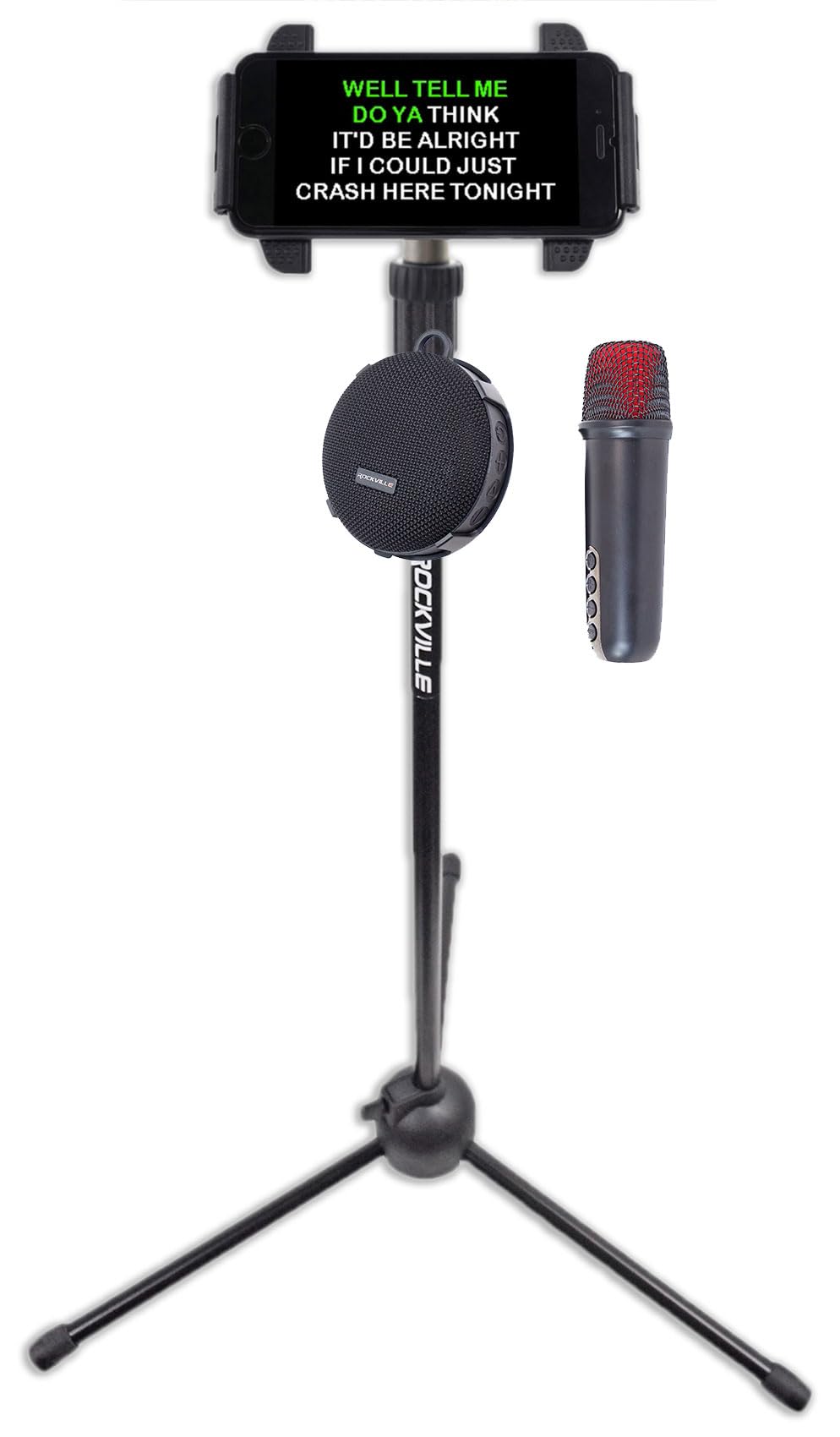
Image: Rockville K-GO speaker and wireless microphone. The image shows the compact, round speaker with a mesh grille and control buttons on the side, alongside the wireless microphone with a red mesh head and control buttons on its body.

Image: Rockville IPS20 Tablet/Phone Tripod Stand. This image displays the tripod stand with a smartphone mounted at the top, showing karaoke lyrics. The K-GO speaker and microphone are positioned near the base of the stand, illustrating the complete karaoke setup.
Instruccions importants de seguretat
- Do not expose the unit to extreme temperatures or direct sunlight for extended periods.
- No intenteu desmuntar ni modificar el dispositiu. Això anul·larà la garantia.
- Feu servir només el cable de càrrega proporcionat o un equivalent certificat.
- Mantingueu el dispositiu allunyat de camps magnètics forts.
- Ensure all ports are securely closed when using the speaker in wet environments to maintain its IP67 waterproof rating.
- Eliminar les bateries segons la normativa local.
Configuració
Carregant l'altaveu
- Locate the USB-C charging port on the K-GO speaker.
- Connect the provided USB-C cable to the speaker and to a USB power adapter (not included) or a computer's USB port.
- The charging indicator light will illuminate. Once fully charged (approximately 2.5-3 hours), the light will change or turn off.
Note: Ensure the charging port cover is securely closed after charging to maintain waterproofing.
Setting up the IPS20 Tripod Stand
- Unfold the tripod legs to create a stable base.
- Extend the telescopic pole to your desired height (from 35.5" to 63") and secure it with the locking mechanism.
- Attach your tablet or smartphone (4.7" to 12.9" screen sizes) to the adjustable mounting bracket at the top of the stand. Ensure the device is securely held.
Mounting Options for K-GO Speaker
The K-GO speaker offers several ways to be mounted or carried:
- Bicycle Bar Mounting Bracket: Attach the bracket to your bike handlebars and secure the speaker.
- Clip de mosquetó: Use the carabiner clip to attach the speaker to a backpack, belt loop, or other gear.
- Hanging String: Loop the string through the designated eyelet on the speaker for hanging.

Image: Rockville K-GO speaker demonstrating multiple mounting options. The image shows the speaker attached to a backpack strap with a carabiner, mounted on bicycle handlebars, and held by hand with a wrist strap, illustrating its versatility.
Instruccions de funcionament
Controls dels altaveus
Familiarize yourself with the buttons on the K-GO speaker:
- Botó d'encesa: Mantingueu premut per activar o desactivar l'altaveu.
- Botó Reproduir/Pausa: Premeu per reproduir o posar en pausa la música.
- Puja el volum (+): Press to increase volume. Hold to skip to the next track.
- Baixar el volum (-): Press to decrease volume. Hold to go to the previous track.
- Botó de mode: Press to switch between Bluetooth, TF Card, and USB modes.

Image: Rockville K-GO speaker ports and controls. This close-up view shows the side of the speaker with its control buttons (Power, Play/Pause, Volume Up/Next, Volume Down/Previous, Mode) and the covered ports for USB-C charging and TF card slot.
Emparellament Bluetooth
- Turn on the K-GO speaker. It will automatically enter Bluetooth pairing mode, indicated by a flashing LED light.
- On your smartphone or other Bluetooth device, enable Bluetooth and search for "K-GO".
- Select "K-GO" from the list of available devices to pair. Once connected, the LED light will stop flashing and remain solid.
- You can now play audio from your device through the K-GO speaker.
Ús del micròfon sense fil
- Ensure the microphone is charged and turned on.
- The microphone will automatically connect to the K-GO speaker when both are powered on and within range.
- Voice Changing Effects: Press the dedicated button on the microphone to cycle through various voice effects (e.g., male, female, child, monster).
- Echo/Reverb: Adjust the echo or reverb level using the corresponding button on the microphone.
- Control de volum: Use the volume buttons on the microphone to adjust your vocal output level.
Note: For optimal performance, keep the microphone within a reasonable distance from the speaker to avoid feedback.
Targeta TF i reproducció USB
- Insert a TF (microSD) card or a USB drive (via adapter, if needed) containing MP3, WMA, or WAV audio files into the respective port on the speaker.
- Press the "Mode" button on the speaker to switch to TF Card or USB mode.
- The speaker will automatically begin playing music from the inserted storage device.

Image: Rockville K-GO speaker demonstrating TF card and USB playback options. The image highlights the USB-C port and TF card slot on the speaker, showing a hand inserting a TF card and another hand connecting a USB-C cable, indicating various music input methods.
Trucades mans lliures
When connected via Bluetooth to a smartphone, the K-GO speaker can be used for hands-free calls:
- Respon a la trucada: Premeu el botó Reprodueix/Pausa per respondre a una trucada entrant.
- Finalitzar la trucada: Press the Play/Pause button again to end a call.
- Rebutja la trucada: Mantén premut el botó Reproduir/Pausa per rebutjar una trucada entrant.
Manteniment
- Neteja: Wipe the speaker and microphone with a soft, damp cloth. Do not use abrasive cleaners or solvents. For the IPS20 stand, wipe metal and plastic parts with a dry or slightly damp tela.
- Emmagatzematge: Store the devices in a cool, dry place away from direct sunlight when not in use for extended periods.
- Cura de la bateria: To prolong battery life, fully charge the speaker before first use and recharge it at least once every three months if not used regularly.
- Impermeabilització: Always ensure the rubber flap covering the charging port and TF card slot on the speaker is securely closed when near water to maintain the IP67 rating.
Resolució de problemes
| Problema | Possible solució |
|---|---|
| L'altaveu no s'encén. | Assegureu-vos que la bateria estigui carregada. Connecteu-la a una font d'alimentació i torneu-ho a provar. |
| No es pot emparellar per Bluetooth. |
|
| No hi ha so de l'altaveu. |
|
| El micròfon no funciona. |
|
| Mala qualitat de so o distorsió. |
|
| IPS20 stand is unstable. |
|
Especificacions
Rockville K-GO Speaker
| Model | K-GO |
| Potència RMS | 8W |
| Potència màxima | 16W |
| Versió Bluetooth | 5.3 |
| Interval Bluetooth | 40 peus |
| Classificació impermeable | IP67 (submergible) |
| Tipus de bateria | Ió de liti recarregable |
| Capacitat de la bateria | 5 V 1800 mAh |
| Temps de càrrega | 2.5 - 3 hores |
| Durada de la bateria (aprox.) | Up to 24 hours (low volume), 12 hours (medium), 5 hours (max) |
| Resposta de freqüència | 100 Hz - 16 kHz |
| Dimensions de l'altaveu | 4" x 4" x 2" |
| Mides del micròfon | 5.08" x 1.54" x 1.54" |
| Pes de l'altaveu | 0.6 lliures |
| Formats d'àudio compatibles | MP3, WMA, WAV (via TF card/USB) |
Rockville IPS20 Tablet/Phone Tripod Stand
| Model | IPS20 |
| Alçada ajustable | 35.5" a 63" |
| Mides de pantalla compatibles | 4.7" a 12.9" |
Garantia i Suport
For warranty information or technical support, please refer to the official Rockville weblloc web o contacteu directament amb el seu servei d'atenció al client. Conserveu el comprovant de compra per a qualsevol reclamació de garantia.
Rockville Official Weblloc: www.rockvilleaudio.com


