Introducció
The MiBOXER C5 4-Zone RGB+CCT Remote is a versatile wireless controller designed to manage up to four independent lighting zones. It utilizes 2.4GHz RF wireless technology to provide precise control over brightness, color temperature (CCT), and color saturation for RGB+CCT lighting systems. This manual provides detailed instructions for setting up, operating, and maintaining your C5 remote.

Figure 1: MiBOXER C5 4-Zone RGB+CCT Remote, front view. This image shows the sleek black remote with its color ring, brightness slider, and various control buttons.
Característiques del producte
- Control de 4 zones: Independently manage up to four distinct lighting zones.
- Adjustable RGB, CCT & Saturation: Fine-tune colors, color temperature (warm white to cool white), brightness, and color saturation.
- 2.4GHz RF Wireless Technology: Ensures a reliable and interference-free connection for responsive control.
- Interfície fàcil d'utilitzar: Ergonomic design with an intuitive button layout for easy operation.
- Aplicació versàtil: Suitable for various environments including homes, offices, restaurants, and retail spaces.
Product Components and Button Functions
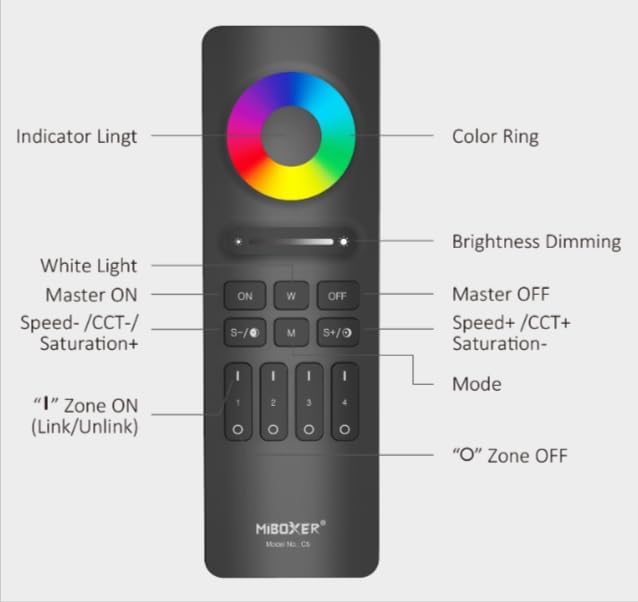
Figure 2: MiBOXER C5 Remote Button Diagram. This diagram illustrates the various buttons and their corresponding functions on the remote control.
- Anell de color: Touch to select desired RGB color.
- Llum indicadora: Illuminates to confirm button presses.
- Brightness Dimming Slider: Slide to adjust brightness level.
- ON (Master ON): Turns on all linked lights.
- W (White Light): Activa el mode de llum blanca pura.
- OFF (Master OFF): Turns off all linked lights.
- S-/CCT-/Saturation+: Decreases speed in dynamic mode, decreases color temperature (warmer white), or increases saturation.
- M (mode): Cycles through dynamic modes.
- S+/CCT+/Saturation-: Increases speed in dynamic mode, increases color temperature (cooler white), or decreases saturation.
- Zone ON (1, 2, 3, 4): Press 'I' to turn on a specific zone and link/unlink.
- Zone OFF (1, 2, 3, 4): Press 'O' to turn off a specific zone.
Instruccions de configuració
1. Instal·lació de la bateria
The C5 remote requires 2x AAA batteries (not included). Follow these steps:
- Localitza la tapa del compartiment de les piles a la part posterior del comandament a distància.
- Feu lliscar la tapa cap avall per obrir-la.
- Introduïu dues piles AAA, assegurant-vos de la polaritat correcta (+ i -).
- Feu lliscar la coberta al seu lloc fins que faci clic de manera segura.
2. Linking/Pairing the Remote with Lights
To control your lights, the C5 remote must be linked to compatible MiBOXER lighting products. This process typically involves the following steps:
- Ensure the light(s) you wish to link are powered off.
- Power on the light(s).
- Within 3 seconds of powering on the light, press the 'I' (ON) button of the desired zone (1, 2, 3, or 4) on the C5 remote tres vegades.
- The light(s) should flash three times slowly, indicating successful linking.
- If linking fails, power off the light, wait 10 seconds, and repeat the process.
3. Unlinking the Remote from Lights
To unlink a light from a specific zone, follow these steps:
- Ensure the light(s) you wish to unlink are powered off.
- Power on the light(s).
- Within 3 seconds of powering on the light, press the 'I' (ON) button of the previously linked zone (1, 2, 3, or 4) on the C5 remote cinc vegades.
- The light(s) should flash ten times quickly, indicating successful unlinking.
Instruccions de funcionament
Once linked, you can control your lights using the C5 remote:
- Màster ON/OFF: Premeu el botó ON button to turn on all linked lights. Press the OFF button to turn off all linked lights.
- Control de zona: To control a specific zone, first press the 'I' (ON) button for that zone (1, 2, 3, or 4) to activate it. Then, use the other control buttons. Press the 'O' (OFF) button for a zone to turn off lights in that specific zone.
- Ajust de brillantor: Utilitza el Brightness Dimming Slider to increase or decrease the light intensity.
- Color Selection (RGB): Toca el Anell de color to select any desired color from the spectrum.
- Mode de llum blanca: Premeu el botó W button to switch to pure white light.
- Ajust de la temperatura de color (CCT): In white light mode, use the S-/CCT-/Saturation+ i S+/CCT+/Saturation- buttons to adjust the color temperature. S- makes it warmer, S+ makes it cooler.
- Saturation Adjustment: When in a color mode, use the S-/CCT-/Saturation+ (increase saturation) and S+/CCT+/Saturation- (decrease saturation) buttons.
- Modes dinàmics: Premeu el botó M (Mode) button to cycle through various pre-programmed dynamic lighting effects.
- Ajust de velocitat en mode dinàmic: While in a dynamic mode, use the S- (decrease speed) and S+ (increase speed) buttons.
Manteniment
- Neteja: Wipe the remote with a soft, dry cloth. Do not use abrasive cleaners or immerse in water.
- Substitució de la bateria: Replace batteries when the indicator light becomes dim or the remote's response becomes sluggish. Always use new AAA batteries and dispose of old batteries responsibly.
- Emmagatzematge: Store the remote in a cool, dry place away from direct sunlight and extreme temperatures. If storing for extended periods, remove the batteries to prevent leakage.
Resolució de problemes
| Problema | Causa possible | Solució |
|---|---|---|
| Remote not responding to lights. |
|
|
| Lights flash unexpectedly. |
|
|
| Color or brightness control is erratic. |
|
|
Especificacions
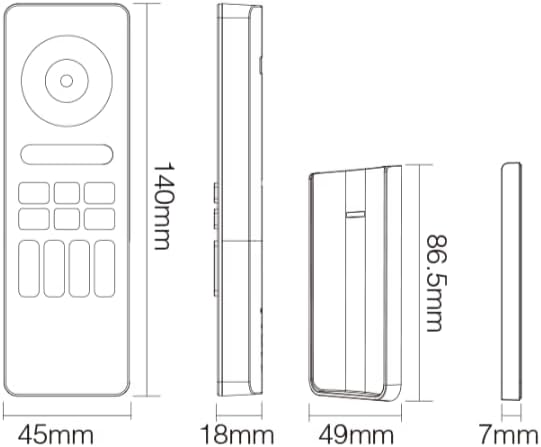
Figure 3: MiBOXER C5 Remote Dimensions. This diagram provides the physical measurements of the remote control in millimeters.
| Característica | Detall |
|---|---|
| Número de model | C5 |
| Mode de comunicació | RF sense fil de 2.4 GHz |
| Zones de control | 4 zones |
| Tipus de control | RGB+CCT (Brightness, Color Temperature, Saturation) |
| Font d'alimentació | 2x piles AAA (no incloses) |
| Dimensions remotes | 140 mm x 45 mm x 18 mm (aprox. 5.5 x 1.8 x 0.7 polzades) |
| Pes de l'article | 2.88 unces (aproximadament 81.6 grams) |
| Temperatura de funcionament | -20°C to 60°C (approx. -4°F to 140°F) |
| Distància de control | Up to 30 meters (approx. 98 feet) in open area |
Garantia i Suport
For detailed warranty information, please refer to the official MiBOXER website or contact your point of purchase. MiBOXER products typically come with a limited warranty covering manufacturing defects.
If you encounter any issues not covered in the troubleshooting section or require further assistance, please visit the official MiBOXER support page or contact their customer service. You can often find contact details and FAQs on the MiBOXER Amazon Store o el seu oficial weblloc.


