1. Introducció
Thank you for choosing the RCA Wave-68 True Wireless Earbuds. These earbuds are designed to provide a high-quality audio experience with features such as Hi-Res Audio, deep bass, and Transparency Mode. They offer a stable Bluetooth 5.2 connection, a built-in microphone for clear calls, and up to 20 hours of battery life with the charging case. This manual will guide you through the setup, operation, and maintenance of your new earbuds.
2. Contingut del paquet
Si us plau, verifiqueu que tots els elements siguin presents al vostre paquet:
- Auriculars sense fil RCA Wave-68 (esquerra i dreta)
- Estoig de càrrega portàtil
- Cable de càrrega USB-C
- Múltiples mides de puntes d'orella
- Manual d'usuari
3. Producte acabatview

Figure 3.1: RCA Wave-68 True Wireless Earbuds and Charging Case. The earbuds are securely placed within the compact charging case, ready for use or recharging.

Figure 3.2: Key Features of a Single Earbud. This diagram highlights the various functionalities integrated into each earbud, such as built-in microphones for calls, touch-sensitive controls for playback and volume, and the true wireless design for freedom of movement. It also indicates the capability for ultra-bass sound and high-quality audio output.
Components dels auriculars:
- Àrea de control tàctil: Per gestionar la reproducció, les trucades i l'assistent de veu.
- Micròfon: Per a trucades de mans lliures i ordres de veu.
- Ganxo per a l'orella: Provides a secure and comfortable fit.
- Contactes de càrrega: For recharging the earbuds within the case.
Components de la caixa de càrrega:
- Port de càrrega (USB-C): Per recarregar la caixa.
- Indicador LED de bateria: Displays the charging status and battery level of the case and earbuds.
- Ranures de càrrega per a auriculars: Subjecta i carrega els auriculars de manera segura.
4. Configuració
4.1. Càrrega dels auriculars i l'estoig
Abans del primer ús, carregueu completament els auriculars i l'estoig de càrrega.
- Col·loca els auriculars a l'estoig de càrrega. Assegura't que estiguin correctament col·locats a les seves ranures respectives.
- Connecteu el cable de càrrega USB-C al port de càrrega de la funda i l'altre extrem a un adaptador de corrent USB (no inclòs) o al port USB d'un ordinador.
- The LED indicator on the charging case will show the charging status. Once fully charged, the indicator will typically show a solid light or turn off.
- Una càrrega completa proporciona fins a 20 hores de reproducció total amb l'estoig de càrrega.

Figure 4.1: Earbuds in Open Charging Case. The image displays the earbuds inside the charging case with the lid open, revealing digital displays that indicate the battery levels of both the individual earbuds and the charging case itself.
4.2. Vinculació amb un dispositiu Bluetooth
Els auriculars entraran automàticament en mode d'emparellament quan es treguin de l'estoig de càrrega.
- Assegureu-vos que els auriculars estiguin carregats.
- Obre l'estoig de càrrega i treu els dos auriculars. S'encendran automàticament i intentaran emparellar-se entre si.
- Al dispositiu (telèfon intel·ligent, tauleta, ordinador portàtil), activeu el Bluetooth.
- Cerca new Bluetooth devices. You should see "RCA Wave-68" in the list of available devices.
- Select "RCA Wave-68" to connect. Once connected, you will hear an audio prompt, and the earbud indicator lights will change (e.g., turn off or flash slowly).
- Si l'emparellament falla, torna a col·locar els auriculars a l'estoig, tanca la tapa, espera uns segons i repeteix els passos.
5. Instruccions de funcionament
5.1. Controls tàctils bàsics
Els auriculars RCA Wave-68 tenen controls tàctils intuïtius a cada auricular. Les funcions específiques són:
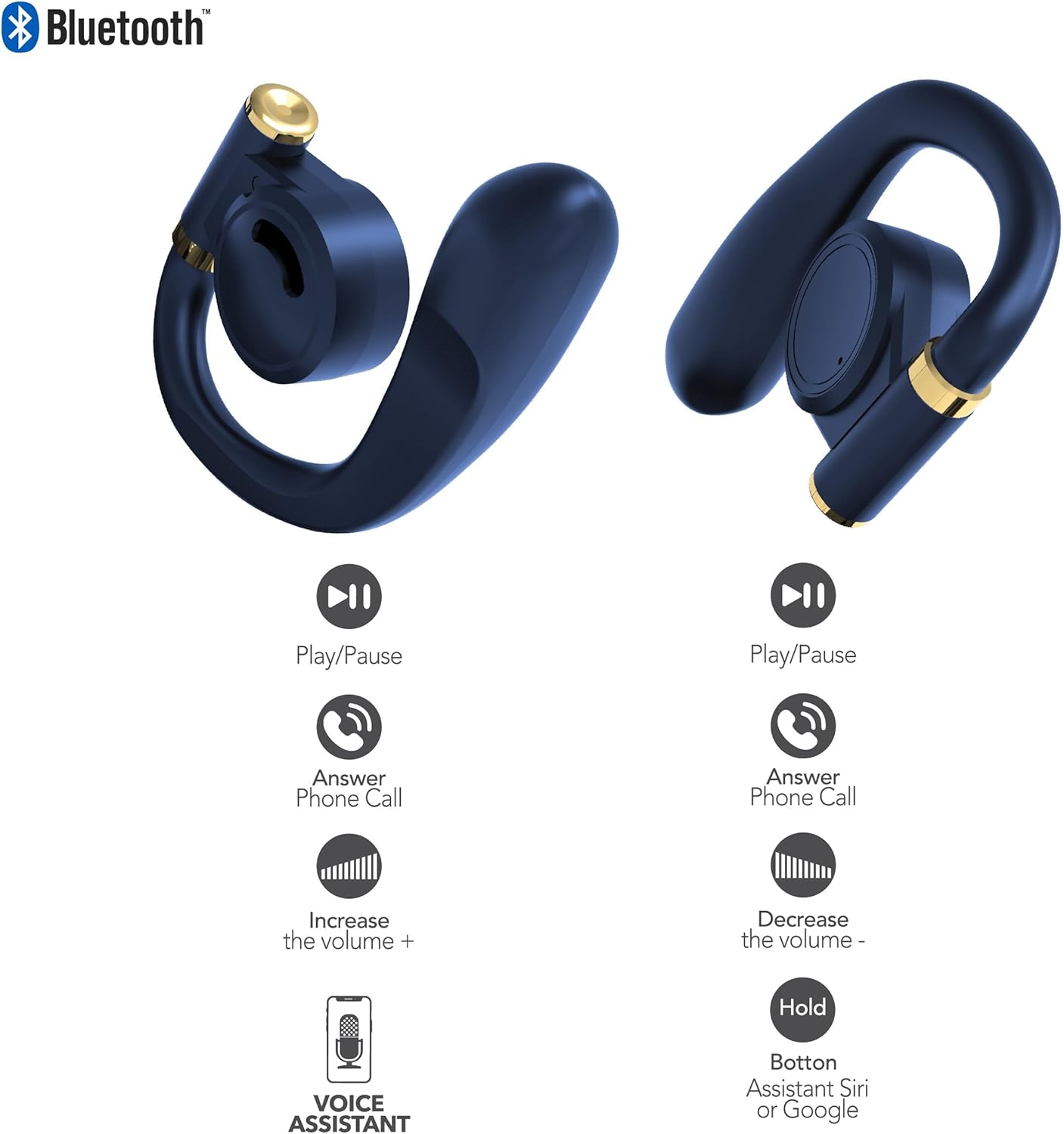
Figure 5.1: Earbud Touch Control Functions. This diagram details the touch-sensitive areas on both the left and right earbuds and their corresponding actions for media playback, call management, volume adjustment, and activating voice assistants.
| Acció | Auricular esquerre | Auricular dret |
|---|---|---|
| Reproduir/Pausa | Un sol toc | Un sol toc |
| Contestar la trucada telefònica | Un sol toc | Un sol toc |
| Augmenta el volum | Fes doble toc | N/A |
| Disminuir el volum | N/A | Fes doble toc |
| Activa l'assistent de veu (Siri/Google) | Aguanta | Aguanta |
5.2. Mode de transparència
Transparency Mode allows you to hear your surroundings while still enjoying your audio. This feature is useful for maintaining awareness in environments like busy streets or public transport.
- Activating Transparency Mode: Refer to your specific earbud control diagram or experiment with a triple tap on either earbud. An audio prompt will confirm the mode change.
- Deactivating Transparency Mode: Repeat the activation gesture.
5.3. Encendre/apagar
- Encès: Els auriculars s'encenen automàticament quan es treuen de l'estoig de càrrega.
- Apagar: Torna a col·locar els auriculars a l'estoig de càrrega i tanca la tapa. Es desconnectaran i s'apagaran automàticament.
6. Manteniment
Proper maintenance ensures the longevity and optimal performance of your RCA Wave-68 earbuds.
- Neteja: Regularly clean the earbuds and charging case with a soft, dry, lint-free cloth. Do not use harsh chemicals or abrasive materials. Gently clean the charging contacts on both the earbuds and the case to ensure proper connection.
- Puntes d'orelles: Remove and clean the eartips periodically with mild soap and water. Ensure they are completely dry before reattaching them to the earbuds.
- Emmagatzematge: When not in use, always store the earbuds in their charging case to protect them from dust, dirt, and damage. Store in a cool, dry place away from extreme temperatures.
- Exposició a l'aigua: The earbuds are not waterproof. Avoid exposing them to excessive moisture, rain, or sweat.
7. Solució De Problemes
If you encounter issues with your RCA Wave-68 earbuds, try the following solutions:
| Problema | Possible solució |
|---|---|
| Els auriculars no es combinen amb el dispositiu |
|
| Només funciona un auricular |
|
| Sense so ni volum baix |
|
| La funda de càrrega no es carrega |
|
8. Especificacions
The following are the technical specifications for the RCA Wave-68 True Wireless Earbuds:
| Característica | Detall |
|---|---|
| Nom del model | Onada |
| Tecnologia de connectivitat | Sense fil |
| Tecnologia de comunicació sense fils | Bluetooth |
| Versió Bluetooth | 5.3 |
| Dispositius compatibles | Laptops, Smart Speakers, Smartphones, Tablets |
| Interval de freqüència | 20 Hz - 20 kHz |
| Mètode de control | Remote (Touch Control) |
| Durada de la bateria | Fins a 20 hores (amb estoig de càrrega) |
| Tipus de controlador d'àudio | Conductor dinàmic |
| Forma de l'auricular | A l'orella |
| Col·locació de l'orella | A l'orella |
| Factor de forma | A l'orella |
| Control de soroll | Cancel·lació adaptativa de soroll (mode de transparència) |
| Característica especial | Built-In Voice Assistant, Smart Button |
| Dimensions del producte | 4.06 x 2.87 x 0.79 polzades |
| Pes de l'article | 1 lliures |
| UPC | 850068964482 |
9. Garantia i Suport
9.1. Garantia limitada
RCA warrants this product against defects in material and workmanship for a period of one (1) year from the date of original purchase. This warranty does not cover damage caused by accident, misuse, abuse, improper installation or operation, lack of reasonable care, or unauthorized modification. For detailed warranty terms and conditions, please refer to the warranty card included with your product or visit the official RCA weblloc.
9.2. Atenció al client
If you have any questions, require technical assistance, or need to claim warranty service, please contact RCA customer support through the following channels:
- Weblloc: Visita el suport oficial de RCA weblloc web per a preguntes freqüents, guies de resolució de problemes i formularis de contacte.
- Correu electrònic: Consulteu l'embalatge del producte o la RCA. weblloc web per a adreces de correu electrònic d'atenció al client.
- Telèfon: Check the RCA website for regional customer support phone numbers.
Please have your product model number (Wave-68) and proof of purchase ready when contacting support.


