Introducció
This manual provides detailed instructions for the proper use and maintenance of your RCA Wave-55 Wireless Over-Ear Bluetooth Headphones. Please read this manual thoroughly before using the product to ensure optimal performance and longevity. Keep this manual for future reference.
Producte acabatview
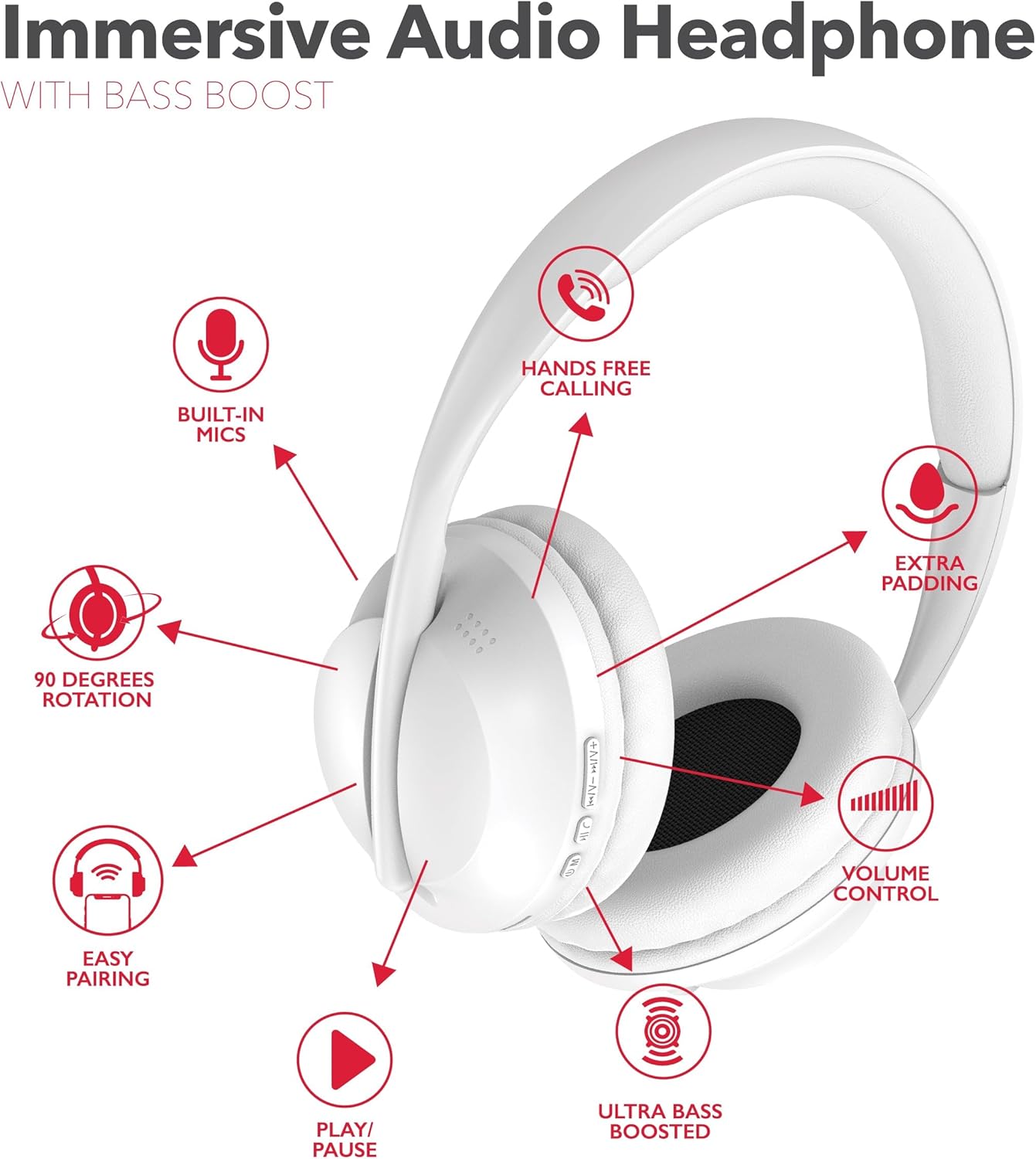
The RCA Wave-55 headphones are designed for an immersive audio experience with features like Hi-Res Audio, deep bass, and a comfortable over-ear design. Familiarize yourself with the components and controls.
Components dels auriculars
- Diadema ajustable
- Soft Over-Ear Cushions
- Control Buttons (Power, Play/Pause, Volume, Track Navigation)
- Micròfon incorporat
- Port de càrrega (USB-C)
- 3.5mm Àudio Jack
Disposició de control
This diagram illustrates the dual-function buttons located on the earcups. These buttons control power, Bluetooth mode, play/pause, phone calls, previous/next track, and volume.

The image above provides a visual guide to the dual function buttons, allowing you to manage music and calls directly from the headphones.
Configuració
Carregant els auriculars
- Connecteu el cable de càrrega USB-C proporcionat al port de càrrega dels auriculars.
- Connecteu l'altre extrem del cable a una font d'alimentació USB (per exemple, un ordinador, un adaptador de paret).
- The LED indicator will illuminate to show charging status. It will change color or turn off when fully charged.
- Una càrrega completa proporciona fins a 12 hores de reproducció.
Note: The headphones cannot be used while charging.
Emparellament Bluetooth
- Assegureu-vos que els auriculars estiguin completament carregats.
- Press and hold the Power/Bluetooth button until the LED indicator flashes, indicating pairing mode.
- Al dispositiu (telèfon intel·ligent, tauleta, ordinador), activeu el Bluetooth i cerqueu els dispositius disponibles.
- Seleccioneu "RCA Wave-55" de la llista de dispositius.
- Un cop connectat, l'indicador LED deixarà de parpellejar i romandrà fix.

The headphones offer quick Bluetooth pairing for wireless convenience and also include a 3.5mm audio jack for wired listening options.
Instruccions de funcionament
Encès/Apagat
- Encès: Premeu i manteniu premut el botó d'engegada durant aproximadament 3 segons.
- Apagar: Premeu i manteniu premut el botó d'engegada durant aproximadament 5 segons.
Reproducció de música
- Reproduir/pausa: Premeu el botó Reproduir/Pausa una vegada.
- Pujar el volum: Premeu el botó '+'.
- Baixar el volum: Premeu el botó '-'.
- Pista següent: Premeu i manteniu premut el botó '+'.
- Pista anterior: Premeu i manteniu premut el botó '-'.
Gestió de trucades
- Respondre/Finalitzar la trucada: Premeu el botó Reproduir/Pausa una vegada.
- Rebutja la trucada: Manteniu premut el botó Reproduir/Pausa durant 2 segons.
- Torna a marcar l'últim número: Premeu dues vegades el botó Reproduir/Pausa.
Mode de transparència
The Transparency Mode allows you to hear your surroundings while listening to audio. This feature is useful for maintaining awareness in busy environments. Refer to your device's specific instructions or the headphone's control layout for activating this mode.
Assistent de veu
Activate your device's voice assistant (e.g., Siri, Google Assistant) by pressing the dedicated Voice Assistant button or following the instructions in your device's manual.
Manteniment
Neteja
- Netegeu els auriculars amb un drap suau i sec.
- No utilitzeu netejadors abrasius, dissolvents ni productes químics forts.
- Eviteu que entri humitat a cap obertura.
Emmagatzematge
- Guardeu els auriculars en un lloc fresc i sec, allunyat de la llum solar directa i de temperatures extremes.
- Eviteu col·locar objectes pesats sobre els auriculars.
- The earcups feature 90-degree rotation for compact storage.

The 90-degree rotating earcups and adjustable headband ensure a personalized and comfortable fit, as well as convenient storage.

The enhanced ear cushioning provides extra padding to reduce ear strain, contributing to a more enjoyable listening experience.
Resolució de problemes
If you encounter issues with your RCA Wave-55 headphones, refer to the following common solutions:
- Sense energia: Assegureu-vos que els auriculars estiguin completament carregats. Connecteu-los a una font d'alimentació i comproveu l'indicador de càrrega.
- No es pot emparellar: Make sure Bluetooth is enabled on your device and the headphones are in pairing mode (flashing LED). Move the headphones closer to your device. Try unpairing and re-pairing.
- Sense so: Check the volume level on both the headphones and your connected device. Ensure the headphones are properly paired. If using a wired connection, ensure the 3.5mm cable is fully inserted.
- Qualitat de so baixa: Move closer to your device to avoid interference. Ensure there are no obstructions between the headphones and your device. Try disconnecting and reconnecting.
- El micròfon no funciona: Ensure the headphones are properly connected and selected as the audio input device on your computer or smartphone.
Especificacions
| Característica | Especificació |
|---|---|
| Nom del model | Onada 55 |
| Tecnologia de connectivitat | Sense fil (Bluetooth 5.3) |
| Tipus de controlador d'àudio | Conductor dinàmic |
| Interval de freqüència | 20 Hz - 40 kHz |
| Durada de la bateria | Fins a 12 hores |
| Mètode de control | Remote (On-ear buttons) |
| Característiques especials | 90 Degree Rotation, Built-in Mics, Easy Pairing, Transparency Mode |
| Nivell de resistència a l'aigua | No resistent a l'aigua |
| Dimensions del producte | 8.66 x 1.97 x 8.07 polzades |
| Pes de l'article | 1.1 lliures |
| UPC | 850068964321 |
Garantia i Suport
For warranty information or technical support, please refer to the warranty card included with your product or visit the official RCA website. Contact customer service for assistance with product issues or inquiries.


