Introducció
Thank you for choosing the RCA Wave-78 True Wireless Earbuds. This manual provides essential information for setting up, operating, and maintaining your earbuds to ensure optimal performance and longevity. Please read this manual thoroughly before using the product.
Característiques clau
- High-Resolution Sound Quality: Delivers immersive audio with enhanced bass.
- Llarga vida útil de la bateria: Up to 20 hours of playtime with the charging case.
- Mode de transparència: Allows ambient sound for situational awareness.
- TWS Fit Pro Connectivity: Ensures a stable and reliable Bluetooth connection.
- Disseny ergonòmic: Provides a comfortable and secure fit for extended wear.
- Controls tàctils intuïtius: Easy management of music, calls, and voice assistant.

Image: A person relaxing comfortably while wearing the RCA Wave-78 earbuds, illustrating the ergonomic design for long-lasting comfort during listening sessions.

Image: A person on a bus wearing the RCA Wave-78 earbuds, depicting an immersive audio experience that feels real, rich, and vibrant, allowing the user to enjoy their sound environment.
Contingut del paquet
- Auriculars sense fil RCA Wave-78 (esquerra i dreta)
- Estoig de càrrega
- Cable de càrrega USB
- Manual d'usuari
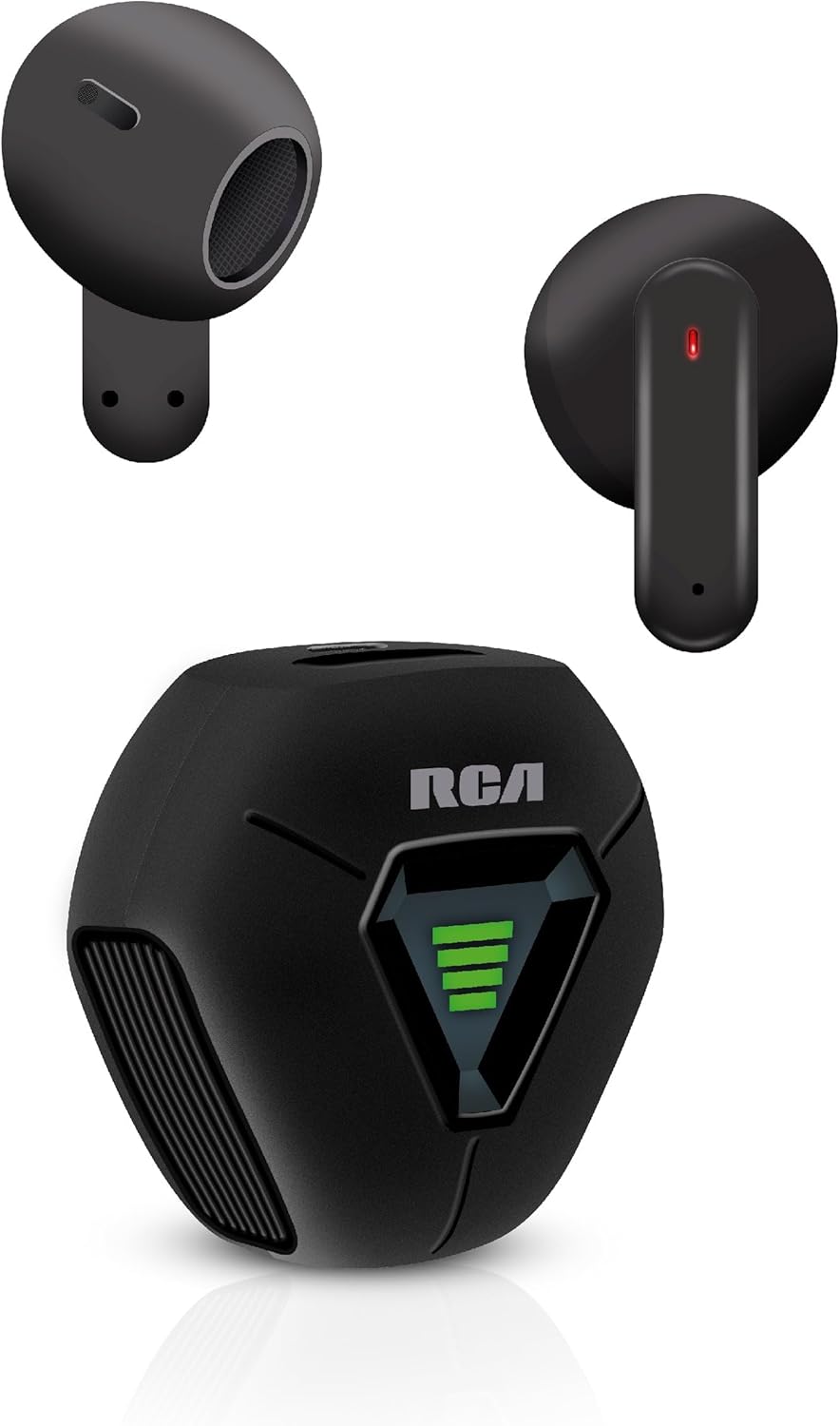
Image: The RCA Wave-78 True Wireless Earbuds, showing both earbuds and the compact charging case. The earbuds are black, and the case features the RCA logo and a battery indicator.
Producte acabatview
Components dels auriculars
- Àrea de control tàctil: Per gestionar la reproducció, les trucades i l'assistent de veu.
- Micròfon: For hands-free calling and voice commands.
- Indicador LED: Shows pairing status, charging status, and power.
- Contactes de càrrega: Per carregar dins de la caixa.

Image: A detailed diagram illustrating the touch control functions of the RCA Wave-78 earbud, including built-in mics, hands-free calling, touch control, high quality audio, volume control, ultra bass sound, play/pause, and true wireless capabilities.
Charging Case Components
- Ranures de càrrega per a auriculars: Subjecta i carrega els auriculars de manera segura.
- Indicador de bateria: Mostra el nivell de bateria de l'estoig de càrrega.
- Port de càrrega USB-C: Per carregar la funda.

Image: The RCA Wave-78 True Wireless Earbuds placed inside their open charging case, showing the earbuds nestled in their slots and the green battery indicator lights on the case.
Configuració
1. Càrrega dels auriculars i l'estoig
Abans del primer ús, carregueu completament els auriculars i l'estoig de càrrega.
- Col·loca els auriculars a l'estoig de càrrega. Assegura't que estiguin correctament col·locats.
- Connecteu el cable de càrrega USB al port de càrrega de la carcassa i a una font d'alimentació USB (per exemple, un ordinador, un adaptador de paret).
- The LED indicators on the earbuds and case will show charging status. Once fully charged, the indicators will change or turn off.
Una càrrega completa proporciona fins a 20 hores de reproducció amb l'estoig de càrrega.

Image: An illustration highlighting the long-lasting and fast-charging capabilities of the earbuds, showing a person happily using their phone with the earbuds, and text indicating "20 Hours Playtime" and "Faster Charge".
2. Vinculació amb un dispositiu Bluetooth
Els auriculars entraran automàticament en mode d'emparellament quan es treguin de l'estoig de càrrega.
- Obre l'estoig de càrrega i treu els dos auriculars. S'encendran automàticament i intentaran emparellar-se entre si.
- Al dispositiu (telèfon intel·ligent, tauleta, etc.), activeu el Bluetooth.
- Cerca "RCA Wave-78" in the list of available Bluetooth devices.
- Select "RCA Wave-78" to connect. Once connected, you will hear a confirmation tone, and the earbud LED indicators will turn off or flash slowly.
Els auriculars es tornaran a connectar automàticament a l'últim dispositiu emparellat quan es treguin de l'estoig, si el Bluetooth està activat al dispositiu.

Image: A graphic illustrating the Bluetooth 5.4 technology, showing compatibility with iOS, Android, and Windows, and demonstrating how opening the case auto-powers on and connects the earbuds, while closing it disconnects and powers them off.
Instruccions de funcionament
Controls tàctils
The RCA Wave-78 earbuds feature intuitive touch controls on each earbud. The specific functions are:
| Acció | Funció |
|---|---|
| Toc únic (auricular esquerre/dret) | Reproducció/pausa de música |
| Doble toc (auricular esquerre/dret) | Respondre/Finalitzar la trucada |
| Toc triple (auricular dret) | Pista següent |
| Toc tres vegades (auricular esquerre) | Pista anterior |
| Premda llarga (auricular esquerre/dret) | Activa l'assistent de veu (Siri/Assistent de Google) |
| Premsa llarga (auricular dret) | Augmenta el volum |
| Premsa llarga (auricular esquerre) | Disminuir el volum |

Image: A visual representation of the touch controls on the RCA Wave-78 earbuds, showing a person interacting with the earbud and icons for Play/Pause, Answer Phone Calls, Volume Control, and Assistive Siri/Google.
Mode de transparència
The RCA Wave-78 earbuds feature a Transparency Mode, which allows ambient sounds to blend with your audio. This is useful for maintaining awareness of your surroundings, such as when walking in a city or needing to hear announcements.
- To activate/deactivate Transparency Mode: Specific touch control action for Transparency Mode is not provided in the input. Please refer to the quick start guide or product packaging for the exact touch control gesture to toggle Transparency Mode.
Fer i rebre trucades
- Respon a la trucada: Toca dues vegades qualsevol dels auriculars.
- Finalitzar la trucada: Toqueu dues vegades qualsevol dels auriculars durant una trucada.
- Rebutja la trucada: Premeu llargament qualsevol dels auriculars durant 2 segons.
Assistent de veu
Activate your device's voice assistant (Siri, Google Assistant) by long pressing either earbud. This allows you to control your device using voice commands without needing to take it out of your pocket.

Image: A diagram showing the "Smart Button" functions of the RCA Wave-78 earbuds, including Play/Pause, Answer Phone Call, Increase Volume, and Button Assistant for Siri or Google.
Manteniment i cura
- Neteja: Feu servir un drap suau, sec i sense borrissol per netejar els auriculars i l'estoig de càrrega. No utilitzeu productes químics agressius ni materials abrasius.
- Emmagatzematge: Quan no els utilitzeu, guardeu els auriculars a la seva funda de càrrega per protegir-los i mantenir-los carregats.
- Temperatura: Eviteu exposar els auriculars a temperatures extremes (calor o fred) o a una humitat elevada.
- Resistència a l'aigua: Aquests auriculars són no resistent a l'aigua. Avoid contact with water or excessive moisture.
- Durada de la bateria: To preserve battery life, fully charge the earbuds and case at least once every three months if not used regularly.
Resolució de problemes
| Problema | Possible solució |
|---|---|
| Els auriculars no s'emparellan amb el dispositiu. |
|
| Només funciona un auricular. |
|
| Sense so o amb un volum baix. |
|
| L'estoig de càrrega no es carrega. |
|
Especificacions
| Característica | Detall |
|---|---|
| Nom del model | Wave-78 Black |
| Tecnologia de connectivitat | Sense fil (Bluetooth 5.4) |
| Hora de joc | Fins a 20 hores (amb estoig de càrrega) |
| Tipus de controlador d'àudio | Conductor dinàmic |
| Interval de freqüència | 20 Hz - 20,000 Hz |
| Control de soroll | Cancel·lació adaptativa de soroll (mode de transparència) |
| Característiques especials | Built-In Voice Assistant, Smart Button, Hi-Res Audio, Enhanced Bass |
| Col·locació de l'orella | A l'orella |
| Pes de l'article | 10 lliures (Note: This weight is likely for shipping/packaging and not the product itself.) |
| Dimensions del producte | 2.17 x 1.85 x 0.47 polzades |
| Nivell de resistència a l'aigua | No resistent a l'aigua |
| UPC | 850068964413 |
Informació de seguretat
- No desmunteu, repareu o modifiqueu el producte.
- No exposar al foc ni a altes temperatures.
- Mantenir fora de l'abast dels nens i mascotes.
- Eviteu escoltar a volums elevats durant períodes prolongats per evitar danys auditius.
- Use caution when using earbuds in situations requiring awareness of surroundings (e.g., driving, cycling), unless Transparency Mode is specifically designed for such use and activated.
Garantia i Suport
For warranty information and customer support, please refer to the warranty card included in your product packaging or visit the official RCA weblloc web. Conserveu el comprovant de compra per a reclamacions de garantia.
Botiga oficial de RCA: Botiga RCA a Amazon


