1. Producte acabatview
The RCA Wave-68 True Wireless Earbuds provide a high-quality audio experience with advanced features such as Hi-Res Audio, Deep Bass, Transparency Mode, and Bluetooth 5.2 connectivity. Designed for comfort and extended use, these earbuds offer up to 20 hours of battery life with the charging case, making them suitable for various activities.
Contingut del paquet
- Auriculars sense fil RCA Wave-68 (esquerra i dreta)
- Estoig de càrrega
- Cable de càrrega USB
- Manual d'usuari
- Customizable Ear Tips (various sizes)
Identificació de components

Figura 1.1: The RCA Wave-68 True Wireless Earbuds shown with their charging case. The earbuds feature an over-ear hook design for a secure fit, and the charging case includes a digital display for battery status.
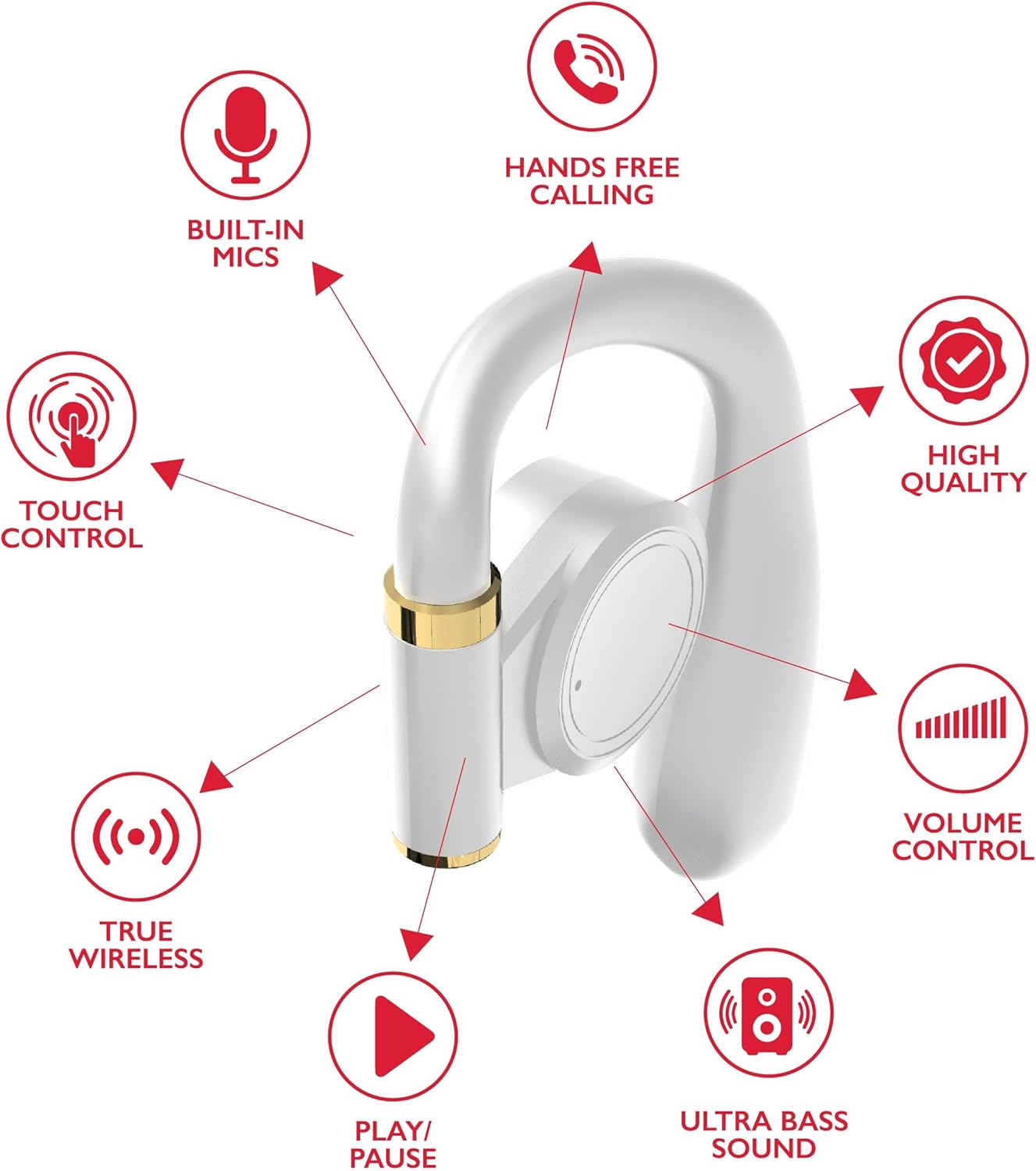
Figura 1.2: Detailed diagram highlighting key features of a single RCA Wave-68 earbud, including built-in mics, hands-free calling, touch control, true wireless connectivity, play/pause function, ultra bass sound, volume control, and high-quality audio.
2. Configuració
2.1 Càrrega dels auriculars i l'estoig
Before first use, fully charge the earbuds and the charging case. The charging case provides additional power for the earbuds on the go.
- Connect the provided USB charging cable to the charging port on the case and to a USB power source (e.g., computer, wall adapter).
- The digital display on the charging case will show the battery level. Allow the case to charge until the display indicates 100%.
- Place the earbuds into their respective slots in the charging case. Ensure they are properly seated. The earbuds will begin charging automatically.
- The earbuds' indicator lights will show their charging status (refer to the indicator light section for details).

Figura 2.1: The RCA Wave-68 earbuds placed inside their charging case with the lid open, showing the digital battery display.
2.2 Emparellament amb un dispositiu Bluetooth
The earbuds will automatically enter pairing mode when removed from the charging case for the first time or when disconnected from a previously paired device.
- Ensure the earbuds are charged and removed from the charging case. They will automatically power on and enter pairing mode.
- Al dispositiu (telèfon intel·ligent, tauleta, ordinador portàtil), activeu el Bluetooth.
- Cerca dispositius Bluetooth disponibles.
- Seleccioneu "RCA Wave-68" de la llista de dispositius trobats.
- Once connected, you will hear an audible confirmation, and the earbud indicator lights will change (refer to the indicator light section for details).
- Els auriculars es tornaran a connectar automàticament a l'últim dispositiu emparellat quan es treguin de l'estoig, si el Bluetooth està activat al dispositiu.
3. Instruccions de funcionament
The RCA Wave-68 earbuds feature intuitive touch controls for managing audio playback, calls, and voice assistant functions.
3.1 Encès/Apagat
- Encès: Remove the earbuds from the charging case. They will power on automatically. Alternatively, press and hold the touch control area on both earbuds for 3 seconds.
- Apagar: Place the earbuds back into the charging case. They will power off automatically. Alternatively, press and hold the touch control area on both earbuds for 5 seconds.
3.2 Reproducció de música

Figura 3.1: Visual guide to the touch controls on the RCA Wave-68 earbuds for functions like Play/Pause, Answer Phone Call, Volume adjustment, and Voice Assistant activation.
- Reproduir/pausa: Un sol toc a qualsevol dels auriculars.
- Pista següent: Toqueu dues vegades l'auricular dret.
- Pista anterior: Toqueu dues vegades l'auricular esquerre.
- Pujar el volum: Toqueu tres vegades l'auricular dret.
- Baixar el volum: Toqueu tres vegades l'auricular esquerre.
3.3 Gestió de trucades
- Respondre/Finalitzar la trucada: Toqueu un sol cop a qualsevol dels auriculars durant una trucada entrant o activa.
- Rebutja la trucada: Press and hold the touch control area on either earbud for 2 seconds during an incoming call.
3.4 Assistent de veu
- Activa l'assistent de veu (Siri/Assistent de Google): Press and hold the touch control area on the left earbud for 2 seconds.
3.5 Mode de transparència
Transparency Mode allows you to hear your surroundings while listening to audio, enhancing awareness in environments like commuting or exercising outdoors.
- Toggle Transparency Mode: Press and hold the touch control area on the right earbud for 2 seconds. Repeat to switch back to normal mode.
4. Manteniment
4.1 Neteja
- Netegeu regularment els auriculars i l'estoig de càrrega amb un drap suau, sec i sense borrissol.
- No utilitzeu netejadors abrasius, alcohol ni dissolvents químics.
- Traieu suaument la cera o les restes de les puntes de les orelles i la malla de l'altaveu amb un raspall petit i suau o un bastonet de cotó.
- Ensure charging contacts on both earbuds and the case are clean and dry.
4.2 Emmagatzematge
- Quan no els utilitzeu, guardeu sempre els auriculars a la seva funda de càrrega per protegir-los i mantenir-los carregats.
- Emmagatzemar en un lloc fresc i sec, allunyat de temperatures extremes i de la llum solar directa.
5. Solució De Problemes
| Problema | Possible solució |
|---|---|
| Els auriculars no s'encenen. | Ensure the earbuds are charged. Place them in the charging case for a few minutes, then remove them. |
| No es pot emparellar amb el dispositiu. |
|
| Sense so o amb un volum baix. |
|
| Els auriculars es desconnecten sovint. |
|
| Un auricular no fa so. |
|
6. Especificacions
| Característica | Detall |
|---|---|
| Nom del model | Onada 68 |
| Tecnologia de connectivitat | Sense fil (Bluetooth) |
| Versió Bluetooth | 5.3 |
| Durada de la bateria | Fins a 20 hores (amb estoig de càrrega) |
| Tipus de controlador d'àudio | Conductor dinàmic |
| Interval de freqüència | 20 Hz - 20 kHz |
| Nivell de resistència a l'aigua | Resistent a l'aigua |
| Mètode de control | Remote (Touch Control) |
| Característiques especials | Built-In Voice Assistant, Smart Button, Transparency Mode |
| Dispositius compatibles | Laptops, Smart Speakers, Smartphones, Tablets |
| Dimensions | 4.06 x 2.87 x 0.79 polzades |
| Pes de l'article | 1 lliures |
7. Garantia i Suport
RCA products are designed for reliability and performance. For specific warranty information regarding your RCA Wave-68 True Wireless Earbuds, please refer to the warranty card included in your product packaging or visit the official RCA weblloc.
For technical support, troubleshooting assistance, or to inquire about replacement parts, please contact RCA customer service through their official weblloc web o la informació de contacte que es proporciona a la documentació del producte.
Recursos en línia:
- RCA Official Store on Amazon
- Oficial de la RCA Weblloc (General) (Note: Specific product support pages may vary)


