1. Introducció
The OWON HDS271 is a versatile 3-in-1 handheld device, integrating a digital oscilloscope, a multimeter, and a waveform generator into a single compact unit. Designed for field service, education, and general electronics testing, this instrument offers a 70MHz bandwidth oscilloscope, a 24000-count digital multimeter, and a 100KHz signal generator. Its portable design, built-in rechargeable battery, and high-resolution color LCD make it an essential tool for various electrical measurement and analysis tasks.

Davant view of the OWON HDS271, showcasinel seu disseny compacte i la pantalla a color.
2. Informació de seguretat
To ensure safe operation and prevent damage to the device, please read and adhere to the following safety precautions:
- Seguretat general: Always operate the device within its specified voltage, current, and frequency limits. Do not use the device if it appears damaged or is not operating correctly.
- Perill de descàrrega elèctrica: Avoid contact with live circuits. Use caution when working with voltages above 30V AC RMS, 42V peak, or 60V DC, as these pose a shock hazard. Ensure probes are properly insulated.
- Probe Connections: Connect the ground lead of the oscilloscope probe to earth ground before connecting the probe tip to the circuit under test. Disconnect the probe tip first when finished.
- Seguretat de la bateria: Use only the specified charging adapter. Do not expose the battery to extreme temperatures or disassemble it. Dispose of batteries according to local regulations.
- Medi ambient: Operate the device in a dry environment, away from moisture, dust, and direct sunlight.
3. Producte acabatview
The OWON HDS271 features a clear 3.5-inch color LCD and an intuitive button layout for easy operation. Below is a diagram illustrating the main components and controls of the device.
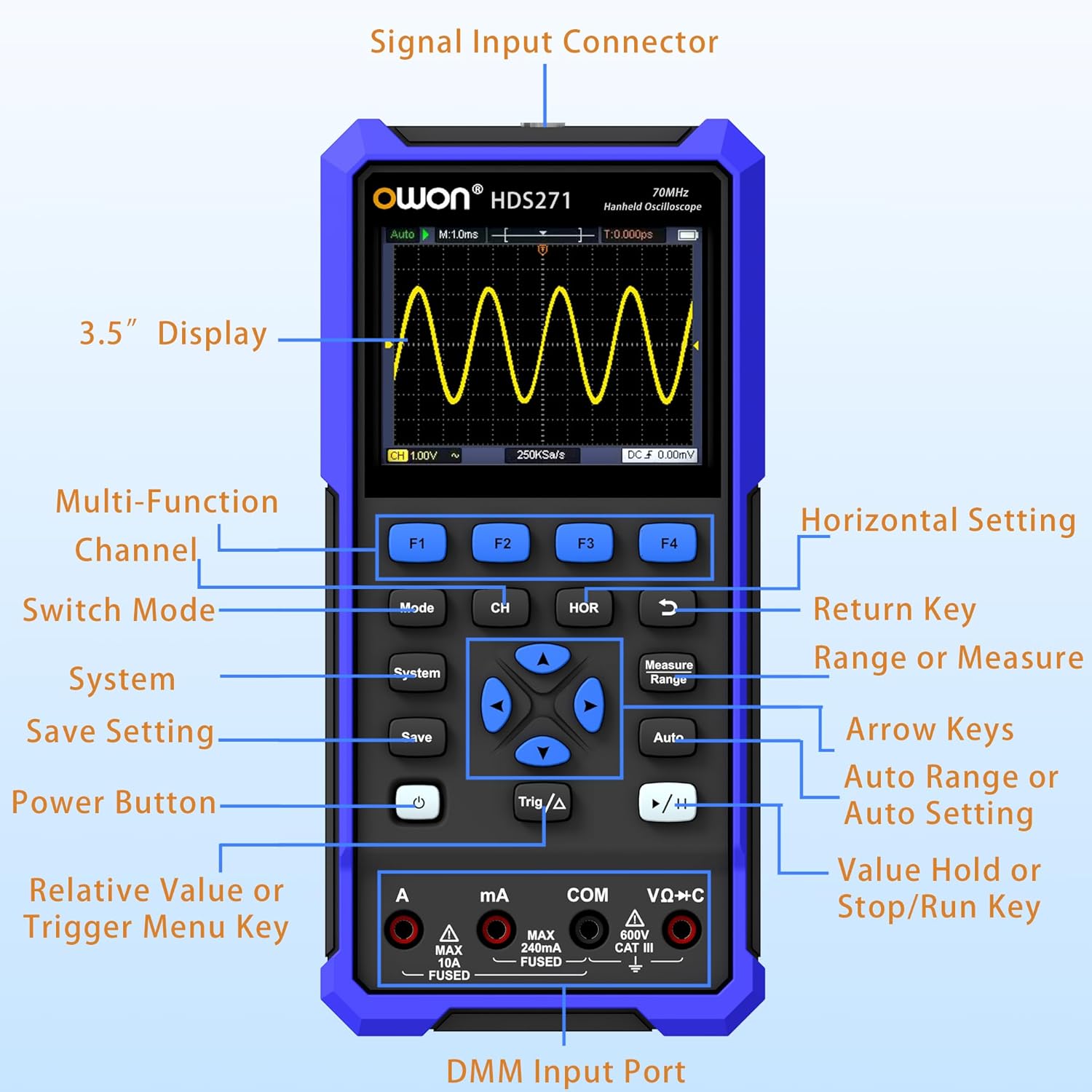
Detailed diagram of the OWON HDS271 front panel, indicating the function of each button, input port, and display area.
Components clau:
- Pantalla de 3.5 polzades: High-resolution color LCD for waveform and measurement data.
- Botons de funció (F1-F4): Context-sensitive buttons for menu navigation and quick settings.
- Botó de mode: Switches between Oscilloscope, Multimeter, and Signal Generator modes.
- CH/1/2 Button: Selects oscilloscope channel or other channel-related settings.
- HOR Button: Adjusts horizontal scale/time base in oscilloscope mode.
- Botó del sistema: Accedeix a la configuració i els paràmetres del sistema.
- Botó Desa: Saves waveforms or measurement data.
- Botó d'encesa: Encén o apaga el dispositiu.
- Trig/Δ Button: Adjusts trigger settings or enables delta measurements.
- Tecles de fletxa: Navigates menus and adjusts parameters.
- Measure/Range Button: Initiates automatic measurements or adjusts measurement range.
- Botó automàtic: Performs auto-setup for oscilloscope or auto-ranging for multimeter.
- Run/Stop (▶/‖) Button: Starts or stops waveform acquisition.
- DMM Input Ports (A, mA, COM, VΩ+C): Connectors for multimeter probes.
- Connector d'entrada de senyal: BNC connector for oscilloscope probes and signal generator output.
4. Configuració
4.1 Desembalatge i inspecció inicial
Carefully remove the OWON HDS271 and all accessories from the packaging. Inspect the device for any signs of physical damage. If any damage is found, contact your supplier immediately.
4.2 Càrrega de la bateria
The HDS271 is equipped with a built-in 2000mAh lithium battery. Before first use, it is recommended to fully charge the device.
- Connect the provided USB Type-C cable to the Type-C port on the device.
- Connecteu l'altre extrem del cable USB a un adaptador de corrent USB compatible (no sempre inclòs) o al port USB d'un ordinador.
- L'indicador de càrrega del dispositiu mostrarà l'estat de càrrega. Una càrrega completa sol trigar diverses hores.

Un primer pla view of the HDS271's bottom, highlighting the Type-C charging port and indicating the presence of a 2000mAh built-in lithium battery.
4.3 Connexió de sondes
- Oscilloscope Probes: Connect the BNC connector of the oscilloscope probe to the Signal Input Connector on the top of the device. Ensure the probe is properly compensated before use.
- Multimeter Leads: Insert the red test lead into the VΩ+C or A/mA input jack and the black test lead into the COM input jack for multimeter measurements.
5. Instruccions de funcionament
The HDS271 offers three primary functions: Oscilloscope, Multimeter, and Signal Generator. Use the Mode botó per canviar entre aquestes funcions.

An illustration demonstrating the three primary functions of the HDS271: oscilloscope waveform display, multimeter voltage reading, and signal generator output.
5.1 Encès/Apagat
- Per encendre, premeu i manteniu premut Poder botó fins que la pantalla s'il·lumini.
- Per apagar-lo, manteniu premut el botó Poder botó fins que el dispositiu s'apaga.
5.2 Mode d'oscil·loscopi
In Oscilloscope mode, the HDS271 displays real-time waveforms, allowing for detailed signal analysis.
- Premeu el botó Mode button to select Oscilloscope mode.
- Connect the oscilloscope probe to the signal input and the circuit under test.
- Premeu el botó Automàtic button for automatic setup of vertical, horizontal, and trigger settings.
- Utilitza el CH/1/2 button to select the channel (HDS271 is 1-channel).
- Adjust vertical scale (Volts/Div) and horizontal time base (Sec/Div) using the arrow keys and corresponding menu options (accessed via F-buttons or dedicated buttons like HORA).
- Adjust trigger level and mode using the Trig/Δ button and arrow keys.
- Utilitza el Mesura button to access automatic measurement functions (e.g., Vpp, Vmax, Freq).
- El Run/Stop (▶/‖) button pauses or resumes waveform acquisition.

Quatre examples of waveforms displayed on the HDS271 screen, including mains waveform, TV signal wave, PLC pulse wave, and multi-audio frequency response signal.
5.3 Mode multímetre
The multimeter function provides precise measurements of various electrical parameters.
- Premeu el botó Mode button to select Multimeter mode.
- Connect the test leads to the appropriate DMM input ports (VΩ+C for voltage/resistance/capacitance, A for high current, mA for low current, COM for common ground).
- Select the desired measurement function (e.g., DCV, ACV, Resistance, Capacitance, Diode, Continuity) using the F-buttons or dedicated menu options.
- The device typically features auto-ranging, but manual range selection may be available via the Measure/Range botó.
- Llegeix el valor de mesura que es mostra a la pantalla.
5.4 Mode generador de senyals
The built-in signal generator can output various waveforms for testing circuits.
- Premeu el botó Mode button to select Signal Generator mode.
- Connect the signal output (via the BNC connector) to the circuit or device you wish to test.
- Use the F-buttons and arrow keys to select the desired waveform type (Sine, Square, Sawtooth, Pulse).
- Ajustar la freqüència i amplitude of the output signal according to your requirements.
- Ensure the output is enabled before connecting to sensitive circuits.
5.5 PC Software Connectivity
The HDS271 supports PC software connectivity via USB for data logging, waveform analysis, and device control.
- Install the OWON PC software on your computer (software typically available from the manufacturer's weblloc).
- Connect the HDS271 to your computer using the provided USB Type-C cable.
- Follow the instructions in the PC software to establish a connection and begin data transfer or remote control.
6. Manteniment
6.1 Neteja
To maintain the device's appearance and functionality, clean it regularly.
- Netegeu l'exterior del dispositiu amb un damp tela. No utilitzeu netejadors abrasius ni dissolvents.
- Ensure no moisture enters the device through ports or openings.
6.2 Cura i emmagatzematge de la bateria
Proper battery care extends the lifespan of the device.
- Torneu a carregar la bateria quan aparegui l'indicador de bateria baixa.
- If storing the device for an extended period, charge the battery to approximately 50% to 70% capacity.
- Guardeu el dispositiu en un lloc fresc i sec, allunyat de la llum solar directa i de temperatures extremes.
7. Solució De Problemes
This section addresses common issues you might encounter with the OWON HDS271.
| Problema | Causa possible | Solució |
|---|---|---|
| El dispositiu no s'encén | Bateria baixa; el botó d'engegada no s'ha premut correctament | Charge the battery; Press and hold the power button for a few seconds |
| No waveform displayed in OSC mode | Probe not connected; Incorrect vertical/horizontal settings; No signal input | Check probe connection; Use Auto button; Verify signal source |
| Incorrect multimeter readings | Leads connected incorrectly; Wrong measurement function selected; Out of range | Ensure leads are in correct ports; Select appropriate function; Use Auto-ranging or adjust range manually |
| PC software not connecting | USB cable issue; Driver not installed; Software not running | Check USB cable; Install necessary drivers; Ensure software is open and configured |
8. Especificacions
The following table details the technical specifications of the OWON HDS271.

A summary graphic detailing the key specifications for the Digital Multimeter (DMM), Oscilloscope (OSC), and Signal Generator functions of the HDS271.
8.1 Oscilloscope (OSC) Specifications
- Canals: 1 canals
- Ample de banda: 70 MHz
- Sampli Rate: 250MSa/s (real-time)
- Durada del registre: 8K
- Freqüència d'actualització de la forma d'ona: Up to 10,000wfms/s
- Característiques: Auto Setup, Multiple Measurement Functions, Cursor Measurement, Slow Sweep Mode
8.2 Digital Multimeter (DMM) Specifications
- Visualització: 4 1/2 Digit, 24,000 Counts
- Funcions de mesura: Voltage (AC/DC), Current (AC/DC), Resistance, Capacitance, Diode, Continuity
- Característiques: True RMS, Auto-Ranging, Data Hold
8.3 Signal Generator (WG) Specifications
- Freqüència: 100 KHz
- Waveform Output: Sine, Square, Sawtooth, Pulse
- Sortida màxima Amplatitud: 2.5 Vpp
8.4 Especificacions generals
- Visualització: 3.5 inch High-Resolution Color LCD
- Bateria: Ió de liti de 2000 mAh (inclosa)
- Port de càrrega: USB tipus C
- Connectivitat: USB (for PC software)
- Dimensions del producte: 7.8 x 1.5 x 3.78 polzades
- Pes: 2.65 lliures
- Fabricant: OWON
9. Garantia i Suport
OWON products are designed and manufactured to high-quality standards. For information regarding warranty coverage, please refer to the warranty card included with your product or visit the official OWON weblloc.
For technical support, troubleshooting assistance, or service inquiries, please contact OWON customer support through their official channels. Contact details can typically be found on the OWON weblloc o a l'embalatge del producte.


