1. Introducció
The Fenton Pulse65 is a versatile portable party speaker designed for various events and environments. It delivers powerful sound, offers wireless connectivity, and features dynamic lighting. This manual provides essential information for the safe and optimal use of your Pulse65 speaker.
Característiques principals:
- 60W RMS (140W max) output for clear, powerful sound with deep bass.
- Bluetooth 5.3 for wireless streaming and stereo pairing (TWS).
- Dynamic multicolour light show synchronized with music.
- IPX4 splashproof design for outdoor use.
- Integrated 12-hour rechargeable battery.
- Includes a wireless UHF microphone and remote control.
- USB playback and FM radio functionality.
2. Informació de seguretat
Si us plau, llegiu i comprengui totes les instruccions de seguretat abans d'utilitzar aquest producte. Conservi aquest manual per a futures consultes.
- Resistència a l'aigua: The Pulse65 is IPX4 splashproof. Do not immerse the speaker in water or expose it to heavy rain. Ensure all port covers are securely closed when used near water.
- Font d'alimentació: Use only the specified charging cable and power adapter. Do not attempt to open or modify the battery compartment.
- Ventilació: No bloquegeu cap obertura de ventilació. Assegureu-vos que hi hagi un flux d'aire adequat al voltant de l'altaveu.
- Neteja: Desconnecteu l'alimentació abans de netejar. Feu servir un drap suau i sec. No utilitzeu netejadors líquids ni aerosols.
- Temperatura: Avoid extreme temperatures. Do not expose to direct sunlight for extended periods or place near heat sources.
- Nens: Mantenir fora de l'abast dels nens. Aquest producte no és una joguina.
3. Contingut del paquet
Verifiqueu que tots els elements siguin presents al paquet:
- Fenton Pulse65 Portable Party Speaker
- Micròfon sense fil UHF
- Control remot
- Cable de càrrega USB
- Manual d'usuari
4. Configuració
4.1. Càrrega inicial
Before first use, fully charge the speaker. Connect the provided USB charging cable to the speaker's charging port and a suitable USB power adapter (not included). The charging indicator will show the charging status. A full charge provides approximately 12 hours of playback, depending on usage volume and light effects.
4.2. Encès / apagat
Manteniu premut el botó Poder button on the control panel to turn the speaker on or off.
4.3. Configuració del micròfon sense fil
The included wireless UHF microphone is pre-paired with the speaker. Ensure the microphone has fresh batteries (not included) and is powered on. The microphone's display will indicate its status.

Image: The Fenton Pulse65 speaker shown with its wireless microphone and remote control, illustrating the complete package.
5. Instruccions de funcionament
5.1. Tauler de control acabatview
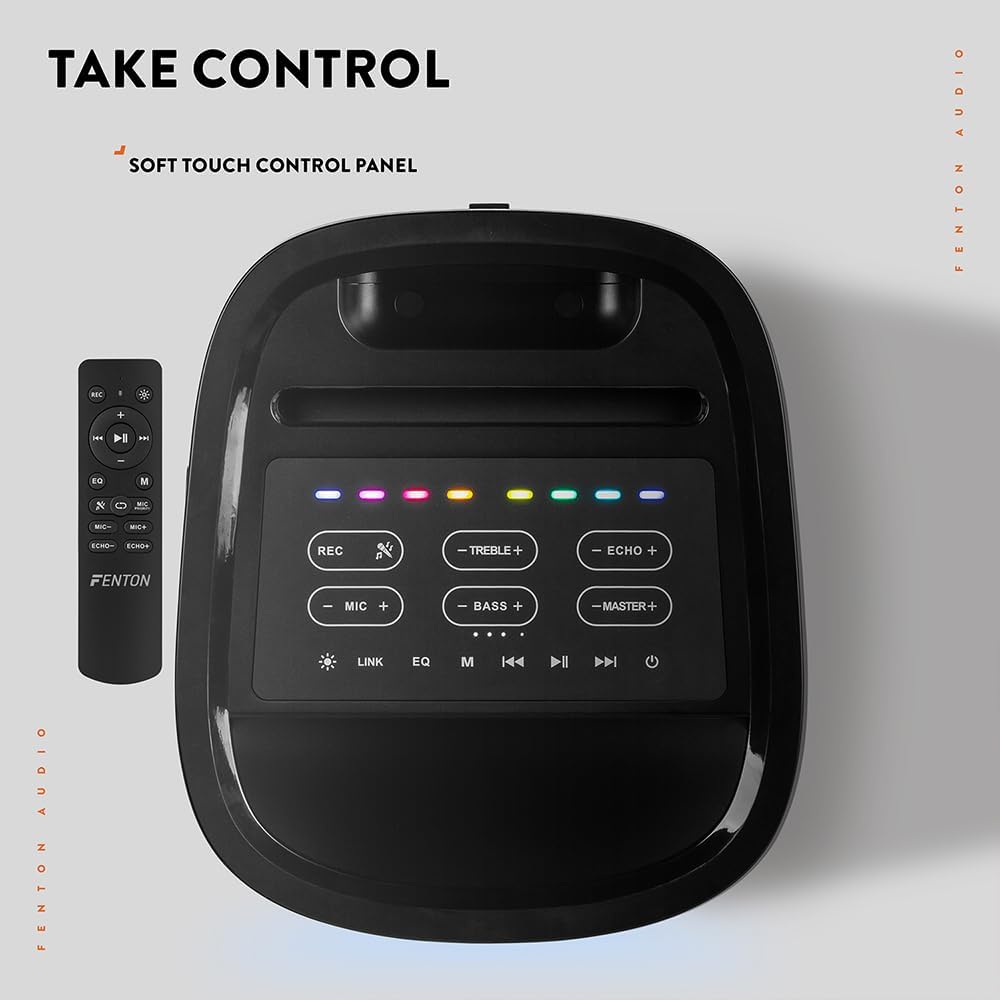
Imatge: Vista de dalt a baix view of the Fenton Pulse65 speaker's soft-touch control panel, alongside the remote control, highlighting various buttons for audio and light adjustments.
The top panel features soft-touch controls for various functions:
- REC: Gravar àudio.
- AGUTS +/-: Ajusta els nivells d'aguts.
- ECO +/-: Adjust microphone echo effect.
- MIC +/-: Ajusta el volum del micròfon.
- BAIX +/-: Ajusta els nivells de greus.
- MASTER +/-: Adjust overall master volume.
- ENLLAÇ: Activate TWS (True Wireless Stereo) pairing.
- EQ: Anar ciclant pels preajustos de l'equalitzador.
- M (mode): Switch between input modes (Bluetooth, USB, FM Radio, AUX).
- Reproduir/pausa: Reprodueix o pausa la reproducció d'àudio.
- Anterior/Següent: Skip tracks or tune FM radio stations.
- Potència: Enceneu/apaga l'altaveu.
5.2. Connexió Bluetooth
- Turn on the Pulse65 speaker.
- Premeu el botó M (mode) button until the Bluetooth indicator lights up or you hear a Bluetooth pairing prompt.
- Al dispositiu mòbil, activeu el Bluetooth i cerqueu els dispositius disponibles.
- Select "Fenton Pulse65" from the list.
- Once connected, the speaker will confirm with an audible prompt.

Image: The Fenton Pulse65 speaker with a smartphone placed in its integrated dock, illustrating the Bluetooth streaming and charging capabilities.
5.3. Emparellatge estèreo sense fil veritable (TWS)
To link two Pulse65 speakers for stereo sound:
- Ensure both Pulse65 speakers are powered on and in Bluetooth mode, but not connected to any device.
- En un altaveu (aquest serà l'altaveu principal), premeu el botó ENLLAÇ button. It will search for another Pulse65.
- The primary speaker will automatically connect to the secondary speaker. Once connected, you will hear a confirmation tone.
- Now, connect your mobile device to the primary Pulse65 speaker via Bluetooth as described in section 5.2.
- L'àudio ara es reproduirà en estèreo a tots dos altaveus.
5.4. Reproducció USB
Inseriu una unitat flash USB que contingui àudio MP3 files into the USB port on the back of the speaker. The speaker will automatically switch to USB mode and begin playback. Use the Play/Pause and Previous/Next buttons to control playback.
5.5. Ràdio FM
- Premeu el botó M (mode) botó per canviar al mode de ràdio FM.
- Manteniu premut el botó Reproduir/Pausa per escanejar i desar automàticament les emissores de FM disponibles.
- Utilitza el Anterior/Següent botons per navegar per les emissores desades.
5.6. Entrades de micròfon i guitarra
The speaker features dedicated inputs for a wired microphone and a guitar on the rear panel. Connect your devices to these ports. Use the MIC +/- i ECO +/- controls on the top panel to adjust the microphone's volume and echo effect.

Image: A composite image showing the rear panel of the Fenton Pulse65 speaker with its various input ports, and a front view of the speaker with a microphone, illustrating connectivity options.
5.7. Modes de llum
The multicolour LED lights on the speaker can be controlled via the remote control or specific buttons on the control panel (if available, refer to the remote for full control). Cycle through different light patterns or turn them off as desired.

Imatge: Un primer pla view of the Fenton Pulse65 speaker, highlighting its multicolour LED light ring on the front grille, indicating its splashproof design.
6. Manteniment
6.1. Neteja
Wipe the speaker's exterior with a soft, dry, or slightly damp cloth. Do not use abrasive cleaners, waxes, or solvents. Ensure all port covers are closed before cleaning if using a damp tela.
6.2. Emmagatzematge
Guardeu l'altaveu en un lloc fresc i sec, allunyat de la llum solar directa i de temperatures extremes. Si l'emmagatzemeu durant un període prolongat, carregueu la bateria aproximadament al 50% cada pocs mesos per mantenir-la en bon estat.
6.3. Cura de la bateria
To prolong battery life, avoid fully discharging the battery frequently. Recharge the speaker when the low battery indicator appears. Do not expose the battery to excessive heat.
7. Solució De Problemes
If you encounter issues with your Fenton Pulse65, refer to the following common problems and solutions:
| Problema | Causa possible | Solució |
|---|---|---|
| L'altaveu no s'encén. | Bateria baixa; botó d'engegada no premut correctament. | Carrega l'altaveu completament. Prem i mantén premut el botó d'engegada durant uns segons. |
| No hi ha so de l'altaveu. | Volum massa baix; Mode d'entrada incorrecte; Dispositiu no connectat. | Increase master volume. Press 'M' to select correct input mode. Ensure Bluetooth device is connected or USB is inserted correctly. |
| L'aparellament de Bluetooth falla. | Altaveu no en mode d'emparellament; Dispositiu massa lluny; Interferències. | Ensure speaker is in Bluetooth mode and not connected to another device. Move device closer to speaker. Turn off other Bluetooth devices. |
| El micròfon no funciona. | Microphone off; Low battery in mic; Mic volume too low. | Ensure wireless mic is powered on. Replace mic batteries. Increase MIC volume on speaker. |
| L'emparellament TWS falla. | Speakers already connected to a device; Speakers too far apart. | Disconnect both speakers from any Bluetooth devices. Ensure both are in Bluetooth mode. Place speakers close together during pairing. |
8. Especificacions
- Marca: Fenton
- Model: Pols 65
- Potència de sortida màxima dels altaveus: 140 watts (pic)
- Resposta de freqüència: 12000 Hz
- Tecnologia de connectivitat: Bluetooth 5.3
- Mode de sortida d'àudio: estèreo
- Tipus de muntatge: Taula
- Tipus d'altaveu: A l'aire lliure
- Dimensions del producte: 49 x 34.5 x 39.5 cm
- Pes: 7.6 kg
- Bateria: 1 Nonstandard Battery (included), 12-hour playback
- Classificació IP: IPX4 (a prova d'esquitxades)
- Fabricant: Tronios BV
- País d'origen: Xina

Image: The Fenton Pulse65 speaker displayed with its approximate dimensions (40cm height, 32cm width, 27cm depth) and an icon indicating 12 hours of battery life.
9. Garantia i Suport
For warranty information and customer support, please refer to the documentation provided with your purchase or visit the official Fenton brand store. You can find more information and contact details at the Fenton Brand Store.


