1. Introducció
The Wellue Bluetooth Pulse Oximeter (Model 60FWB) is a compact, non-invasive device designed for spot-checking blood oxygen saturation (SpO2) and pulse rate (PR). It features a bright OLED screen, built-in memory, and Bluetooth connectivity for real-time data synchronization with a free mobile application. This device is intended for sports and aviation use only and is not a medical device.
2. Què hi ha a la caixa
- Wellue Fingertip Pulse Oximeter (Model 60FWB)
- 2 x piles AAA
- Bossa de transport
- Corda
- Manual d'usuari
- Guia ràpida
- Targeta de garantia

Figure 1: Included accessories with the Wellue Pulse Oximeter.
3. Configuració
3.1 Instal·lació de la bateria
- Obriu la tapa del compartiment de la bateria que es troba a la part posterior del dispositiu.
- Introduïu les dues piles AAA, assegurant-vos de la polaritat correcta (+ i -).
- Tanqueu bé la tapa del compartiment de la bateria.
3.2 Descàrrega de l'aplicació i connexió Bluetooth
The Wellue Pulse Oximeter can connect to your smartphone via Bluetooth for real-time data viewing and historical tracking using the VHealth app.
- Download the "VHealth" app from the iOS App Store or Google Play Store.
- Assegureu-vos que el Bluetooth del telèfon estigui activat.
- Turn on the oximeter by inserting your finger.
- Open the VHealth app and select the device for initial connection.
- The app will automatically receive and store data when open and connected.

Figure 2: Bluetooth connectivity and VHealth app interface.
4. Instruccions de funcionament
4.1 Mesura bàsica
- Open the clip of the oximeter.
- Insert one finger (preferably the index finger) into the rubber opening of the oximeter, ensuring the finger is in full contact with the sensor.
- Release the clip. The device will automatically power on and begin measurement within 8 seconds.
- Read the SpO2 and Pulse Rate values displayed on the OLED screen.
- The device will automatically power off 3 seconds after the finger is removed.

Figure 3: Automatic power on/off with finger insertion.
4.2 Visualització de la pantalla
La pantalla OLED mostra la informació següent:
- Saturació d'oxigen (SpO2): Percenttage of oxygen-saturated hemoglobin relative to total hemoglobin in the blood.
- Taxa de pols (PR): Number of heartbeats per minute.
- Índex de perfusió (PI): Indicates the pulse strength at the measurement site.
- Plethysmograph Waveform: A graphical representation of blood flow through the finger.
- Indicador de bateria: Shows remaining battery life.

Figure 4: Key display elements on the OLED screen.
4.3 Menu Navigation and Alarm Settings
While measuring, a long press of the display key (button) allows you to enter the setup menu. Short presses navigate through options, and another long press confirms a selection or exits the menu.
- SpO2 Alarm Low: Set the lower limit for oxygen saturation. If the reading falls below this, an alarm will sound.
- PR Alarm High: Set the upper limit for pulse rate. An alarm will sound if the pulse rate exceeds this.
- PR Alarm Low: Set the lower limit for pulse rate. An alarm will sound if the pulse rate falls below this.
- Bip On/Off: Enable or disable the audible beep for each pulse beat.

Figure 5: Menu setup for alarm thresholds and beep function.

Figure 6: Audible reminder when readings exceed preset limits.
4.4 Built-in Memory
The device can store up to 12 groups of data for Oxygen Level, Pulse Rate, and Perfusion Index. To view historical data, short press the display key when the device is off. You can cycle through the stored records.

Figure 7: Built-in memory display for historical data.
5. App Features (VHealth)
The VHealth app provides enhanced functionality for your pulse oximeter:
- Dades en temps real: View your SpO2, Pulse Rate, and Perfusion Index in real-time on your smartphone.
- Dades històriques: The app automatically stores all received data, allowing you to track trends over time.
- Detailed Reports: Generate and view comprehensive reports of your measurements.
- Gestió d'usuaris: Set up multiple user profiles to track individual health data.
- Customizable Units: Adjust units for various measurements (e.g., weight in kg/lb, height in cm/ft, temperature in °C/°F).
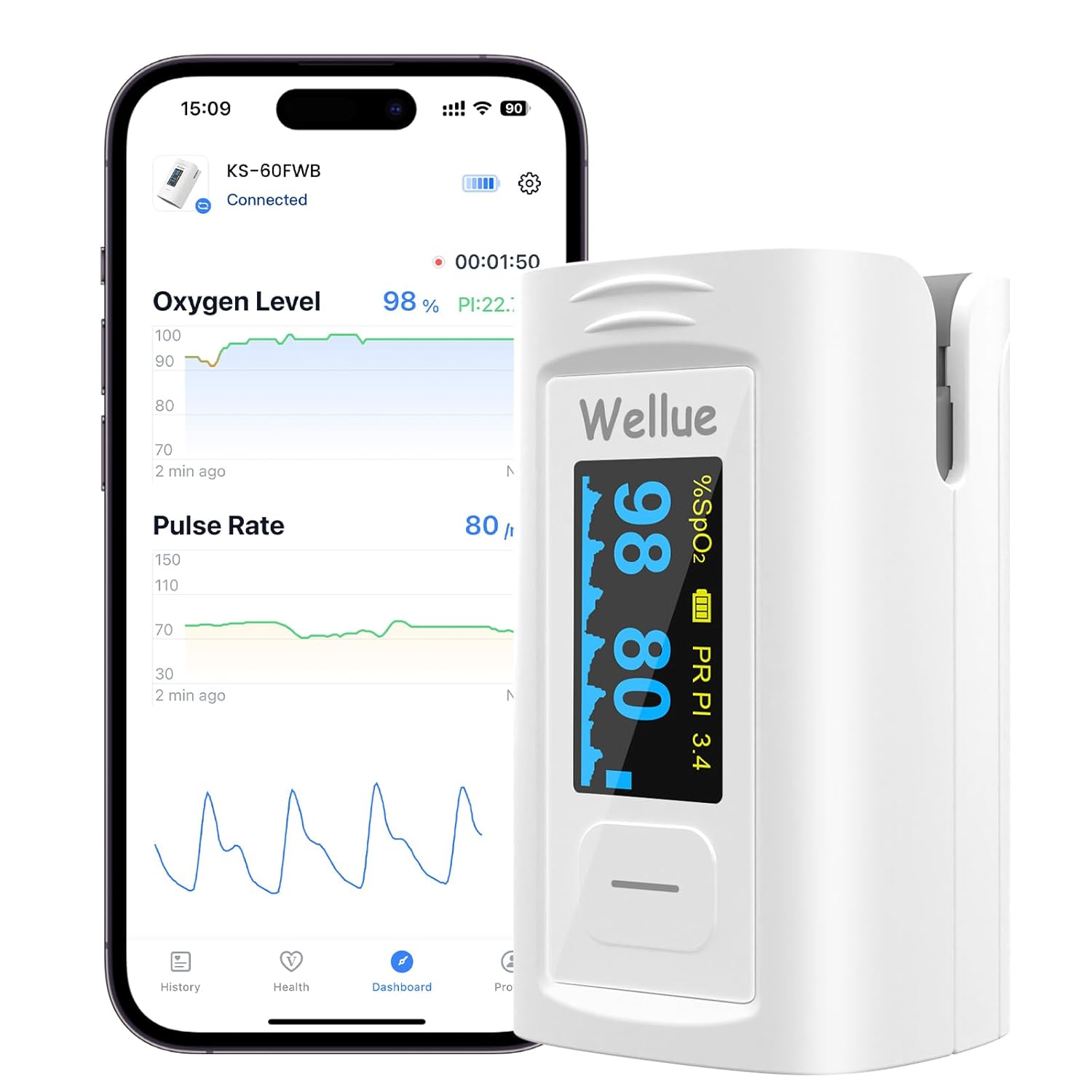
Figure 8: Real-time data display on the VHealth app.
6. Manteniment
- Keep the oximeter clean and dry. Use a soft cloth dampened with alcohol to clean the surface.
- Do not immerse the device in water or other cleaning solutions.
- Traieu les piles si no heu d'utilitzar el dispositiu durant un període prolongat per evitar fuites.
- Guardeu el dispositiu en un lloc fresc i sec, allunyat de la llum solar directa i de temperatures extremes.
- Eviteu impactes forts o que el dispositiu caigui.
- It is recommended that the oximeter should not be applied to the same location for longer than 2 hours. If any abnormal condition is found, please change the position of the oximeter.
7. Solució De Problemes
- No Reading/Inaccurate Reading:
- Ensure the finger is fully inserted into the device.
- Comproveu els nivells de la bateria i substituïu-la si cal.
- Eviteu moviments excessius durant la mesura.
- Ensure fingernails are clean and free of thick polish (though the device may read through some dark polishes, clear nails are ideal).
- Cold fingers can affect readings; warm hands before use.
- Problemes de connectivitat Bluetooth:
- Assegureu-vos que el Bluetooth estigui habilitat al vostre telèfon intel·ligent.
- Make sure the oximeter is powered on and within range of your phone.
- Restart the VHealth app or your phone.
- L'alarma no sona:
- Check the alarm settings in the device menu or VHealth app to ensure they are enabled and set to appropriate thresholds.
- Ensure the beep function is turned on if you desire audible pulse beeps.
8. Especificacions
- Número de model: 60FWB
- Precisió de la mesura: <2%
- Measuring Range (SpO2): 35% ~ 100%
- Interval de visualització de freqüència de pols: 30bpm~240bpm
- Interval de visualització de l'índex de perfusió (PI).: 0% ~ 20%
- Font d'alimentació: 2 piles AAA (incloses)
- Mostra: OLED Screen
- Connectivitat:Bluetooth
- Dimensions del paquet: 3.7 x 2.83 x 1.65 polzades
- Pes de l'article: 2.89 unces
- Fabricant: Creative Industry
9. Garantia i Suport
The Wellue Pulse Oximeter comes with a manufacturer's warranty. Please refer to the included warranty card for specific terms and conditions. For product support, technical assistance, or warranty claims, please contact:
- Correu electrònic: service@getwellue.com
- Weblloc: www.getwellue.com


