1. Introducció
Thank you for choosing the Intenso O400HA Over-Ear Headphones. These headphones are designed to provide a superior audio experience with advanced features such as Hybrid Active Noise Cancelling (ANC), Transparency Mode, and Bluetooth 5.3 connectivity. This manual will guide you through the setup, operation, and maintenance of your new headphones.
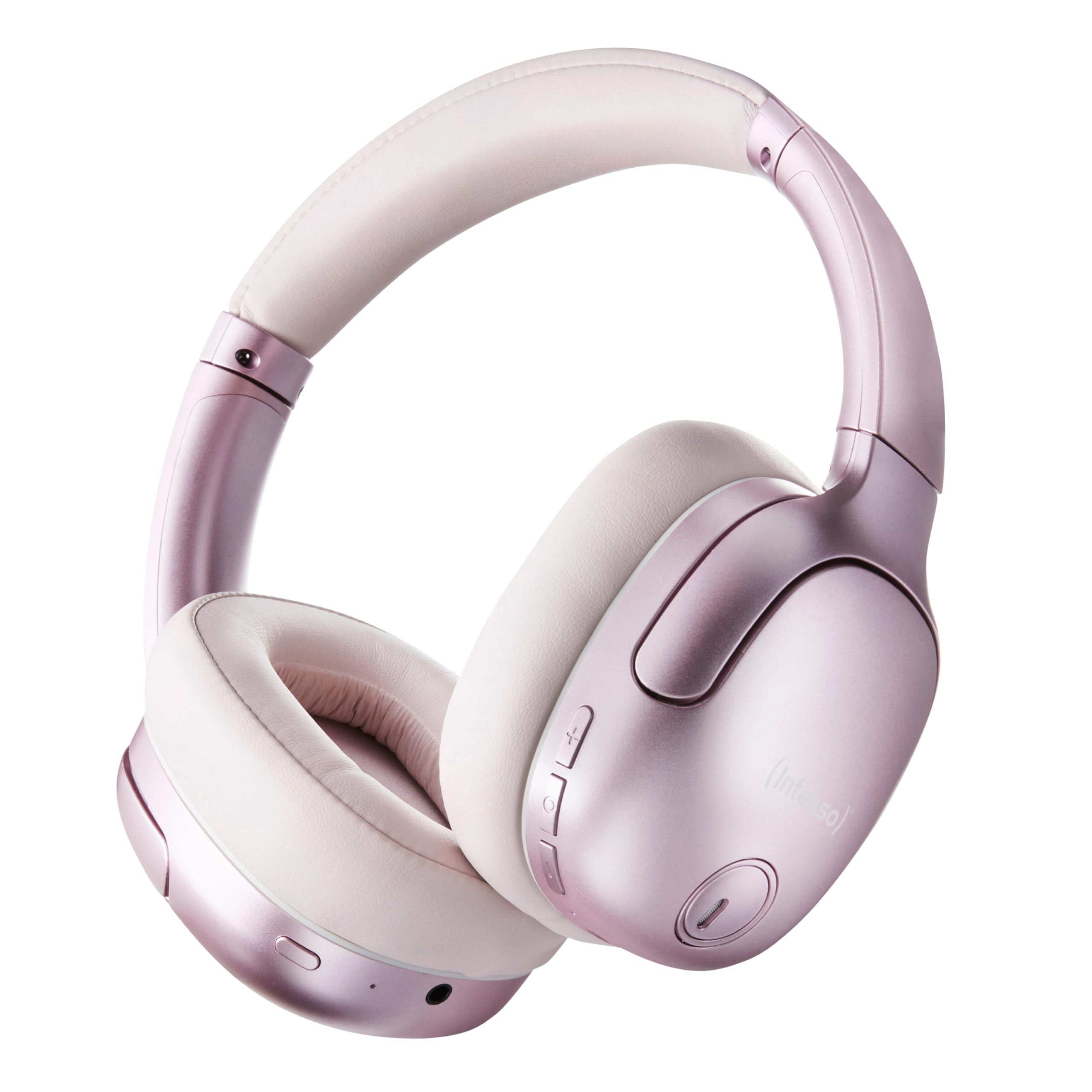
Image 1.1: Intenso O400HA Over-Ear Headphones (Pink)
The Intenso O400HA headphones feature a comfortable over-ear design with soft ear pads, an adjustable headband, and intuitive controls on the earcups.
2. Contingut del paquet
Si us plau, comproveu el paquet per veure si hi ha els elements següents:
- Intenso O400HA Over-Ear Headphones
- Cable de càrrega USB-C a USB-C
- 1.5m Audio Cable (3.5mm jack)
- Manual d'usuari
3. Producte acabatview
Familiarize yourself with the various parts and controls of your Intenso O400HA headphones.

Imatge 3.1: Lateral view of Intenso O400HA headphones with controls
This image displays the right earcup with its control buttons and ports. These typically include power, volume, multi-function buttons, and a charging port.
Controls i ports:
- Botó d'encesa: Used to turn the headphones on/off and initiate Bluetooth pairing.
- Botó Pujar volum/Pista següent: Augmenta el volum amb una pulsació curta, salta a la pista següent amb una pulsació llarga.
- Botó per baixar el volum/pista anterior: Decreases volume with a short press, goes to the previous track with a long press.
- Botó multifunció (MFB): Controls playback (play/pause), answers/ends calls, activates voice assistant.
- Botó de mode ANC/Transparència: Toggles between Hybrid Active Noise Cancelling, Transparency Mode, and normal mode.
- Port de càrrega USB-C: Per carregar els auriculars.
- Conector d'àudio de 3.5 mm: Per a connexió amb cable.
- Micròfons: Internal and external microphones for ANC and calls.
4. Configuració
4.1. Càrrega dels auriculars
Abans del primer ús, carregueu completament els auriculars.
- Connecteu el cable de càrrega USB-C subministrat al port USB-C dels auriculars.
- Connecteu l'altre extrem del cable a un adaptador de corrent USB (no inclòs) o al port USB d'un ordinador.
- L'indicador LED mostrarà l'estat de càrrega. Normalment s'apaga o canvia de color quan està completament carregat.
A full charge takes approximately 2 hours. A quick charge of 15 minutes provides up to 6 hours of playtime.
4.2. Emparellament Bluetooth
Per connectar els auriculars a un dispositiu amb Bluetooth:
- Assegureu-vos que els auriculars estiguin apagats.
- Premeu i manteniu premut el botó d'engegada durant aproximadament 5-7 segons fins que l'indicador LED parpellegi en blau i vermell, cosa que indica el mode d'emparellament.
- Al dispositiu (telèfon intel·ligent, tauleta, ordinador portàtil), aneu a la configuració de Bluetooth i activeu-lo.
- Cerca available devices and select "Intenso O400HA" from the list.
- Once connected, the LED indicator will typically flash blue slowly or remain solid blue.
Els auriculars intentaran tornar a connectar-se automàticament amb l'últim dispositiu emparellat quan s'engeguin.
5. Funcionament dels auriculars
5.1. Encendre/apagar
- Encès: Premeu i manteniu premut el botó d'engegada durant 2-3 segons.
- Apagar: Premeu i manteniu premut el botó d'engegada durant 3-4 segons.
5.2. Audio Modes: ANC, Transparency, Music
The Intenso O400HA headphones offer three distinct audio modes to suit your environment.

Imatge 5.1: acabatview of Noise Control Modes
This image illustrates the key noise control technologies: Hybrid Active Noise Cancellation (ANC) for reducing ambient noise, Environmental Noise Cancellation (ENC) for clear calls, and Transparency Mode for hearing your surroundings.

Image 5.2: Hybrid Active Noise Cancelling Explained
This diagram shows how Hybrid ANC works using both external and internal microphones to filter out up to 95% of ambient noise, such as engine sounds.
- Cancel·lació activa de soroll híbrida (ANC): Press the ANC/Transparency Mode button to activate. This mode significantly reduces ambient noise, ideal for travel or noisy environments.
- Mode de transparència: Press the ANC/Transparency Mode button again to switch to Transparency Mode. This allows external sounds to pass through, enabling you to hear your surroundings without removing the headphones.
- Normal Mode (Music Mode): Press the ANC/Transparency Mode button a third time to return to normal mode, where ANC and Transparency are off. This mode provides balanced sound for a comprehensive listening experience.
5.3. Reproducció de música i trucades
- Reproduir/pausa: Premeu breument el botó multifunció (MFB).
- Pista següent: Premeu llargament el botó de pujar el volum.
- Pista anterior: Premeu llargament el botó per baixar el volum.
- Pujar el volum: Premeu breument el botó de pujar el volum.
- Baixar el volum: Premeu breument el botó per baixar el volum.
- Respondre/Finalitzar la trucada: Premeu breument el MFB.
- Rebutja la trucada: Premeu llargament la tecla MFB.
- Activa l'Assistent de veu: Premeu dues vegades el MFB.
5.4. Wired Connection (Passive Mode)
You can use the headphones in passive mode even if the battery is depleted or if you prefer a wired connection.
- Connecteu un extrem del cable d'àudio de 3.5 mm al connector d'àudio dels auriculars.
- Connecteu l'altre extrem a la sortida d'àudio de 3.5 mm del vostre dispositiu.
Note: ANC and Transparency modes may not function or may have reduced performance when using the wired connection without power.
6. Manteniment
To ensure the longevity and optimal performance of your Intenso O400HA headphones, follow these maintenance guidelines:
- Neteja: Feu servir un drap suau i sec per netejar els auriculars. No utilitzeu productes de neteja abrasius, dissolvents ni productes químics agressius.
- Emmagatzematge: Store the headphones in a cool, dry place away from direct sunlight and extreme temperatures. When not in use, it is recommended to store them in a protective case (if provided or purchased separately).
- Exposició a l'aigua: Aquests auriculars no són impermeables. Eviteu l'exposició a l'aigua, la humitat o la pluja.
- Cura de la bateria: For optimal battery life, avoid fully discharging the battery frequently. Charge the headphones regularly, even if not used for extended periods.
- Cura del cable: Handle the charging and audio cables gently. Avoid bending or twisting them excessively.
7. Solució De Problemes
Si teniu algun problema amb els auriculars, consulteu els problemes i solucions més comuns següents:
| Problema | Causa possible | Solució |
|---|---|---|
| Els auriculars no s'encenen | Bateria baixa | Carregueu els auriculars completament. |
| No es pot emparellar per Bluetooth | Auriculars no en mode d'emparellament; Bluetooth del dispositiu desactivat; Interferències | Ensure headphones are in pairing mode (flashing blue/red). Turn Bluetooth on your device. Move closer to the device. Forget previous pairings and try again. |
| Sense so ni volum baix | Volume too low; Incorrect audio source; Loose cable (wired mode) | Increase volume on headphones and device. Check if the correct audio output is selected on your device. Ensure 3.5mm cable is securely connected. |
| ANC no eficaç | ANC not activated; Improper fit | Prem el botó ANC per activar-lo. Ajusta els auriculars perquè s'adaptin bé a les orelles. |
| Distorsió del so | Distance from device; Interference; Low battery | Move closer to your device. Avoid strong electromagnetic fields. Charge the headphones. |
8. Especificacions
| Característica | Detall |
|---|---|
| Nom del model | Over-Ear O400HA |
| Tecnologia de connectivitat | Wireless (Bluetooth 5.3) / Wired (3.5mm jack) |
| Control de soroll | Cancel·lació de soroll híbrida |
| Durada de la bateria | Fins a 75 hores |
| Temps de càrrega | Approximately 2 Hours (15 min for 6 hours playtime) |
| abast sense fils | Fins a 15 metres |
| Resposta de freqüència | 20 Hz a 20 KHz |
| Impedància | 32 ohms |
| Mètode de control | Botons tàctils |
| Pes | 0.25 quilos |
| Material | Elastòmer termoplàstic (TPE) |
| Dispositius compatibles | Mobile phones, Laptops, Tablets, Gaming Consoles, Car Audio Systems |
9. Garantia i Suport
Intenso products are designed for reliability and performance. For warranty information and customer support, please refer to the warranty card included with your purchase or visit the official Intenso weblloc web. Conserveu el comprovant de compra per a qualsevol reclamació de garantia.
For further assistance, you may contact Intenso customer service through their official channels.


