1. Configuració i configuració inicial
This section guides you through the initial setup of your VILTROX DC-X3 Camera Monitor, including unboxing, component identification, and basic assembly.
1.1 Què hi ha a la caixa
Verifiqueu que tots els components siguin presents al vostre paquet:
- VILTROX DC-X3 Camera Monitor
- Monitor Rig Cage
- Custom Ball Head
- Bateria NP-F550
- Cable d'alimentació USB-C
- Cable mini HDMI
- Cable HDMI
- Quick-release Sunhood
- Estoig de transport rígid
- Targeta de garantia
- Manual d'instruccions (aquest document)

Image: VILTROX DC-X3 Camera Monitor with its rig cage and various accessories, including cables, battery, and sunhood.
1.2 Attaching the Rig Cage and Mounting
The included rig cage provides robust protection and multiple mounting points for accessories. Attach the monitor securely to the rig cage using the provided screws. The custom ball head allows for flexible multi-angle installation on your camera or other support systems.

Image: A VILTROX DC-X3 monitor with its rig cage attached to a camera, demonstrating its use in a field setup.
1.3 Alimentació del monitor
The DC-X3 monitor supports three power supply modes:
- Bateria NP-F: Insert the provided NP-F550 battery into the battery slot on the rear of the monitor.
- Adaptador DC: Connect an external DC power adapter (not included) to the DC port.
- Tipus C: Use a compatible Type-C cable to power the monitor.
Ensure the power source is securely connected before powering on the device.
Video: This video demonstrates the setup and various features of the VILTROX DC-X3 monitor, including battery installation and general usage scenarios.
2. Funcionament del monitor
The VILTROX DC-X3 features an intuitive touchscreen interface and a range of professional monitoring tools.
2.1 Interfície de pantalla tàctil
The 6-inch IPS touchscreen display offers 1920x1200 resolution and 2000 nits brightness for clear visibility. Navigate menus and adjust settings directly on the screen.
- Accés al menú: Double-tap the screen to open the menu options. Tap an empty space to exit.
- Volume/Backlight: Scroll up/down on the left side for volume, and on the right side for backlight adjustment.
- Zoom: Pinch to zoom in/out on the image.

Image: Close-up of the VILTROX DC-X3's 6-inch IPS HD touchscreen, highlighting its display quality and touch capabilities.
2.2 Connexions d'entrada i sortida
The monitor supports 4K HDMI 1.4 and 3G-SDI input and output, allowing for versatile connectivity with various cameras and external devices.
- Entrada/sortida HDMI: Connect HDMI cables for video signal transmission.
- SDI In/Out: Connect 3G-SDI cables for professional video workflows.
- Presa d'auriculars de 3.5 mm: Per a la monitorització d'àudio.
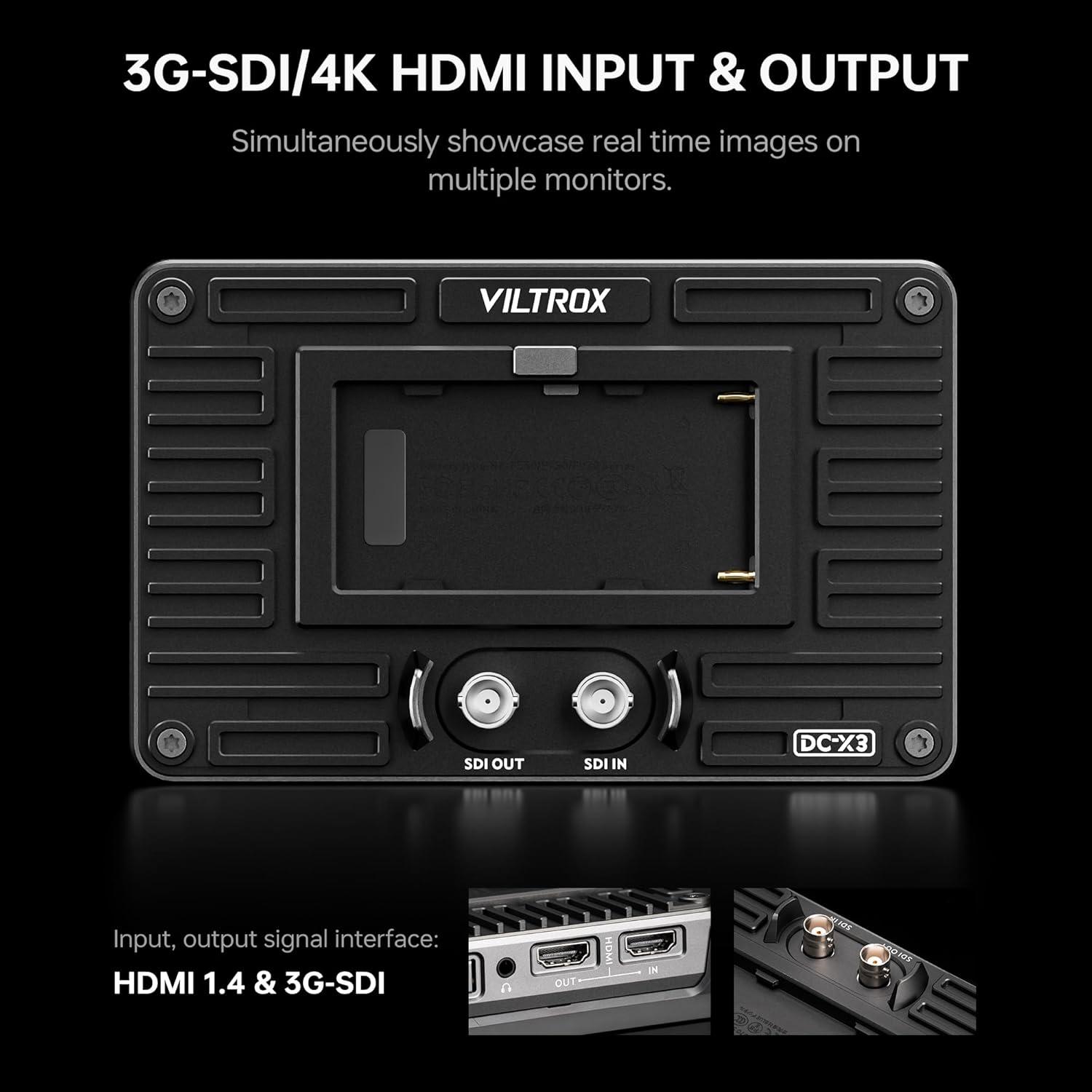
Imatge: Part posterior view of the VILTROX DC-X3 monitor, clearly showing the 3G-SDI and 4K HDMI input and output ports.
2.3 Assistive Features and Tools
The DC-X3 includes 23 assist functions to aid in accurate exposure and focus:
- Assistència d'enfocament màxim: Destaca les àrees d'interès.
- Color fals: Displays exposure levels using color overlays.
- Patró de zebra: Indica zones sobreexposades.
- Histograma: Visualizes tonal distribution.
- Full Waveform: Shows luminance and chrominance levels.
- Vectorscopi: Displays color saturation and hue.
- 3D LUT Function: Load up to 20 custom 3D LUT files via the USB interface for real-time color grading.

Image: The VILTROX DC-X3 monitor screen showing various professional monitoring functions like 3D LUT, Waveform, Histogram, and Vectorscope.

Image: The VILTROX DC-X3 monitor demonstrating the process of uploading custom 3D LUTs via its USB-A port.
2.4 Botons personalitzables
The monitor features four customizable buttons (F1-F4) that can be assigned to frequently used functions for quick access.
3. Manteniment
Proper maintenance ensures the longevity and optimal performance of your VILTROX DC-X3 monitor.
3.1 Neteja del monitor
Use a soft, lint-free cloth to gently wipe the screen and body of the monitor. For stubborn smudges, slightly dampNetegeu el drap amb aigua o una solució de neteja segura per a pantalles. Eviteu materials abrasius o productes químics agressius.
3.2 Emmagatzematge
When not in use, store the monitor in its hard-shell carrying case to protect it from dust, moisture, and physical damage. Store in a cool, dry place away from direct sunlight.
3.3 actualitzacions de microprogramari
Periodically check the VILTROX official website for firmware updates. Updates can improve performance, add new features, or resolve bugs. Firmware can typically be updated via the USB interface.
3.4 Dissipació de calor
The monitor features an automatic fan speed control system to efficiently dissipate heat. Ensure that the cooling air intake and exhaust vents are not obstructed during operation.
4. Solució De Problemes
If you encounter issues with your VILTROX DC-X3 monitor, refer to the following common problems and solutions:
| Problema | Causa possible | Solució |
|---|---|---|
| El monitor no s'encén | Low or depleted battery; Loose power connection | Charge or replace battery; Check all power cable connections. |
| Sense senyal de vídeo | Incorrect input selected; Loose HDMI/SDI cable; Incompatible signal format | Verify input source; Reconnect cables securely; Check camera output settings. |
| La pantalla tàctil no respon | Temporary software glitch; Screen protector interference | Restart the monitor; Ensure screen protector is properly applied or remove it for testing. |
| Image appears too dark/bright | Brightness/Contrast settings incorrect | Adjust brightness and contrast settings via the touchscreen menu. |
If the problem persists after trying these solutions, please contact VILTROX customer support for further assistance.
5. Especificacions
Detailed technical specifications for the VILTROX DC-X3 Camera Monitor:
- Visualització: Pantalla tàctil IPS de 6 polzades
- Resolució: 1920 x 1200
- Brillantor: 2000 nits
- Relació de contrast: 1000:1
- Viewangle: 160° Ultra-wide
- Color Spaces: Rec.709, sRGB (100% coverage)
- Entrades: 4K HDMI 1.4, 3G-SDI
- Sortides: 4K HDMI 1.4, 3G-SDI
- Sortida d'àudio: Conector d'auriculars de 3.5 mm
- Modes d'alimentació: DC adapter, NP-F Lithium Battery, Type-C
- Assistive Functions: Peaking Focus, False Color, Zebra Pattern, Histogram, Full Waveform, Vectorscope, 3D LUT (20 files via USB)
- Botons personalitzables: 4
- Construcció: Solid Metal Housing
- Pes: 3.21 lliures (aprox. 1.46 kg)
- Dimensions: 12.09 x 6.77 x 2.91 polzades (aprox. 30.7 x 17.2 x 7.4 cm)
- Accessoris inclosos: Rig Cage, Sunshade Hood

Image: A visual comparison demonstrating the high 2000 nits brightness of the VILTROX DC-X3 monitor compared to a standard 400 nits display.
6. Garantia i Suport
VILTROX products typically come with a manufacturer's warranty, usually 1-2 years, covering defects in materials and workmanship. Please refer to the warranty card included in your package for specific terms and conditions.
For technical support, product inquiries, or warranty claims, please contact VILTROX customer service. You can find contact information on the VILTROX official weblloc web o a través del vostre distribuïdor.
VILTROX is committed to providing excellent service and technical assistance to help you resolve any product-related issues.


