1. Introducció
This manual provides detailed instructions for the installation, operation, and maintenance of your XTRONS TIXA745L Car Multimedia Player. Please read this manual thoroughly before using the product to ensure proper function and to prevent damage. Keep this manual for future reference.
2. Informació de seguretat
- Seguretat de conducció: Always prioritize driving safety. Do not operate the system in a way that distracts you from driving.
- Instal·lació: Professional installation is recommended. Incorrect installation can lead to damage to the device or vehicle.
- Font d'alimentació: Ensure the unit is connected to a 12V DC power supply with a negative ground.
- Temperatura: Eviteu exposar la unitat a temperatures extremes o a la llum solar directa durant períodes prolongats.
- Humitat: Mantingueu la unitat allunyada de l'aigua i de la humitat excessiva.
- Neteja: Utilitzeu un drap suau i sec per netejar. No utilitzeu netejadors abrasius ni dissolvents.
- Ventilació: Assegureu-vos que hi hagi una ventilació adequada al voltant de la unitat per evitar el sobreescalfament.
3. Contingut del paquet
Carefully unpack the box and check that all items are present and in good condition. If any items are missing or damaged, contact your dealer immediately.
- XTRONS TIXA745L Car Multimedia Player
- Arnès de cablejat
- Antena GPS
- Antena 4G
- Cables USB
- Cables RCA
- Suports de muntatge
- Cargols
- Micròfon extern
- Manual d'usuari

Image: All included accessories for the XTRONS TIXA745L car multimedia player.
4. Producte acabatview
The XTRONS TIXA745L is a 2-DIN universal car multimedia player featuring a 7-inch HD IPS screen, powered by Android 14. It includes an 8-core CPU, 6GB RAM, and 128GB ROM, offering advanced navigation, entertainment, and connectivity options for your vehicle.
Característiques principals:
- 7-inch HD IPS Touchscreen Display
- Sistema operatiu Android 14
- Octa-Core Processor (Cortex A75 x 2, Cortex A55 x 6)
- 6GB DDR4 RAM, 128GB SSD ROM
- Built-in GPS, BDS, GLONASS Navigation
- Dual Wi-Fi (2.4G/5G) and 4G LTE Connectivity
- Bluetooth 5.1 per a trucades de mans lliures i transmissió d'àudio
- Integrated Apple CarPlay and Android Auto
- Built-in DSP (Digital Sound Processor)
- DAB/DAB+ Tuner Support
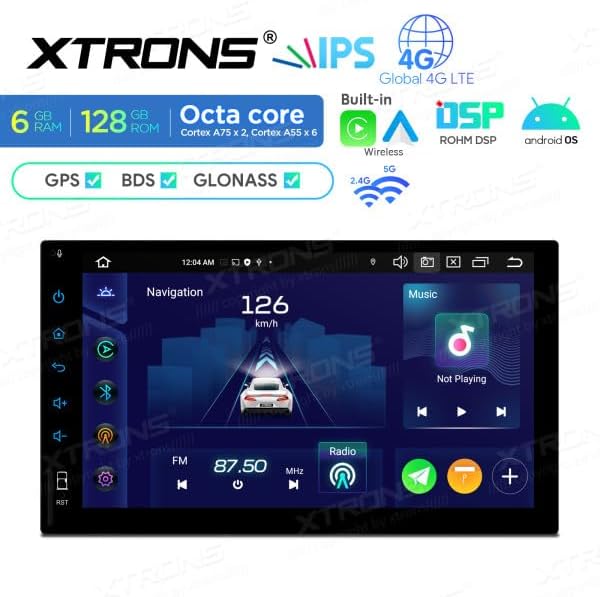
Image: Main display interface showing navigation and music.
5. Configuració i instal·lació
Installation of this unit requires technical knowledge. It is highly recommended to have it installed by a qualified professional to avoid damage to the unit or your vehicle.
5.1 Comprovació prèvia a la instal·lació
- Ensure the vehicle's ignition is off and the negative terminal of the battery is disconnected.
- Verify the dimensions of the unit fit your car's dashboard opening.

Image: Product dimensions for installation reference.
5.2 Connexions de cablejat
Consulteu el diagrama de cablejat que s'inclou amb la unitat per a les connexions específiques. Les connexions generals inclouen:
- Cables d'alimentació: Connecteu el cable groc als 12V constants, el cable vermell als 12V accessoris i el cable negre a terra.
- Cables de l’altaveu: Connect to your vehicle's speaker system, ensuring correct polarity.
- Antenes: Connect the GPS antenna and 4G antenna to their respective ports. Position them for optimal signal reception.
- USB/RCA: Connect any external USB devices or RCA inputs/outputs as needed.
5.3 Muntatge de la unitat
- Slide the unit into the dashboard opening.
- Fixeu la unitat amb els suports i els cargols de muntatge proporcionats.
- Torneu a connectar la bateria del vehicle.
- Engegueu el contacte i proveu el funcionament de la unitat.
6. Instruccions de funcionament
6.1 Operacions bàsiques
- Encès/apagat: Premeu el botó d'engegada del panell frontal o feu servir l'encesa del vehicle.
- Control de volum: Adjust volume using the on-screen controls or steering wheel controls (if supported).
- Pantalla tàctil: Navigate the interface by tapping, swiping, and pinching on the HD IPS display.
6.2 Navegació del sistema operatiu Android 14
The unit runs on Android 14, providing a familiar smartphone-like experience. Access apps, settings, and features from the home screen or app drawer.

Image: Android OS application screen.
6.3 Navegació GPS
The unit supports GPS, BDS, and GLONASS for accurate positioning. Use pre-installed navigation apps or download your preferred ones from the Google Play Store. Ensure the GPS antenna has a clear view of the sky for optimal signal.
6.4 Radio (DAB/DAB+)
Access the radio application to tune into FM/AM stations. With DAB/DAB+ support, you can enjoy high-quality digital radio broadcasts where available. An optional DAB+ antenna may be required for full functionality.
6.5 Bluetooth 5.1
- Maridatge: Go to Bluetooth settings on the unit and your mobile device. Cerca and select the unit's Bluetooth name to pair.
- Trucades mans lliures: Feu i rebeu trucades directament des de la pantalla de la unitat.
- Transmissió d'àudio: Play music from your paired phone through the car's speakers.
6.6 Wi-Fi and 4G Connectivity
- Wi-Fi: Connect to available Wi-Fi networks (2.4G/5G) for internet access, app downloads, and online services.
- 4G LTE: Insert a compatible SIM card into the integrated 4G slot for mobile data connectivity. Ensure the 4G antenna is connected.
6.7 Apple CarPlay / Android Auto
Connect your iPhone or Android smartphone via USB or wirelessly to access Apple CarPlay or Android Auto. This allows for seamless integration of your phone's navigation, music, messages, and other apps onto the unit's display.

Image: Apple CarPlay interface.

Image: Android Auto interface.
6.8 USB/SD Card Media Playback
Connect USB drives (up to 128GB) or SD cards (up to 64GB) to play audio and video files. Use the built-in media player app to browse and play your content.
6.9 Configuració d'àudio DSP
Utilize the Digital Sound Processor (DSP) to customize your audio experience. Adjust equalizer settings, balance, fader, and other sound effects to optimize sound quality.
7. Manteniment
- Neteja de la pantalla: Feu servir un drap suau i sense borrissol per netejar suaument la pantalla. Per a taques difícils, fregueu lleugeramentampNetegeu el drap amb aigua o un netejador de pantalles dissenyat per a electrònica. No ruixeu líquid directament sobre la pantalla.
- Neteja general: Wipe the unit's body with a dry, soft cloth. Avoid using harsh chemicals or abrasive materials.
- Actualitzacions de programari: Periodically check for software updates to ensure optimal performance and access to new features. Updates can usually be found on the XTRONS official website or through the unit's system settings.
8. Solució De Problemes
If you encounter issues with your XTRONS TIXA745L, refer to the following common problems and solutions:
| Problema | Causa possible | Solució |
|---|---|---|
| La unitat no s'encén. | Cablejat incorrecte, fusible fundit, problema amb la bateria del vehicle. | Check power connections (yellow, red, black wires). Inspect vehicle fuses. Ensure battery is charged. |
| Sense so. | Volume too low, speaker wires disconnected, mute function active. | Increase volume. Check speaker wiring. Disable mute. Check audio settings. |
| Senyal GPS perdut o inexacte. | Antena GPS no connectada correctament o obstruïda. | Assegureu-vos que l'antena GPS estigui connectada correctament i col·locada en un lloc amb visibilitat clara view del cel. |
| El Bluetooth no es connecta. | Bluetooth no habilitat, dispositiu no en mode d'emparellament, interferències. | Enable Bluetooth on both devices. Put phone in pairing mode. Try pairing again. Move closer to the unit. |
| La pantalla tàctil no respon. | Bloqueig del sistema, error temporal del programari. | Perform a soft reset (refer to manual for specific reset button location, often a small pinhole). If persistent, disconnect battery for a few minutes. |
| Apple CarPlay/Android Auto not starting. | Incorrect USB cable, phone not compatible, app not installed/updated. | Use a high-quality USB data cable. Ensure your phone's OS and apps are updated. Check phone settings for CarPlay/Android Auto permissions. |
If the problem persists after trying these solutions, please contact XTRONS customer support or your dealer for further assistance.
9. Especificacions
| Característica | Detall |
|---|---|
| Model | TIXA745L |
| Sistema operatiu | Android 14 |
| Processador | Octa-Core (Cortex A75 x 2, Cortex A55 x 6) |
| RAM | 6 GB DDR4 |
| ROM | 128GB SSD (Expandable via USB/SD) |
| Mostra | 7-inch HD IPS Touchscreen |
| Connectivitat | Wi-Fi (2.4G/5G), Bluetooth 5.1, 4G LTE, USB |
| Navegació | GPS, BDS, GLONASS |
| Tecnologia del sintonitzador | DAB / DAB+ / T-DMB |
| Característiques especials | Android Auto, Apple CarPlay, DSP |
| Mètode de control | Toca |
| Font d'alimentació | 12 V CC (massa negativa) |
| Dimensions (A x A x P) | 178 mm x 100 mm x 149 mm (aprox.) |
10. Garantia i Suport
XTRONS products are designed and manufactured to high-quality standards. For warranty information, please refer to the warranty card included with your product or visit the official XTRONS website. For technical support, product inquiries, or service, please contact your authorized XTRONS dealer or XTRONS customer service directly.
Informació de contacte:
- Refer to your purchase documentation for specific dealer contact details.
- Visit the official XTRONS website for global support information.


