1. Introducció
Thank you for choosing the Arylic A30+ Wireless Streaming Amplifier. This compact and versatile device allows you to add wireless and network streaming capabilities to your existing speakers, home amplifiers, or stereo systems. With support for Wi-Fi and Bluetooth 5.0, multi-room/multi-zone audio, and various streaming protocols, the A30+ delivers high-quality digital audio for an enhanced listening experience. This manual provides detailed instructions for setup, operation, and troubleshooting to help you get the most out of your device.

Figure 1.1: Arylic A30+ Wireless Streaming Ampmés viu
2. Producte acabatview
2.1 Contingut del paquet
- Arylic A30+ Main Unit
- Manual d'usuari
- Control remot
- Adaptador d'alimentació
- Antenes (2x)
- Screw Terminal Block Connector
- Tornavís
- 2-1 RCA Cable
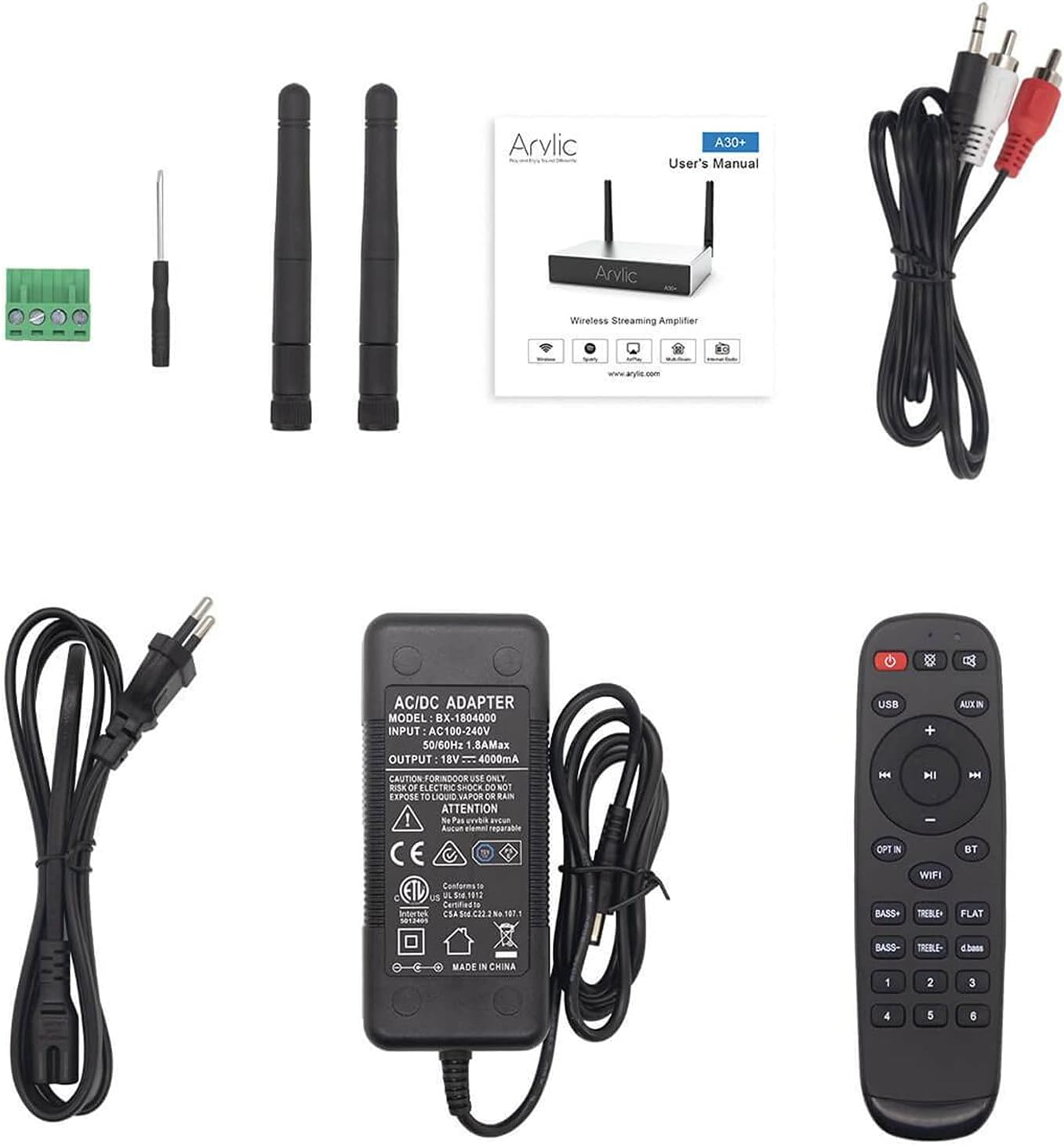
Figure 2.1: Contents included in the Arylic A30+ package.
2.2 Product Diagrams

Figure 2.2: Front Panel Layout. This diagram shows the front panel of the Arylic A30+, highlighting the LED indicators for WiFi, Bluetooth, Line In, USB DAC, and USB, as well as the IR sensor for remote control.

Figure 2.3: Rear Panel Layout. This diagram illustrates the rear panel connections, including the WiFi antenna port, Power/Reset button, RJ45 LAN port, USB port, Micro USB port, AUX IN, Speaker Out (L+, L-, R+, R-), DC Input (12V-18V), and Bluetooth antenna port.
2.3 Característiques clau
- Estereo sense fil Ampmés viu: Adds wireless/network streaming capabilities to existing speakers, home amplifiers, home stereo, or receivers.
- Transmissió estable i alta qualitat de so: Admet música sense pèrdues file playback (MP3, APE, FLAC, WAV) with high-resolution audio. Wi-Fi streaming ensures signal coverage.
- Aplicació mòbil: Control the device using the 4stream app for iOS and Android.
- Múltiples fonts i protocols musicals: Supports Spotify, Amazon Music, TuneIn, iHeartRadio, XIMALAYA, QQ Music, TIDAL, Napster, Qobuz, QQFM, AirPlay1, Qplay, DLNA, UPnP protocols. Also supports local music, USB flash drives, NAS, and line inputs.
- Aplicació versàtil: Advanced circuit design with built-in speaker protection circuit, suitable for bookshelf, ceiling, desktop, home speakers, home TV audio, computer sound systems, and even car audio systems.
- Multiroom Control: Allows multi-room and multi-zone streaming through multiple connected devices on the same network, controllable via your phone.
3. Configuració
3.1 Connexió inicial del maquinari
- Col·loca les antenes: Screw the two provided antennas into the 'WiFi' and 'BT' ports on the rear panel.
- Connectar els altaveus: Use the included screw terminal block connector to connect your passive speakers to the 'SPEAKER OUT' terminals (L+, L-, R+, R-). Ensure correct polarity.
- Connecteu la font d'àudio (opcional): If using a wired audio source, connect it to the 'AUX IN' port using an appropriate audio cable. For USB audio, connect your device to the 'USB' port.
- Connectar l'alimentació: Plug the power adapter into the 'DC INPUT (12V-18V)' port on the rear panel, then plug the adapter into a wall outlet. The device will power on automatically.
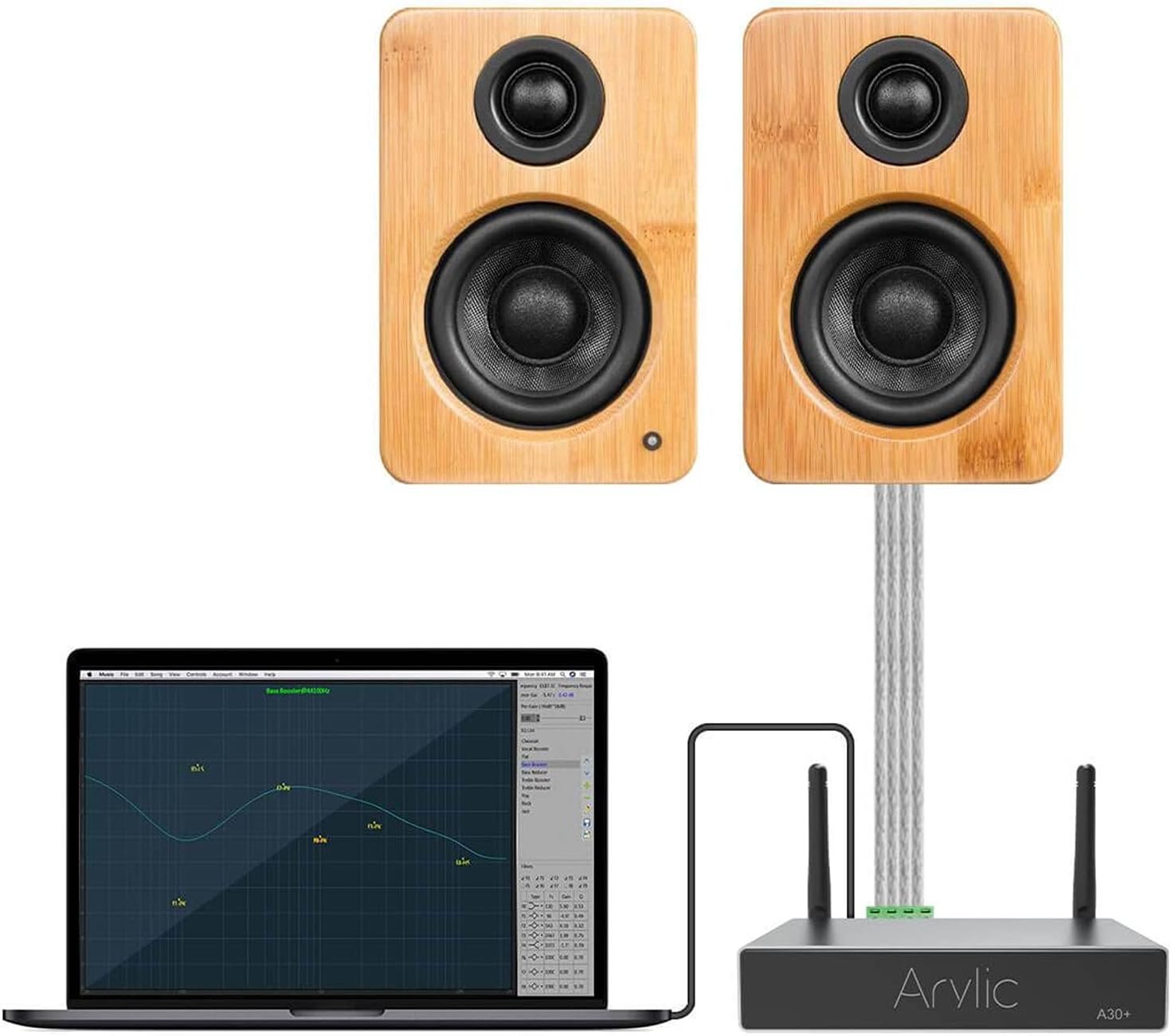
Figura 3.1: Example setup showing the Arylic A30+ connected to a laptop and speakers.
3.2 Connexió de xarxa (Wi-Fi)
To utilize the full streaming capabilities and multi-room features, connect your A30+ to your Wi-Fi network using the 4stream app.
- Download 4stream App: Cerca "4stream" in the Apple App Store or Google Play Store and install the application on your smartphone or tablet.
- Encendre el dispositiu: Ensure your A30+ is powered on. The Wi-Fi LED indicator on the front panel should be blinking, indicating it's ready for setup.
- Obre l'aplicació i afegeix un dispositiu: Open the 4stream app. The app will automatically search for new devices. Follow the on-screen prompts to add your A30+. You will be asked to select your Wi-Fi network and enter the password.
- Confirmació: Once connected, the Wi-Fi LED indicator will turn solid, and the app will confirm the successful connection.

Figure 3.2: The 4stream app interface showing the device search process during initial setup.
4. Funcionament
Reproducció d'àudio 4.1
The A30+ supports various methods for audio playback:
- Transmissió per Wi-Fi: Use the 4stream app to access integrated music services (Spotify, Amazon Music, Tidal, etc.), internet radio, or local music files from your network (NAS, USB drive connected to A30+). The app allows you to browse and control playback.
- Bluetooth: Pair your smartphone or other Bluetooth-enabled device directly with the A30+. Select "Arylic A30+" from your device's Bluetooth settings. The Bluetooth LED will illuminate when connected.
- Entrada AUX: Connect any audio device with a 3.5mm or RCA output to the 'AUX IN' port on the A30+. Select the AUX input via the 4stream app or remote control.
- DAC USB: Connect your computer to the Micro USB port on the A30+ to use it as an external DAC for high-quality audio playback from your computer.

Figure 4.1: Using the included remote control to manage playback and settings.
4.2 Multi-Room/Multi-Zone Functionality
The A30+ excels in multi-room audio setups, allowing you to synchronize music across multiple Arylic devices or play different music in different zones.
- Group Devices: In the 4stream app, navigate to the device list. You can drag and drop devices to group them for synchronized playback.
- Reproducció independent: Each A30+ unit can also play independent audio streams, creating distinct audio zones in your home.
- Control: All multi-room and multi-zone settings are managed directly through the 4stream app, providing flexible control over your entire audio system.

Figure 4.2: The 4stream app displaying multi-room control options, allowing users to manage audio in different areas of their home.
5. Manteniment
To ensure the longevity and optimal performance of your Arylic A30+ amplificador, seguiu aquestes senzilles pautes de manteniment:
- Neteja: Use a soft, dry cloth to clean the exterior of the device. Avoid using liquid cleaners, aerosols, or abrasive chemicals, as they may damage the finish or internal components.
- Ventilació: Ensure the device is placed in a well-ventilated area. Do not block any ventilation openings.
- Medi ambient: Mantenir el ampl'aparell allunyat de la llum solar directa, fonts de calor, pols excessiva, humitat i camps electromagnètics forts.
- Apagar: If the device will not be used for an extended period, it is recommended to unplug the power adapter from the wall outlet.
6. Solució De Problemes
If you encounter issues with your Arylic A30+, refer to the table below for common problems and their solutions.
| Problema | Causa possible | Solució |
|---|---|---|
| Sense alimentació / El dispositiu no s'encén | L'adaptador de corrent no està connectat o està defectuós; Problema amb la presa de corrent. | Assegureu-vos que l'adaptador de corrent estigui connectat correctament al dispositiu i a una presa de corrent que funcioni. Proveu una altra presa de corrent. |
| Sense sortida de so | Speakers not connected correctly; Incorrect input source selected; Volume too low; Faulty audio cable. | Check speaker wire connections (L+, L-, R+, R-). Verify the correct input source is selected in the 4stream app or via remote. Increase volume. Test with a different audio cable. |
| Problemes de connexió Wi-Fi | Incorrect Wi-Fi password; Device too far from router; Network interference; Router settings. | Double-check Wi-Fi password. Move the device closer to the router. Restart your router and the A30+. Ensure your router is on a 2.4GHz band if experiencing issues. |
| Error d'emparellament Bluetooth | Device not in pairing mode; Bluetooth disabled on source device; Interference. | Ensure the A30+ is in Bluetooth mode. Make sure Bluetooth is enabled on your source device and it's within range. Try unpairing and re-pairing. |
| L'aplicació no detecta el dispositiu | Device not connected to Wi-Fi; App version outdated; Network firewall. | Ensure the A30+ is successfully connected to your Wi-Fi network. Update the 4stream app to the latest version. Check router settings for any firewall restrictions. |
7. Especificacions
Detailed technical specifications for the Arylic A30+ ampmés viu:
| Característica | Especificació |
|---|---|
| Número de model | A30+ |
| Tecnologia de connectivitat | Bluetooth 5.0, USB, Wi-Fi |
| Característiques especials | Built-In Wi-Fi, Multiroom |
| Pes de l'article | 1.87 lliures (0.85 quilograms) |
| Dimensions del paquet | 10.35 x 7.2 x 2.24 polzades |
| Fabricant | Rakoit Technology (Shenzhen) Co., Ltd. |
| Primera data disponible | 13 de novembre de 2024 |
8. Garantia i Suport
Arylic products are designed for reliability and performance. For information regarding warranty coverage and technical support, please refer to the warranty card included with your product or visit the official Arylic website. You may also contact Arylic customer service directly for assistance with product setup, operation, or troubleshooting beyond the scope of this manual.
Recursos en línia: For the latest updates, FAQs, and community support, please visit the Arylic official weblloc.


