1. Introducció
This manual provides comprehensive instructions for the setup, operation, and maintenance of your Aokeo Wireless Microphone System. Designed for various applications including singing, karaoke, church events, and DJ performances, this system offers clear sound quality and stable signal transmission. Please read this manual thoroughly before using the product to ensure optimal performance and longevity.

Figure 1.1: Aokeo Wireless Microphone System components, including the receiver and two handheld microphones.
2. Contingut del paquet
Verifiqueu que tots els elements que s'enumeren a continuació siguin presents al vostre paquet:
- Micròfon x 2
- Receptor x 1
- Aerial x 2
- Anti-slip ring x 2
- Cable d'alimentació x 1
- Cable de 6.35 mm x 1
- AA battery (random) x 4
- Caixa d'embalatge x 1
- Manual x 1

Figure 2.1: All components included in the Aokeo Wireless Microphone System package.
3. Producte acabatview
3.1 Característiques del receptor
The receiver unit is the central hub for the wireless microphone system, managing signal reception and output. It features individual volume controls for each microphone channel, an LED screen displaying frequency and signal strength, and various output ports for connection to audio equipment.

Figura 3.1: Davant i darrere view of the receiver with labeled components.
- Microphone Output A/B: Dedicated outputs for each microphone.
- 6.35mm Mic Plug: Main audio output.
- Potència: Port d'entrada d'alimentació.
- Aèria: Antennas for stable signal reception.
- Mic A/B Volume Adjustment: Rotary knobs to control individual microphone volumes.
- AF/RF Signal Light: Indicators for audio frequency and radio frequency signals.
- Pantalla LED: Displays channel, frequency, and signal strength.
- Interruptor d'alimentació: Encén/apaga el receptor.
3.2 Microphone Features
The handheld microphones are designed for clear audio capture and durability. They feature a metal mesh head with a blowout prevention sponge, an LED screen for channel display, and are powered by AA batteries.
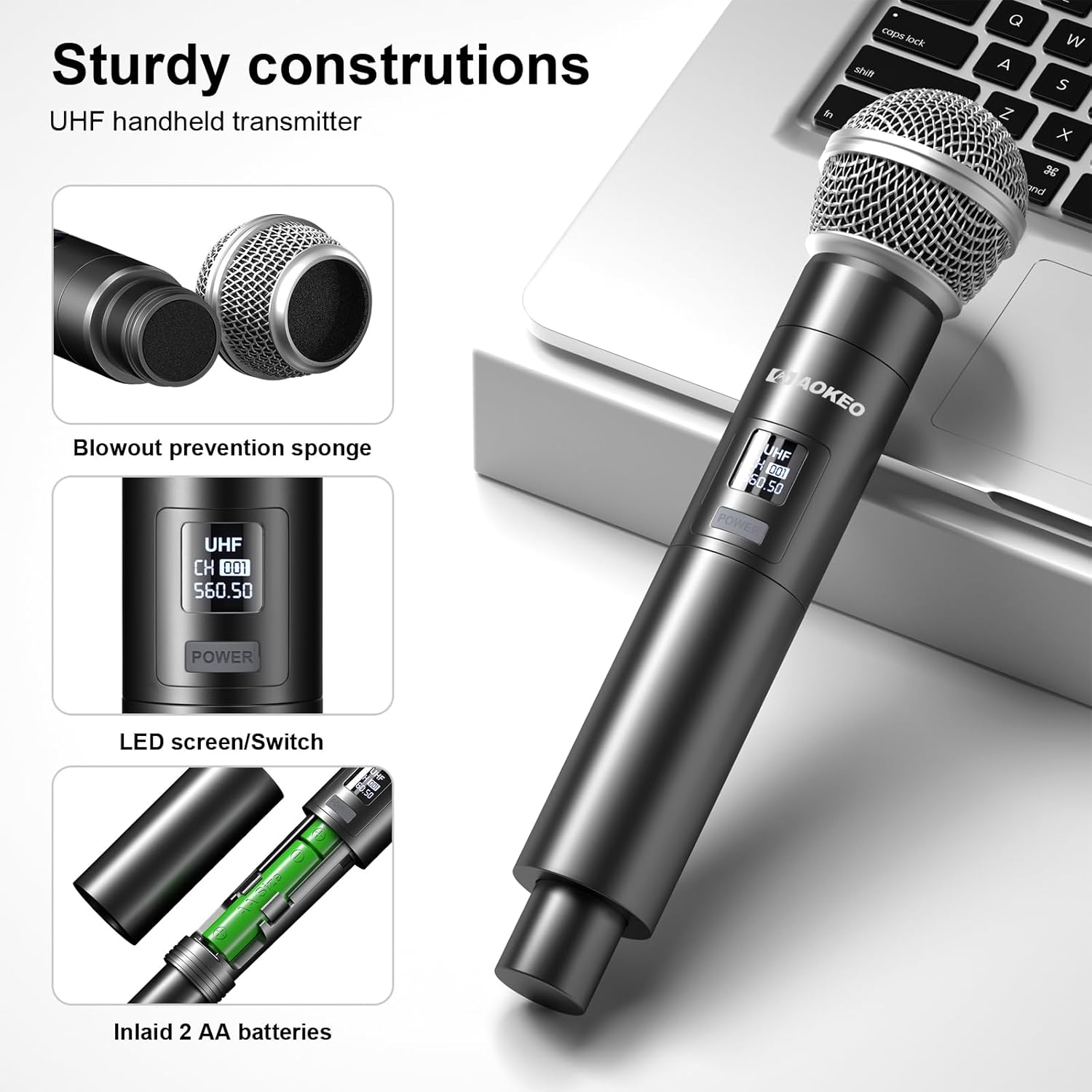
Figure 3.2: Handheld microphone components.
- Metal Mesh Head: Protects the microphone capsule and helps reduce plosive sounds.
- Blowout Prevention Sponge: Integrated inside the mesh head to further reduce breath noise and plosives.
- LED Screen/Switch: Displays channel information and serves as the power button.
- Compartiment de la bateria: Houses 2 AA batteries for power.
4. Instruccions de configuració
Follow these steps to set up your Aokeo Wireless Microphone System:
- Connecteu el receptor: Plug the receiver into a power source using the provided power cable.
- Connecteu-vos a la font d'àudio: Use the 6.35mm cable to connect the receiver's output to your sound system (e.g., mixer, amplifier, karaoke machine, outdoor speaker). Ensure the connection is secure.

Figure 4.1: Product connection diagram.
- Inseriu les piles als micròfons: Open the battery compartment of each microphone and insert 2 AA batteries (included), ensuring correct polarity.
- Encès: Turn on the receiver using its power switch. Then, turn on each microphone using its power switch. The receiver and microphones will automatically synchronize their frequencies.
- Ajustar el volum: Use the volume knobs on the receiver to adjust the output level of each microphone.
The system is now ready for use. For optimal performance, ensure the receiver's aerials are extended and positioned for best signal reception.
5. Guia de funcionament
5.1 Ús bàsic
Once set up, the Aokeo Wireless Microphone System operates on a plug-and-play principle. The microphones and receiver automatically pair upon power-on. The system is designed for stable signal transmission up to 100 feet (approximately 30 meters) in an open outdoor environment, and up to 200 feet (approximately 60 meters) in an open space.
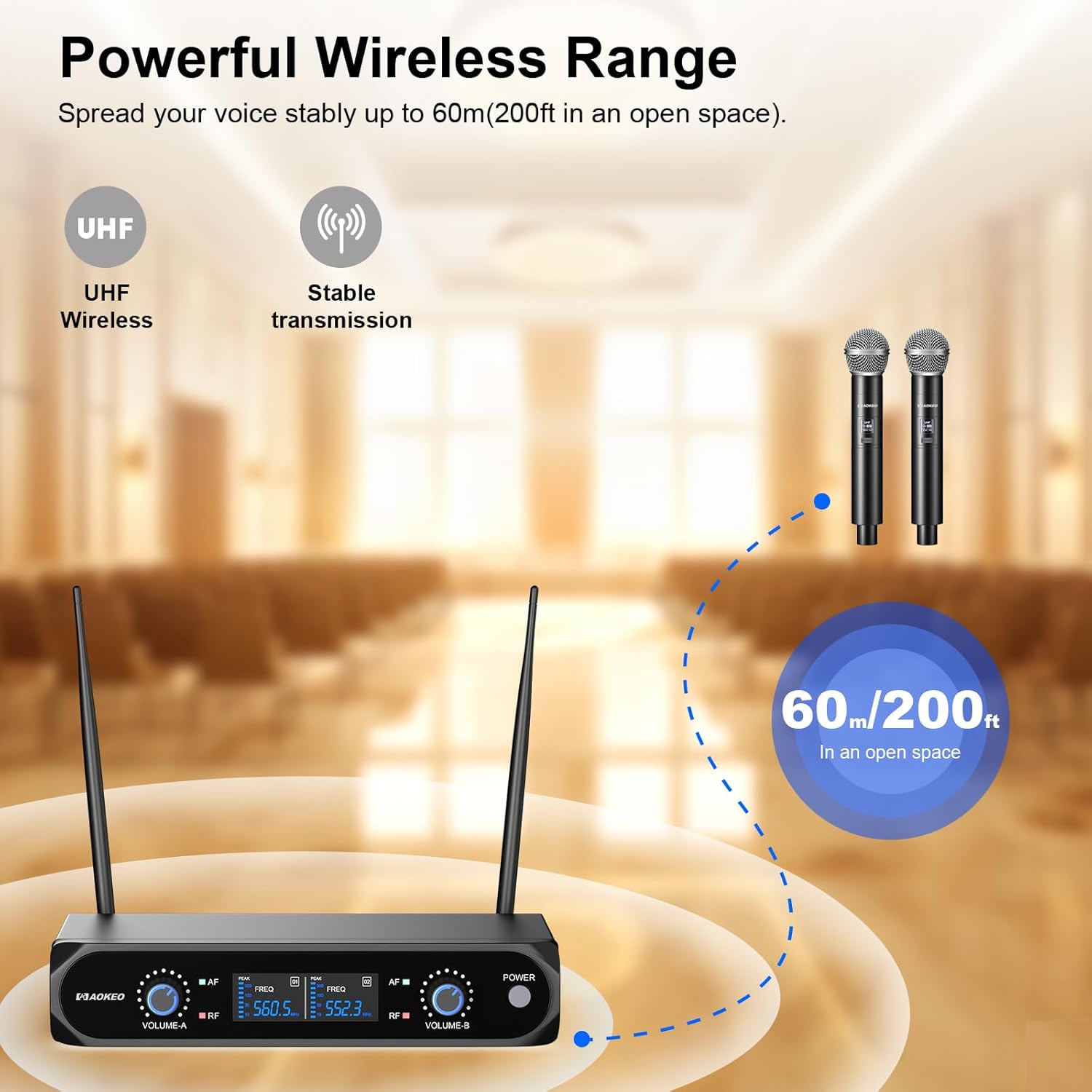
Figure 5.1: Wireless range capability.
5.2 Sound Quality and Noise Reduction
The system incorporates high-quality chips and automatic noise reduction to ensure clear, pure, and full sound quality. The dynamic microphones are designed for accurate sound pickup, reproducing human voices and instruments effectively.

Figure 5.2: Dynamic microphone sound pickup and noise reduction.
5.3 Compatibilitat àmplia
The Aokeo Wireless Microphone System is compatible with a variety of audio equipment featuring a 6.35mm interface. This includes karaoke machines, mixers, power amplifiers, outdoor speakers, sound cards, and other multimedia equipment.

Figure 5.3: Compatible devices and interface types.
Nota: To connect to mobile phones, computers, or tablets, an additional 3.5mm (1/8") interface adapter is needed, which is not included in the package.
6. Manteniment i cura
- Neteja: Use a soft, dry cloth to clean the microphones and receiver. Avoid using liquid cleaners or solvents, as they may damage the components.
- Substitució de la bateria: Replace AA batteries in the microphones when the power indicator shows low battery or when performance degrades. Ensure to use new, high-quality alkaline AA batteries for optimal battery life (over 8 hours of continuous use).
- Emmagatzematge: When not in use for extended periods, remove batteries from the microphones to prevent leakage. Store the system in a cool, dry place away from direct sunlight and extreme temperatures.
- Manipulació: Handle microphones and receiver with care. Avoid dropping or subjecting them to strong impacts, which can damage internal components.
7. Solució De Problemes
| Problema | Causa possible | Solució |
|---|---|---|
| No hi ha so del micròfon |
|
|
| Intermittent sound or signal dropouts |
|
|
| Mala qualitat del so (distorsió, estàtica) |
|
|
8. Especificacions
- Marca: Aokeo
- Número de model: 854289008802
- Factor de forma del micròfon: Portàtil
- Font d'alimentació: Alimentat per piles (calen 4 piles AA, incloses)
- Ràtio senyal / soroll: 80 dB
- Nombre de canals: 2
- Nivell de soroll: 70 dB
- Pes de l'article: 2.9 lliures
- Dimensions del paquet: 13.86 x 10.83 x 2.24 polzades
- Tecnologia de connectivitat: UHF sense fil
- Tipus de connector: 6.35 mm Jack (for receiver output)
- Característica especial: Control de volum
- Usos recomanats: Interior/Exterior
- Patró polar: Unidireccional (cardioide)
- Sensibilitat d'àudio: 120 dB
9. Garantia i Suport
Aokeo provides 12 months of after-sales service for this product. If you encounter any issues with your Aokeo Wireless Microphone System, please contact our customer support. We are committed to assisting you and will replace your product with a new one if necessary.
For support, please refer to the contact information provided on the product packaging or the official Aokeo weblloc.


