1. Introducció
This manual provides essential information for the safe and efficient operation of your VIZIO 50-inch 4K UHD LED Smart TV, model V4K50C-08. Please read this manual thoroughly before using your television and retain it for future reference.
The VIZIO V4K50C-08 Smart TV delivers vivid 4K picture quality with Dolby Vision HDR, enhancing detail, contrast, and color. It features WiFi 6 for faster streaming and gaming, and built-in VIZIO Home for instant access to applications, free channels, and on-demand titles.

Imatge 1.1: Frontal view of the VIZIO 50-inch 4K UHD LED Smart TV.
2. Informació de seguretat
Always follow basic safety precautions when using this television to reduce the risk of fire, electric shock, and injury to persons. Keep this manual handy for reference.
- No exposar aquest aparell a la pluja o la humitat.
- No bloquegeu cap obertura de ventilació. Instal·leu-ho d'acord amb les instruccions del fabricant.
- No instal·leu a prop de cap font de calor com ara radiadors, registres de calor, estufes o altres aparells (inclosos amplificadors) que produeixen calor.
- Eviteu que el cable d'alimentació sigui trepitjat o pessigat, especialment als endolls, els endolls i el punt on surten de l'aparell.
- Utilitzeu només accessoris/accessoris especificats pel fabricant.
- Demaneu tot el servei a personal de servei qualificat.
3. Què hi ha a la caixa
Your VIZIO 50-inch 4K UHD LED Smart TV package includes the following items:
- VIZIO 50-inch 4K UHD LED Smart TV
- Remot de veu
- 2 piles AAA (per al comandament a distància)
- Cable d'alimentació
- Moble per a TV (2 peces)

Image 3.1: Included components and TV dimensions.
4. Configuració
4.1 Col·locació del suport
- Col·loqueu amb cura el televisor cap per avall sobre una superfície suau i neta per evitar que es faci malbé.
- Alineeu cada peça del suport amb les ranures corresponents de la part inferior del televisor.
- Secure each stand piece with the provided screws. Ensure they are tightened firmly.
4.2 Connexió de perifèrics
Connect your external devices to the appropriate ports on the back or side of your VIZIO TV.
- HDMI: For high-definition video and audio devices (e.g., Blu-ray players, gaming consoles). Your TV features multiple HDMI ports, including HDMI 1 (eARC) for enhanced audio return channel functionality.
- USB: Per connectar dispositius d'emmagatzematge USB.
- Antena: For connecting an over-the-air antenna.
- Sortida d'àudio òptica (S/PDIF): Per connectar-lo a una barra de so o a un receptor d'àudio.
- Ethernet: Per a una connexió de xarxa amb cable.
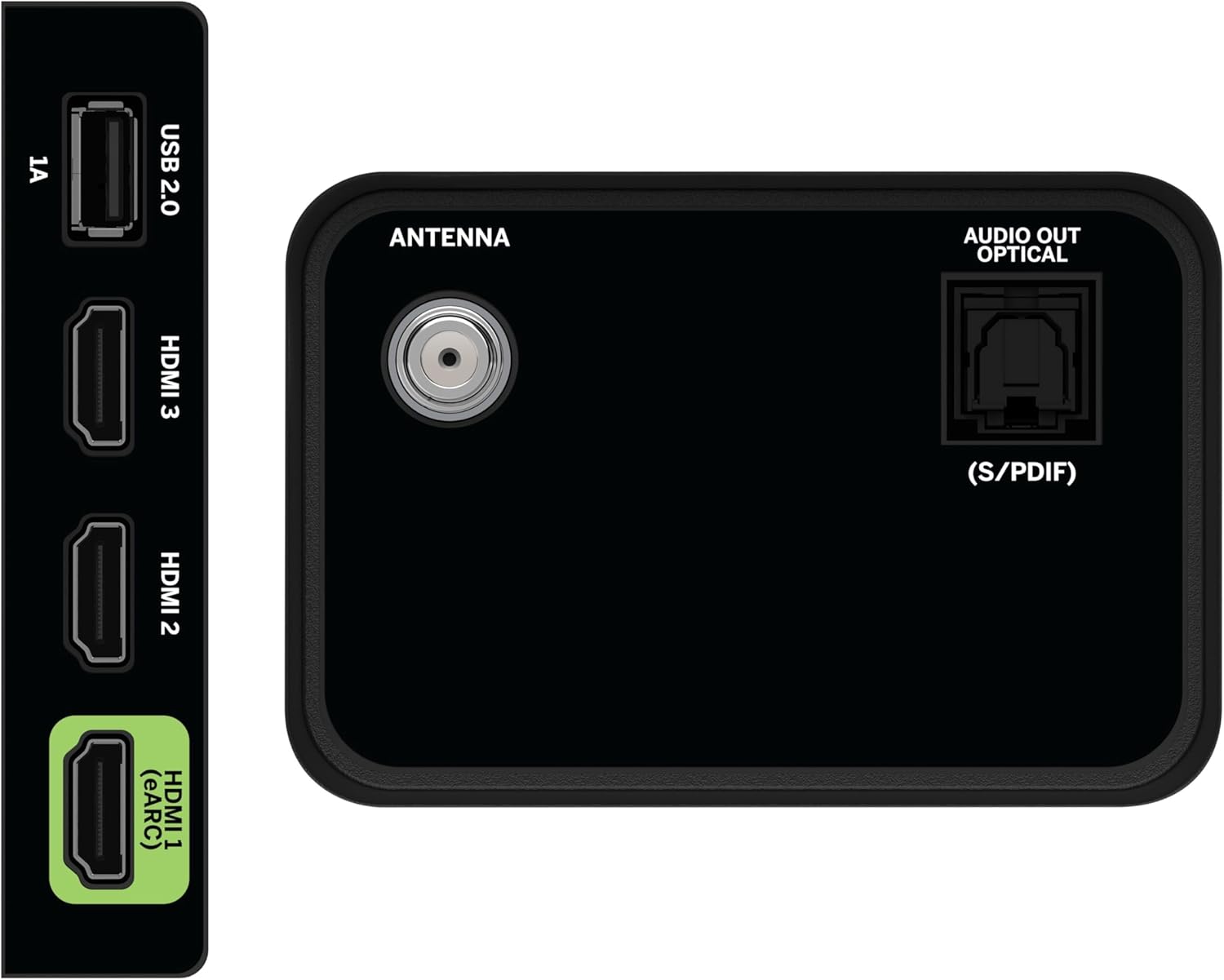
Image 4.1: Rear and side input/output ports.
4.3 Initial Power On & Network Connection
- Plug the power cable into the TV and then into a power outlet.
- Premeu el botó d'engegada del comandament a distància o del televisor.
- Follow the on-screen prompts to select your language, country, and connect to your Wi-Fi network (WiFi 6 supported for faster performance).
4.4 VIZIO Account Setup
A VIZIO Account is required for Smart TV functionality and product updates. Follow the on-screen instructions to create or log in to your VIZIO Account. This allows access to VIZIO Home, app subscriptions, and free channels.

Image 4.2: VIZIO Account setup via mobile device.
5. Funcionament del televisor
5.1 Control remotview
The included Voice Remote provides intuitive control over your TV. It features dedicated buttons for popular streaming apps and voice assistance integration.
- Entrada: Canvia entre dispositius connectats.
- Potència: Encendre/apagar el televisor.
- Bloc de navegació: Use the directional buttons and OK button to navigate menus.
- Inici: Access the VIZIO Home screen.
- WatchFree+: Direct access to VIZIO's free streaming service.
- Botó de veu: Activa les ordres de veu.
- Volum/Canal: Ajusta el volum i canvia de canal.
- Dreceres d'aplicacions: Quick access to pre-installed streaming applications.

Image 5.1: VIZIO Voice Remote and mobile app functionality.
5.2 Navigating VIZIO Home
The VIZIO Home screen is your central hub for all entertainment. It provides quick access to:
- Aplicacions i entrades: Browse and launch your favorite streaming apps (Netflix, Prime Video, Hulu, Disney+, etc.) and switch between connected inputs.
- TV en directe: Access hundreds of free channels and thousands of free On Demand titles with the built-in WatchFree+ app.
- Trending Now: Discover popular movies and shows.

Image 5.2: The VIZIO Home screen, your destination for easy streaming.
5.3 Configuració de la imatge
Your VIZIO TV features Dolby Vision HDR, HDR10+, HDR10, and HLG for a true-to-life picture with a wider range of color and detail. Adjust picture modes (e.g., Calibrated, Vivid, Game) in the settings menu to optimize your viewexperiència.

Image 5.3: Breathtaking details for a crystal-clear 4K picture with Dolby Vision.
5.4 Configuració d'àudio
Experience immersive sound with DTS Virtual:X setting. You can also connect Bluetooth headphones for private listening.

Image 5.4: Pair your wireless Bluetooth headphones for uninterrupted audio.
5.5 Funcions intel·ligents
The VIZIO Smart TV supports Apple AirPlay and Google Cast Built-in, allowing you to stream content directly from your compatible devices. WiFi 6 ensures better streaming and gaming performance in a congested smart home environment.
5.6 Característiques del joc
For gamers, the TV offers Dolby Vision HDR Gaming for enhanced in-game color. When a console or PC is detected, Auto Low Latency Mode is automatically enabled to reduce input lag.

Image 5.5: Venture into game realism with Dolby Vision HDR.
6. Manteniment
6.1 Neteja del televisor
- Desendolla sempre el televisor abans de netejar-lo.
- Feu servir un drap suau i sense borrissol per netejar suaument la pantalla i la carcassa.
- Do not use liquid or aerosol cleaners directly on the TV.
6.2 Actualitzacions de programari
Your VIZIO TV will automatically receive software updates when connected to the internet. Ensure your TV is connected to a network for optimal performance and access to the latest features.
7. Solució De Problemes
Si teniu problemes amb el vostre televisor VIZIO, proveu les solucions habituals següents:
- Sense energia: Assegureu-vos que el cable d'alimentació estigui connectat correctament tant al televisor com a la presa de corrent. Proveu una altra presa de corrent.
- Sense imatge/so: Check all cable connections (HDMI, audio). Ensure the correct input source is selected.
- El comandament a distància no funciona: Canvieu les piles. Assegureu-vos que no hi hagi cap obstacle entre el comandament a distància i el televisor.
- Problemes de connexió de xarxa: Restart your router and modem. Reconnect the TV to the Wi-Fi network via the settings menu.
- Mala qualitat d'imatge: Check the source content resolution. Adjust picture settings in the TV menu.
For further assistance, refer to the VIZIO support weblloc o contacteu amb el servei d'atenció al client.
8. Especificacions
| Característica | Especificació |
|---|---|
| Marca | VIZIO |
| Número de model | V4K50C-08 |
| Mida de la pantalla | 50 polzades |
| Tecnologia de visualització | LED |
| Resolució | 4K UHD |
| Suport HDR | Dolby Vision HDR, HDR10+, HDR10, HLG |
| Freqüència d'actualització | HDMI VRR |
| Tecnologia de connectivitat | Bluetooth, HDMI, Wi-Fi (WiFi 6) |
| Característiques especials | Apple AirPlay, Bluetooth Headphone compatibility, Built-in apps with VIZIO Home, Closed Captioning, Google Chromecast, Sleep Timer, Voice Assistance Integration, Voice Remote |
| Dimensions del producte | 9.68 "P x 43.69" W x 27.57" H |
| Pes de l'article | 28.4 lliures |
| Relació d'aspecte | 16:9 |
9. Garantia i Suport
For warranty information and customer support, please visit the official VIZIO website or refer to the warranty card included with your product. VIZIO provides award-winning customer support to assist with any questions or issues you may have.


