1. Introducció
This manual provides essential information for the safe and efficient operation, setup, and maintenance of your CATLINK SE Lite Automatic Self-Cleaning Litter Box. Please read this manual thoroughly before using the product to ensure proper function and safety for your pet.
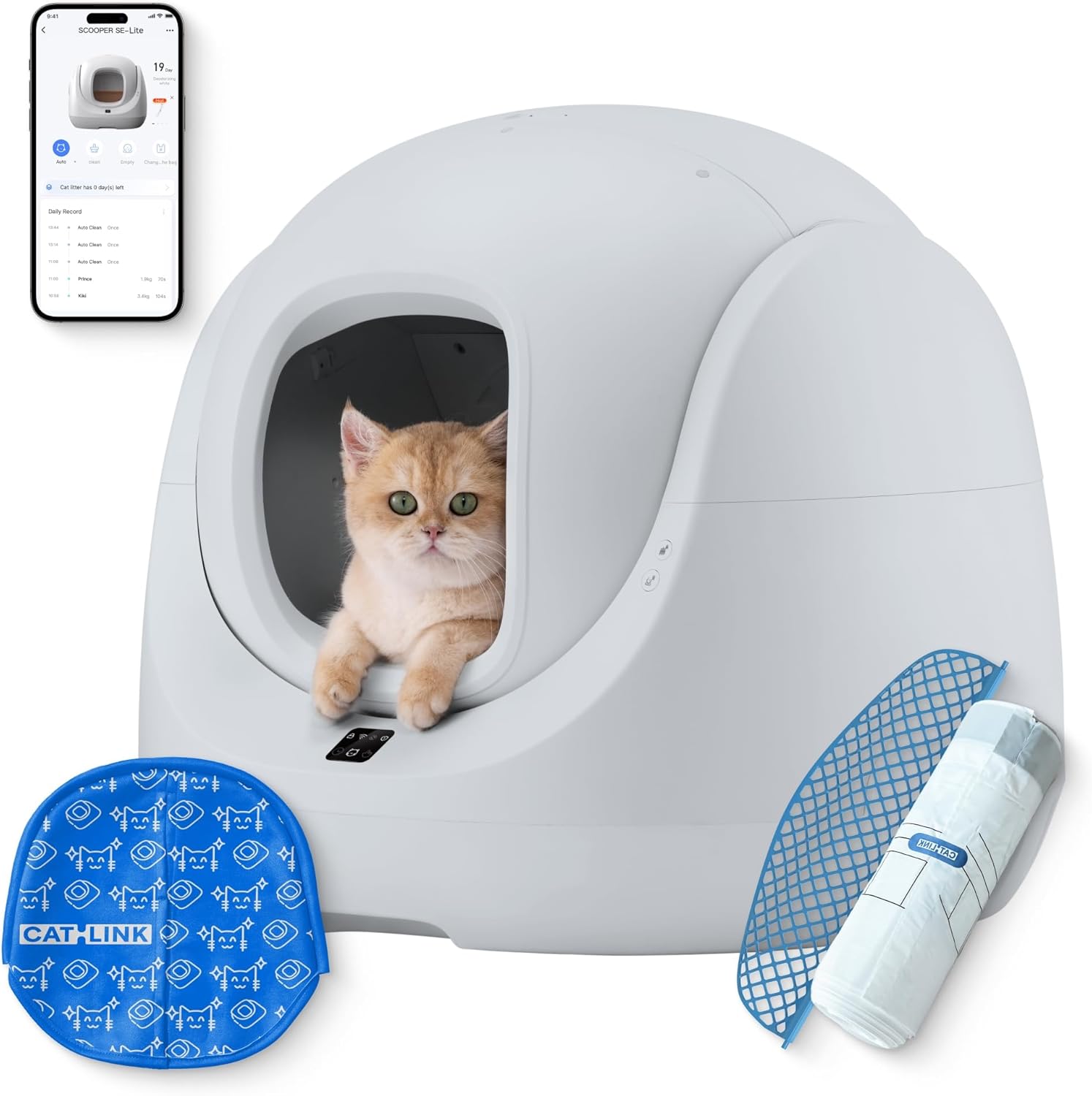
Image 1.1: CATLINK SE Lite Automatic Self-Cleaning Litter Box overview.
2. Informació de seguretat
Your cat's safety is paramount. The CATLINK SE Lite is equipped with multiple safety features to prevent accidents.
- 8-Level Safety Features: Includes 4 gravity sensors, 2 anti-pinch protections, 1 infrared sensor, and a safety motor.
- Parada automàtica: The unit automatically stops operation if your cat is detected nearby during a cleaning cycle.
- Pinch-Free Design: Features a partially geared globe with reserved living space to prevent pinching. For cats under 1.5 kg, manual mode is recommended.

Image 2.1: Eightfold Safety Protection System.

Image 2.2: Infrared Sensor detection.
3. Producte acabatview
The CATLINK SE Lite is an automatic self-cleaning litter box designed for convenience and pet well-being.
3.1 Característiques clau
- Compacte i espaiós: Occupies 0.3 square meters with a 70L capacity, suitable for cats from 3.5 to 22 lbs.
- Low Entry: 7.8-inch entry height for easy access by senior or mobility-challenged cats.
- Vigilància de la salut: Smart gravity-sensing technology tracks usage and provides real-time health updates via the CATLINK app.
- Neteja sense esforç: Non-stick inner liner, built-in drainage, and washable globe.
- 4 modes de neteja: Automatic, Scheduled, Manual, and Emptying modes.
- Funcionament ultra silenciós: Designed to run quietly at approximately 60dB.

Image 3.1: Product dimensions and capacity.
4. Configuració
4.1 Col·locació
Proper placement ensures optimal performance and safety.
- Col·loqueu el dispositiu sobre una superfície plana i estable.
- Ensure it is positioned 5-10 cm away from any walls.
- Avoid placing rugs or mats underneath, as this may interfere with the sensor's detection accuracy.

Image 4.1: Placement suggestions.
4.2 Adding Litter
Add litter from the top of the unit. The design allows for easy, upright litter addition.

Image 4.2: Effortless Litter Disposal and Addition.
4.3 App Connection (Wi-Fi)
To utilize smart features, connect your CATLINK SE Lite to the CATLINK app.
- Download the CATLINK app.
- Register and log in to the app. Enable location and GPS for Android devices.
- If the SCOOPER SE is not found, tap to add manually at the bottom of the screen. Hold the Clean Button for 10 seconds until the indicator flashes after four beeps.
- Follow the CATLINK app prompts to connect the SCOOPER SE to Wi-Fi.
Nota:
- The device must be near your router with power on.
- Wi-Fi name should contain only letters and numbers.
- Connect using a 2.4GHz Wi-Fi network; 5GHz and certain public Wi-Fi are not supported.

Image 4.3: Wi-Fi Connection Guide.
5. Instruccions de funcionament
The CATLINK SE Lite offers various modes for managing your cat's litter needs.
5.1 modes de neteja
Choose from four cleaning modes:
- Mode automàtic: The litter box automatically cleans after your cat exits.
- Mode programat: Estableix horaris específics per als cicles de neteja.
- Mode manual: Initiate a cleaning cycle manually via the app or device button.
- Emptying Mode: Lowers the board for complete litter removal, facilitating deep cleaning or litter changes.
5.2 Vigilància de la salut
The CATLINK app provides real-time health updates and tracks your cat's usage patterns.
- Tracks each cat's usage with smart gravity-sensing technology.
- Sends personalized health updates and alerts for abnormalities.
- Monitors cat weight and litter usage.

Image 5.1: Health Monitoring via CATLINK App.
5.3 Funcionament silenciós
The unit operates at approximately 60dB, designed to minimize disturbance.

Image 5.2: Ultra Quiet Operation.
6. Manteniment
Regular maintenance ensures the longevity and hygiene of your litter box.
6.1 Cleaning the Globe
The inner globe is designed for easy cleaning.
- The non-stick inner liner and walls prevent clumps from sticking.
- The globe is washable. After washing, remove the plug to allow water to drain.
- Two-step disassembly for the ball bin makes rinsing easy.

Image 6.1: Washable Ball Bin.

Image 6.2: One-Click Cleaning and Disassembly.
6.2 Litter Disposal and Odor Control
The unit is designed for hygienic waste management.
- Effortless Disposal: Open the cover, pull to gather the trash bag, and lift to dispose.
- Sealed Waste Compartment: Traps odors, preventing them from escaping.
- Optional Deodorization: A 24-hour gel deodorization formula (sold separately) can be used for enhanced odor control.

Image 6.3: Double Odor Elimination.
7. Solució De Problemes
Aquesta secció tracta problemes comuns que podeu trobar.
7.1 Problemes de connectivitat Wi-Fi
- Incorrect Wi-Fi Band: Ensure your router is broadcasting a 2.4GHz network and your phone is connected to it during setup. The device does not support 5GHz networks.
- Nom de la xarxa: Confirm your Wi-Fi network name (SSID) contains only letters and numbers. Special characters may cause connection failures.
- Intensitat del senyal: Place the litter box within a reasonable range of your Wi-Fi router for a stable connection.
- Permisos de l'aplicació: For Android users, ensure location and GPS permissions are enabled for the CATLINK app.
- Restableix la connexió: If issues persist, try resetting the device's Wi-Fi connection by holding the Clean Button for 10 seconds until the indicator flashes, then re-attempt the setup process in the app.
7.2 Cleaning Cycle Malfunctions
- Obstruccions: Check for any foreign objects or excessive litter clumps that might be obstructing the globe's rotation.
- Sensor Interference: Ensure the device is on a flat, stable surface and no rugs or mats are interfering with the gravity sensors.
- Cat Detection: If the cycle stops unexpectedly, verify no cat is near or inside the unit, triggering the safety sensors.
- Tipus de brossa: Ensure you are using clumping cat litter suitable for automatic litter boxes. Non-clumping litter may not be effectively processed.
7.3 Odor Issues
- Waste Bag Full: Check if the waste bag needs to be replaced.
- Segellat: Ensure the waste compartment is properly sealed after changing the bag.
- Desodorant: Consider using the optional CATLINK deodorization gel for enhanced odor control.
- Freqüència de neteja: Adjust automatic cleaning frequency or perform manual cleaning more often if needed.
8. Especificacions
| Especificació | Detall |
|---|---|
| Marca | CATLINK |
| Nom del model | SE Lite |
| Número de model de l'article | CL-CA-02 |
| Dimensions del producte (LxWxH) | 21 x 21.46 x 23.62 polzades (53.34 x 54.51 x 60 cm) |
| Pes de l'article | 22 lliures (10 kg) |
| Material | Acrilonitril butadiè estirè (ABS) |
| Color | Gris |
| Tipus de caixa de sorra | Caixa de sorra autonetejable automatitzada |
| Públic objectiu | Cats, house-cats (3.5 to 22 lbs) |
| Usos específics | Interior |
9. Garantia i Suport
9.1 Informació de la garantia
The CATLINK SE Lite Automatic Self-Cleaning Litter Box comes with a 1 anys de garantia des de la data de compra. Aquesta garantia cobreix els defectes de fabricació en condicions d'ús normal. Si us plau, conserveu el comprovant de compra per a reclamacions de garantia.
9.2 Atenció al client
For technical assistance, troubleshooting not covered in this manual, or warranty inquiries, please contact CATLINK customer support. Refer to the contact information provided with your product packaging or visit the official CATLINK weblloc per obtenir detalls de suport.


