1. Introducció
The Catit PIXI Smart 6-Meal Feeder is an advanced automatic feeding solution designed to provide your cat with scheduled meals throughout the day. This feeder offers app-controlled scheduling, a durable stainless steel tray suitable for both dry and wet food, and includes ice packs to maintain food freshness. Its design prioritizes ease of use, cleaning, and security, ensuring a consistent and convenient feeding routine for your feline companion.

Figure 1: Catit PIXI Smart 6-Meal Feeder with a portion of wet food visible.
2. Característiques clau
- Smart Feeding via App: Customize your cat’s daily feeding schedule using the free Catit PIXI app. Serve up to 6 meals per day—perfectly timed for your cat’s routine, even while you're away.
- Supports Wet & Dry Food: Designed for variety, the feeder’s stainless steel tray can hold dry kibble, wet food, or treats. Includes 2 ice packs to help keep meals fresh and delicious all day.
- Night & Day Scheduling: Whether your cat demands breakfast at dawn or a midnight snack, this smart feeder delivers—no more 3 a.m. wake-up calls for you.
- Cat-Proof & Easy to Clean: The clever cat-proof lid keeps curious paws out, while the removable stainless steel tray is dishwasher-safe for fuss-free cleaning.
- Time-Saving Convenience: Fill and clean just once a day while your cat enjoys multiple fresh meals. Spend less time prepping and more time cuddling your feline friend.

Figura 2: Intern view of the feeder showing meal compartments and ice pack placement.
3. Guia de configuració
- Unboxing: Carefully remove all components from the packaging. Ensure you have the feeder unit, stainless steel tray, and two ice packs.
- Connexió d'alimentació: The feeder can be powered via a USB adapter (not included) or C-cell batteries (not included, approximately 4 days backup). Connect the USB cable to the feeder and a power source, or insert 4 C-cell batteries into the battery compartment located on the underside of the unit.
- Instal·lació de la safata: Place the stainless steel tray securely into the feeder base. Ensure it is properly aligned with the rotating mechanism.
- Col·locació de bosses de gel: For wet food or to keep dry food fresh longer, place the two included ice packs into their designated slots beneath the stainless steel tray. Ensure they are frozen prior to placement for optimal cooling.
- Descàrrega i emparellament de l'aplicació: Download the free Catit PIXI app from the App Store (iOS) or Google Play Store (Android). Follow the in-app instructions to pair your feeder with your smartphone. This typically involves connecting to the feeder's Wi-Fi signal (2.4GHz only) and then connecting the feeder to your home Wi-Fi network.

Figure 3: Battery compartment and cat-proof lid detail.
4. Instruccions de funcionament
4.1. Programació d'àpats a través de l'aplicació
The Catit PIXI app provides comprehensive control over your feeder's schedule. You can program up to six distinct meal times per day.
- Open the Catit PIXI app on your smartphone.
- Select your PIXI Smart 6-Meal Feeder from the device list.
- Navigate to the "Schedule" section.
- Tap to add a new meal time or edit an existing one. Set the desired time for each meal. The feeder will automatically rotate to the next available compartment at the scheduled time.
- Fill the compartments with your cat's preferred dry kibble, wet food, or treats. Ensure the food does not overfill the compartments to prevent jamming.

Figure 4: Catit PIXI App scheduling interface.
4.2. Alimentació manual
For immediate feeding or to dispense an extra portion, you can manually trigger the feeder rotation:
- Mitjançant l'aplicació: In the Catit PIXI app, there is typically an option to "Serve Now" or manually advance the feeder.
- Al dispositiu: Press the button on the feeder's display panel to manually rotate to the next meal compartment.

Figure 5: Cat enjoying a meal from the feeder, with app notification example.
5. Manteniment
5.1. Neteja de l'alimentador
Regular cleaning is essential for hygiene and proper operation. The stainless steel tray is designed for easy cleaning.
- Remove the stainless steel tray from the feeder unit.
- The stainless steel tray is dishwasher-safe. Alternatively, wash it by hand with mild soap and water. Rinse thoroughly.
- Wipe down the main feeder unit with a damp drap. No submergiu la unitat principal en aigua.
- Assegureu-vos que totes les peces estiguin completament seques abans de tornar a muntar l'alimentador.

Figure 6: Dishwasher-safe stainless steel tray.
5.2. Ice Pack Care
The included ice packs help keep wet food fresh. For best results:
- Freeze the ice packs for at least 6-8 hours before use.
- Replace ice packs daily, especially when dispensing wet food. Additional ice packs (Catit #43755) can be purchased separately for daily rotation.
- Clean ice packs with mild soap and water as needed.
6. Solució De Problemes
| Problema | Causa possible | Solució |
|---|---|---|
| Feeder not dispensing food / Tray not rotating. |
|
|
| L'aplicació no es pot connectar al feeder. |
|
|
| El menjar no es manté fresc. |
|
|
| Cat cannot access food easily. |
|
|
7. Especificacions
| Nom del model | 43759 |
| ASIN | B0DN1D821M |
| Marca | Gat |
| Material | Stainless Steel (tray) |
| Color | Blanc |
| Pes de l'article | 2.64 lliures (1.2 quilograms) |
| Dimensions del producte (LxWxH) | 13.6 x 4 x 14.6 polzades |
| Espècie objectiu | gat |
| Característica especial | Automatic, App Control |
| Font d'alimentació | USB (adapter not included), 4 x C-cell batteries (not included) |
| Compatibilitat Wi-Fi | Només 2.4 GHz |
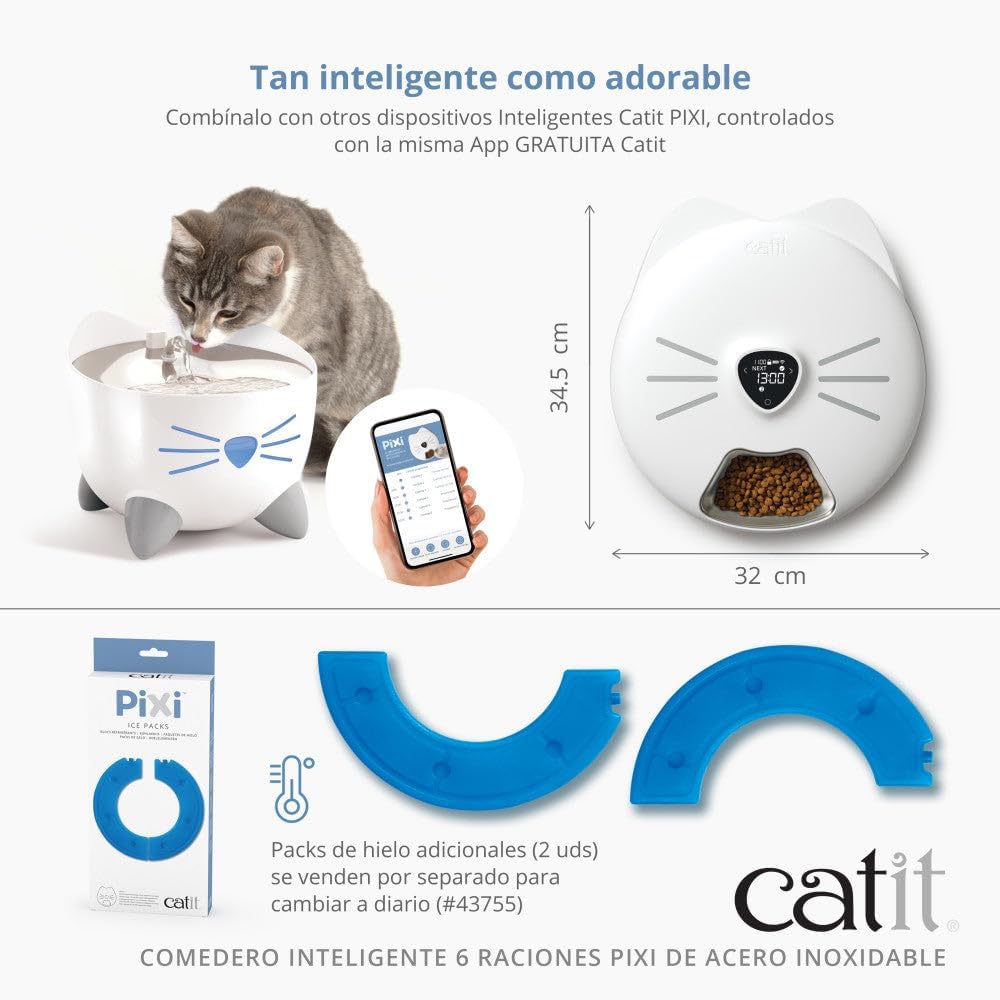
Figura 7: Dimensions del producte.
8. Garantia i Suport
For warranty information and detailed support, please refer to the documentation included with your product or visit the official Catit website. You can also find additional resources and contact customer service through the Catit Brand Store on Amazon.
For technical assistance with the Catit PIXI app or feeder functionality, please consult the in-app help section or the Catit support portal.


