1. Introducció
This manual provides detailed instructions for the VILTROX DC-X3 Touchscreen Camera Monitor Kit with Rig Cage. This professional field monitor is designed to enhance your videography and cinematography workflow with its ultra-bright display, advanced monitoring tools, and robust protection.

Figure 1.1: VILTROX DC-X3 Camera Monitor with Rig Cage.
2. Producte acabatview
2.1 Característiques clau
- Protecció robusta: Sturdy metal cage safeguards the 6-inch monitor against accidental bumps and scratches.
- Multiple Attachment Points: Features standard screw holes for third-party accessories like microphones, LED lights, and battery plates.
- Connexions segures: Reinforces structural integrity and ensures secure cable fastening, preventing disconnections.
- All-in-One Professional Solution: Integrates ultra-bright display, professional monitoring tools, customizable color grading, and extensive connectivity.
- Cost and Time Savings: Eliminates the need for additional protective gear, simplifying setup.
- 2000 nits Ultra-Bright Display: 6-inch Full HD 1920x1080 IPS monitor for clarity and brightness in any light.
- Eines de monitorització professionals: Includes waveform monitor, vectorscope, focus peaking, grid overlay, and overexposure warnings.
- Compatibilitat amb LUT 3D: Import 3D LUTs via USB for precise color correction and creative style application.
- Gestió tèrmica intel·ligent: Strategically placed ventilation ports and active cooling system for long-term stability.
- Anamorphic Lens Correction: Supports various de-squeeze ratios (1.00X/1.33X/1.50X/1.60X/1.80/2.00X).
- 160° Ultra-wide Viewangle: Ensures consistent image quality from various perspectives.
2.2 Components i ports
Familiarize yourself with the various components and ports of the VILTROX DC-X3 monitor.
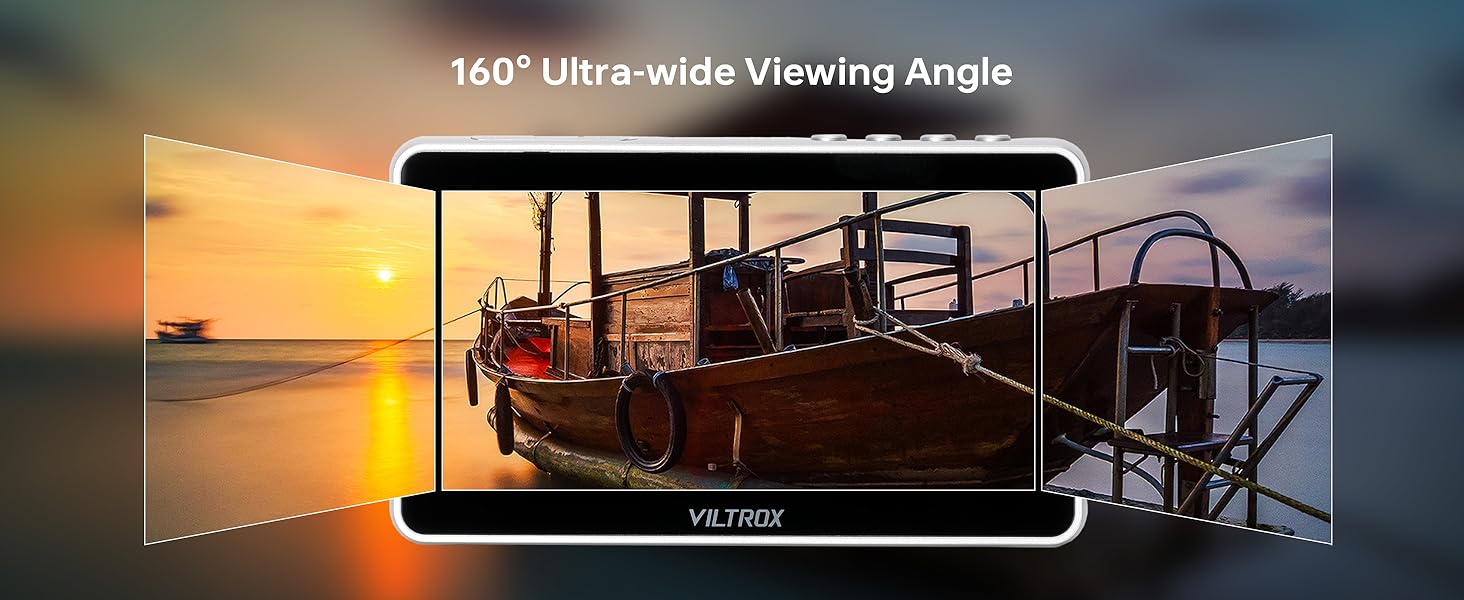
Figure 2.1: Front, Back, and Side Views of the DC-X3 Monitor with labeled ports and buttons.
- Botó Enrere/Menú
- Tecla de drecera
- Pantalla de visualització
- Ventilador d'escapament
- Llum indicadora
- Botó d'engegada
- Entrada HDMI
- Sortida HDMI
- Conector d'auriculars
- Entrada d'aire de refrigeració
- 1/4 Forat de cargol
- Port DC
- Port tipus C
- Entrada d'aire de refrigeració
- Interfície USB
- Botó d'alliberament de la bateria
- Ranura de bateria
- Sortida SDI
- Entrada SDI
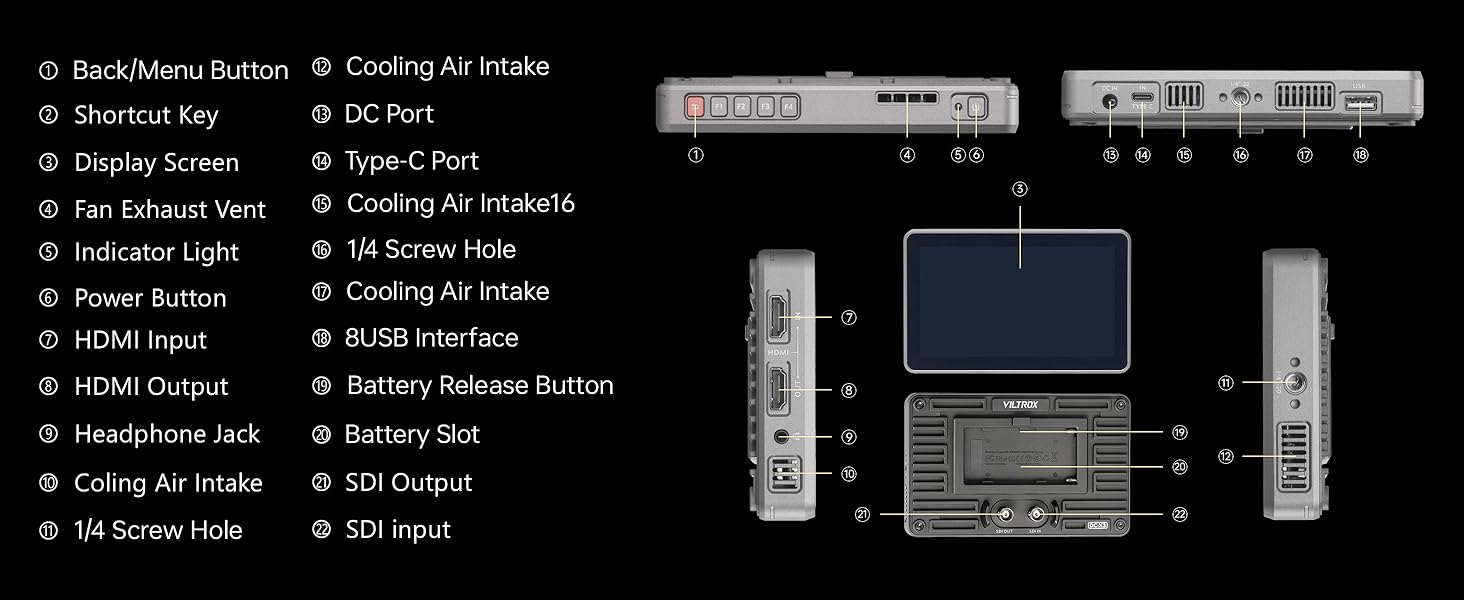
Figura 2.2: Angle views of the DC-X3 Monitor highlighting various ports and features.
3. Configuració
3.1 Attaching the Rig Cage
The monitor comes pre-assembled with the rig cage for immediate use. Ensure all screws are securely tightened before mounting.
3.2 Alimentació del monitor
Insert the included NP-F550 battery into the battery slot on the back of the monitor. Alternatively, connect the DC power adapter to the DC Port (12) for continuous power.
3.3 Connexió a una càmera
Connect your camera to the monitor using either the HDMI Input (7) or SDI Input (19) ports. Use the appropriate cable (Mini HDMI or HDMI cable included) for your camera's output.

Figure 3.1: DC-X3 Monitor showing HDMI and SDI input/output ports connected to a camera setup.
3.4 Attaching the Sunshade Hood
The sunshade hood can be easily attached to the monitor to reduce glare and improve visibility in bright outdoor conditions.

Figure 3.2: DC-X3 Monitor with sunshade hood in use, providing improved visibility outdoors.
4. Instruccions de funcionament
4.1 Funcionament bàsic
Press the Power Button (6) to turn the monitor on or off. Use the Back/Menu Button (1) and Shortcut Keys (2) to navigate the menu and access various settings.
4.2 Ajust de la brillantor
The monitor features a 2000 nits ultra-bright display, ideal for outdoor use. Adjust the backlight setting via the menu to suit your environment.
Video 4.1: Demonstration of the VILTROX DC-X3 monitor's brightness and outdoor visibility, showing adjustment of backlight settings.
4.3 Eines de monitorització professionals
The monitor includes a suite of professional tools accessible through the touchscreen interface:
- Forma d'ona: Mostra els nivells de luminància i crominància del senyal de vídeo.
- Vectorscopi: Shows the color information of your video signal.
- Histograma: Illustrates the tonal distribution of your image.
- Focus Peaking: Destaca les zones enfocades per a un enfocament precís.
- Superposició de quadrícula: Various grid options for composition.
- Overexposure Warnings: Alerts you to overexposed areas.

Figure 4.1: DC-X3 Monitor showcasing various professional monitoring tools on its display.
Compatibilitat amb LUT 3D 4.4
Import 3D Look-Up Tables (LUTs) via a USB flash drive connected to the USB Interface (15) for real-time color grading and previewing. This allows for precise color correction and creative style application directly on set.

Figure 4.2: Visual comparison demonstrating the effect of applying a 3D LUT for color correction on the DC-X3 Monitor.
4.5 Anamorphic Lens Correction
The monitor supports de-squeezing for anamorphic lenses with ratios of 1.00X, 1.33X, 1.50X, 1.60X, 1.80X, and 2.00X. This feature allows you to view correctly proportioned images when shooting with anamorphic lenses.

Figure 4.3: Illustration of anamorphic lens correction on the DC-X3 Monitor, showing a de-squeezed image.
5. Manteniment
5.1 Neteja del monitor
Feu servir un drap suau i sense borrissol per netejar la pantalla i el cos del monitor. Per a les taques difícils, es pot utilitzar amb moderació una solució netejadora de pantalles dissenyada per a dispositius electrònics. Eviteu materials abrasius o productes químics agressius.
5.2 Gestió tèrmica
The VILTROX DC-X3 features intelligent thermal management with cooling air intakes (10, 14) and a fan exhaust vent (4). Ensure these vents are not obstructed during operation to maintain optimal performance and prevent overheating.

Figura 5.1: Intern view of the DC-X3 Monitor highlighting its intelligent thermal management system.
5.3 Cura de la bateria
When not in use for extended periods, remove the battery from the monitor. Store batteries in a cool, dry place. Follow manufacturer guidelines for battery charging and disposal.
6. Solució De Problemes
| Problema | Causa possible | Solució |
|---|---|---|
| El monitor no s'encén. | Low or depleted battery; power cable not connected properly. | Charge or replace the battery. Ensure DC power cable is securely connected. |
| Sense senyal de vídeo. | Incorrect input selected; loose HDMI/SDI cable; camera output settings. | Verify correct input source (HDMI/SDI) is selected on the monitor. Check cable connections. Ensure camera video output settings match monitor's capabilities. |
| La pantalla és massa tènue/brillant. | Brightness/backlight settings are incorrect. | Adjust the backlight and brightness settings in the monitor's menu. |
| SDI IN port not working. | Faulty cable; incompatible signal; internal issue. | Try a different SDI cable. Ensure the input signal is compatible with the monitor's SDI specifications. If the issue persists, contact customer support. |
| Monitor overheating. | Obstructed ventilation; prolonged use in high temperatures. | Ensure cooling vents are clear. Operate in a well-ventilated area. Allow the monitor to cool down if it becomes excessively hot. |
7. Especificacions
| Característica | Detall |
|---|---|
| Dimensions del producte | 6.1 x 1.18 x 3.85 polzades |
| Pes de l'article | 3.1 lliures |
| Número de model de l'article | FS-JYC-03459-2 |
| Bateries | Necessites 1 piles de ions de liti (incloses) |
| Mida de la pantalla de peu | 6 polzades |
| Relació d'aspecte | 16:9 |
| Voltage | 12 volts (CC) |
| Marca | VILTROX |
| Resolució | FHD 1080p Ultra Wide + |
| Descripció de la superfície de la pantalla | brillant |
8. Què hi ha a la caixa
The VILTROX DC-X3 Touchscreen Camera Monitor Kit includes the following items:
- DC-X3 Camera Monitor (with Rig Cage pre-attached)
- Caputxa para-sol
- Bateria NP-F550
- NP-F550 Battery Cable
- Cable mini HDMI
- Cable HDMI
- HD Screen Protector
- Standard Shoe Adapter

Figure 8.1: All items included in the VILTROX DC-X3 Camera Monitor Kit package.
9. Garantia i Suport
9.1 Informació de la garantia
VILTROX products are covered by a standard manufacturer's warranty. Please refer to the warranty card included in your package for specific terms and conditions. Keep your purchase receipt as proof of purchase for warranty claims.
9.2 Atenció al client
For technical assistance, troubleshooting, or warranty inquiries, please contact VILTROX customer support. Contact information can typically be found on the official VILTROX weblloc web o a l'embalatge del producte.
Visit the official VILTROX Store for more information: VILTROX Official Store


