Introducció
This manual provides detailed instructions for the installation, operation, and maintenance of your NZXT N9 Z890 ATX Gaming Motherboard. Please read this manual thoroughly before proceeding with installation to ensure proper setup and optimal performance.

Image: The NZXT N9 Z890 motherboard shown alongside its retail packaging, highlighting its sleek design and white color scheme.
The NZXT N9 Z890 is a high-performance ATX gaming motherboard designed for Intel Core Ultra (Series 2) CPUs. It features a robust power delivery system, advanced cooling solutions, and extensive connectivity options to support demanding gaming and computing tasks.
Què hi ha a la caixa
Verifiqueu que tots els components siguin presents abans de començar la instal·lació:
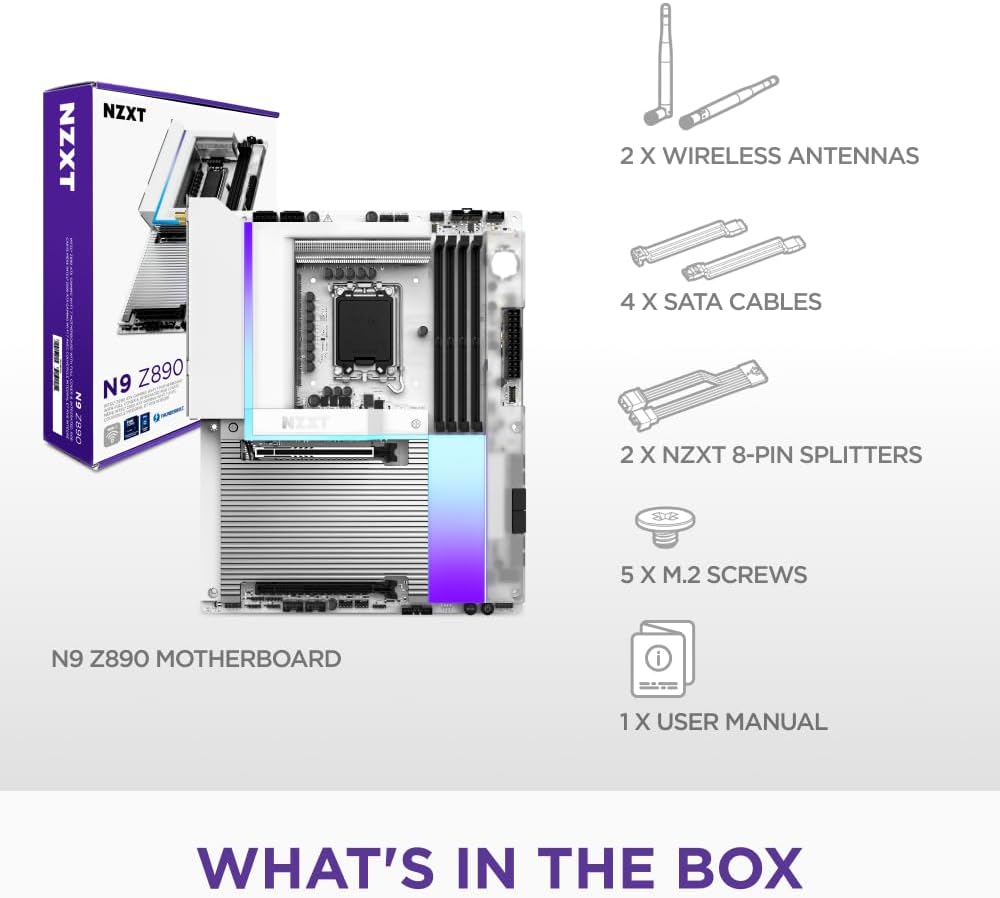
Image: A visual representation of the items included in the NZXT N9 Z890 motherboard package, including the motherboard, wireless antennas, SATA cables, NZXT 8-pin splitters, M.2 screws, and a user manual.
- Placa base NZXT N9 Z890
- 2 x Wireless Antennas
- 4 cables SATA
- 2 x NZXT 8-pin Splitters
- 5 x M.2 Cargols
- 1 x Manual d'usuari (aquest document)
Configuració i instal·lació
Follow these steps for proper installation of the motherboard and its components.
1. Placa mare per sobreview

Image: An annotated diagram of the NZXT N9 Z890 motherboard, pointing out the 20+1+1 power phases, LGA 1851 socket, 4 DDR5 DIMM slots, 5 M.2 slots (1x PCIe 5.0, 4x PCIe 4.0), and 2 expansion slots (1x PCIe 5.0 x16, 1x PCIe 4.0 x16).
- LGA 1851 Socket: Designed for Intel Core Ultra (Series 2) processors. Features an RL-ILM design for enhanced thermal contact.
- Ranures per a DIMM DDR5: Four dual-channel slots supporting DDR5 RAM speeds of 8000+ MT/s (OC).
- M.2 Slots: One PCIe 5.0 M.2 2280 slot and four PCIe 4.0 M.2 2280 slots for high-speed storage.
- PCIe Expansion Slots: One PCIe 5.0 x16 slot for graphics cards and one PCIe 4.0 x16 slot for additional expansion cards.
- Subministrament d'energia: 20+1+1 power phase design with 110A Smart Power Stages.
2. Instal·lació del processador
- Carefully open the LGA 1851 socket retention mechanism.
- Align the Intel Core Ultra (Series 2) processor with the socket, ensuring the notches on the CPU match the keys on the socket.
- Col·loca suaument la CPU al sòcol sense forçar-la.
- Tanqueu el mecanisme de retenció per fixar la CPU.
3. Instal·lació de memòria (RAM)
- Obriu els clips dels dos extrems de les ranures DIMM DDR5.
- Alineeu el mòdul de RAM amb la ranura, assegurant-vos que l'osca del mòdul coincideixi amb la clau de la ranura.
- Premeu fermament els dos extrems del mòdul RAM fins que els clips encaixin al seu lloc.
- For dual-channel operation, refer to your motherboard manual for recommended slot configurations.
4. Storage (M.2 SSDs) Installation
- Locate the M.2 slots on the motherboard. The NZXT N9 Z890 has one PCIe 5.0 and four PCIe 4.0 M.2 slots.
- Remove the M.2 heatsink cover if present.
- Inseriu l'SSD M.2 a la ranura en angle.
- Premeu suaument l'SSD cap avall i fixeu-lo amb el cargol M.2 proporcionat.
- Reattach the M.2 heatsink cover to ensure optimal thermal performance.
5. Instal·lació de la targeta gràfica (GPU)
- Localitzeu la ranura PCIe 5.0 x16.
- Traieu la coberta de la ranura d'expansió corresponent de la carcassa del vostre PC.
- Align your graphics card with the PCIe slot and press down firmly until it is fully seated and the retention clip engages.
- Fixeu la targeta gràfica a la carcassa amb un cargol.
6. Instal·lació del sistema de refrigeració

Image: An annotated diagram showing the advanced thermal design of the NZXT N9 Z890 motherboard, including the VRM heatsink array with heat pipe, thermal pads, and dual PWM fans, as well as the 5 M.2 heatsinks with thermal pads. Fan and AIO headers are also indicated.
- Matriu de dissipadors de calor VRM: The motherboard features an integrated VRM heatsink array with a heat pipe, thermal pads, and dual PWM fans for efficient power delivery cooling.
- Dissipadors de calor M.2: Dedicated heatsinks with thermal pads are provided for all M.2 slots to prevent thermal throttling of SSDs.
- Fan & AIO Headers: Connect your case fans and AIO liquid cooler pumps to the designated headers:
- 2 x NZXT 8-pin (PWM + RGB)
- 3 x 4-pin system fan
- 1 x CPU fan
- 1 x AIO pump
7. Connexió de perifèrics i alimentació

Imatge: Una imatge detallada view of the rear input/output (I/O) panel of the NZXT N9 Z890 motherboard, showing ports for HDMI, Thunderbolt 4, USB 3.2 Gen 2, USB 3.2 Gen 1 Type-A, USB 3.2 Gen 2x2 Type-C, 5GbE LAN, Wi-Fi 7 (Dual-Band), Optical S/PDIF Out, and Audio Jacks. Also visible are the Clear CMOS and BIOS Flashback buttons.
- Connect the 24-pin ATX power connector and the 8-pin CPU power connectors from your power supply to the motherboard.
- Connect front panel headers (power button, reset button, USB ports, audio jacks) to their respective pins on the motherboard. Refer to your PC case manual for specific pin assignments.
- Attach the included wireless antennas to the Wi-Fi 7 ports on the rear I/O panel.
- Connect your display to the graphics card or the motherboard's HDMI port (if using an integrated GPU).
- Connect USB peripherals, Ethernet cable, and audio devices to the rear I/O ports as needed.
Instruccions de funcionament
1. Arrencada inicial i configuració de la BIOS
- Després de completar totes les instal·lacions del maquinari, connecteu el monitor, el teclat i el ratolí.
- Enceneu el vostre sistema.
- Durant el procés d'arrencada, premeu repetidament la tecla DEL or F2 clau per entrar a la utilitat de configuració de la BIOS/UEFI.
- In the BIOS, you can configure boot order, enable XMP/EXPO for RAM, adjust fan curves, and monitor system status.
- Desa els canvis i surt de la BIOS per continuar arrencant al suport d'instal·lació del sistema operatiu.
2. Característiques de connectivitat

Image: A graphic displaying icons for the NZXT N9 Z890 motherboard's connectivity features: Thunderbolt 4 (40 Gbps), USB 3.2 Type-C (20 Gbps), Wi-Fi 7 (320 MHz), Realtek 5Gb Ethernet, Realtek ALC 4082 Audio, and Bluetooth 5.4.
- Thunderbolt 4: Provides up to 40 Gbps data transfer speeds and supports display output.
- USB 3.2 tipus C: Offers up to 20 Gbps data transfer.
- Wi-Fi 7 (320 MHz): For high-speed wireless networking.
- 5GbE Ethernet: For ultra-fast wired network connections.
- Bluetooth 5.4: Per connectar perifèrics sense fil.
- Realtek ALC 4082 Audio: High-definition audio output.
3. RGB Lighting and Customization

Image: An annotated diagram of the NZXT N9 Z890 motherboard, showcasing its RGB headers (1x NZXT RGB LED, 2x 5V ARGB LED, 2x NZXT 8-pin RGB+PWM), onboard RGB lighting powered by NZXT CAM, a full-metal cover with matching PCB, and a digital debug LED.
The NZXT N9 Z890 features onboard customizable RGB lighting and multiple RGB headers for connecting additional lighting components.
- NZXT CAM Software: Baixeu i instal·leu el programari CAM de NZXT des del lloc web oficial de NZXT. website to customize RGB lighting effects, monitor system performance, and control fan speeds.
- Capçaleres RGB:
- 1 x NZXT RGB LED header
- 2 x 5V Addressable RGB (ARGB) LED headers
- 2 x NZXT 8-pin (RGB + PWM) headers
Manteniment
Un manteniment regular ajuda a garantir la longevitat i el rendiment òptim de la placa base.
- Eliminació de pols: Netegeu periòdicament la pols de la carcassa del vostre PC i dels components de la placa base amb aire comprimit. Assegureu-vos que el sistema estigui apagat i desendollat abans de netejar-lo.
- Actualitzacions de la BIOS/UEFI: Check the official NZXT support website for the latest BIOS/UEFI updates. Updating the BIOS can improve compatibility, stability, and performance. Follow the instructions provided by NZXT carefully when performing updates.
- Actualitzacions de controladors: Keep your chipset, network, audio, and other drivers updated to ensure compatibility and optimal performance with your operating system and peripherals.
Resolució de problemes
Aquesta secció tracta problemes comuns que podeu trobar.
- El sistema no s'encén:
- Verifiqueu que tots els cables d'alimentació (ATX de 24 pins, CPU de 8 pins) estiguin connectats correctament a la placa base i a la font d'alimentació.
- Assegureu-vos que l'interruptor de l'alimentació estigui en la posició ON.
- Comproveu les connexions del panell frontal (botó d'engegada) a la placa base.
- No Display Output (No Post):
- Ensure your monitor is connected to the correct display output (graphics card or motherboard).
- Reseat your graphics card and RAM modules.
- Comproveu el Digital Debug LED on the motherboard (refer to the "Sleek & Customizable" image for location). This LED displays codes that can help identify the component causing the boot failure (e.g., CPU, RAM, GPU, Boot Device). Consult the full manual or NZXT support for specific code meanings.
- BIOS Flashback Feature:
- The NZXT N9 Z890 motherboard includes a BIOS Flashback button on the rear I/O panel (visible in the "Rear I/O" image). This feature allows you to update the BIOS without a CPU, RAM, or graphics card installed. Refer to the official NZXT website for detailed instructions on how to use the BIOS Flashback function.
- Inestabilitat o errors del sistema:
- Assegureu-vos que tots els controladors estiguin actualitzats.
- Check for proper cooling of the CPU, GPU, and VRM.
- Verify RAM stability, especially if XMP/EXPO profiles are enabled. Try running with default RAM settings.
- Problemes de connectivitat de xarxa:
- For Wi-Fi, ensure antennas are securely attached.
- For Ethernet, check cable connections and router status.
- Actualitza els controladors de xarxa.
Especificacions
| Característica | Detall |
|---|---|
| Marca | NZXT |
| Nom del model | N9-Z89XT-W1 |
| Socket de CPU | LGA 1851 |
| Processadors compatibles | Intel Core Ultra (Series 2), Arrow Lake-S |
| Tipus de xipset | Intel Z890 |
| Tecnologia de memòria RAM | DDR5 |
| Velocitat de memòria | 8600 MHz (Overclocked) |
| Dispositius compatibles | Ordinador personal |
| Plataforma | Windows |
| Power Phase Design | 20+1+1 with 110A Smart Power Stages |
| Expansió PCIe | 1 PCIe 5.0 x16, 1 PCIe 4.0 x16 |
| M.2 Ranures | 1 PCIe 5.0 x4, 4 PCIe 4.0 x4 |
| Treball en xarxa | Wi-Fi 7 (320 MHz), 5GbE Ethernet |
| Connectivitat USB | Thunderbolt 4, USB 3.2 Gen 2, USB 3.2 Gen 1, USB 3.2 Gen 2x2 Type-C |
| Àudio | Realtek ALC 4082 |
| Bluetooth | 5.4 |
| Color | Blanc |
Garantia i Suport
NZXT is committed to providing reliable products and excellent customer service.
- Informació de la garantia: For detailed warranty terms and conditions, please visit the official NZXT weblloc web. Conserveu el comprovant de compra per a reclamacions de garantia.
- Suport tècnic: If you encounter any issues not covered in this manual or require further assistance, please contact NZXT customer support. You can find support resources, FAQs, and contact information on the official NZXT weblloc: www.nzxt.com/support.


