1. Introducció
This manual provides detailed instructions for the setup, operation, and maintenance of your ATTACK SHARK X98PRO Wireless Mechanical Keyboard. The X98PRO features tri-mode connectivity (Bluetooth, 2.4GHz wireless, USB-C wired), hot-swappable switches, a customizable TFT screen, and a multi-function CNC knob, designed for both gaming and productivity across various operating systems.
2. Contingut del paquet
- ATTACK SHARK X98PRO Mechanical Keyboard
- Cable trenat USB-C a USB-A
- Receptor sense fils de 2.4 GHz
- Extractor de tecles
- Tirador de commutació
- Manual d'usuari (aquest document)
3. Keyboard Layout and Components
The X98PRO features a compact 98-key layout, integrating a numeric keypad while maintaining a smaller footprint than a full-size keyboard. Key components include:
- Pantalla TFT d'1.14 polzades: Located above the numeric keypad, this screen displays various information and allows for customization.
- CNC Multi-Function Knob: Positioned next to the TFT screen, this knob controls volume, brightness, RGB effects, and connection modes.
- Port USB-C: Per a connexió amb cable i càrrega.
- 2.4GHz Wireless Receiver Storage: Typically located in a dedicated slot on the keyboard for safekeeping.


4. Configuració
4.1. Càrrega del teclat
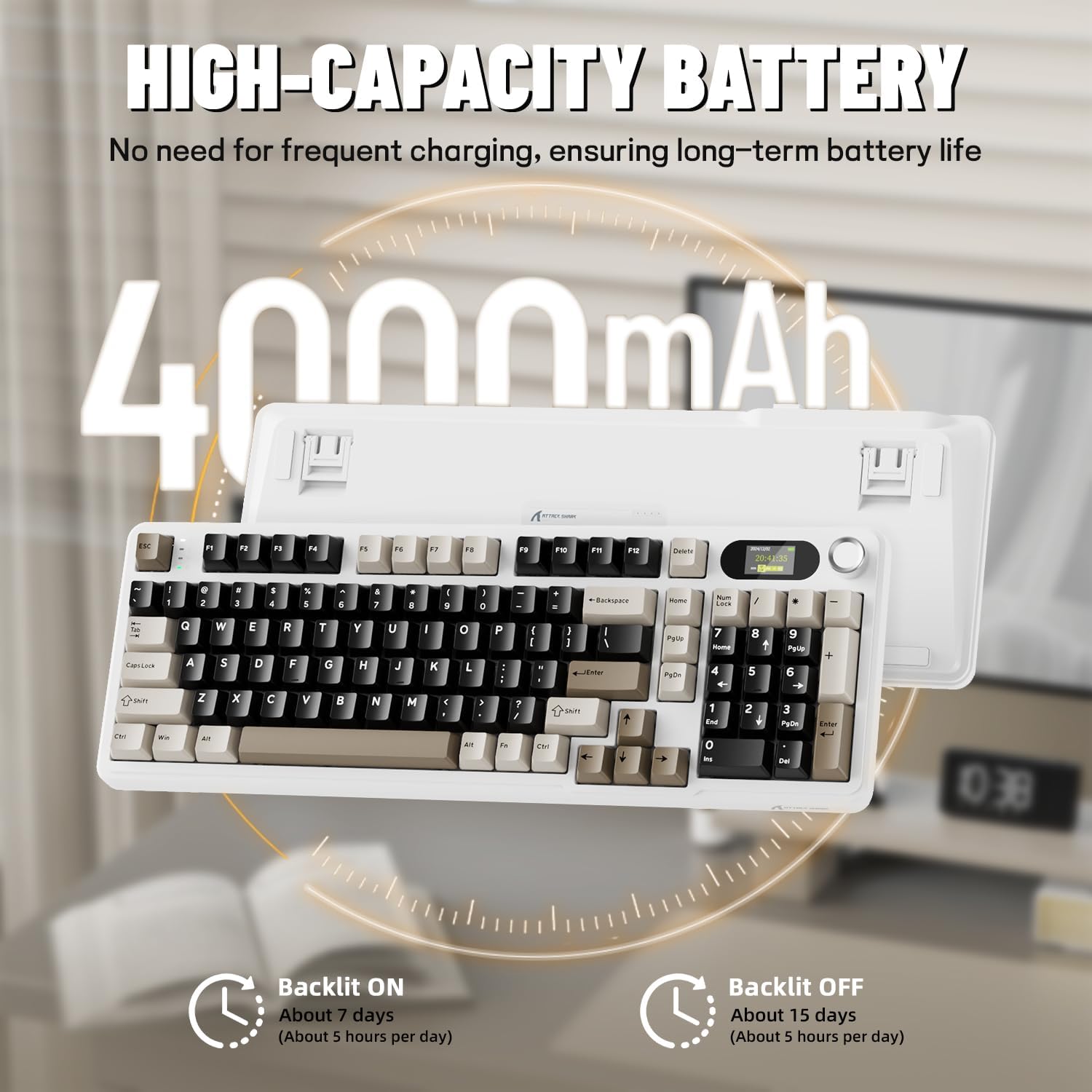
Before first use, it is recommended to fully charge the keyboard. Connect the provided USB-C cable to the keyboard's USB-C port and the other end to a USB-A power source (e.g., computer, wall adapter). The TFT screen will indicate charging status. The keyboard features a 4000mAh battery for extended wireless use.
4.2. Modes de connectivitat
L'X98PRO admet tres modes de connexió:
- Mode amb cable USB-C: Connect the keyboard directly to your device using the USB-C cable. This mode also charges the keyboard.
- Mode sense fil de 2.4 GHz:
- Insert the 2.4GHz wireless receiver into an available USB port on your computer.
- Switch the keyboard's mode selector to 2.4G. The keyboard should automatically connect.
- Mode Bluetooth 5.0: El teclat es pot emparellar amb fins a tres dispositius Bluetooth.
- Canvieu el selector de mode del teclat a Bluetooth.
- Mantén premut Fn + 1, Fn + 2, o Fn + 3 durant 3-5 segons fins que l'indicador lluminós parpellegi, cosa que indica el mode d'emparellament.
- On your device (PC, Mac, Tablet), search for Bluetooth devices and select "ATTACK SHARK X98PRO" to pair.
- Per canviar entre dispositius Bluetooth emparellats, premeu Fn + 1, Fn + 2, o Fn + 3 breument.

4.3. Configuració inicial (Web-based Driver)
The X98PRO utilizes an intuitive web-based driver for advanced customization. This allows you to edit, upload, and switch display content for the TFT screen, customize RGB lighting, remap keys, and set macros without installing dedicated software. Access the official ATTACK SHARK weblloc per a web driver interface.

5. Instruccions de funcionament
5.1. TFT Screen Functions
The 1.14-inch TFT screen can display various information:
- Estat del sistema: Connection mode (wired, 2.4G, BT1/2/3), operating system (Win/Mac).
- Durada de la bateria: Real-time battery level.
- Hora: Hora actual.
- Custom GIFs: Upload personalized animations via the web conductor.
To navigate the TFT screen menu, rotate the CNC knob to scroll through options and press the knob to confirm a selection.
5.2. CNC Multi-Function Knob
The CNC knob provides intuitive control over several keyboard features:
- Control de volum: By default or after switching, rotate to adjust system volume.
- Control de brillantor: Ajusteu la brillantor de la llum de fons.
- RGB Effects: Canvia entre els diferents efectes d'il·luminació RGB.
- Modes de connexió: Switch between wired, 2.4GHz, and Bluetooth modes.
To switch the knob's function (e.g., between volume and RGB control), press Fn + botó (press the knob down).
5.3. Retroil·luminació RGB
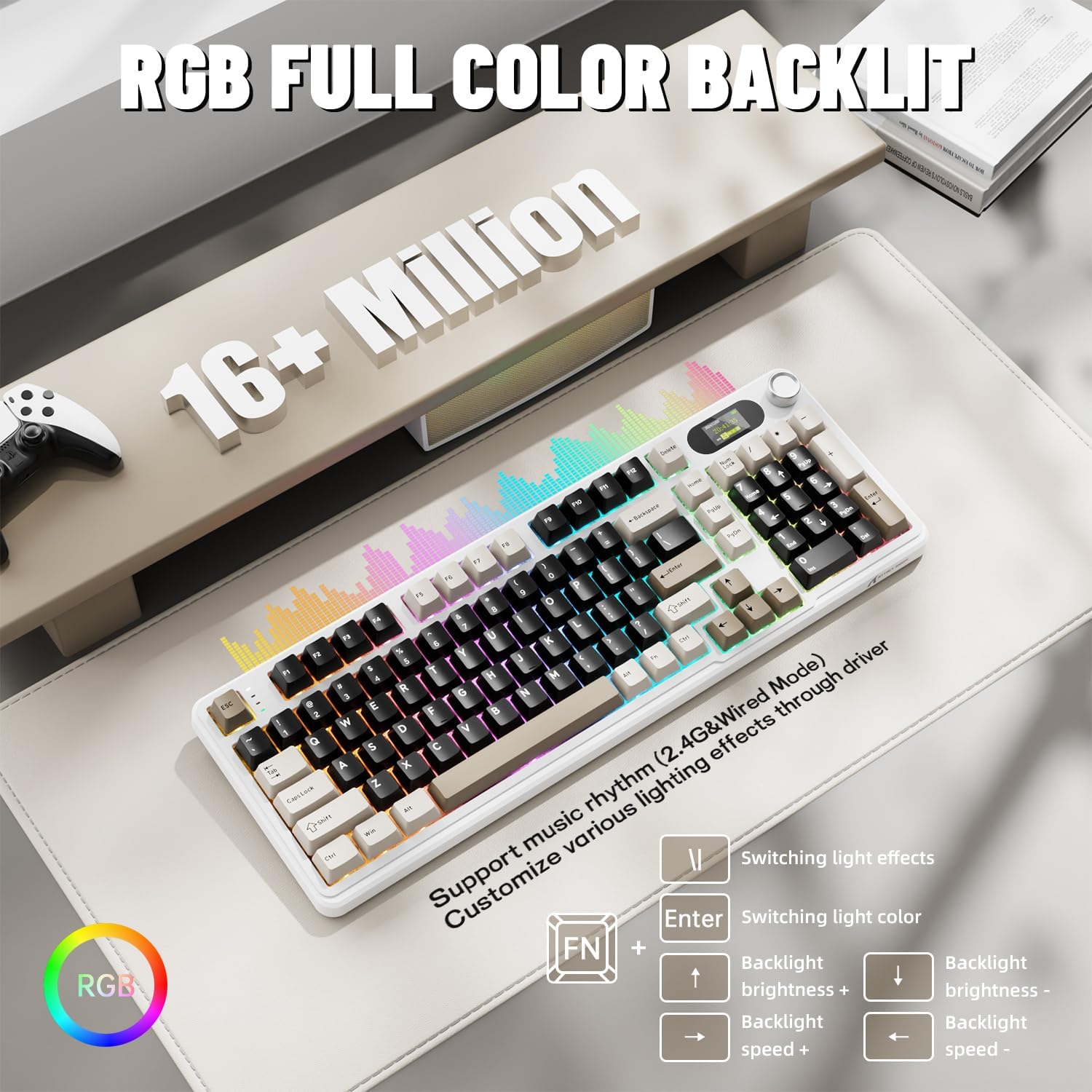
The X98PRO features full RGB backlighting with multiple effects. Control options include:
- Canvi d'efectes de llum: Premeu Fn + Intro.
- Switching Light Color: Premeu Fn + \|.
- Brillantor de la llum de fons: Premeu Fn + Fletxa amunt (augmentar) o Fn + Fletxa avall (disminució).
- Velocitat de la llum de fons: Premeu Fn + Fletxa esquerra (disminució) o Fn + Fletxa dreta (augmentar).
Further customization of RGB lighting, including per-key lighting and custom profiles, is available through the web-based driver.
5.4. Commutadors intercanviables en calent
The X98PRO features a hot-swappable PCB, allowing you to easily change mechanical switches without soldering. It is compatible with most 3-pin and 5-pin mechanical switches.
- Using the provided switch puller, carefully grip the switch and pull it straight up to remove it.
- Alineeu els pins del nou interruptor amb els forats de la placa de circuit imprès. Assegureu-vos que els pins estiguin rectes.
- Gently press the new switch into place until it clicks. Do not force it.

6. Manteniment
6.1. Neteja
- Desconnecteu el teclat de totes les fonts d'alimentació abans de netejar-lo.
- Use a keycap puller to remove keycaps for thorough cleaning.
- Wipe the keyboard surface with a soft, damp tela. Eviteu els productes químics durs.
- Feu servir aire comprimit per eliminar la pols i les restes entre les tecles.
6.2. Switch and Keycap Replacement
Refer to Section 5.4 for instructions on replacing switches. Keycaps can be removed using the provided keycap puller and replaced with compatible sets.
7. Solució De Problemes
- El teclat no respon: Ensure the keyboard is charged. Check the connection mode (wired, 2.4G, BT) and ensure it matches your device. For 2.4GHz, ensure the receiver is properly inserted. For Bluetooth, re-pair if necessary.
- TFT screen not updating/syncing: Ensure the keyboard is connected to a device. For time synchronization or custom GIFs, use the web-based driver.
- Autonomia curta de la bateria: Ensure the keyboard is fully charged. Reduce backlight brightness or disable RGB effects to conserve battery.
- Claus que no es registren: If a specific key is not working, try removing and re-inserting its switch. If the issue persists, consider replacing the switch.
- Problemes de personalització: Ensure you are using the official web-based driver. Clear browser cache or try a different browser if experiencing issues.
8. Especificacions
| Marca | ATACA AL TAURON |
| Model | X98PRO |
| Tecnologia de connectivitat | 2.4GHz, Bluetooth 5.0, USB-C Wired |
| Descripció del teclat | Mecànica |
| Tipus de canvi | Linear (Blueberry switches) |
| Intercanviable en calent | Sí (compatible amb 3 i 5 pins) |
| Capacitat de la bateria | 4000 mAh |
| Característiques especials | Customizable TFT Display, Multi-Function CNC Knob, RGB Backlit, Gasket Mount |
| Dispositius compatibles | Laptop, PC, Tablet (Windows, Mac, Linux) |
| Dimensions | 16.4 x 5.8 x 1.8 polzades (aproximadament) |
| Pes de l'article | 2.9 lliures |
9. Garantia i Suport
For warranty information and technical support, please refer to the official ATTACK SHARK weblloc web o poseu-vos en contacte amb el servei d'atenció al client. Conserveu el rebut de compra per a reclamacions de garantia.


