Producte acabatview
The ATTACK SHARK X98PRO is a versatile wireless mechanical keyboard designed for both gaming and productivity. It features a compact 98-key layout, a customizable TFT screen, a multi-functional CNC metal knob, and tri-mode connectivity for seamless use across various devices and operating systems.

The ATTACK SHARK X98PRO keyboard in Starry Black with its distinctive yellow keycaps and coiled USB-C cable.
Característiques clau
- Fully Customizable Smart Screen: A 1.14-inch TFT screen capable of displaying custom GIFs, system status, battery life, time, and connection mode.
- Multi-Functional CNC Metal Knob: Precision control for volume, brightness, RGB effects, and connection modes.
- Connectivitat trimodal: Supports Bluetooth 5.0, 2.4G wireless, and USB-C wired connections.
- Interruptors intercanviables en calent: Compatible with 3-pin and 5-pin mechanical switches for personalized typing feel.
- Premium Gasket Mount: Features a 20-point cross-beam gasket mount with 5 layers of sound-dampening materials for a satisfying and quiet keystroke.
- Retroil·luminació RGB: Offers multiple lighting effects and customization options.
- Bateria d'alta capacitat de 4000 mAh: Garanteix un ús sense fil prolongat.
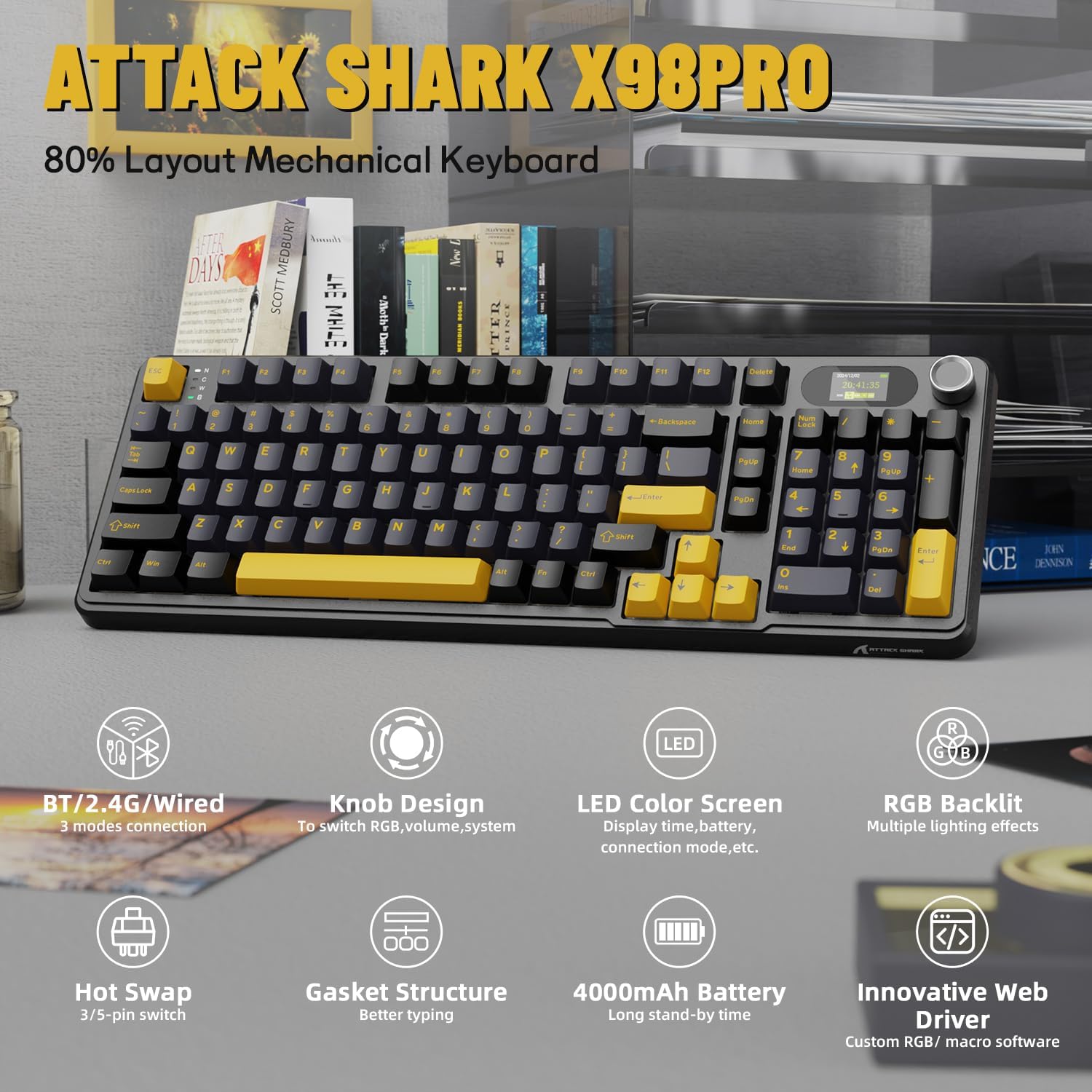
Un acabatview of the ATTACK SHARK X98PRO's main features, including its tri-mode connection, knob design, LED color screen, RGB backlighting, hot-swappable switches, gasket structure, 4000mAh battery, and innovative web conductor.
Presentació oficial del vídeo del producteasing the ATTACK SHARK X98PRO 98-key mechanical keyboard, highlighting its design and TFT display capabilities.
Configuració
Contingut del paquet
Abans de començar, assegureu-vos que tots els elements estiguin presents al paquet:
- ATTACK SHARK X98PRO Keyboard
- Cable trenat USB-C a USB-A
Càrrega inicial
For optimal performance, fully charge the keyboard before its first use. Connect the provided USB-C cable to the keyboard's USB-C port and the other end to a powered USB-A port on your computer or a wall adapter. The 4000mAh battery ensures extended usage.
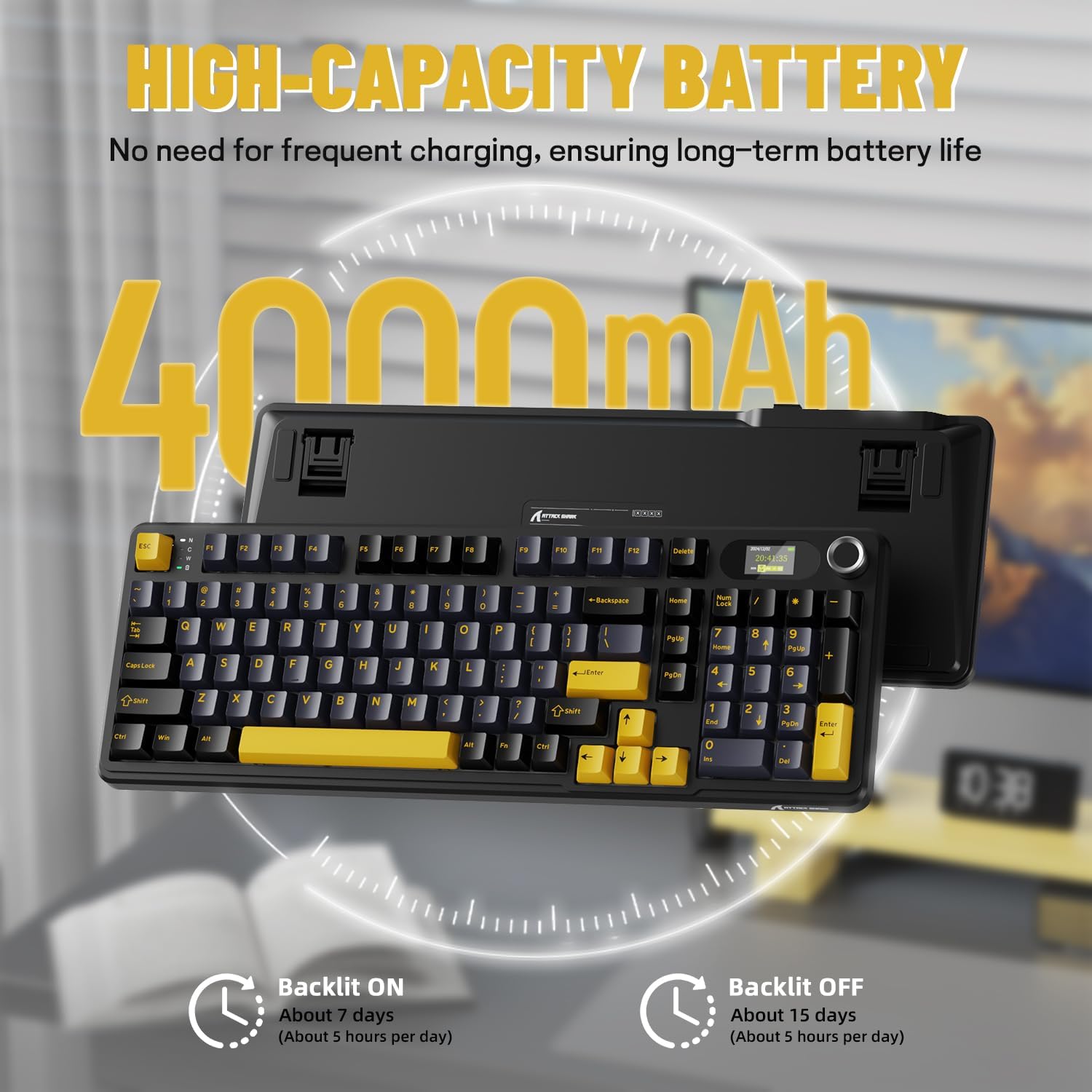
Details on the keyboard's high-capacity 4000mAh battery, indicating approximately 7 days of use with backlight on (5 hours/day) and 15 days with backlight off (5 hours/day).
Opcions de connectivitat
The X98PRO keyboard offers three connection modes:
- Mode amb cable USB-C: Connect the keyboard directly to your device using the provided USB-C cable. This mode offers the most stable connection and charges the keyboard simultaneously.
- Mode sense fil 2.4G: Insert the 2.4G USB dongle (usually found in a compartment on the keyboard) into your device's USB port. The keyboard will automatically connect.
- Mode Bluetooth 5.0: Enable Bluetooth on your device and put the keyboard into Bluetooth pairing mode (refer to operating instructions for specific key combinations). Select the keyboard from your device's Bluetooth list to connect. The keyboard can store up to three Bluetooth connections.

The keyboard supports tri-mode connection: USB-C wired, 2.4GHz wireless, and Bluetooth 5.0, allowing connection to multiple devices like PCs, laptops, and tablets.
Official product video demonstrating the ATTACK SHARK X98PRO Wireless Keyboard in use, highlighting its wireless capabilities.
Instruccions de funcionament
Multi-Function Knob and TFT Screen
The CNC metal knob provides intuitive control over various keyboard functions. Rotate the knob to adjust settings such as light intensity, light speed, and light color. Press the knob to confirm selections or switch between different menu options on the TFT screen.
The 1.14-inch TFT smart screen displays essential information including the current time, battery level, connection mode, and system status. It can also be customized to show personalized GIFs or animations.
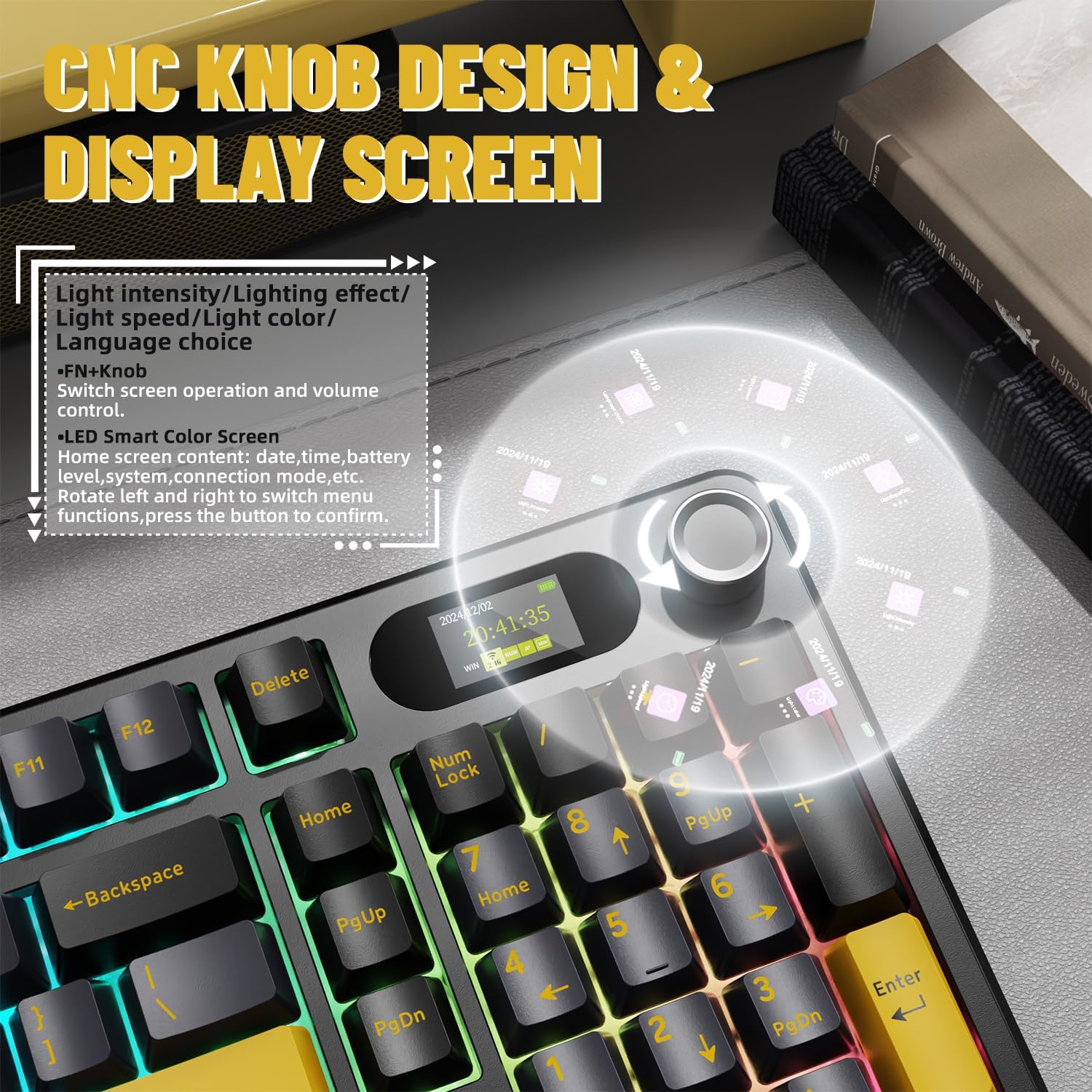
Detallada view of the CNC knob and TFT display, explaining how to navigate menus, adjust light settings, and control volume. The screen can show time, battery, and connection mode.
Control de retroil·luminació RGB
The keyboard features full RGB backlighting with over 16 million colors and various dynamic effects. You can switch light effects, change light colors, and adjust backlight brightness and speed directly from the keyboard using key combinations, typically involving the Fn key and other designated keys.

The keyboard supports music rhythm synchronization and allows customization of various lighting effects through its driver. Key combinations for switching light effects, color, brightness, and speed are also shown.
Personalització
Interruptors intercanviables en calent
The X98PRO keyboard is equipped with a hot-swappable PCB, allowing you to easily change mechanical switches without soldering. It supports both 3-pin and 5-pin switches, providing flexibility to customize your typing experience with different switch types (e.g., linear, tactile, clicky).
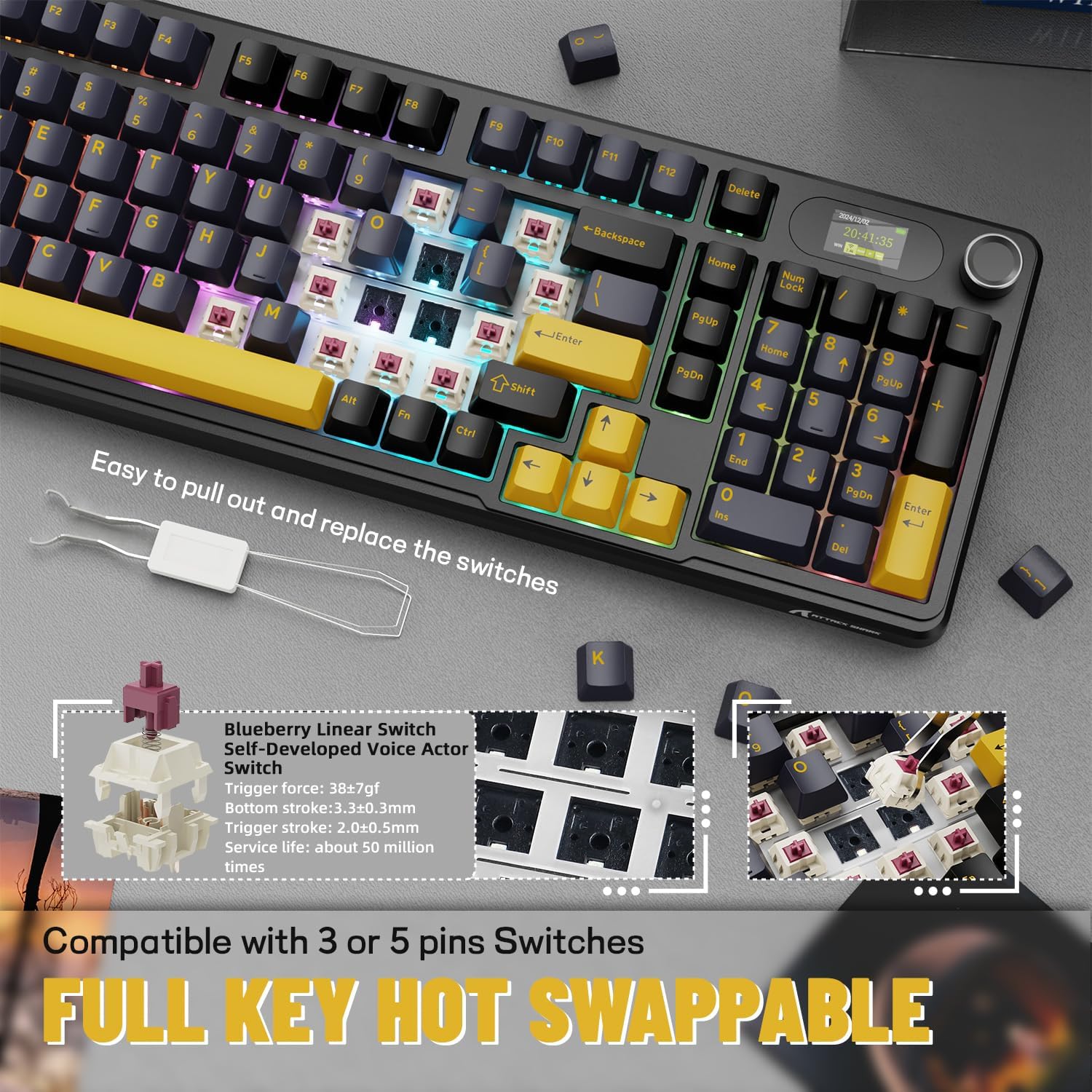
Demonstration of the hot-swappable feature, allowing users to easily replace switches. The keyboard is compatible with both 3-pin and 5-pin mechanical switches.
Web-Based Driver
The keyboard utilizes an intuitive web-based driver for advanced customization. This driver allows you to:
- Edit and upload custom GIFs to the TFT screen.
- Personalitza els efectes d'il·luminació i els colors RGB.
- Remap keys and create custom key combinations.
- Set up programmable macros for enhanced productivity or gaming.
No software installation is needed; simply access the driver through your web navegador.

La innovadora web driver allows for full programmability, customization of backlight colors and effects, creation of custom key combinations, and setting screen animations, including GIF images.
Manteniment
Proper maintenance ensures the longevity and performance of your ATTACK SHARK X98PRO keyboard.
Neteja general
- Netegeu regularment la pols del teclat amb aire comprimit per eliminar les restes que hi hagi entre les tecles.
- Netegeu les tecles i la superfície del teclat amb un drap suau i lleugerament dryamp, drap sense borrissol. Eviteu productes químics agressius o materials abrasius.
- For deeper cleaning, keycaps can be carefully removed using a keycap puller.
Atenció al canvi
As the switches are hot-swappable, ensure they are seated correctly after any replacement. Avoid excessive force when inserting or removing switches to prevent damage to the PCB or switch pins.
Cura de la bateria
- Eviteu descarregar completament la bateria amb freqüència.
- Guardeu el teclat en un lloc fresc i sec quan no el feu servir durant períodes prolongats.
- Use only the provided or a certified USB-C cable for charging.
Resolució de problemes
Problemes comuns i solucions
- Problemes de connectivitat:
- Ensure the keyboard is in the correct mode (BT, 2.4G, or Wired).
- For 2.4G, ensure the dongle is securely inserted and try a different USB port.
- For Bluetooth, ensure the keyboard is in pairing mode and your device's Bluetooth is enabled. Try re-pairing.
- Assegureu-vos que el teclat estigui carregat.
- TFT Screen Not Displaying Correctly:
- Check the keyboard's battery level.
- Accedeix al web-based driver to reconfigure or update the screen content.
- Ensure the keyboard firmware is up to date (if applicable, check manufacturer's weblloc).
- Unexpected Key Presses (Miss-clicks):
- This can sometimes occur with sensitive switches. Ensure your typing posture does not put unintended pressure on keys.
- Consider if different switch types might be more suitable for your typing style (leveraging the hot-swap feature).
- Durada de la bateria curta:
- Assegureu-vos que el teclat estigui completament carregat abans d'utilitzar-lo.
- Reduce RGB backlight brightness or turn it off when not needed to conserve battery.
- Ensure the keyboard is not constantly searching for a connection in wireless modes.
For more detailed troubleshooting or advanced issues, refer to the official ATTACK SHARK website and its web-based driver for specific diagnostic tools or firmware updates.
Especificacions
| Característica | Detall |
|---|---|
| Marca | ATACA AL TAURON |
| Model | X98PRO |
| Tecnologia de connectivitat | 2.4 GHz, Bluetooth, USB-C |
| Descripció del teclat | Mecànica |
| Nombre de claus | 98 |
| Característica especial | Customizable Display Keys (TFT Screen) |
| Font d'alimentació | Funciona amb bateria |
| Capacitat de la bateria | 4000 mAh |
| Dispositius compatibles | Portàtil, PC, tauleta |
| Pes de l'article | 2.86 lliures |
| Dimensions del paquet | 17.4 x 7.72 x 2.09 polzades |
| País d'origen | Xina |
| Data de primera disponibilitat | 19 de novembre de 2024 |
Garantia i Suport
The ATTACK SHARK X98PRO Wireless Mechanical Keyboard comes with a standard manufacturer's warranty. For specific details regarding warranty coverage, duration, and terms, please refer to the warranty card included with your product or visit the official ATTACK SHARK weblloc.
For technical support, product inquiries, or assistance with any issues not covered in this manual, please contact ATTACK SHARK customer service through their official website or designated support channels. Keep your purchase receipt or proof of purchase handy for warranty claims.
Botiga oficial de la marca: Botiga ATTACK SHARK a Amazon


