
1. Introducció
Aquest manual proporciona instruccions detallades per a l'ús, la configuració i el manteniment adequats del vostre monocular de visió nocturna digital Pard NV009-850nm. Llegiu atentament aquest manual abans d'utilitzar el dispositiu per garantir un rendiment i una longevitat òptims. Aquest dispositiu està dissenyat per a l'observació de la vida salvatge, la caça i l'ús general a l'aire lliure. viewen diverses condicions de llum.

Imatge 1.1: Monocular de visió nocturna digital Pard NV009-850nm. Aquesta imatge mostra el disseny compacte i ergonòmic del monocular, destacant el seu cos principal, la lent de l'objectiu i l'ocular.
2. Producte acabatview
2.1 Contingut del paquet
En desembalar, comproveu que hi hagi tots els elements que s'enumeren a continuació:
- Monocular de visió nocturna digital Pard NV009-850nm
- Funda protectora de transport
- Cable de càrrega USB
- Corretja de canell / Corretja de coll
- Manual d'usuari (aquest document)

Imatge 2.1: Contingut del paquet del Pard NV009-850nm. Aquesta imatge mostra el monocular, la seva funda de transport, el cable de càrrega, les corretges i el manual d'usuari, tot ben organitzat.
2.2 Característiques clau
- Funcionament diürn i nocturn: Transició perfecta entre el dia a tot color viewi mode de visió nocturna monocrom.
- Imatges d'alta resolució: Compta amb un sensor d'imatge CMOS FHD de 1920 x 1080 i una pantalla OLED de 1024 x 768 per a imatges nítides i detallades.
- Il·luminador IR ajustable: Il·luminador IR de 850 nm integrat amb tres nivells d'intensitat, que proporciona una il·luminació efectiva de fins a 200 metres.
- Enregistrament de fotos i vídeos: Captura fotos amb una resolució de 2608 x 1944 i vídeos Full HD de 1920 x 1080 directament a una targeta Micro SD.
- Zoom òptic i digital: Ofereix un augment òptic de 4.7x i un zoom digital d'1.5x a 3.0x per a una observació precisa de l'objectiu.
- Connectivitat Wi-Fi: Es connecta a dispositius mòbils intel·ligents a través de l'aplicació "PardVision" per a control remot viewi transferència de dades.
- Mode d'imatge dins d'imatge (PIP): Proporciona un augment de la imatge inserida view de la zona central per obtenir detalls millorats sense perdre el camp més ampli de view.
- Disseny durador: La classificació d'impermeabilitat IP67 garanteix la fiabilitat en diverses condicions a l'aire lliure.

Imatge 2.2: Comparació dels modes de visió diürna i nocturna. Aquesta imatge il·lustra la capacitat del monocular per proporcionar imatges a tot color durant el dia i imatges monocromes nítides a la nit, amb una guineu en ambdós escenaris.

Imatge 2.3: Nit viewil·lustració de l'abast de l'ull. Aquest gràfic demostra l'efectivitat del monocular viewdistància de fins a 200 metres (656 peus) en condicions de poca llum, mostrant un senglar com a exampl'objectiu.

Imatge 2.4: Demostració de la qualitat d'imatge millorada. Aquesta imatge compara una imatge borrosa i de menor qualitat amb una imatge nítida i millorada, i il·lustra l'eficàcia de l'algoritme de millora de la llum visual (VLEA) de PARD i la pantalla OLED.
3. Configuració
3.1 Instal·lació de la bateria
- Localitza la tapa del compartiment de la bateria, normalment a la part inferior o lateral del monocular.
- Obriu la tapa girant-la o fent-la lliscar segons l'indicador.
- Inseriu una bateria tipus 18650 completament carregada (no inclosa) amb la polaritat correcta (+/-) tal com s'indica a l'interior del compartiment.
- Tanqueu de manera segura la tapa del compartiment de la bateria.
3.2 Inserció de la targeta Micro SD
El dispositiu admet targetes Micro SD per emmagatzemar fotos i vídeos.
- Localitza la ranura per a la targeta Micro SD, que normalment està protegida per una tapa de goma.
- Introduïu suaument la targeta Micro SD a la ranura fins que encaixi al seu lloc. Assegureu-vos que la targeta estigui orientada correctament.
- Tanqueu la tapa de goma per protegir la ranura de la pols i la humitat.
3.3 Engegada inicial i ajust de l'enfocament
- Manteniu premut el botó d'engegada per encendre el dispositiu.
- Ajusteu l'anell de diòptries de l'ocular fins que el text que es mostra en pantalla (OSD) aparegui nítid i clar.
- Gireu l'anell d'enfocament de la lent de l'objectiu per enfocar nítidament la imatge observada.
4. Instruccions de funcionament
4.1 Encès/Apagat
- Encès: Premeu i manteniu premut el botó d'engegada durant aproximadament 3 segons.
- Apagar: Premeu i manteniu premut el botó d'engegada durant aproximadament 3 segons fins que el dispositiu s'apagui.
4.2 Selecció de mode (Dia/Nit)
L'NV009-850nm s'ajusta automàticament a la llum ambiental, però podeu canviar de mode manualment:
- En el principal viewA la interfície d'inici, premeu breument el botó Mode per alternar entre els modes de visió diürna (color) i nocturna (monocrom).
4.3 Ajust de l'il·luminador IR
L'il·luminador d'infrarojos integrat millora la visibilitat en la foscor completa.
- Activeu l'il·luminador d'infrarojos prement el botó dedicat (si n'hi ha) o a través del menú.
- Premeu breument el botó d'infrarojos per alternar entre els tres nivells d'intensitat (Baix, Mitjà, Alt) o per apagar-lo.

Imatge 4.1: Funcionalitat de l'il·luminador IR. Aquest gràfic il·lustra l'il·luminador IR de feix ajustable de 200 m amb els seus tres nivells d'intensitat, mostrant com il·lumina un objectiu a la foscor.
4.4 Operació de zoom
- Feu servir els botons de zoom designats (sovint '+' i '-') per ajustar l'augment digital. L'augment òptic està fixat a 4.7x.
4.5 Captura de fotos i vídeos
- Foto: In viewEn el mode d'enregistrament, premeu breument el botó Foto per capturar una imatge.
- Vídeo: Premeu breument el botó Vídeo per iniciar la gravació. Premeu-lo de nou per aturar la gravació.

Imatge 4.2: Funció d'enregistrament i reproducció de vídeo. Aquesta imatge mostra la capacitat del monocular per capturar i reproduir vídeo d'alta definició, amb una pantalla simulada que mostra una escena enregistrada d'una guineu.
4.6 Reproducció
- Entra al menú Reproducció a través del menú principal.
- Navegueu per les fotos i els vídeos gravats amb els botons direccionals.
- Selecciona un element per view ho a la pantalla OLED.
4.7 Connectivitat Wi-Fi (aplicació PardVision)
- Baixeu l'aplicació "PardVision" des de la botiga d'aplicacions del vostre dispositiu (Apple App Store o Google Play Store).
- Al monocular, activeu el Wi-Fi a través de la configuració del sistema. El dispositiu emetrà una xarxa Wi-Fi.
- Connecta el teu telèfon intel·ligent o tauleta a la xarxa Wi-Fi del monocular.
- Obre l'aplicació PardVision per a view una transmissió en directe, configuració de control i transferència files.
4.8 Mode d'imatge dins d'imatge (PIP)
- Activeu el mode PIP a través del menú ràpid o de la configuració del sistema.
- Apareixerà una finestra ampliada a la pantalla principal, mostrant una imatge ampliada view de la zona central.
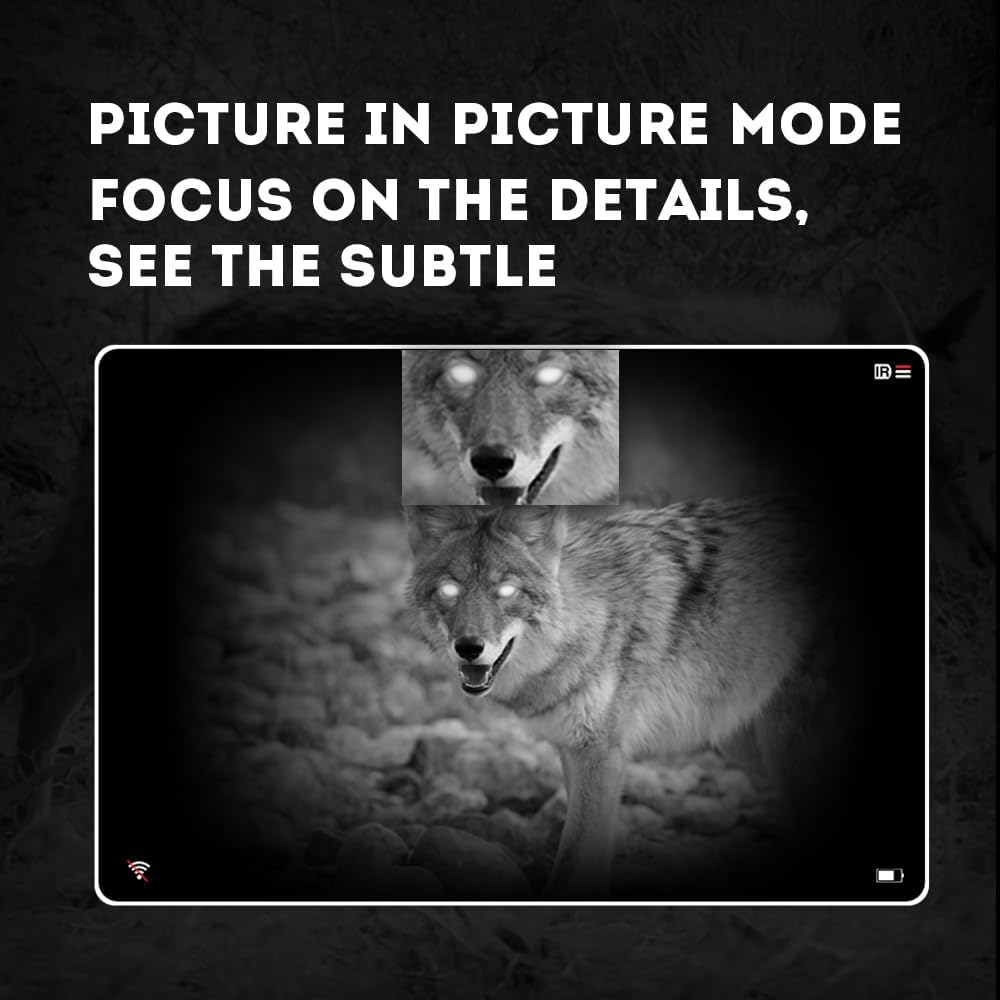
Imatge 4.3: Mode Picture-in-Picture (PIP). Aquesta imatge mostra com el mode PIP permet als usuaris centrar-se en detalls específics dins de la pantalla principal. view, mostrant un augment de la imatge inserida de la cara d'un coiot.
5. Manteniment
5.1 Neteja del dispositiu
- Lents: Feu servir un drap suau i sense borrissol dissenyat específicament per a lents òptiques. Per a taques difícils, feu servir una petita quantitat de solució netejadora de lents. Eviteu materials abrasius.
- Cos: Netegeu el cos del monocular amb un drap suauamp tela. No utilitzeu productes químics o dissolvents aggressivs.
5.2 Cura de la bateria
- Utilitzeu sempre bateries 18650 recarregables d'alta qualitat.
- Traieu la bateria si el dispositiu no s'utilitzarà durant un període prolongat.
- Guardeu les piles en un lloc fresc i sec.
5.3 Emmagatzematge
- Guardeu el monocular a la seva funda protectora quan no l'utilitzeu.
- Mantingueu el dispositiu en un lloc sec, allunyat de la llum solar directa i de temperatures extremes.
6. Solució De Problemes
Si teniu problemes amb el vostre Pard NV009-850nm, consulteu els següents problemes i solucions habituals:
| Problema | Causa possible | Solució |
|---|---|---|
| El dispositiu no s'encén | Bateria baixa o esgotada; instal·lació incorrecta de la bateria | Carregueu o substituïu la bateria; torneu a instal·lar la bateria amb la polaritat correcta. |
| La imatge és borrosa | Ajust d'enfocament incorrecte; Lent bruta | Ajusteu els anells d'enfocament de la diòptria i de la lent de l'objectiu; Netegeu les lents. |
| Sense imatge en mode nocturn | L'il·luminador d'infrarojos està apagat o massa baix | Engegueu l'il·luminador d'infrarojos i ajusteu-ne la intensitat. |
| Problemes de connexió Wi-Fi | Wi-Fi no activat al dispositiu; configuració de l'aplicació incorrecta | Assegureu-vos que el Wi-Fi estigui activat al monocular; comproveu els permisos i la configuració de l'aplicació. |
| No es poden gravar fotos/vídeos | No hi ha targeta Micro SD; la targeta SD està plena o està malmesa | Inseriu una targeta Micro SD; Suprimiu l'antiga fileo formateu la targeta (feu una còpia de seguretat de les dades importants primer). |
Si el problema persisteix després d'intentar aquestes solucions, poseu-vos en contacte amb el servei d'atenció al client de Pard.
7. Especificacions
| Característica | Detall |
|---|---|
| Marca | Pard |
| Nom del model | Monocular de visió nocturna PARD |
| Número de model | NV009-850nm |
| Color | Negre |
| Dimensions del producte (LxWxH) | 7.16" x 2.24" x 2.79" (18.19 cm x 5.69 cm x 7.09 cm) |
| Pes de l'article | 340 grams |
| Material | Alumini |
| Diàmetre de la lent objectiu | 25 mil·límetres |
| Alleujament ocular | 25 mil·límetres |
| Capacitat de visió nocturna | Sí |
| Longitud d'ona de l'il·luminador IR | 850 nm (amb l'opció de 940 nm disponible en altres variants) |
| Resolució del sensor CMOS | 1920 x 1080 píxels |
| Pantalla de visualització | OLED de 1024 x 768 |
| Ampliació òptica | 4.7x |
| Zoom digital | 1.5x-3.0x |
| Resolució fotogràfica | 2608 x 1944 píxels |
| Resolució de vídeo | 1920 x 1080 píxels |
| Classificació impermeable | IP67 |
| Dispositius compatibles | Càmera (per gravar) |
| Tipus de muntatge | Muntatge de carril (si escau per a accessoris) |
8. Garantia i Suport
8.1 Informació de la garantia
El monocular de visió nocturna digital Pard NV009-850nm inclou un... 1 any de garantia des de la data de compra. Aquesta garantia cobreix els defectes de fabricació i els mals funcionaments en condicions d'ús normal. No cobreix els danys causats per un mal ús, accidents, modificacions no autoritzades o un manteniment inadequat.
Conserveu el vostre comprovant de compra per a reclamacions de garantia.
8.2 Atenció al client
Per a assistència tècnica, reclamacions de garantia o qualsevol pregunta sobre el vostre dispositiu, poseu-vos en contacte amb el servei d'atenció al client de Pard a través del lloc web oficial de Pard. weblloc web o al vostre distribuïdor. Quan us poseu en contacte amb el servei d'assistència, tingueu a mà el número de model (NV009-850nm) i la data de compra.