1. Introducció
This manual provides comprehensive instructions for the safe and effective use of your iBstone K21 Rechargeable Hearing Aids. Please read this manual thoroughly before using the device and retain it for future reference. The iBstone K21 is designed to provide an enhanced hearing experience for individuals with mild to significant hearing loss.
2. Contingut del paquet
Verifiqueu que tots els elements que s'enumeren a continuació s'inclouen al vostre paquet:
- iBstone K21 Hearing Aids (1 pair)
- Estoig de càrrega portàtil
- Ear Tips (18 pieces in various shapes and sizes)
- Adaptador d'alimentació
- Cable de càrrega
- Eina de neteja
- Manual d'usuari (aquest document)
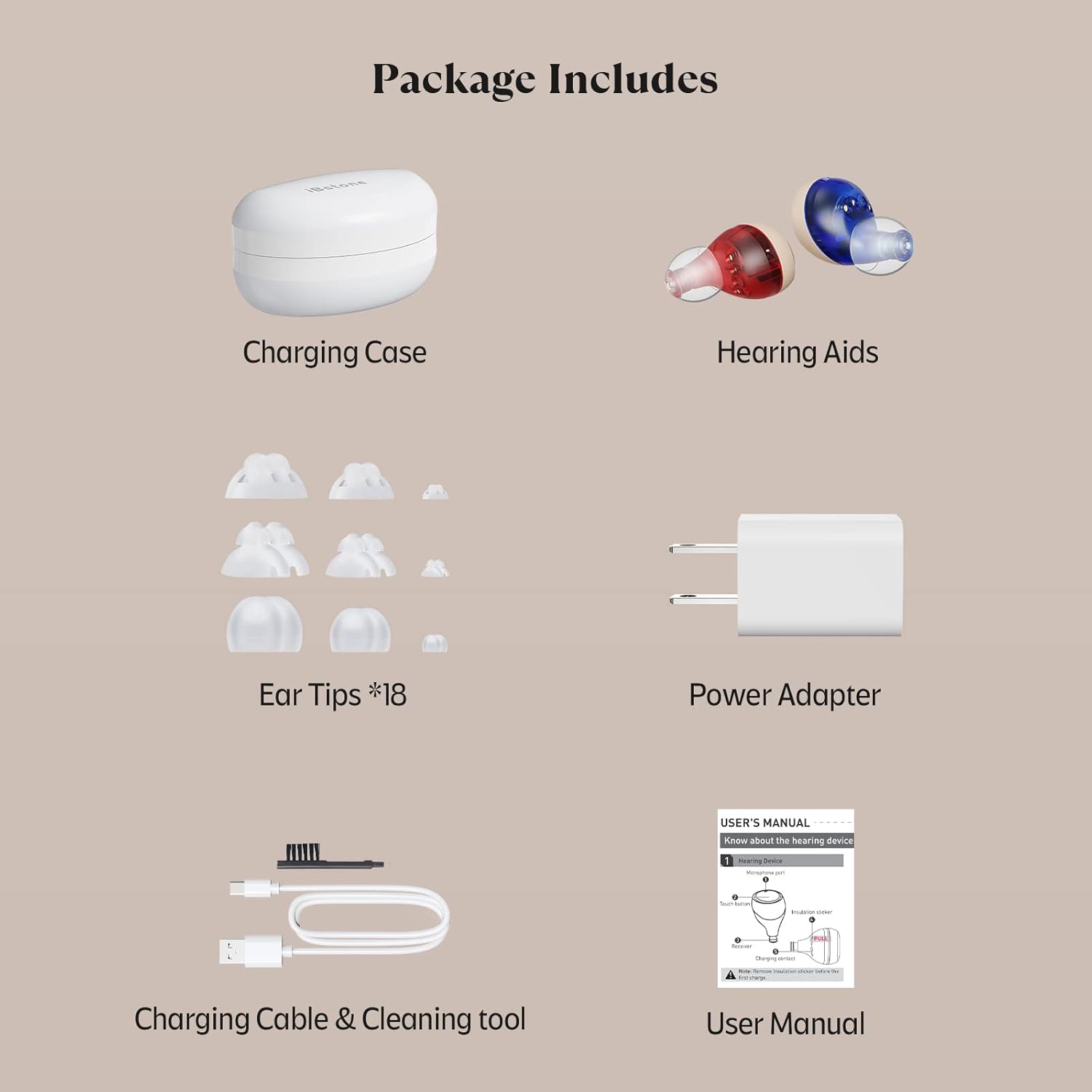
Imatge 2.1: All items included in the iBstone K21 hearing aid package, featuring the charging case, a pair of hearing aids, various ear tips, power adapter, charging cable, cleaning tool, and the user manual.
3. Producte acabatview
The iBstone K21 hearing aids are designed with advanced features for an optimal hearing experience:
- US-made Digital Core: Provides clear sound and smart noise reduction.
- Smart-touch Control: For easy adjustment of volume and programs.
- Recarregable: Offers extended use with a portable charging case.
- 4 Hearing Programs: Adaptable to various listening environments.
- Comfortable CIC Design: Discreet and comfortable fit with multiple dome options.

Imatge 3.1: Visual representation of the iBstone K21's key features, including its US-made digital core, smart-touch control, rechargeable capability, and comfortable design.
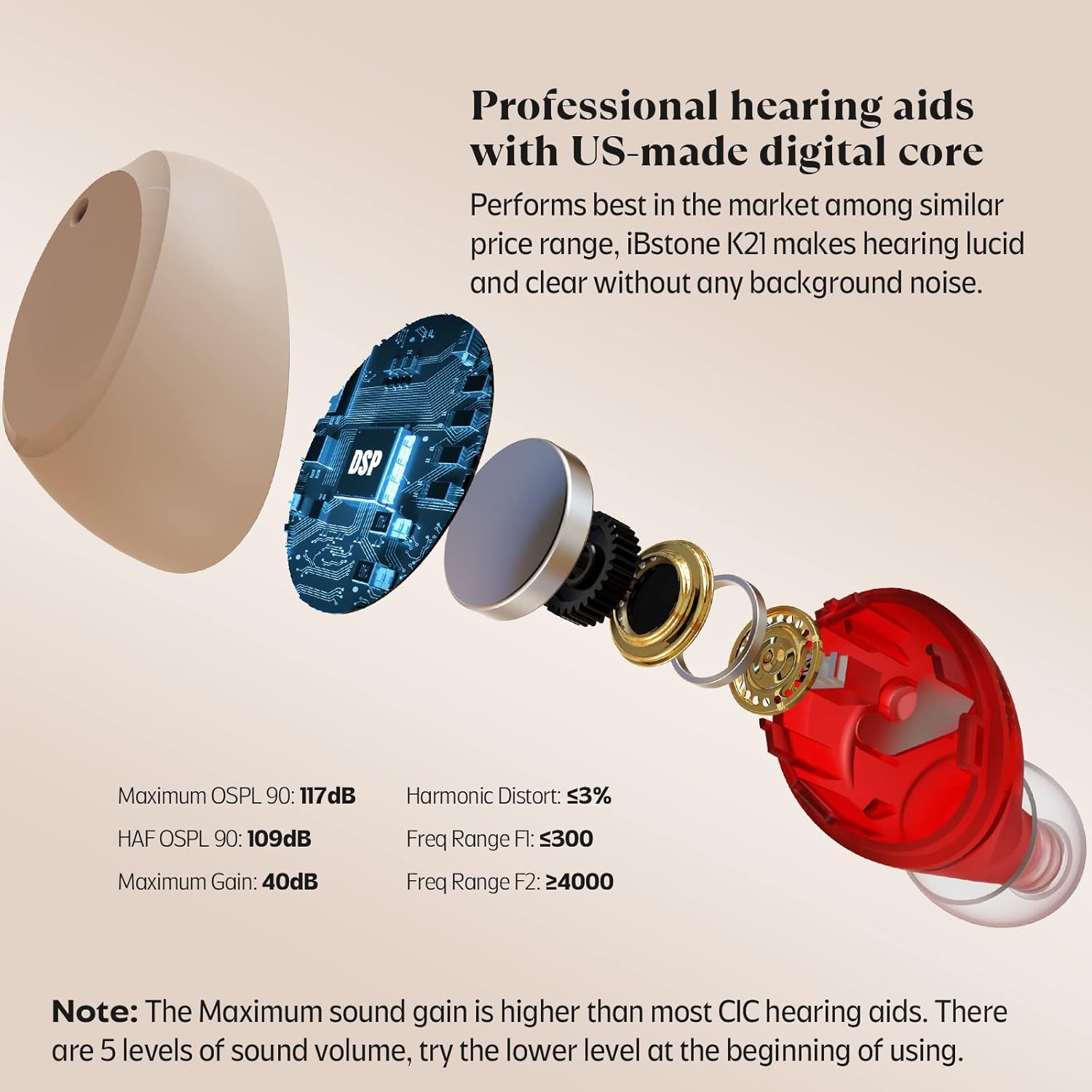
Imatge 3.2: Un va explotar view of the iBstone K21 hearing aid, highlighting its internal components and technical performance specifications such as maximum OSPL, HAF OSPL, maximum gain, harmonic distortion, and frequency range.
4. Configuració
4.1 Càrrega inicial
Before first use, ensure the hearing aids and charging case are fully charged. Remove any insulation stickers from the hearing aids if present.
- Place the hearing aids into their respective slots in the charging case.
- Connect the charging cable to the charging case and plug the power adapter into a wall outlet.
- The charging case indicator will show a blinking blue light while charging and a stable green light when fully charged. The hearing aid indicators will blink green while charging and show a stable green light when fully charged.
- A full charge takes approximately 2-3 hours for both devices and the charging case.

Imatge 4.1: Illustration of the iBstone K21 charging process, showing the charging case connected to power, indicator lights for charging status, and details on charging time and battery life.
4.2 Selecting and Fitting Ear Domes
The iBstone K21 comes with 18 ear tips (domes) in three shapes (Open, Magic, Round) and various sizes to ensure a comfortable and effective fit. Choose the dome that fits snugly in your ear canal without causing discomfort.
- Open Domes: Most comfortable, designed to eliminate the occlusion effect.
- Magic Domes: More comfortable and effective at reducing whistling.
- Round Domes: Effectively reduce feedback and whistling.
Gently attach the selected dome to the hearing aid. Insert the hearing aid into your ear canal until it feels secure and comfortable. The device is a Completely-in-Canal (CIC) type, designed to be discreet.

Imatge 4.2: Guide to selecting the correct ear dome for the iBstone K21, showing different dome types (Open, Magic, Round) and sizes, along with an illustration of a hearing aid properly fitted in an ear.
5. Funcionament
5.1 Encès/Apagat
- Automàtic: The hearing aids automatically turn ON when removed from the charging case and turn OFF when placed back into the charging case.
- manual: To manually turn ON/OFF without using the case, press and hold the touch button on the hearing aid for 5 seconds.
A power-on delay is incorporated to prevent whistling when inserting the hearing aid into your ear.
5.2 Ajust de volum
The iBstone K21 features 5 levels of sound volume. It is recommended to start with a lower level when first using the device.
- Quick-click: Briefly touch the button on the hearing aid to adjust the sound volume. Each quick-click will cycle through the volume levels.
5.3 Selecció de programes
The iBstone K21 offers 4 distinct programs optimized for different listening environments. The hearing aids will retain the last program setting you used.
- 2-second Press: Press and hold the touch button on the hearing aid for 2 seconds to switch between programs. You will hear a beep sound indication for each program change.
| Indicació de bip | Nom del programa | Descripció |
|---|---|---|
| 1 bip | Tot al voltant | General listening environment. |
| 2 bips | Restaurant | Optimized for noisy environments with multiple speakers. |
| 3 bips | Trànsit | Reduces background traffic noise for clearer speech. |
| 4 bips | A l'aire lliure | Adjusts for open-air environments, minimizing wind noise. |

Imatge 5.1: Visual guide to the smart touch controls on the iBstone K21 hearing aids, detailing actions for volume adjustment, mode switching, and manual power on/off.

Imatge 5.2: Illustration of the four distinct hearing programs available on the iBstone K21, showing how to switch between "All around," "Restaurant," "Traffic," and "Outdoor" settings.
6. Manteniment
6.1 Cleaning Your Hearing Aids
Regular cleaning is essential to maintain the performance and longevity of your iBstone K21 hearing aids.
- Use the provided cleaning tool to gently remove any earwax or debris from the ear domes and sound outlet.
- Wipe the surface of the hearing aids with a soft, dry cloth. Do not use water or cleaning solutions directly on the devices.
- Ensure the charging contacts on both the hearing aids and the charging case are clean and free of obstruction.
- Store the hearing aids in their charging case when not in use to protect them from dust and damage.
6.2 Emmagatzematge
When not in use, store the hearing aids in their charging case in a cool, dry place away from direct sunlight and extreme temperatures.
7. Solució De Problemes
If you encounter issues with your iBstone K21 hearing aids, refer to the following common problems and solutions:
| Problema | Causa possible | Solució |
|---|---|---|
| Sense so o so dèbil | Low battery; Earwax blockage; Incorrect volume setting; Hearing aid not turned on. | Charge the hearing aids; Clean the ear dome and sound outlet; Increase volume; Ensure device is powered on. |
| Xiulets o comentaris | Improper fit; Earwax blockage; Volume too high. | Re-insert the hearing aid for a snug fit; Try a different size/type of ear dome; Clean ear canal/hearing aid; Reduce volume. |
| Els audiòfons no es carreguen | Charging cable/adapter issue; Poor contact with charging pins; Insulation sticker not removed. | Check cable/adapter connection; Clean charging contacts; Ensure insulation sticker is removed before first charge. |
| El so està distorsionat o poc clar | Earwax blockage; Low battery; Environmental interference. | Clean the hearing aid; Charge the hearing aids; Move to a quieter environment or change program. |
8. Especificacions
| Característica | Detall |
|---|---|
| Model | K21 |
| Tipus | Completely-in-Canal (CIC) |
| Dimensions (aprox.) | 0.3" x 0.5" x 0.8" (per hearing aid) |
| Pes (aprox.) | 1.8g (per hearing aid) |
| Maximum OSPL 90 | 117 dB |
| HAF OSPL 90 | 109 dB |
| Guany màxim | 40 dB |
| Distorsió harmònica | ≤3% |
| Frequency Range F1 | ≤300 |
| Frequency Range F2 | ≥4000 |
| Temps de càrrega | 2-3 hours (for devices and case) |
| Temps d'ús | Over 20 hours per charge |
| Charging Case Backup Power | Approx. 100 hours (4 full charges for devices) |
| Tipus de bateria | Rechargeable (1 A battery included per device) |
9. Garantia i Suport
iBstone is committed to providing high-quality products and excellent customer service. For warranty information, technical support, or any inquiries regarding your iBstone K21 hearing aids, please refer to the contact information provided with your purchase or visit the official iBstone weblloc.
Client reviews indicate that iBstone offers responsive and helpful customer support for product assistance and replacements.


