1. Introducció
This manual provides detailed instructions for the setup, operation, and maintenance of your ECHTPower Wireless Switch Controller. Please read this manual thoroughly before using the product to ensure proper functionality and to maximize your gaming experience. This controller is designed for use with Nintendo Switch, PC, iOS, and Android devices.

Image 1.1: ECHTPower Wireless Switch Controller in purple. This image displays the front view of the controller, highlighting its ergonomic design and button layout.
2. Producte acabatview
2.1 Contingut del paquet
- ECHTPower Wireless Switch Controller
- Cable de càrrega USB-C
- Manual d'usuari (aquest document)
2.2 Disseny del controlador
Familiarize yourself with the buttons and features of your controller:

Imatge 2.1: Frontal view of the ECHTPower Wireless Switch Controller. This image shows the left and right analog sticks, D-pad, A/B/X/Y buttons, Home button, Capture button, Plus/Minus buttons, and shoulder buttons.
- Stick analògic esquerre: For movement and camera control. Features Hall Effect technology for precision.
- Stick analògic dret: For camera control and aiming. Features Hall Effect technology for precision.
- D-Pad: Entrada direccional.
- Botons A/B/X/Y: Botons d'acció.
- Botons E/D: Botons a l'espatlla.
- ZL/ZR Triggers: Disparadors analògics.
- Botó HOME: Torna a la pantalla d'inici del sistema.
- CAPTURE Button: Takes screenshots or records video clips.
- Botons +/-: Start/Select functions.
- Botó M: Macro/Customization button (refer to advanced settings for programming).
- Indicadors LED: Player number and charging status.

Imatge 2.2: Primer pla view of the Hall Effect joystick. This image highlights the advanced sensor technology used in the analog sticks for enhanced durability and drift-free performance.
The controller features Hall Effect joysticks, which utilize electromagnetic induction for precise, drift-free control and extended lifespan compared to traditional potentiometers.
3. Configuració i connexió
3.1 Càrrega del controlador
Before first use, fully charge the controller. Connect the supplied USB-C cable to the controller's charging port and the other end to a USB power source (e.g., console, PC, USB wall adapter). The LED indicators will show charging status and turn off when fully charged.
3.2 Connexió a la Nintendo Switch
- Al menú INICI, seleccioneu "Controlants" > "Canvia l'empunyadura/l'ordre".
- On the next screen, press and hold the SYNC button on the top of the ECHTPower controller for a few seconds until the player LEDs begin to flash.
- Un cop aparellats, els LED del reproductor corresponents al número del controlador es mantindran encès.
Note: The SYNC button is usually a small, recessed button on the top edge of the controller.
3.3 Connexió a l'ordinador (Windows)
The controller supports both wired and wireless connections to PC.
3.3.1 Connexió per cable
- Connect the controller to your PC using the USB-C cable.
- L'ordinador hauria de detectar i instal·lar automàticament els controladors necessaris.
- The controller will be recognized as an XInput device.
3.3.2 Connexió sense fil (Bluetooth)
- Assegureu-vos que el vostre ordinador tingui el Bluetooth habilitat.
- Go to "Settings" > "Devices" > "Bluetooth & other devices" and select "Add Bluetooth or other device".
- Choose "Bluetooth".
- Press and hold the SYNC button on the controller until the LEDs flash rapidly.
- Select the "Pro Controller" or similar device name from the list on your PC.
- Once paired, the controller LEDs will stop flashing and remain lit.
3.4 Connecting to iOS/Android Devices

Image 3.1: The ECHTPower Wireless Switch Controller shown alongside various devices, including a tablet, smartphone, and laptop, illustrating its multi-device compatibility.
- Activeu el Bluetooth al vostre dispositiu iOS o Android.
- Go to Bluetooth settings and search for new devices.
- Press and hold the SYNC button on the controller until the LEDs flash rapidly.
- Select the "Pro Controller" or similar device name from the list on your mobile device.
- Once paired, the controller LEDs will stop flashing and remain lit.
Compatibility may vary with specific games and applications on mobile platforms.
4. Instruccions de funcionament
4.1 Controls bàsics
The controller functions similarly to standard gaming controllers. Refer to the in-game instructions for specific button mappings.
- Manets analògics: Used for movement, camera control, and menu navigation.
- D-Pad: Used for directional input, often for menu navigation or specific game actions.
- Botons A/B/X/Y: Primary action buttons, typically for jumping, attacking, interacting, etc.
- Botons E/D/ZL/ZR: Used for various in-game actions such as aiming, shooting, or special abilities.
- Botó HOME: Returns to the console's home screen or main menu.
- CAPTURE Button: Captures screenshots or video clips (Nintendo Switch specific).
- Botons +/-: Often used for pausing games, opening menus, or selecting options.
4.2 Advanced Features (Hall Effect Joysticks)
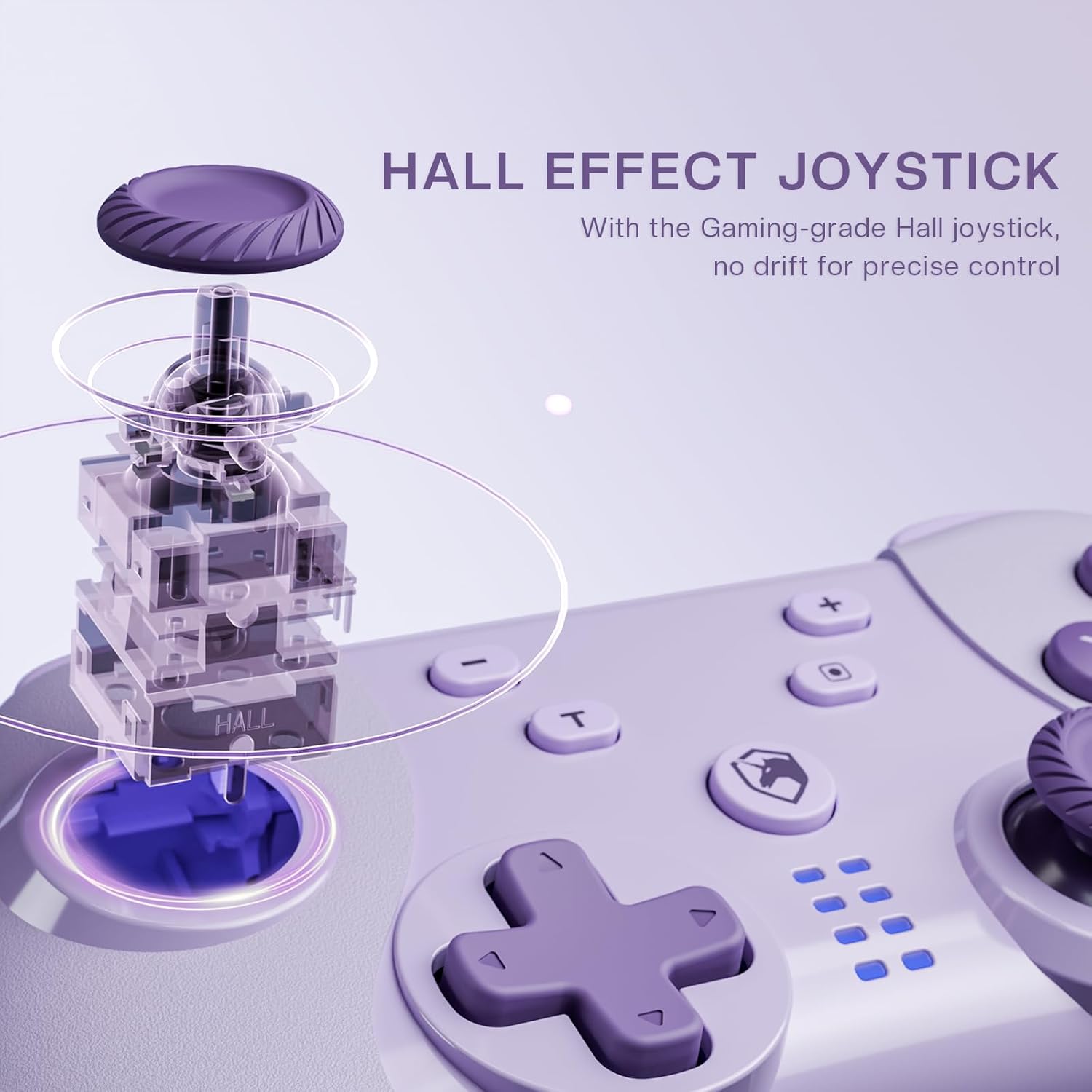
Image 4.1: Diagram illustrating the internal mechanism of a Hall Effect joystick. This image demonstrates how magnetic fields are used for position detection, contributing to drift-free and precise control.
The Hall Effect joysticks provide enhanced precision and durability. This technology uses magnetic fields instead of physical contact, virtually eliminating stick drift and extending the lifespan of the joysticks. No special operation is required; simply enjoy the improved responsiveness and accuracy.
4.3 Macro Function (M Button)
The 'M' button can be programmed for macro functions. Refer to the ECHTPower official website or advanced user guides for detailed instructions on how to program and utilize macro functions for specific gaming scenarios.
5. Manteniment
- Neteja: Feu servir un drap suau i sec per netejar el controlador. No utilitzeu productes químics agressius ni materials abrasius.
- Emmagatzematge: Guardeu el controlador en un lloc fresc i sec, allunyat de la llum solar directa i de temperatures extremes.
- Cura de la bateria: Per allargar la durada de la bateria, eviteu descarregar completament el controlador amb freqüència. Carregueu-lo regularment, fins i tot si no l'utilitzeu durant períodes prolongats.
- Eviteu les gotes: Protegiu el controlador de caigudes i impactes, que poden danyar els components interns.
6. Solució De Problemes
| Problema | Causa possible | Solució |
|---|---|---|
| El controlador no s'encén. | Bateria baixa. | Charge the controller using the USB-C cable. |
| No es pot connectar al dispositiu. | Not in pairing mode; Bluetooth interference; device's Bluetooth off. | Ensure controller is in pairing mode (flashing LEDs). Check device's Bluetooth settings. Try restarting both controller and device. |
| Input lag or disconnection. | Distance from device; low battery; wireless interference. | Move closer to the device. Charge the controller. Reduce other wireless devices nearby. |
| Joystick drift. | Rare with Hall Effect, but possible calibration issue or extreme wear. | Try recalibrating the joysticks through your device's settings (e.g., Nintendo Switch system settings). If issue persists, contact support. |
7. Especificacions
- Model: Controlador de commutació sense fil
- Connectivitat: Bluetooth Wireless, USB-C Wired
- Compatibilitat: Nintendo Switch, PC (Windows), iOS, Android
- Joystick Technology: Efecte Hall
- Font d'alimentació: Bateria recarregable incorporada
- Port de càrrega: USB-C
- ASIN: B0DNN1BP4F
8. Garantia i Suport
ECHTPower products come with a standard manufacturer's warranty. For specific warranty terms and conditions, please refer to the warranty card included with your product or visit the official ECHTPower weblloc.
If you encounter any issues or have questions not covered in this manual, please contact ECHTPower customer support:
- Weblloc: ECHTPower Official Store on Amazon
- Correu electrònic: Consulteu l'embalatge del producte o la informació oficial weblloc web per al correu electrònic de contacte.


