1. Introducció
This manual provides instructions for the safe and effective use of your iJoy Disney Stitch Disco Party Bluetooth Over-Ear Headphones. Please read this manual thoroughly before operating the device and retain it for future reference.

Imatge 1.1: Frontal view of the iJoy Disney Stitch Disco Party Bluetooth Over-Ear Headphones.
2. Contingut del paquet
Verifiqueu que tots els elements siguin presents al paquet:
- iJoy Disney Stitch Disco Party Bluetooth Over-Ear Headphones
- Cable de càrrega USB
- Cable d'àudio auxiliar
- Funda protectora de transport
- Manual d'usuari
3. Producte acabatview
Familiarize yourself with the headphone components and controls.
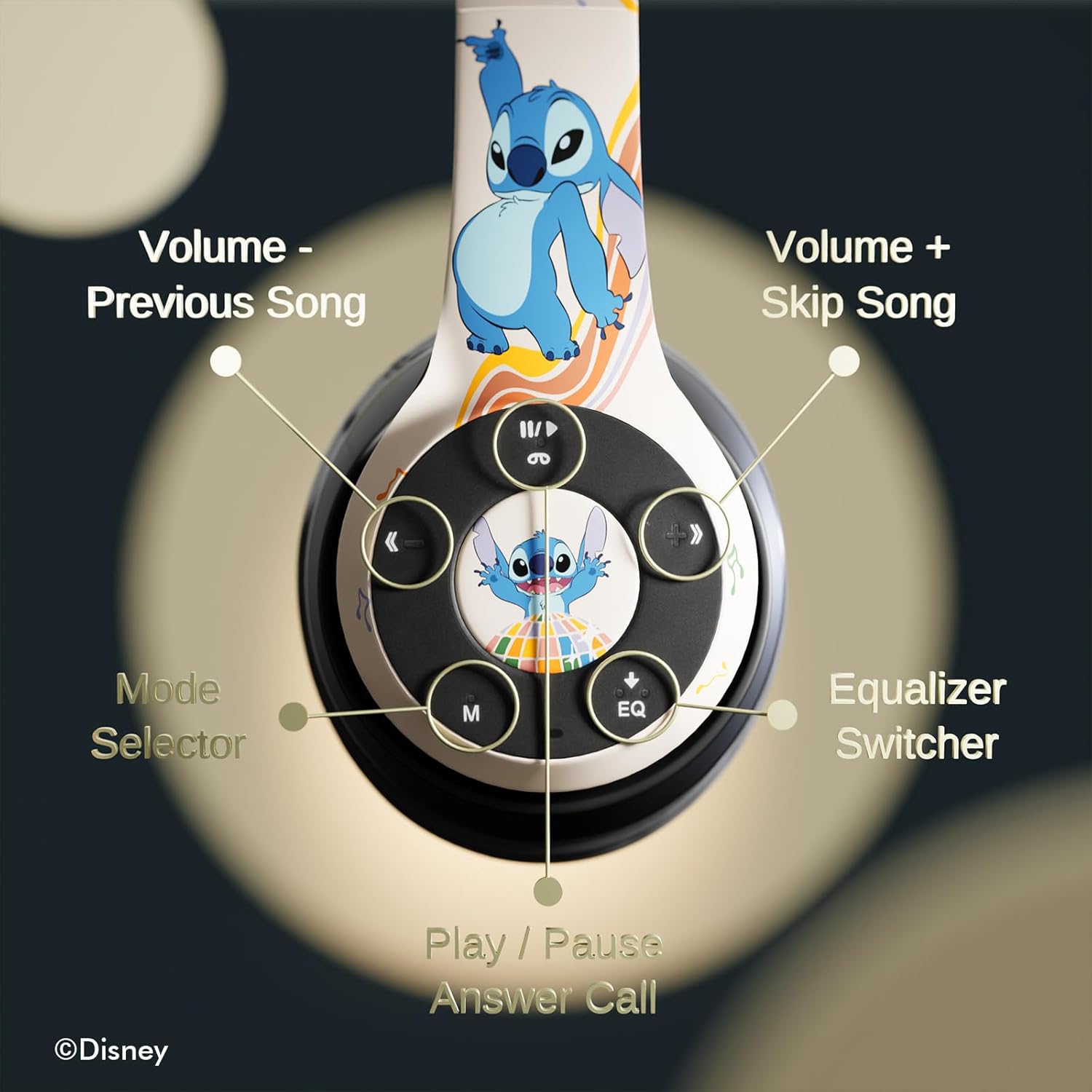
Imatge 3.1: Detallada view of the control buttons on the right earcup.
Funcions de control:
- Volum - / Cançó anterior: Premeu curt per baixar el volum, premeu llargament per anar a la pista anterior.
- Volume + / Skip Song: Premeu curt per pujar el volum, premeu llargament per passar a la següent pista.
- Play / Pause / Answer Call: Short press to play/pause music or answer/end a call. Long press to reject a call.
- Mode Selector (M): Press to switch between Bluetooth, Micro SD, and FM Radio modes.
- Equalizer Switcher (EQ): Press to cycle through available equalizer presets.
- Indicador LED: Displays power, charging, and Bluetooth connection status.
- Micròfon integrat: Per a trucades amb mans lliures.
- Ranura per a targetes Micro SD: For direct audio playback from a Micro SD card.
4. Configuració
4.1. Càrrega dels auriculars
Before initial use, fully charge the headphones. Connect the supplied USB charging cable to the charging port on the headphones and to a USB power source (e.g., computer USB port, wall adapter). The LED indicator will illuminate during charging and change color or turn off when charging is complete. A full charge provides approximately 15 hours of playtime.

Image 4.1: The headphones offer up to 15 hours of audio playback on a single charge.
4.2. Emparellament Bluetooth
- Assegureu-vos que els auriculars estiguin carregats i apagats.
- Premeu i manteniu premut el botó d'engegada fins que l'indicador LED parpellegi, cosa que indica el mode d'emparellament.
- Al dispositiu (telèfon intel·ligent, tauleta, etc.), activeu el Bluetooth i cerqueu els dispositius disponibles.
- Select "iJoy Stitch Headphones" from the list of found devices.
- Un cop connectat, l'indicador LED deixarà de parpellejar i romandrà fix.

Image 4.2: The headphones are compatible with various Bluetooth-enabled devices.
4.3. Micro SD Card Usage
Insert a Micro SD card (not included) into the Micro SD card slot on the headphones. The headphones will automatically switch to Micro SD mode and begin playing audio files from the card. Use the Mode button to switch to this mode if already in another mode.
5. Instruccions de funcionament
5.1. Encendre/apagar
- Encès: Press and hold the Power button until the LED indicator illuminates.
- Apagar: Premeu i manteniu premut el botó d'engegada fins que l'indicador LED s'apagui.
5.2. Reproducció de música
- Reproduir/pausa: Premeu el botó Reproduir/Pausa.
- Pista següent: Premeu llargament el botó Volum +.
- Pista anterior: Premeu llargament el botó de volum -.
- Pujar el volum: Premeu breument el botó Volum +.
- Baixar el volum: Premeu breument el botó de volum -.
5.3. Gestió de trucades
- Respondre/Finalitzar la trucada: Premeu el botó Reproduir/Pausa.
- Rebutja la trucada: Premeu llargament el botó Reproduir/Pausa.
5.4. Funció de ràdio FM
In FM Radio mode (selected via the Mode button), the headphones can scan and play FM radio stations. Use the Volume +/- buttons to change stations or adjust volume.
5.5. Equalizer Function
Press the EQ button to cycle through different audio equalizer presets, adjusting the sound profile a la teva preferència.
6. Manteniment
6.1. Neteja
Wipe the headphones with a soft, dry cloth. Do not use abrasive cleaners or solvents. Avoid exposing the headphones to excessive moisture.
6.2. Emmagatzematge
When not in use, store the headphones in the provided protective carrying case. The foldable design allows for compact storage, protecting them from damage.
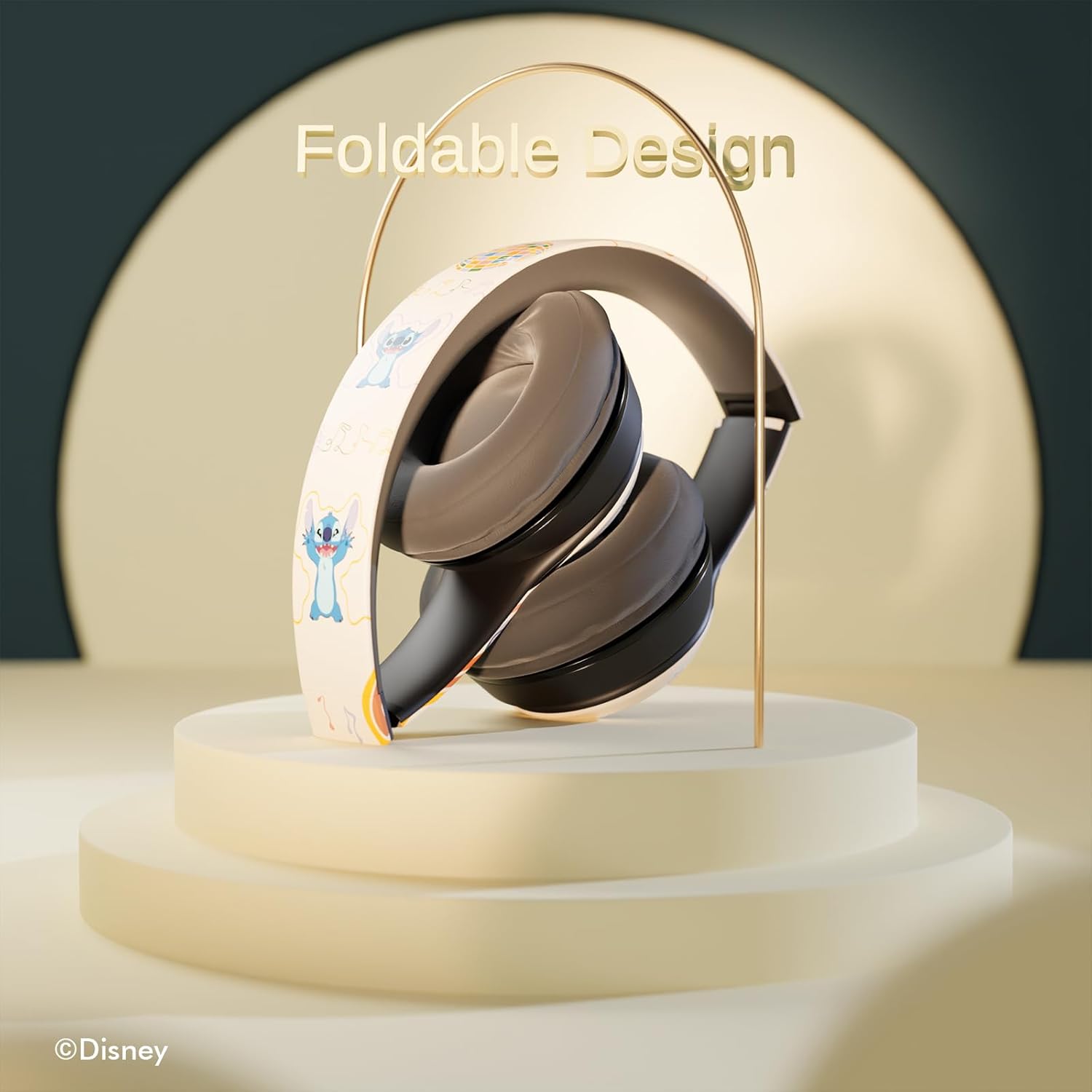
Image 6.1: The headphones feature a foldable design for easy storage and portability.
7. Solució De Problemes
Si teniu problemes amb els auriculars, consulteu els problemes i solucions més comuns següents:
- Sense energia: Assegureu-vos que els auriculars estiguin completament carregats. Connecteu-los a una font d'alimentació i comproveu l'indicador LED.
- No es pot emparellar per Bluetooth:
- Assegureu-vos que els auriculars estiguin en mode d'emparellament (el LED parpelleja).
- Verifiqueu que el Bluetooth estigui habilitat al vostre dispositiu.
- Acosta els auriculars al dispositiu.
- Turn off and on both the headphones and your device, then attempt pairing again.
- Sense so:
- Comproveu el nivell de volum tant dels auriculars com del dispositiu connectat.
- Ensure the headphones are correctly paired or the audio cable is fully inserted.
- If using a Micro SD card, ensure it contains compatible audio files i s'ha inserit correctament.
- Qualitat de so baixa:
- Apropeu-vos més al dispositiu Bluetooth per reduir les interferències.
- Assegureu-vos que no hi hagi obstacles entre els auriculars i el dispositiu.
- Prova una font d'àudio diferent o file.
8. Especificacions
| Nom del model | Disney Stitch Disco Party |
| Número de model de l'article | 810146469544 |
| Tecnologia de connectivitat | Sense fil (Bluetooth) |
| Tecnologia de comunicació sense fils | Bluetooth |
| Interval d'edat (descripció) | Adult, nen |
| Tipus de control | Control de volum, tàctil |
| Característiques especials | Built-in Radio Receiver, Foldable and Adjustable headband, Micro SD Card Plug-in, Microphone Included |
| Pes de l'article | 0.26 quilograms (9.1 unces) |
| Bateries | 1 bateria de polímer de liti (inclosa) |
| Interval de freqüència | 20 Hz - 20,000 Hz |
| Nivell de resistència a l'aigua | No resistent a l'aigua |
| Col·locació de l'orella | Sobre l'orella |
| Control de soroll | Aïllament acústic |

Image 8.1: The headphones feature sound isolation and include an auxiliary cable for wired connection.
9. Informació de seguretat
Observeu les següents pautes de seguretat per evitar danys al dispositiu o lesions personals:
- Do not expose the headphones to extreme temperatures, direct sunlight, or excessive moisture.
- Eviteu deixar caure els auriculars ni sotmetre'ls a impactes forts.
- Do not disassemble or attempt to repair the headphones yourself. This may void the warranty and cause damage.
- Adjust volume to a moderate level to prevent hearing damage. Prolonged exposure to loud sounds can cause permanent hearing loss.
- Do not use headphones while driving, cycling, or in situations where inability to hear ambient sounds could be dangerous.
10. Garantia i Suport
This product is covered by a manufacturer's warranty. For specific warranty details, please refer to the documentation included with your purchase or contact iJoy customer support. For technical assistance or inquiries, please visit the official iJoy weblloc o poseu-vos en contacte amb el seu departament d'atenció al client.


