1. Introducció
The ZTE U30 Air is a high-performance 5G portable WiFi mobile router designed to provide fast and reliable internet access on the go. Featuring intelligent dual network support, NFC one-touch connectivity, and a large 4500mAh battery, it ensures seamless connectivity for multiple devices. This manual provides essential information for setting up, operating, maintaining, and troubleshooting your device.

Figure 1.1: ZTE U30 Air 5G Portable WiFi Mobile Router
Video 1.1: ZTE U30 Air Product Overview. This video provides a brief visual introduction to the device's design and key functionalities.
2. Característiques del producte
- Connectivitat d'alta velocitat: Supports WiFi speeds up to 867Mbps with dual 5G/4G compatibility for uninterrupted internet access.
- Wide WiFi Coverage: Extends up to 100 meters, providing robust WiFi signals in open spaces.
- Simultaneous Device Support: Connects up to 10 WiFi-enabled devices simultaneously, ideal for group usage.
- Dual-Mode 5G Networks: Supports SA+NSA networks and Sub-6GHz frequency bands for superior speed and coverage.
- Advanced Antenna Design: Features 7 antennas with 4x MIMO technology, enhancing signal strength and channel capacity.
- Durada de la bateria ampliada: Proporciona fins a 10 hores d'ús continu amb una sola càrrega.
- NFC Instant Pairing: Enables Android devices to connect to WiFi networks with a simple tap, without entering a password.
- USB 3.0 Type-C Connectivity: Ensures fast and stable wired internet connections for laptops and other devices.
- Enhanced Network Stability: AI network scheduling algorithm ensures stable connections even in poor network environments.

Figure 2.1: Illustrates the 4500mAh battery capacity of the ZTE U30 Air.
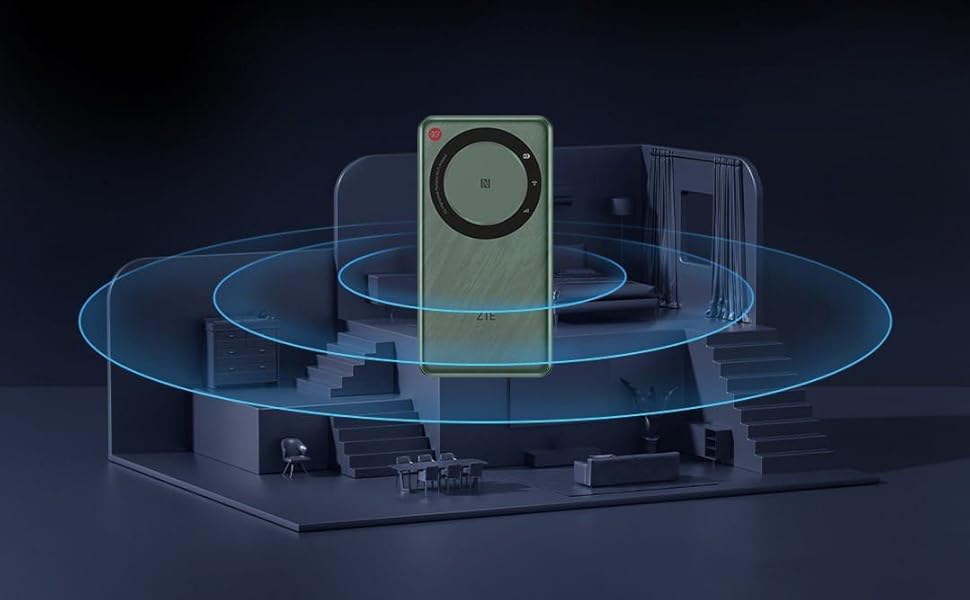
Figure 2.2: Depicts the wide WiFi coverage provided by the device within a typical living space.
3. Guia de configuració
3.1 Desembalatge i inspecció inicial
Carefully remove all components from the packaging. Verify that all items listed in the package contents are present and undamaged. The package typically includes the ZTE U30 Air device, a USB-C charging cable, and this instruction manual.

Figure 3.1: ZTE U30 Air with its retail packaging.
3.2 Instal·lació de la targeta SIM
- Localitza la ranura de la targeta SIM al lateral del dispositiu.
- Using the provided SIM ejector tool (if included) or a small paperclip, gently press into the small hole next to the SIM tray to eject it.
- Place your activated Nano-SIM card into the tray, ensuring the gold contacts face downwards and the notched corner aligns correctly.
- Empenyeu suaument la safata de la SIM cap al dispositiu fins que encaixi al seu lloc.
3.3 Càrrega del dispositiu
Before first use, fully charge the ZTE U30 Air. Connect the USB-C cable to the device's charging port and the other end to a compatible USB power adapter (not included) or a computer's USB port. The charging indicator light will show the charging status.
3.4 Engegada/apagada
- Per encendre: Premeu i manteniu premut el botó d'engegada durant uns segons fins que els llums indicadors s'il·luminin.
- Per apagar: Press and hold the Power button until the device powers down.
4. Instruccions de funcionament
4.1 Connexió de dispositius mitjançant Wi-Fi
- Ensure the ZTE U30 Air is powered on.
- Al dispositiu amb Wi-Fi (telèfon intel·ligent, ordinador portàtil, tauleta), obriu la configuració del Wi-Fi.
- Cerca available networks. The default Wi-Fi network name (SSID) and password are usually found on a sticker inside the SIM card slot or on the device's packaging.
- Select the ZTE U30 Air's SSID from the list and enter the password when prompted.
- Un cop connectat, el dispositiu tindrà accés a Internet a través del router.

Figure 4.1: Demonstrates a user connecting a laptop to the ZTE U30 Air for internet access.
4.2 Connecting Devices via NFC
For Android devices with NFC capability, you can connect to the ZTE U30 Air with a single tap, eliminating the need to manually enter the Wi-Fi password.
- Assegureu-vos que l'NFC estigui activat al vostre telèfon intel·ligent Android.
- Bring your smartphone close to the NFC area on the ZTE U30 Air (usually indicated by an NFC logo).
- Your phone will prompt you to connect to the Wi-Fi network. Confirm the connection.

Figure 4.2: Illustrates the NFC one-touch connection process between a smartphone and the ZTE U30 Air.
4.3 Connecting Devices via USB-C
The ZTE U30 Air can also provide a wired internet connection to devices like laptops via its USB 3.0 Type-C port.
- Connect one end of the USB-C cable to the ZTE U30 Air and the other end to your laptop's USB-C port.
- The device should be recognized as a network adapter, providing a stable wired connection.
5. Manteniment
5.1 Cura de la bateria
- Eviteu exposar el dispositiu a temperatures extremes.
- Per a una durada òptima de la bateria, eviteu descarregar-la completament amb freqüència.
- Feu servir només els cables de càrrega proporcionats o certificats.
5.2 Neteja
Wipe the device with a soft, dry cloth. Do not use liquid cleaners or abrasive materials, as they may damage the device's surface or internal components.
5.3 actualitzacions de microprogramari
Periodically check for firmware updates through the device's web interface or a dedicated mobile application (if available). Firmware updates can improve performance, add new features, and enhance security.
6. Solució De Problemes
6.1 Sense connexió a Internet
- Comproveu la targeta SIM: Assegureu-vos que la targeta SIM estigui inserida correctament i activada amb un pla de dades vàlid.
- Intensitat del senyal: Verifica que el dispositiu rebi un senyal mòbil fort. Si cal, mou-te a una zona amb millor recepció.
- Reinicieu el dispositiu: Power off the ZTE U30 Air, wait a few seconds, and then power it back on.
- Check Data Usage: Confirm that your data plan has not been exhausted.
6.2 Velocitat de connexió lenta
- Nombre de dispositius connectats: Too many devices connected simultaneously can reduce speed. Disconnect unnecessary devices.
- Congestió de la xarxa: Performance may vary based on network traffic in your area.
- Col·locació del dispositiu: Col·loqueu el router en un lloc central, allunyat d'obstacles i altres dispositius electrònics que puguin causar interferències.
6.3 El dispositiu no s'encén
- Nivell de bateria: Ensure the battery is charged. Connect the device to a power source and try again.
- Cable/adaptador de càrrega: Prova un cable USB-C i un adaptador de corrent diferents per descartar accessoris defectuosos.
7. Especificacions
| Característica | Detall |
|---|---|
| Marca | ZTE |
| Nom del model | U30 Aire |
| Dimensions del producte | 14 x 7.28 x 1.25 cm |
| Pes de l'article | 220 g |
| Bateries | 1 bateria de polímer de liti (inclosa) |
| Contingut d'energia de la bateria de liti | 4500 milionsampabans de l'hora (mAh) |
| Tipus de connectivitat | 5G, 4G, Wi-Fi |
| Tipus sense fil | 802.11n, 802.11b, 802.11ac (Dual-Band) |
| Voltage | 5 Volts |
| Sistema operatiu | ZyNOS |
| Color | Blanc |

Figure 7.1: Detailed dimensions of the ZTE U30 Air device.
8. Garantia i Suport
The ZTE U30 Air comes with a standard manufacturer's warranty. Please refer to the warranty card included in your product packaging for specific terms and conditions, including warranty period and coverage details. For technical support, troubleshooting assistance beyond this manual, or warranty claims, please contact ZTE customer service through their official weblloc web o canals de suport designats.
Mantingueu a mà el rebut de compra i el número de sèrie del producte quan contacteu amb el servei d'assistència.


