1. Introducció
Thank you for choosing FosPower 24K Gold Plated Deadbolt Banana Speaker Plugs. These connectors are designed to provide a secure, high-quality audio connection for your home theater, audio/video receiver, and sound systems. This manual provides detailed instructions for installation, operation, and maintenance to ensure optimal performance and longevity of your banana plugs.
2. Producte acabatview
2.1 Característiques clau
- Durable 24k Gold Plated Design: Ensures high-quality audio transmission and corrosion resistance. The closed-type design prevents wire shorts.
- 6-Leaf Gold Plated Connector: Provides maximum connectivity and sound quality, preventing accidental disconnections.
- Easy, Screwless Installation: Simplifies setup without the need for soldering or additional tools.
- Color Coded for Polarity: Red and black bases allow for easy identification of positive and negative terminals.
- Wide Wire Compatibility: Supports speaker wires ranging from 20AWG to 8AWG.
2.2 Contingut del paquet
- FosPower 24K Gold Plated Deadbolt Banana Speaker Plugs (2 pairs / 4 pieces)
2.3 Dimensions del producte
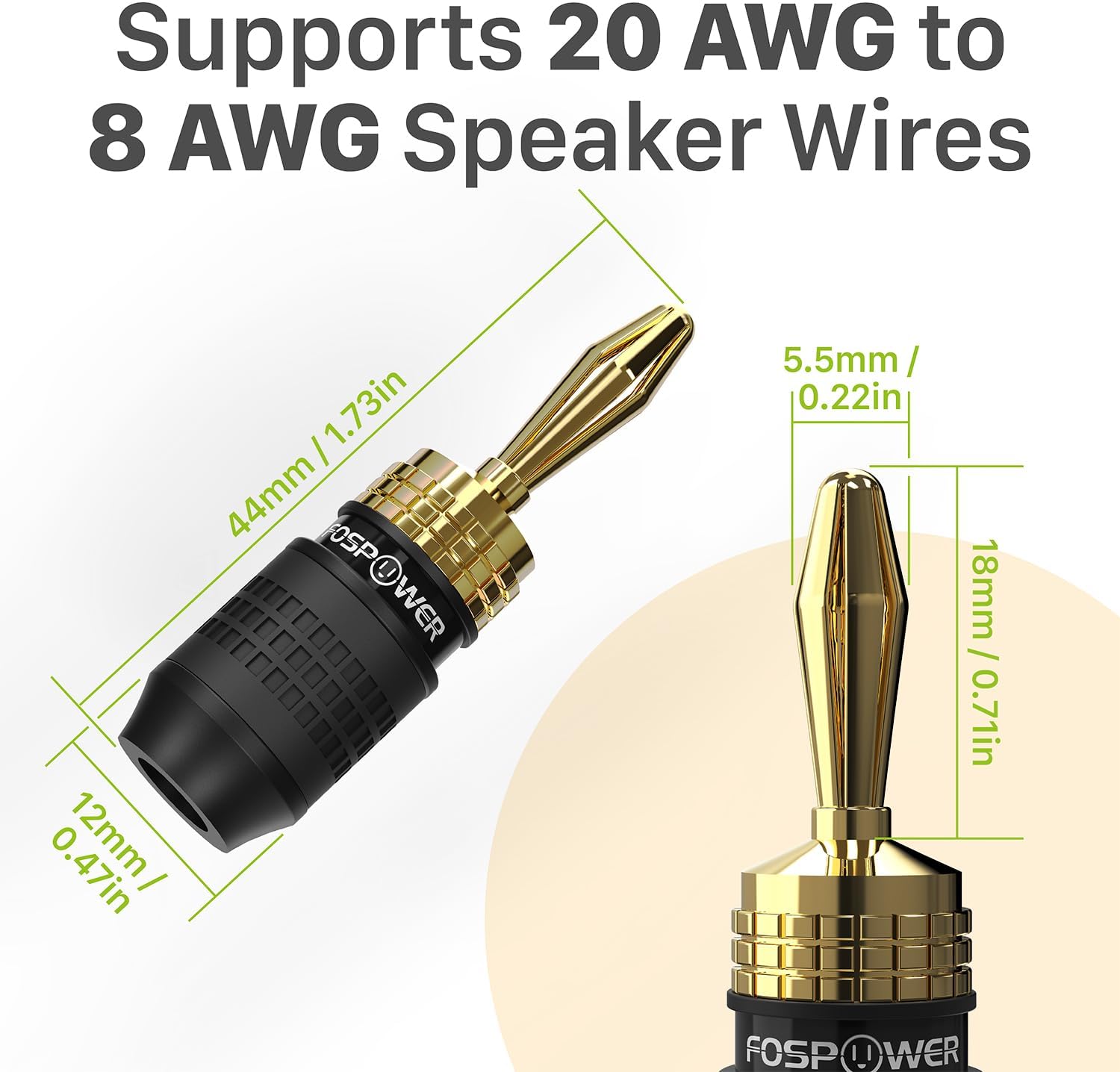
Figura 1: Product dimensions. The banana plug has an overall length of 44mm (1.73 inches) and a base diameter of 12mm (0.47 inches). The gold-plated tip measures 18mm (0.71 inches) in length and 5.5mm (0.22 inches) in diameter. These plugs are designed to support speaker wires from 20 AWG to 8 AWG.
3. Configuració i instal·lació
Follow these steps to properly install your FosPower banana plugs for a secure and high-quality audio connection.
3.1 Connecting Banana Plugs to Speaker Wire
- Unscrew the Connector Tip: Gently unscrew the gold-plated connector tip from the base of the banana plug.
- Strip Speaker Wire: Carefully strip approximately 0.5 inches (14mm) of insulation from the end of your speaker wire. Ensure the copper strands are neat and untwisted.
- Inseriu el cable: Thread the stripped end of the speaker wire through the opening in the base of the banana plug.
- Bend and Spread Wires: Bend the exposed copper strands back over the core of the base, spreading them evenly around the central pin. This ensures maximum contact.
- Screw Connector Tip: Screw the gold-plated connector tip back onto the base. As you tighten, the tip will compress the speaker wire strands against the central pin, creating a secure connection. Do not overtighten.
- Insert into Jack: Once assembled, insert the banana plug firmly into the corresponding banana jack on your speaker or audio receiver.

Figura 2: Step-by-step installation guide for connecting speaker wire to the banana plugs.
3.2 Guia de vídeo d'instal·lació
Vídeo 1: Official video demonstrating the installation process for FosPower 24K Gold Plated Deadbolt Banana Speaker Plugs. This video provides a visual guide to stripping the wire, inserting it into the plug, and securing the connection.
4. Instruccions de funcionament
Once installed, your banana plugs are ready for use. Ensure proper polarity for optimal sound quality.
4.1 Polarity Identification
FosPower banana plugs are color-coded (red and black) to help you easily identify positive and negative terminals. Always connect red to red (positive) and black to black (negative) on both your amplifier/receiver and speakers to maintain correct audio phase.
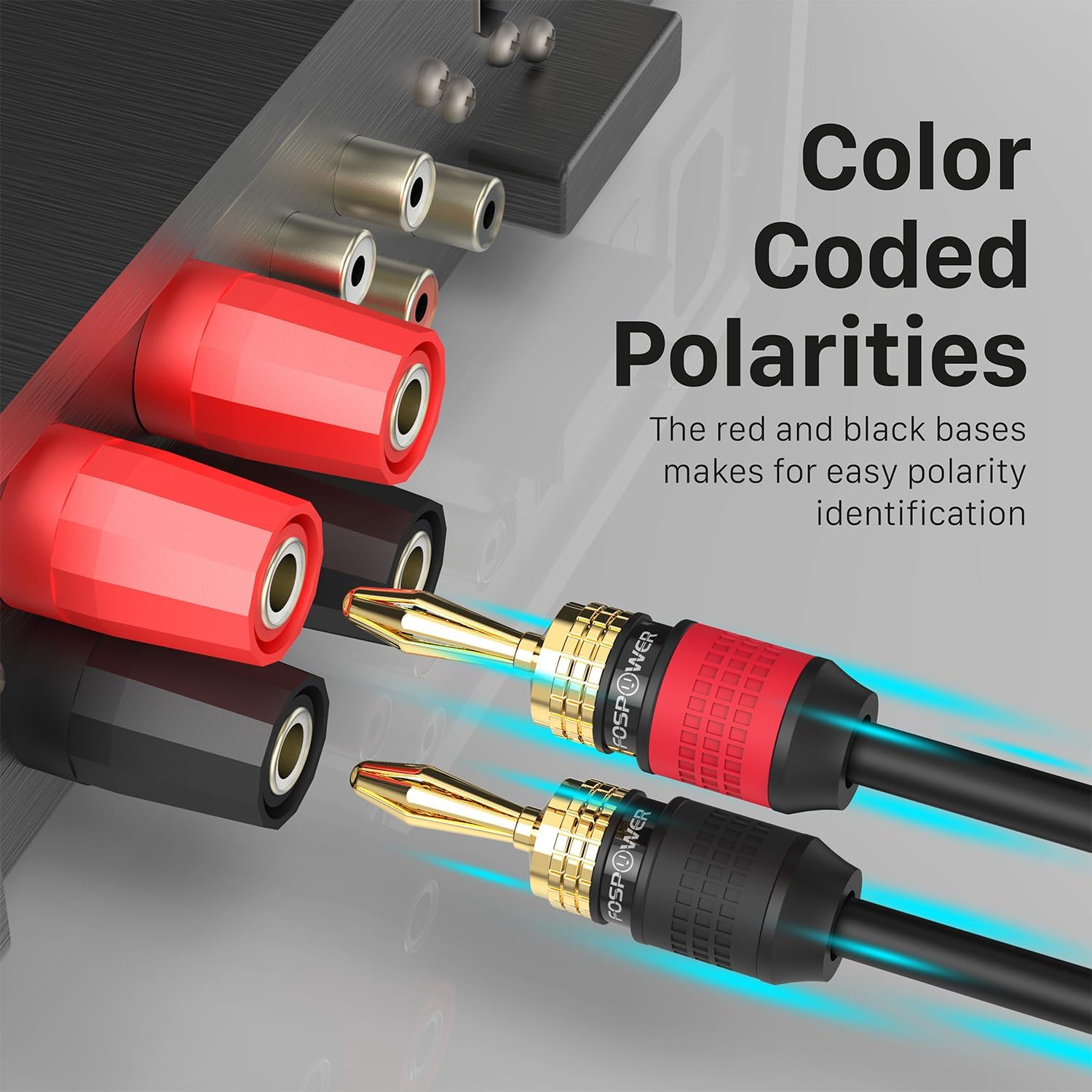
Figura 3: Color-coded bases (red and black) for easy polarity identification, ensuring correct connection to audio components.
4.2 Secure Connection
The unique 6-leaf gold plated connector design ensures a snug fit and maximum surface area contact within the binding post, minimizing signal loss and preventing accidental disconnections. This design also contributes to the non-collapsing nature of the plug tip, maintaining its form over time.

Figura 4: FosPower's durable, non-collapsing design maintains the plug's form even after repeated use, unlike some other brands.

Figura 5: The 6-leaf design ensures maximum contact surface area within the audio jack, leading to better signal transfer and audio quality.
5. Manteniment
FosPower banana plugs are designed for durability and require minimal maintenance. To ensure continued optimal performance:
- Neteja: Periodically inspect the gold-plated tips for any dust or debris. If necessary, gently wipe them with a soft, dry, lint-free cloth. Avoid using abrasive cleaners or solvents.
- Comprovació de la connexió: Occasionally check that the banana plugs are securely seated in their respective jacks and that the speaker wire is still firmly twisted within the plug.
- Emmagatzematge: When not in use, store the banana plugs in a clean, dry environment to prevent dust accumulation.
6. Solució De Problemes
If you experience issues with your banana plugs, refer to the following common troubleshooting tips:
- Sense so o àudio intermitent:
- Ensure the banana plugs are fully inserted into the speaker and receiver jacks.
- Verify that the speaker wire is securely connected inside the banana plug. Unscrew the tip, re-seat the wire, and tighten if necessary.
- Check for correct polarity (red to red, black to black) on all connections.
- Inspect speaker wires for any damage or frayed strands.
- Difficulty Inserting Plugs:
- Some binding posts may have small plastic caps that need to be removed before banana plugs can be inserted. Gently pry or unscrew these caps if present.
- Ensure the plug tip is not bent or damaged.
- Connexió solta:
- Re-check the internal wire connection within the banana plug. Ensure the wire is spread evenly and tightly secured by the tip.
- While the 6-leaf design provides a secure fit, some older or worn binding posts may offer less grip. Ensure the plug is pushed in firmly.
7. Especificacions
| Marca: | FosPower |
| Nom del model: | FOSCBL-2441PU |
| Tipus de connector: | Endoll de plàtan |
| Tipus de cable: | Àudio |
| Dispositius compatibles: | Altaveu |
| Característica especial: | 24k Gold Plated |
| Usos recomanats: | Connexió d'altaveus |
| Color: | Black (with red/black color coding for polarity) |
| Gènere del connector: | Mascle a Mascle |
| Nombre de pins: | 1 |
| Recompte d'unitats: | 4 pieces (2 pairs) |
| Compatibilitat de cables: | 20AWG to 8AWG speaker wires |
| Dimensions (aprox.): | 44mm (1.73in) Length, 12mm (0.47in) Base Diameter |
| Pes de l'article: | 2.39 ounces (for the package) |
8. Garantia i assistència
8.1 Garantia limitada de per vida
FosPower products are backed by a limited lifetime warranty. This warranty covers defects in materials and workmanship under normal use. For specific terms and conditions, please refer to the official FosPower weblloc.
8.2 Atenció al client
For any questions, technical assistance, or warranty claims, please contact FosPower customer service. Our dedicated USA-based customer service team is available to assist you.
Visita el FosPower Store per a més informació i dades de contacte.


