Introducció
Thank you for choosing the Tronsmart Q20S Hybrid Active Noise Cancelling Headphones. This manual provides detailed instructions on how to set up, operate, and maintain your headphones to ensure optimal performance and longevity. Please read this manual thoroughly before using the product.
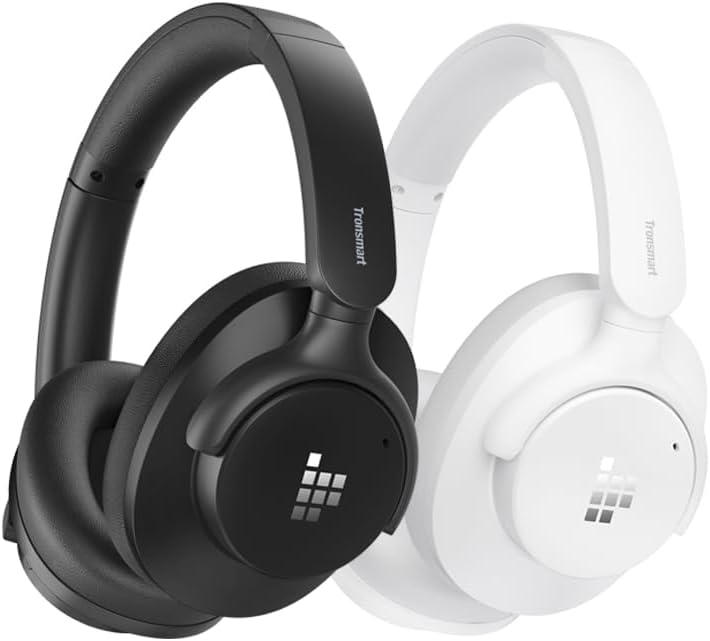
Image: Tronsmart Q20S headphones in black and white, showcasing el seu disseny elegant.
Contingut del paquet
Si us plau, comproveu el contingut del paquet en desempaquetar-lo:
- Tronsmart Q20S Hybrid Active Noise Cancelling Headphones
- Cable de càrrega USB-C
- Cable d'àudio de 3.5 mm
- Manual d'usuari
- Carrying Pouch (if included)
Producte acabatview
Familiarize yourself with the various components and controls of your Tronsmart Q20S headphones.
- Botó d'encesa: Used to power on/off the headphones and activate pairing mode.
- Botó Pujar volum/Pista següent: Augmenta el volum amb una pulsació curta, salta a la pista següent amb una pulsació llarga.
- Botó per baixar el volum/pista anterior: Disminueix el volum amb una pulsació curta, torna a la pista anterior amb una pulsació llarga.
- Botó ANC: Activa/desactiva la cancel·lació activa de soroll.
- Port de càrrega USB-C: Per carregar els auriculars.
- Conector d'àudio de 3.5 mm: Per a connexió amb cable.
- Micròfon: Per a trucades amb mans lliures.
- Indicador LED: Mostra l'estat de l'energia, la càrrega i l'emparellament.
Configuració
Carregant els auriculars
Abans del primer ús, carregueu completament els auriculars. Una càrrega completa triga aproximadament 2.5 hores.
- Connecteu el cable de càrrega USB-C al port de càrrega dels auriculars.
- Connecteu l'altre extrem del cable a un adaptador de corrent USB (no inclòs) o al port USB d'un ordinador.
- L'indicador LED es mostrarà en vermell durant la càrrega i s'apagarà quan estigui completament carregat.
A 10-minute quick charge provides approximately 8 hours of playback.

Image: Visual representation of the Tronsmart Q20S headphones' extended battery life, highlighting 60 hours of playtime and 2.5 hours charge time.
Emparellament Bluetooth
- Assegureu-vos que els auriculars estiguin apagats.
- Premeu i manteniu premut el botó d'engegada durant aproximadament 3-5 segons fins que l'indicador LED parpellegi en blau i vermell alternativament, cosa que indica el mode d'emparellament.
- Al dispositiu (telèfon intel·ligent, tauleta, ordinador portàtil), activeu el Bluetooth i cerqueu dispositius nous.
- Select "Tronsmart Sounfii Q20S" from the list of available devices.
- Un cop connectat, l'indicador LED parpellejarà blau lentament.
The headphones support dual-connections, allowing you to connect to two devices simultaneously.
Instruccions de funcionament
Encès/Apagat
- Encès: Manteniu premut el botó d'engegada durant 2 segons.
- Apagar: Manteniu premut el botó d'engegada durant 3 segons.
Reproducció de música
- Reproduir/pausa: Premeu breument el botó d'engegada.
- Pujar el volum: Premeu breument el botó de pujar el volum.
- Baixar el volum: Premeu breument el botó per baixar el volum.
- Pista següent: Premeu llargament el botó de pujar el volum.
- Pista anterior: Premeu llargament el botó per baixar el volum.

Image: A close-up of the headphone's driver, emphasizing its Hi-Res Audio capabilities for a rich and detailed listening experience.
Cancel·lació activa de soroll (ANC)
The Tronsmart Q20S features Hybrid Active Noise Cancellation to reduce environmental noise by up to 90%.
- Toggle ANC: Short press the ANC button to turn ANC on or off.

Imatge: Side profile of the Tronsmart Q20S headphone, illustrating the Hybrid Active Noise Cancellation feature that reduces external noise.
Trucades telefòniques
Manage calls with the built-in microphone and ENC technology for clear communication.
- Respondre/Finalitzar la trucada: Premeu breument el botó d'engegada.
- Rebutja la trucada: Premeu llargament el botó d'engegada durant 2 segons.
- Activa l'Assistent de veu: Premeu dues vegades el botó d'engegada.

Image: A person wearing Tronsmart Q20S headphones while engaged in a phone call, demonstrating the crystal clear hands-free calling feature.
Mode per cable
Connect the headphones to devices without Bluetooth using the 3.5mm audio cable.
- Introduïu un extrem del cable d'àudio de 3.5 mm a la presa d'àudio dels auriculars.
- Insert the other end into your device's 3.5mm audio output.
- In wired mode, Bluetooth and ANC functions may be limited or unavailable depending on power status.
Custom EQ via App
Customize your audio experience using the Tronsmart app.
- Download the Tronsmart app from your device's app store.
- Connect your Q20S headphones to your device via Bluetooth.
- Open the app and follow the instructions to access and adjust EQ settings.

Image: A user interacting with the Tronsmart app on a smartphone to customize the equalizer settings for their Q20S headphones.
Comoditat i portabilitat
The Tronsmart Q20S headphones are designed for all-day comfort and easy portability.
- Disseny ergonòmic: Made from soft leather material with carefully designed ear cup angles and headband curves for even pressure distribution.
- Pes lleuger: Weighing approximately 249g for extended wear without discomfort.
- Swiveling Earpads: 90° swiveling earpads allow for flat storage and easy carrying.

Image: A person comfortably wearing the Tronsmart Q20S headphones, highlighting their lightweight design and soft earcups for unrivaled comfort.

Image: A person with the Tronsmart Q20S headphones resting around their neck, demonstrating the 90° swiveling earpads for easy portability.
Manteniment
Un manteniment adequat garanteix la longevitat i el rendiment dels teus auriculars.
- Netegeu els auriculars i la diadema regularment amb un drap suau i sec.
- Eviteu utilitzar netejadors abrasius o dissolvents.
- Store the headphones in the provided carrying pouch when not in use to protect them from dust and scratches.
- Keep the headphones away from extreme temperatures, humidity, and direct sunlight.
- Do not expose the headphones to water or other liquids.
Resolució de problemes
| Problema | Causa possible | Solució |
|---|---|---|
| Els auriculars no s'encenen. | Bateria baixa. | Carregueu els auriculars completament. |
| No es pot emparellar amb el dispositiu. | Auriculars no en mode d'emparellament; Bluetooth desactivat al dispositiu; dispositiu massa lluny. | Assegureu-vos que els auriculars estiguin en mode d'emparellament (parpellejant en blau/vermell). Activeu el Bluetooth al dispositiu. Acosteu els auriculars al dispositiu (a menys de 10 metres). |
| Sense so o amb un volum baix. | Volum massa baix; font d'àudio incorrecta; auriculars no connectats. | Increase volume on headphones and device. Check if headphones are properly connected (Bluetooth or wired). |
| L'ANC no funciona eficaçment. | ANC not activated; very high-frequency noise. | Ensure ANC is toggled on. ANC is most effective for low and mid-frequency noises. |
Especificacions
| Característica | Detall |
|---|---|
| Nom del model | Tronsmart Sounfii Q20S |
| Tecnologia de connectivitat | Sense fil (Bluetooth), amb cable (connector de 3.5 mm) |
| Tecnologia de comunicació sense fils | Bluetooth 5.0 |
| Control de soroll | Cancel·lació activa de soroll híbrida |
| Tipus de controlador d'àudio | Conductor dinàmic |
| Interval de freqüència | 20 Hz - 40 kHz (Hi-Res Audio Certified) |
| Durada de la bateria | Fins a 60 hores (ANC desactivat), 40 hores (ANC activat) |
| Temps de càrrega | Approx. 2.5 hours (10 min charge for 8 hours playtime) |
| Material | Pell (auriculars) |
| Pes | Aprox. 249 g |
| Dispositius compatibles | Desktops, Gaming Consoles, Laptops, Tablets, Telephones |
Garantia i Suport
Tronsmart products come with a standard warranty. For detailed warranty information, please refer to the warranty card included in your package or visit the official Tronsmart weblloc.
If you encounter any issues or have questions regarding your Tronsmart Q20S headphones, please contact Tronsmart Customer Support:
- Weblloc: www.tronsmart.com
- Correu electrònic: Consulteu l'oficial weblloc web per a correu electrònic d'assistència.
- Assistència en línia: Check the Tronsmart app or website for live chat options.
Please have your product model and purchase details ready when contacting support.
Informació de seguretat
- No desmunteu ni modifiqueu els auriculars.
- Eviteu l'exposició prolongada a nivells de volum elevats per evitar danys auditius.
- Do not use the headphones while driving or in situations where awareness of surroundings is critical.
- Mantenir fora de l'abast dels nens.
- Eliminar el producte de manera responsable segons la normativa local.


