1. Introducció
Thank you for choosing the XTRONS IXA94MTVL Car Stereo GPS System. This advanced multimedia unit is designed for select VW, Seat, and Skoda vehicles, offering a comprehensive infotainment experience. Featuring Android 14, wireless CarPlay, Android Auto, GPS navigation, WiFi, and 4G connectivity, this system provides a powerful and intuitive interface for your driving needs. This manual will guide you through the installation, operation, and maintenance of your new device.
2. Informació de seguretat
- Instal·lació professional recomanada: A causa de la complexitat dels sistemes elèctrics dels cotxes, es recomana la instal·lació professional per evitar danys a la unitat o al vehicle.
- Seguretat de conducció: No feu funcionar el sistema de manera que us distregui de la conducció. Prioritzeu sempre la seguretat viària.
- Font d'alimentació: Assegureu-vos que la unitat estigui connectada a una font d'alimentació de 12 V CC amb connexió a terra negativa.
- Eviteu la humitat: Mantingueu la unitat allunyada de l'aigua i la humitat excessiva per evitar riscos elèctrics.
- Temperatura: No exposeu la unitat a temperatures extremes.
3. Contingut del paquet
Please check the contents of your package against the list below. If any items are missing or damaged, contact your retailer.

Imatge: Més deview of the XTRONS IXA94MTVL car stereo accessories, including various wiring harnesses, USB cables, GPS antenna, microphone, and user manual.
- XTRONS IXA94MTVL Head Unit
- Arnès de potència
- Antena GPS
- Cables USB
- Micròfon extern
- Cables RCA
- Manual d'usuari
- Other necessary installation accessories (as pictured)
4. Configuració i instal·lació
4.1 Compatibilitat del vehicle
This unit is specifically designed for the following vehicle models:
- VW Golf
- VW Passat
- VW Tiguan
- Seat models
- Skoda models
Ensure your vehicle's dashboard matches the unit's form factor before proceeding with installation.
4.2 Dimensions

Image: Technical drawing showing the dimensions of the XTRONS IXA94MTVL head unit, including width (220mm, 210mm), height (130mm, 100mm), and depth (178mm).
4.3 Passos generals d'instal·lació
- Desconnecta la bateria: Abans d'arrencar, desconnecteu el terminal negatiu de la bateria del vehicle per evitar curtcircuits.
- Eliminar la unitat antiga: Carefully remove your existing car stereo. Refer to your vehicle's service manual for specific instructions.
- Connecteu el cablejat: Connect the provided wiring harnesses to the corresponding ports on the XTRONS unit and your vehicle's wiring. Ensure all connections are secure.
- Connecteu les antenes: Connect the GPS antenna and any other relevant antennas (e.g., radio, 4G) to their respective ports. Position the GPS antenna in a location with a clear view del cel.
- Prova de connexions: Before fully reassembling, reconnect the battery and briefly power on the unit to ensure basic functionality (power, audio, display).
- Unitat segura: Mount the XTRONS unit securely into the dashboard opening.
- Torneu a muntar: Reassemble the dashboard trim and reconnect any other components.
5. Instruccions de funcionament
5.1 Funcionament bàsic
- Encès/apagat: Press and hold the power button (usually on the front panel) to turn the unit on or off. A short press typically mutes or unmutes the audio.
- Pantalla tàctil: The unit features a responsive touch screen. Navigate through menus and applications by tapping, swiping, and pinching.
- Control de volum: Ajusta el volum amb els botons físics o els controls en pantalla.
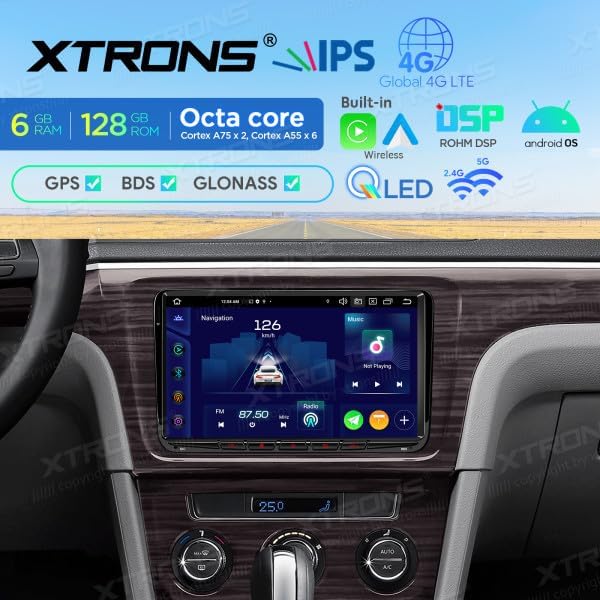
Image: The XTRONS IXA94MTVL car stereo integrated into a vehicle dashboard, displaying the navigation interface with speed and radio frequency.
5.2 Navegació
The unit supports GPS, BDS, and GLONASS for accurate positioning. Access the navigation application from the main menu.
- Starting Navigation: Tap the 'Navigation' icon on the home screen.
- Introducció de la destinació: Use the on-screen keyboard to enter your destination address or select from recent locations/favorites.
- Guia de ruta: Follow the voice prompts and on-screen map for turn-by-turn directions.

Image: The XTRONS IXA94MTVL car stereo displaying its navigation interface, showing a map with a vehicle icon, current speed, and radio frequency.
5.3 CarPlay sense fil i Android Auto
Connect your smartphone wirelessly for seamless integration of CarPlay or Android Auto features.
- Maridatge: Enable Bluetooth and Wi-Fi on your smartphone. On the head unit, go to the CarPlay/Android Auto application and follow the on-screen instructions to pair your device.
- Característiques: Access navigation, music, calls, messages, and other compatible apps directly from the car stereo display.

Image: The XTRONS IXA94MTVL car stereo displaying the Apple CarPlay interface, showing icons for Phone, Music, Maps, Messages, Now Playing, Car, Podcasts, and Audiobooks.
5.4 Reproducció multimèdia
Enjoy various multimedia options including local files, streaming services, and radio.
- Music/Video: Reprodueix àudio i vídeo files from USB drives or internal storage.
- Ràdio: Tune into FM radio stations. Use the scan function to find available stations.
- Transmissió en temps real: Connect to Wi-Fi or 4G to access online streaming applications.

Image: The XTRONS IXA94MTVL car stereo displaying a multimedia interface, showing a map with a vehicle icon, current speed, and radio frequency, similar to the navigation screen but highlighting multimedia aspects.
5.5 Connectivitat
- Wi-Fi: Connect to a Wi-Fi hotspot for internet access.
- 4G: Insert a compatible SIM card (if supported by the specific model variant) for mobile data connectivity.
- Bluetooth: Emparella el telèfon per a trucades de mans lliures i transmissió d'àudio.
- USB: Connect USB drives for media playback or charging.

Image: The XTRONS IXA94MTVL car stereo displaying its Android home screen with various application icons, including Maps, Podcasts, Phone, Calendar, GameSnacks, News, and Settings.
Processador de so digital 5.6 (DSP)
The built-in DSP allows for advanced audio customization. Access the DSP settings to adjust equalizer, balance, fader, and other sound parameters to optimize your listening experience.
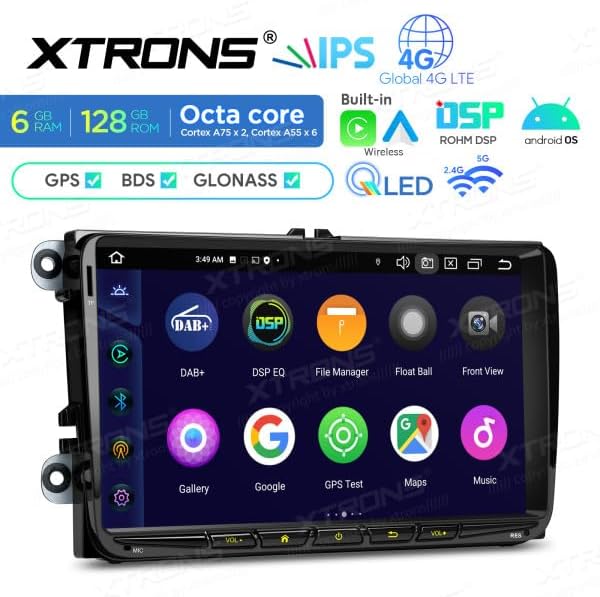
Image: The XTRONS IXA94MTVL car stereo displaying an app drawer or secondary screen with icons for DAB+, DSP EQ, File Manager, Float Ball, Front View, Gallery, Google, GPS Test, Maps, and Music.
6. Manteniment
- Neteja de la pantalla: Feu servir un drap suau i sense borrissol per netejar suaument la pantalla. Per a taques difícils, fregueu lleugeramentampNetegeu el drap amb aigua o un netejador de pantalles dissenyat per a electrònica. Eviteu productes químics agressius.
- Actualitzacions de programari: Consulteu periòdicament la informació oficial de XTRONS weblloc web o la configuració de la unitat per a les actualitzacions de programari disponibles per garantir un rendiment òptim i l'accés a noves funcions.
- Eviteu condicions extremes: Do not expose the unit to direct sunlight for extended periods or to extreme cold, as this can affect its lifespan and performance.
7. Solució De Problemes
- Sense energia: Comproveu totes les connexions d'alimentació i la caixa de fusibles del vehicle. Assegureu-vos que la bateria estigui connectada correctament.
- Sense so: Verify speaker connections, check volume levels, and ensure the unit is not muted. Check audio settings in the DSP.
- Pèrdua de senyal GPS: Ensure the GPS antenna is properly connected and positioned with a clear view of the sky. Move the vehicle to an open area if in a covered location.
- La pantalla tàctil no respon: Prova de reiniciar la unitat. Si el problema persisteix, pot ser necessari restablir les dades de fàbrica (nota: això esborrarà totes les dades de l'usuari).
- Bluetooth/Wi-Fi Connection Issues: Ensure Bluetooth/Wi-Fi is enabled on both the unit and your device. Try unpairing and re-pairing. Check for interference from other devices.
- La unitat es congela/es bloqueja: Perform a soft reset by pressing the reset button (if available) or by turning the vehicle ignition off and on.
8. Especificacions
| Marca | XTRONS |
| Número de model | IXA94MTVL |
| Sistema operatiu | Android 14 |
| RAM | 6 GB |
| Emmagatzematge intern (ROM) | 128 GB |
| Mida de la pantalla | 9 polzades |
| Connectivitat | Wi-Fi, Bluetooth, 4G, USB |
| Característiques especials | Android Auto, Apple CarPlay, GPS (GPS, BDS, GLONASS), Built-in DSP |
| Dispositius compatibles | Smartphone |
| Color | Negre |
| Potència de sortida | 180 watts |
| Configuració del canal de so envoltant | 5.1 |
9. Garantia i Suport
For warranty information and technical support, please refer to the warranty card included with your product or visit the official XTRONS weblloc web. També podeu contactar amb el vostre distribuïdor per obtenir ajuda.
Please have your model number (IXA94MTVL) and purchase details ready when contacting support.


