1. Introducció
Thank you for choosing the SABLUTE Wireless Keyboard and Mouse Combo. This ergonomic set is designed to provide a comfortable and efficient typing experience for various operating systems. Please read this manual carefully to ensure proper setup and optimal performance of your new device.
Key features include an ergonomic wave key design, a cushioned palm rest for reduced hand pressure, quiet typing and clicking, efficient hotkeys, and broad compatibility with Windows and macOS.
2. Producte acabatview
2.1 Contingut del paquet
- Teclat sense fil SABLUTE
- Ratolí sense fil SABLUTE
- 2.4G USB Receiver (Dongle)
- Adaptador USB-C
- Manual d'usuari
2.2 Identificació de components

Figure 1: SABLUTE Wireless Keyboard and Mouse Combo (Lavender Purple)
This image displays the complete SABLUTE wireless keyboard and mouse set in lavender purple, highlighting its ergonomic design and included USB dongles.
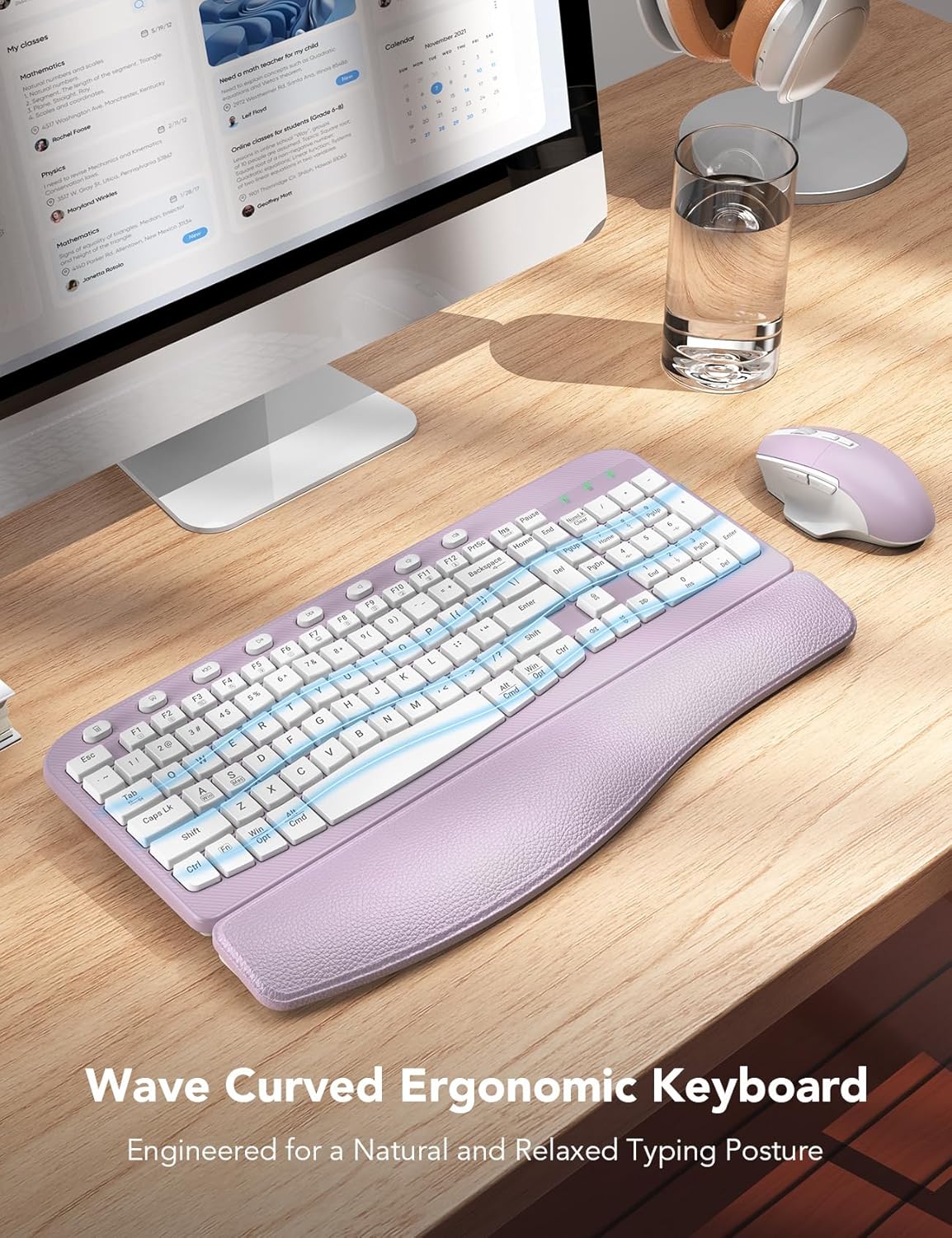
Figure 2: Ergonomic Wave Key Design
Un primer pla view de la presentació del teclatasing its wave-shaped keys, designed for a natural and relaxed typing posture.

Figure 3: Integrated Palm Rest Construction
Un va explotar view illustrating the layers of the integrated palm rest: Togo-style leather, high-density foam support, and a sturdy plastic bottom, all contributing to wrist comfort.

Figure 4: Adjustable Keyboard Tilt and USB Connectivity
This image demonstrates the keyboard's adjustable leg stand, allowing for a 7-degree tilt, and highlights the USB-A and USB-C port compatibility for the dongle.

Figure 5: Comfortable Ergo 7-Button Mouse
Un detallat view of the ergonomic mouse, pointing out its whisper-quiet clicks, ergonomic arc, ultralight design, and the forward/backward buttons with thumb rest.

Figure 6: Smart Power Management Features
This graphic illustrates the power-saving features, including the ON/OFF switch, 10-minute auto-sleep function, and battery life estimates (365 days standby, 250 hours working time for keyboard, 1 AA battery each).

Figure 7: Dual System Compatibility
An image showing the compatibility with Windows, Chrome OS, and Mac OS, along with the FN+A (Windows) and FN+S (Mac) key combinations for switching modes.

Figure 8: 20 Efficient Shortcut Keys
This image highlights the F1-F12 multimedia keys and 8 one-touch shortcut keys available on the keyboard for enhanced efficiency.

Figure 9: Keyboard and Mouse Dimensions
A diagram providing the physical dimensions of both the keyboard (16.5" x 9.15" x 1.42") and the mouse (5.0" x 3.2" x 1.7").
3. Configuració
3.1 Instal·lació de la bateria
The SABLUTE Wireless Keyboard and Mouse Combo requires 2 piles AA (not included) for operation. One AA battery is needed for the keyboard and one for the mouse.
- Locate the battery compartment on the underside of both the keyboard and the mouse.
- Obriu la tapa del compartiment de la bateria.
- Insert the AA batteries, ensuring correct polarity (+ and -).
- Tanqueu bé la tapa del compartiment de la bateria.
3.2 Connexió del dispositiu
The keyboard and mouse connect wirelessly to your computer via a single 2.4G USB receiver (dongle). The setup is plug-and-play, requiring no additional drivers.
- Locate the USB receiver. It may be stored in the battery compartment of the mouse for convenience.
- Insert the USB receiver into an available USB-A port on your computer. If your computer only has USB-C ports, use the provided USB-C adapter.
- Turn on the keyboard and mouse using their respective ON/OFF switches (located on the underside of each device).
- The devices should automatically connect to your computer. If not, try moving the mouse or pressing a key on the keyboard to wake them up.
3.3 System Compatibility Switching
Your SABLUTE combo is compatible with both Windows and macOS. You can easily switch between operating system modes:
- Per canviar a Mode Windows: Premeu FN + A.
- Per canviar a Mode macOS: Premeu FN + S.
4. Instruccions de funcionament
4.1 Ús del teclat
The full-size keyboard features an ergonomic wave design and a comfortable palm rest for extended use. It includes a numeric keypad and a range of shortcut keys.
- Mecanografia: The wave keys are designed for natural finger placement, reducing strain during typing.
- Inclinació ajustable: Use the foldable legs on the underside of the keyboard to adjust the typing angle for your comfort.
- Tecles de drecera: The keyboard is equipped with F1-F12 multimedia keys and 8 one-touch hotkeys for quick access to common functions (e.g., calculator, screenshot, media control, volume).
4.2 Ús del ratolí
The ergonomic mouse features a 6-button design with adjustable tracking speed and silent clicks.
- Left/Right Click: Standard mouse buttons with silent micro-switches for reduced noise.
- Roda de desplaçament: For vertical scrolling through documents and web pàgines.
- Ajust de DPI: Cycle through 3 levels of tracking speed (DPI) to suit your preference and task requirements.
- Botons endavant/enrere: Located on the side for convenient navigation in web navegadors i file exploradors.
4.3 Smart Power Management
To conserve battery life, both the keyboard and mouse feature an auto-sleep function:
- If idle for 10 minuts, the keyboard and mouse will enter sleep mode.
- To wake them up, simply type any key on the keyboard or click/move the mouse.
5. Manteniment
5.1 Neteja
To maintain the longevity and appearance of your keyboard and mouse:
- Use a soft, dry cloth to wipe down the surfaces.
- Per a la brutícia persistent, lleugerament dampal drap amb aigua o un netejador suau i no abrasiu.
- Avoid using harsh chemicals, solvents, or abrasive materials, as these can damage the finish.
- Do not immerse the devices in water or any liquid.
5.2 Substitució de la bateria
When the devices stop responding or the performance degrades, it's time to replace the batteries.
- Turn off the device using the ON/OFF switch.
- Obriu el compartiment de la bateria.
- Traieu la pila AA antiga.
- Insert a new AA battery, observing the correct polarity.
- Tanqueu la tapa del compartiment.
- Eliminar les piles velles de manera responsable d'acord amb la normativa local.
6. Solució De Problemes
6.1 Problemes de connexió
- El dispositiu no respon: Ensure batteries are correctly installed and have sufficient charge. Turn the device ON/OFF switch to reset.
- Sense conexió: Try plugging the USB receiver into a different USB port on your computer. If using the USB-C adapter, ensure it is fully seated.
- Interferència: Move the keyboard and mouse closer to the USB receiver. Avoid placing the receiver near other wireless devices or large metal objects that might cause interference.
6.2 Keyboard Specific Issues
- Keys not typing: Check if the keyboard is in sleep mode (press any key to wake). Ensure the correct operating system mode is selected (FN+A for Windows, FN+S for macOS).
- Incorrect characters: Verify the correct system mode is active.
6.3 Mouse Specific Issues
- Cursor not moving: Ensure the mouse is on a clean, non-reflective surface. Check if the mouse is in sleep mode (click or move to wake).
- Moviment erràtic del cursor: Netegeu el sensor òptic de la part inferior del ratolí.
7. Especificacions
| Característica | Descripció |
|---|---|
| Marca | SABLUTE |
| Número de model | KC15 |
| Tecnologia de connectivitat | 2.4G USB sense fil |
| Dispositius compatibles | Ordinador portàtil, ordinador personal, televisió |
| Dimensions del teclat | 11.31 x 1.88 x 17.32 polzades |
| Pes de l'article | 2.61 lliures |
| Piles necessàries | 2 piles AA (no incloses) |
| Característiques especials | 8 one-touch shortcut keys, ergonomic wave keys, soft wrist rest |
| Color | Lila Lavanda |
8. Garantia i Suport
SABLUTE is committed to providing excellent customer service and product quality.
8.1 Informació de la garantia
- Reemplaçament de 90 dies: For initial product issues.
- Garantia del fabricant de 360 dies: Covers manufacturing defects for nearly a year.
- Cura de la marca: Dedicated support for your SABLUTE products.
8.2 Atenció al client
Should you encounter any issues or have questions regarding your SABLUTE Wireless Keyboard and Mouse Combo, please contact our support team:
- Suport per correu electrònic: sabluteservices@outlook.com
- Assistència telefònica (EUA): +1-213-296-1273
- Horari de funcionament: De dilluns a divendres, de 9:00 a 1:00 PST i de 2:00 a 6:00 PST
- Temps de resposta: We aim for a 24-hour reply to all inquiries.


