Introducció i mésview
The DoukAudio M1 MAX is a high-performance 2-channel Bluetooth amplifier designed to deliver powerful and clear audio for your home stereo system. Featuring a TPA3255 amp chip, it provides up to 300W per channel, ensuring robust sound delivery to your speakers. With Bluetooth 5.1 and aptX HD support, it offers high-fidelity wireless audio streaming. Its versatile input options, including RCA and USB, along with adjustable bass and treble controls, allow for a customized listening experience. The compact and durable design, crafted from aluminum alloy with gold-plated terminals, ensures both longevity and superior sound transmission.

Imatge: Frontal view of the DoukAudio M1 MAX Ampvidador, espectacleasing its compact black aluminum chassis, control knobs, and antenna.

Image: Diagram illustrating the TPA3255 amplifier chip, highlighting its capability to deliver up to 300W per channel with efficient heat dissipation through side and bottom vents.
Què hi ha a la caixa
Upon unboxing your DoukAudio M1 MAX Amplifier, please verify that all the following components are included:
- 1 x M1 MAX Ampmés viu
- 1 x adaptador d'alimentació DC 32V/5A
- 1 x antena Bluetooth
- 1 x Manual d'usuari

Image: Visual representation of the M1 MAX amplifier and its included accessories: power adapter, Bluetooth antenna, and user manual.
Guia de configuració
Follow these steps to set up your DoukAudio M1 MAX Ampmés viu:
- Connectar els altaveus: Connect your passive stereo speakers to the speaker output terminals on the rear of the amplifier. Ensure correct polarity (positive to positive, negative to negative).
- Connecta la font d'àudio:
- Entrada RCA: Connect your audio source (e.g., CD player, TV, pre-amplifier) to the RCA input jacks on the rear panel using RCA cables.
- Entrada USB: Inseriu una unitat flash USB que contingui àudio files al port USB del panell frontal.
- Bluetooth: Ensure the Bluetooth antenna is securely attached to the rear panel.
- Connectar l'alimentació: Connect the provided DC 32V/5A power adapter to the DC 24V-48V IN port on the rear of the amplifier, then plug the adapter into a wall outlet.
- Optional Subwoofer/Amp Connexió: If you wish to connect an active subwoofer or another amplifier for a 2.1-channel system, use the 3.5mm AUX output on the rear panel.

Image: Detailed diagram of the amplifier's front and rear panels, labeling all inputs, outputs, and controls for easy connection and operation.

Imatge: Primer pla view of the 3.5mm AUX output on the amplifier's rear panel, indicating its use for connecting to a 2.1 or multi-channel audio system.
Instruccions de funcionament
Learn how to operate your M1 MAX amplifier for optimal audio performance:
- Encès/apagat i control de volum: The power switch is integrated with the volume knob. Rotate the volume knob clockwise to turn on the amplifier and increase volume. Rotate counter-clockwise to decrease volume and turn off.
- Selecció d'entrada: Use the input select switch on the front panel to cycle between BT (Bluetooth), USB, and RCA inputs. The corresponding input indicator LED will illuminate.
- Emparellament Bluetooth:
- Switch the input to BT. The Bluetooth indicator will blink, indicating it's in pairing mode.
- On your device (smartphone, tablet, computer), search for Bluetooth devices and select "DoukAudio M1 MAX".
- Once paired, the Bluetooth indicator will remain solid.
- To reset Bluetooth connection, press and hold the Bluetooth reset button (if available, or cycle power).
- Reproducció USB: When a USB flash drive is inserted and USB input is selected, the amplifier will automatically play supported audio files. Use the "PREV", "P/P" (Play/Pause), and "NEXT" buttons for media control.
- Controls de to:
- Pom de baix: Adjusts the low-frequency output. Rotate clockwise to increase bass, counter-clockwise to decrease.
- Pom treble: Adjusts the high-frequency output. Rotate clockwise to increase treble, counter-clockwise to decrease.
- Both bass and treble knobs allow for ±6dB adjustment.

Image: Illustration of the QCC304X Bluetooth chip and the Bluetooth reset function, emphasizing stable and optimized wireless audio.

Image: Depiction of the amplifier's multiple input options (Bluetooth 5.1, RCA, U-disk) and the adjustable bass and treble knobs for sound customization.
Manteniment
Un manteniment adequat garanteix la longevitat i el rendiment òptim del vostre ampmés viu:
- Neteja: Utilitzeu un drap suau i sec per netejar l'exterior amplifier. Avoid using liquid cleaners or abrasive materials.
- Ventilació: Assegureu-vos el amplifier is placed in a well-ventilated area. Do not block the side and bottom vents, as these are crucial for heat dissipation.
- Emmagatzematge: Quan no s'utilitzi durant períodes prolongats, guardeu-lo ampGuardar en un lloc fresc i sec, allunyat de la llum solar directa i de temperatures extremes.
- Connexions de cable: Comproveu periòdicament totes les connexions dels cables per assegurar-vos que estiguin ben fixades i que no presentin corrosió.
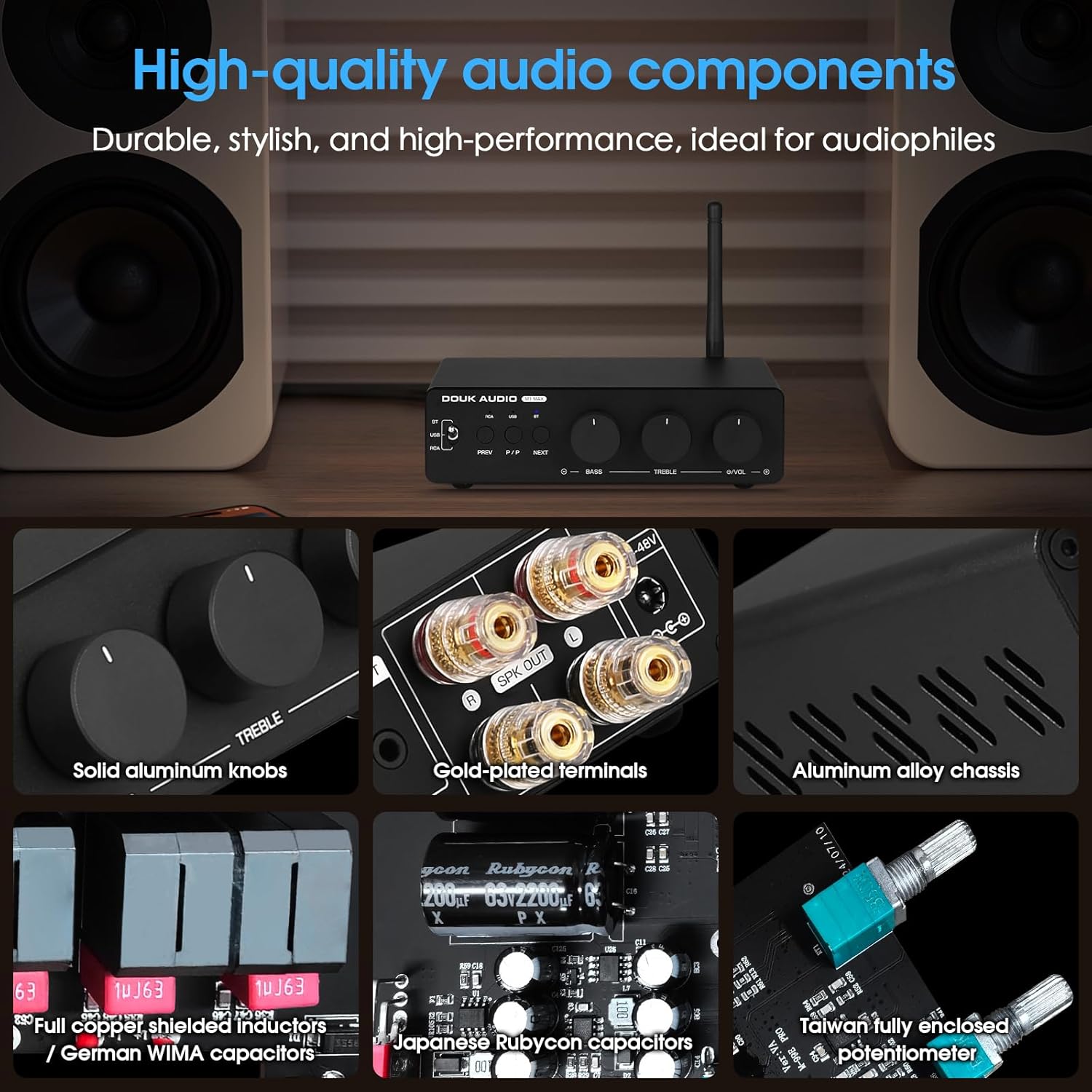
Imatge: Primer pla views de la amplifier's internal and external components, including solid aluminum knobs, gold-plated terminals, aluminum alloy chassis, full copper shielded inductors, Japanese Rubycon capacitors, and a Taiwan fully enclosed potentiometer, indicating durable and high-quality construction.
Resolució de problemes
If you encounter issues with your M1 MAX amplifier, consulteu els següents problemes i solucions habituals:
| Problema | Causa possible | Solució |
|---|---|---|
| Sense sortida de so |
|
|
| Bluetooth Disconnection or Pairing Issues |
|
|
| So distorsionat |
|
|
Especificacions
Detailed technical specifications for the DoukAudio M1 MAX Ampmés viu:
- Dimensions del producte: 4.92 x 6.1 x 1.65 polzades
- Pes de l'article: 1.76 lliures
- Número de model: M1 MÀX
- Fabricant: Douk Audio
- País d'origen: Xina
- Voltage: 32 volts (CC)
- Volum de subministrament màximtage: 48 volts (CC)
- Subministrament mínim Voltage: 24 volts (CC)
- AmpXip lificador: TPA3255
- Versió Bluetooth: 5.1 with QCC304X chip
- Còdecs Bluetooth: aptX/aptX HD supported
- Entrades d'àudio: Bluetooth, RCA, USB (U-disk)
- Sortides d'àudio: Speaker output (2-channel), 3.5mm AUX output (for active subwoofer/amp)
- Control de tons: Bass and Treble (±6dB adjustment)
Rated Output Power Table
| Font d'alimentació | Impedància de l'altaveu | Potència de sortida nominal |
|---|---|---|
| 32V/5A | 4Ω | 78W+78W |
| 32V/5A | 6Ω | 71W+71W |
| 32V/5A | 8Ω | 65W+65W |
| 36V/6A | 4Ω | 107W+107W |
| 36V/6A | 6Ω | 100W+100W |
| 36V/6A | 8Ω | 94W+94W |
| 48V/5A | 4Ω | 120W+120W |
| 48V/5A | 6Ω | 110W+110W |
| 48V/5A | 8Ω | 102W+102W |
| 48V/10A | 4Ω | 250W+250W |
| 48V/10A | 6Ω | 210W+210W |
| 48V/10A | 8Ω | 185W+185W |
Garantia i Suport
Douk Audio products are designed for reliability and performance. For warranty information and technical support, please refer to the official Douk Audio weblloc web o contacteu directament amb el seu servei d'atenció al client. Conserveu el rebut de compra com a comprovant de compra per a qualsevol reclamació de garantia.
Fabricant: Douk Audio
Weblloc: www.doukaudio.com (Nota: Això és un marcador de posició) URL as the exact support URL was not provided in the input. Refer to your product packaging or official documentation for precise contact information.)


