1. Introducció
This manual provides detailed instructions for the installation, operation, and maintenance of your Fortdows Android 13 Car Stereo. This unit is specifically designed for the Honda Accord 7th Generation (2003-2007) and features a 10-inch HD touchscreen, Android 13 operating system, 8-core processor, and integrated connectivity options like Wireless CarPlay, Android Auto, 4G LTE, 5G WiFi, Bluetooth 5.0, and GPS.
Please read this manual thoroughly before installation and use to ensure proper functionality and to maximize your driving experience.
2. Configuració i instal·lació
2.1 Contingut del paquet
Verifiqueu que tots els components siguin presents al paquet:
- Fortdows Android 13 Car Stereo Unit
- Power Cable (Plug and Play)
- 6-pin USB Cable
- 4-pin USB Cable
- 10-pin Rear Camera Signal Wire
- Antena 4G
- Antena GPS
- Adaptador d'antena de ràdio
- Backup Camera (1080P AHD)
- Cable RCA
- CAN BUS Decoder
- Crowbar (for trim removal)
- Original USB Adapter
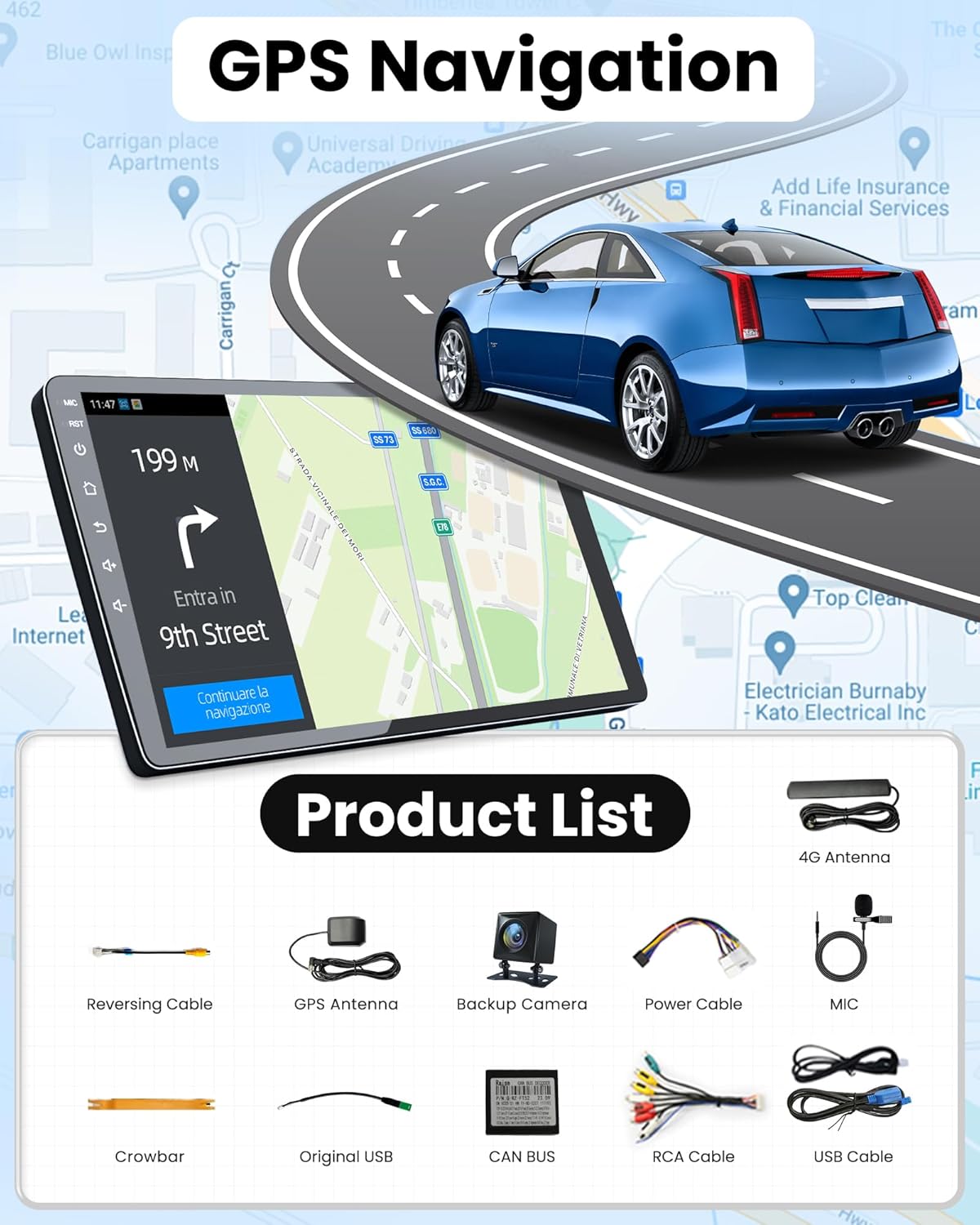
Figure 2.1: Included accessories and cables.
2.2 Comprovació prèvia a la instal·lació
Before beginning installation, ensure your vehicle is a Honda Accord 7th Generation (2003-2007). This unit is custom-fit for these models, offering a plug-and-play installation without requiring wire cutting.
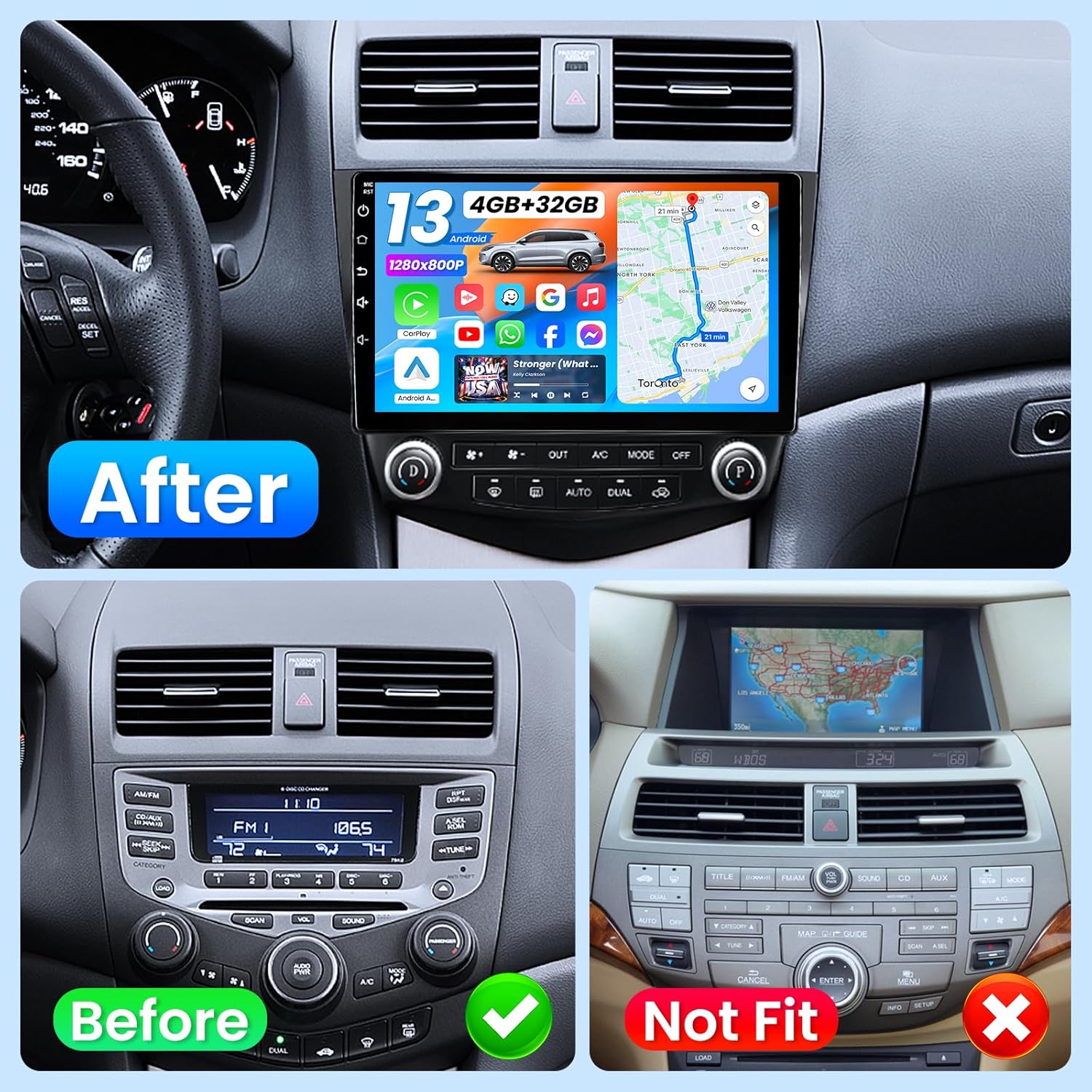
Figure 2.2: Before and after installation view in a Honda Accord 7th Gen. Note: Older navigation systems may not be compatible.
2.3 Guia de connexió
Follow these steps to connect the necessary cables to the head unit:
- Connect the 6-pin USB cable to its corresponding port on the back of the unit.
- Connect the 4-pin USB cable to its corresponding port.
- Connect the 10-pin reversing video input interface for the rear camera signal.
- Connect the 4G antenna to the designated 4G port.
- Connect the GPS antenna to the GPS port.
- Connect the factory radio antenna to the ANT port.
- Connect the main power cable (plug and play) to the 16-pin power port.
Video 2.1: Detailed step-by-step guide for connecting the car radio cables and antennas.
2.4 CANBUS Integration
The included CANBUS decoder integrates with your vehicle's system to display reverse signals, air conditioning status, door status, and handbrake information directly on the stereo screen. This ensures seamless communication with your car's existing electronics.
3. Instruccions de funcionament
3.1 Engegada i configuració inicial
Once installed, the unit will power on with your vehicle's ignition. Follow the on-screen prompts for initial setup, including language selection and time zone.
3.2 Interfície d'Android 13
The stereo runs on Android 13, offering a familiar and intuitive user interface. Navigate through apps and settings using the 10-inch IPS capacitive touchscreen. The system supports 10-point multitouch and features a multi-theme UI for personalization.

Figure 3.1: Main interface of the Fortdows Android 13 Car Stereo.
3.3 CarPlay sense fil i Android Auto
Connect your smartphone wirelessly via CarPlay (for iOS) or Android Auto (for Android) to access navigation, music, calls, and messages directly on the stereo screen. Voice commands via Siri or Google Assistant are supported for hands-free operation.

Figura 3.2: Funcionalitat de CarPlay sense fil i Android Auto.
3.4 Funcionalitat de pantalla dividida
Utilize the split-screen feature to run two applications simultaneously, such as navigation and music playback, enhancing multitasking capabilities.
3.5 Connectivity (4G LTE, 5G WiFi, Bluetooth 5.0)
- 4G LTE: Insert a 4G LTE SIM card for mobile data access.
- WiFi 5G: Connect to 2.4G or 5G WiFi networks for internet access, streaming, and updates.
- Bluetooth 5.0: Pair your phone for stable hands-free calls, music streaming, and podcast playback with high-fidelity audio.

Figure 3.3: 5G WiFi and Hotspot capabilities.

Figure 3.4: Bluetooth 5.0 for calls and music.
3.6 Navegació GPS
The unit includes built-in offline maps and supports GPS/GLONASS/BeiDou tri-band for precise positioning. Real-time updates are available via 5G WiFi, compatible with popular navigation apps like Waze and Google Maps.
Figura 3.5: Interfície de navegació GPS.
3.7 Audio System (DSP & FM/RDS Radio)
Experience enhanced audio with Digital Signal Processing (DSP) and 36 customizable EQ settings. The high-quality FM radio with a digital stereo (RDS) FM tuner (TDA7708 chip) supports multiple stored radio stations for clear and stable signal reception.
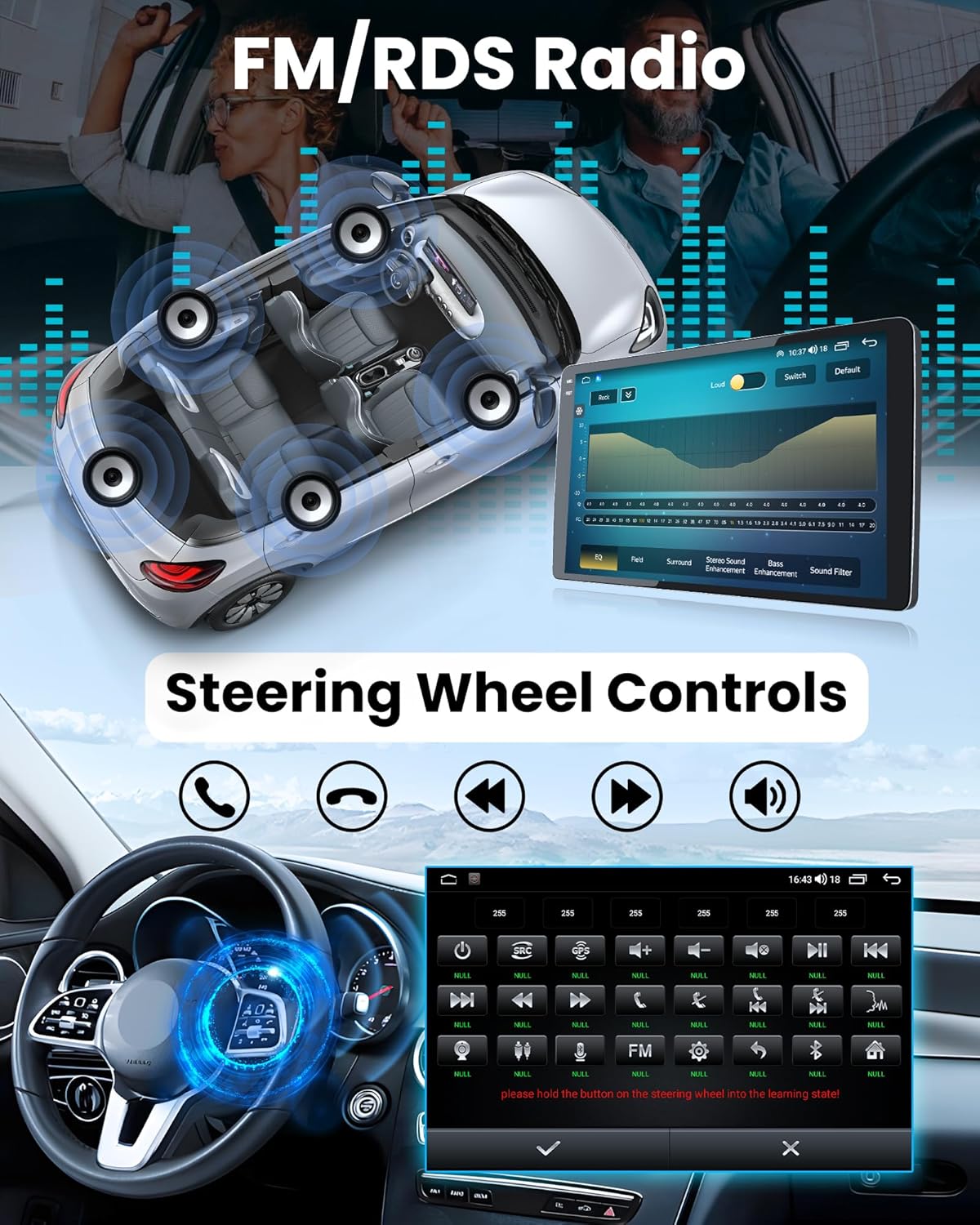
Figure 3.6: FM/RDS Radio and DSP sound settings.
3.8 Comandaments al volant (SWC)
The unit supports existing steering wheel controls, allowing you to manage volume, change tracks, answer calls, and more without taking your hands off the wheel.
3.9 Càmera de marxa enrere
The included 1080P AHD camera provides night vision, a 170° wide-angle view, and an IP69 waterproof rating for safer reversing. The display automatically switches to the camera feed when reversing.

Figure 3.7: Reversing camera view i característiques.
Vídeo 3.1: Acabatview of the car radio's features, including UI, DSP sound settings, FM radio, and UI customization options.
4. Manteniment
4.1 Neteja de la pantalla
Feu servir un drap suau i sense borrissol per netejar suaument la pantalla tàctil. Per a taques difícils, fregueu lleugeramentampNetegeu el drap amb aigua o un netejador de pantalles. Eviteu materials abrasius o productes químics agressius.
4.2 Actualitzacions de programari
Periodically check for software updates via the system settings to ensure optimal performance and access to the latest features. Updates can typically be downloaded over WiFi.
4.3 Atenció general
Avoid exposing the unit to extreme temperatures or direct sunlight for prolonged periods. Ensure all connections remain secure to prevent signal loss or power issues.
5. Solució De Problemes
Si teniu problemes, consulteu els passos habituals següents per a la resolució de problemes:
- Sense energia: Comproveu totes les connexions del cable d'alimentació. Assegureu-vos que el vehicle estigui engegat. Verifiqueu el fusible del cable d'alimentació.
- Sense so: Comproveu les connexions dels altaveus. Assegureu-vos que el volum no estigui silenciat ni massa baix. Verifiqueu la configuració del DSP.
- Pèrdua de senyal GPS: Ensure the GPS antenna is securely connected and placed in an unobstructed location (e.g., dashboard).
- Mala recepció de ràdio: Check the radio antenna connection. Ensure the antenna is fully extended if applicable.
- CarPlay/Android Auto no es connecta: Ensure Bluetooth and WiFi are enabled on both the stereo and your smartphone. Try restarting both devices.
- La càmera posterior no mostra: Check the 10-pin reversing video input connection and the camera's power supply. Ensure the vehicle is in reverse gear.
- Retard/Bloqueig del sistema: Close unnecessary background applications. If issues persist, perform a factory reset (refer to system settings, note that this will erase user data).
Per a més ajuda, poseu-vos en contacte amb l'atenció al client.
6. Especificacions
| Característica | Descripció |
|---|---|
| Sistema operatiu | Android 13 |
| Processador | UNISOC UIS8581A 8-core CPU |
| Memòria (RAM) | 4 GB |
| Emmagatzematge (ROM) | 32 GB |
| Mida de la pantalla | 10 polzades |
| Resolució de pantalla | 1280 x 800 IPS Capacitive Touchscreen |
| Pantalla tàctil | 10-point multitouch, 2.5D glass |
| Connectivitat | 4G LTE (SIM card support), 2.4G/5G WiFi, Bluetooth 5.0, USB |
| Navegació | GPS/GLONASS/BeiDou tri-band, Offline maps, Waze/Google Maps compatible |
| Àudio | DSP (Digital Signal Processing), 36-band EQ, FM/RDS Radio (TDA7708 chip) |
| Suport de càmera | 1080P AHD Rear Camera (Night Vision, 170° Wide-angle, IP69 Waterproof) |
| AmpXip lificador | 7851 |
| Tipus de servei del vehicle | Car (Honda Accord 7th Gen 2003-2007) |
| Pes de l'article | 4.55 lliures |
| Dimensions del paquet | 12.36 x 12.13 x 5.59 polzades |

Figure 6.1: Key hardware specifications.
7. Garantia i Suport
7.1 Informació de la garantia
Your Fortdows Car Stereo comes with a 1 anys de garantia from the date of purchase. This warranty covers manufacturing defects. A Política de devolució de 7 dies is also in place for initial defects.
7.2 Atenció al client
For technical assistance, warranty claims, or any product-related inquiries, please contact our customer support team:
- Correu electrònic: fortdows.cam@gmail.com
- Weblloc: www.fancygod.com


