1. Introducció
The Xvive XV1-R is a compact and versatile portable stereo audio recorder designed for musicians, podcasters, filmmakers, and anyone requiring high-quality audio capture. It features 32-bit float recording, X/Y stereo microphones, and supports both WAV and AAC formats. This manual provides comprehensive instructions for setting up, operating, maintaining, and troubleshooting your XV1-R recorder.

This image displays the Xvive XV1-R portable audio recorder from the front, highlighting its ergonomic design, integrated X/Y stereo microphones at the top, and the central control panel with a monochrome display and various function buttons.
2. Producte acabatview
Característiques clau
- 32-bit Float Recording: Captures audio with an extended dynamic range, preventing clipping and preserving detail without manual gain adjustment.
- High-Quality X/Y Microphones: Integrated directional microphones capable of capturing clear audio up to 130 dB SPL without distortion.
- Versatile Recording Formats: Supports high-fidelity WAV (32-bit float or 24-bit PCM) and efficient AAC formats.
- USB Microphone Functionality: Connects to PC, Mac, iOS, and Android devices via USB-C for use as an external microphone.
- Disseny portàtil: Compact and lightweight, suitable for various recording scenarios with features like auto-record, pre-record, and noise reduction.
Understanding 32-bit Float Recording
The 32-bit float recording capability ensures that your audio is captured with a vast dynamic range, making it virtually impossible to clip or distort the signal. This eliminates the need for precise gain staging during recording, simplifying the process and ensuring high-quality results.

This graphic explains 32-bit float lossless recording. It shows how 32-bit float can scale up low gain audio and scale down high gain audio without clipping or noise, unlike 16/24-bit float which can lose detail or distort.
X/Y Microphone Configuration
The integrated X/Y stereo microphones are designed to capture a wide and accurate stereo image, ideal for recording live performances, ambient sounds, or interviews. Their high SPL handling ensures clean recordings even in loud environments.

An image showing the Xvive XV1-R recorder placed on a stand in front of a person playing an acoustic guitar, illustrating its use for capturing high-quality audio with its X/Y directional microphones in a musical setting.
WAV vs. AAC Formats
The XV1-R offers flexibility with two primary recording formats:
| Característica | Format WAV | AAC Format |
|---|---|---|
| Qualitat d'àudio | Lossless, Highest Fidelity | Compressed, Clear Sound |
| File Mida | Larger (More storage required) | Smaller (Optimized for storage) |
| Sampel suport de tarifa | Up to 96 kHz, 48 kHz, 44.1 kHz | 48 kHz, 24 kHz |
| Casos d'ús | Music production, professional recording | Meetings, voice memos, everyday use |

A comparison table outlining the differences between WAV and AAC recording formats available on the Xvive XV1-R.
3. Introducció (Configuració)
3.1 Contingut del paquet
Ensure your package contains the Xvive XV1-R recorder and 2 AA batteries.
3.2 Instal·lació de la bateria
- Locate the battery compartment on the back of the XV1-R.
- Obriu la coberta del compartiment.
- Introduïu dues piles AA, assegurant-vos de la polaritat correcta (+/-).
- Tanqueu bé la tapa del compartiment de la bateria.
3.3 Inserció d'una targeta MicroSD
The XV1-R records directly to a MicroSD card. Supported card types include MicroSDHC (up to 32GB) and MicroSDXC (up to 128GB).
- Localitza la ranura per a targetes MicroSD al lateral del dispositiu.
- Gently insert the MicroSD card with the contacts facing down until it clicks into place.
- Per treure-la, empenyeu lleugerament la targeta fins que surti.
3.4 Engegada/apagada
- To power on, press and hold the Power button (often integrated with the Play button) until the display illuminates.
- Per apagar, manteniu premut el botó d'engegada fins que el dispositiu s'apaga.
3.5 Controls i ports a través deview
Familiarize yourself with the layout of the XV1-R's controls and ports:
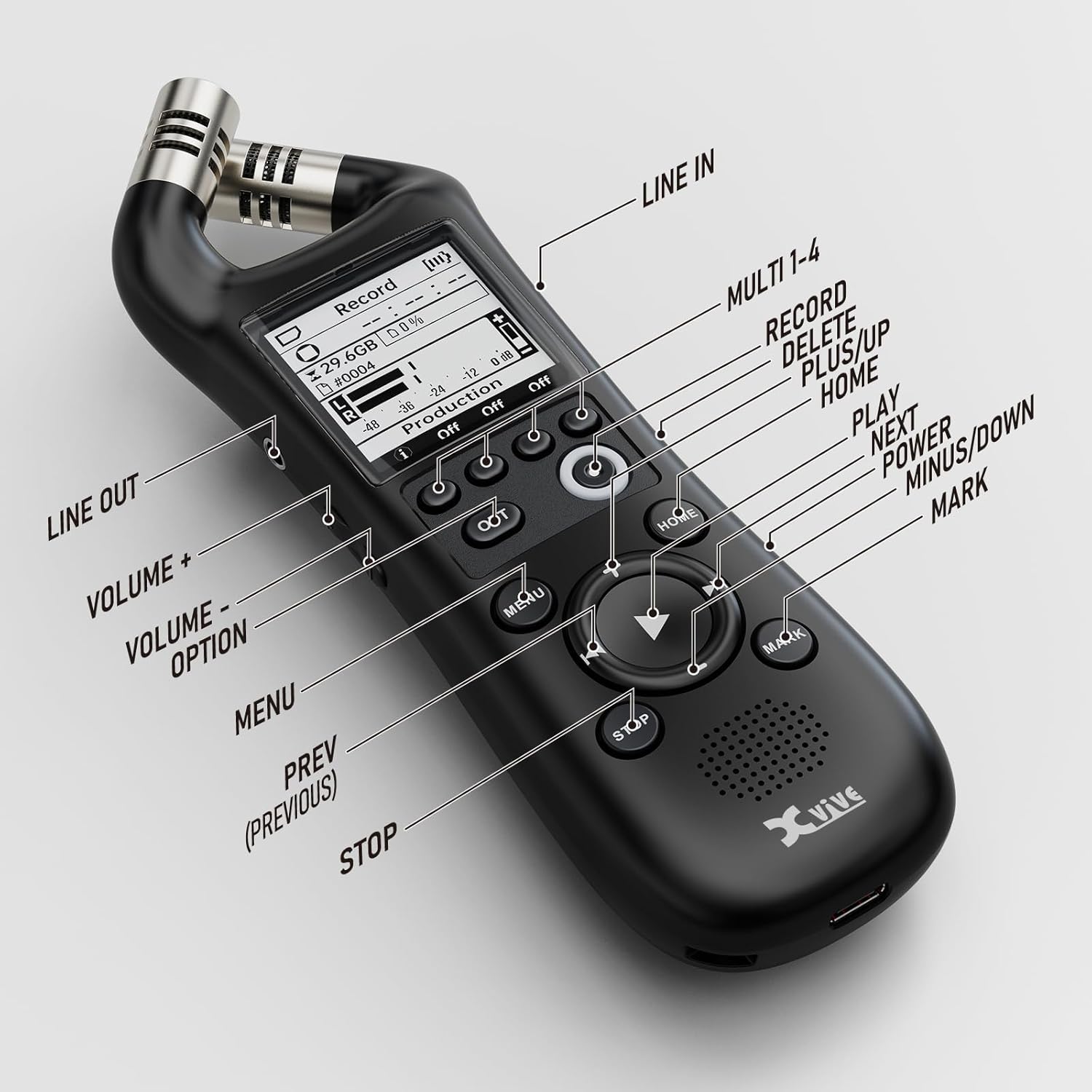
A close-up image of the Xvive XV1-R recorder with labels pointing to each button and port, including Line In, Line Out, Volume controls, Menu, Home, Play, Stop, Mark, and the Multi 1-4 buttons for record, delete, plus, and up functions.
- X/Y Microphones: Top-mounted stereo microphones.
- Pantalla de visualització: Shows recording status, menu options, and settings.
- Multi 1-4 Buttons: Context-sensitive buttons for Record, Delete, Plus, and Up functions.
- OPT Button: Option button for specific settings.
- Botó MENÚ: Accedeix al menú principal.
- Botó HOME: Returns to the main recording screen.
- Navigation Pad (Up/Down/Left/Right/Play): S'utilitza per a la navegació del menú i el control de la reproducció.
- Botó STOP: Atura la gravació o la reproducció.
- Botó MARCA: Adds markers during recording or playback.
- Line In (3.5mm): Entrada d'àudio externa.
- Sortida de línia (3.5 mm): Sortida d'àudio per a auriculars o altaveus externs.
- Port USB-C: For data transfer and USB microphone functionality.
4. Instruccions de funcionament
4.1 Enregistrament bàsic
- Ensure a MicroSD card is inserted and batteries are charged.
- Enceneu el dispositiu.
- Des de la pantalla inicial, premeu el botó Registre button (often labeled as one of the Multi buttons or a dedicated record button). The recording indicator will illuminate.
- Per aturar la gravació, premeu el botó STOP botó.
- Recordings are saved automatically to the MicroSD card.
4.2 Reproducció
- From the home screen, use the navigation pad to select a recorded file.
- Premeu el botó Jugar button (center of the navigation pad) to begin playback.
- Use the navigation pad to fast forward, rewind, or skip tracks.
- Adjust playback volume using the dedicated Volume buttons.
- Premeu el botó STOP botó per finalitzar la reproducció.
4.3 USB Microphone Functionality
The XV1-R can function as a high-quality USB microphone for your computer or mobile device.
- Connect the XV1-R to your computer or compatible mobile device using a USB-C cable.
- The device will prompt you to select a mode (e.g., USB Audio, Card Reader). Select Àudio USB.
- On your computer/device, select the XV1-R as the audio input device in your recording software or system settings.
- The XV1-R will now function as an external microphone with a fixed sampla velocitat de 48 kHz.

The Xvive XV1-R recorder is shown connected to a laptop via a USB-C cable, demonstrating its functionality as a high-quality USB microphone for computer-based audio tasks like streaming or online meetings.
4.4 Advanced Recording Features
- Auto-Record: Configures the recorder to start recording automatically when an audio signal above a set threshold is detected.
- Pre-enregistrament: Captures a few seconds of audio before the record button is pressed, ensuring you don't miss the beginning of an event.
- Reducció de soroll: Applies digital processing to reduce unwanted background noise during recording or playback.
These features can be accessed and configured through the device's MENÚ settings. Refer to the on-screen menu for detailed options and adjustments.
5. Manteniment
5.1 Neteja
- Use a soft, dry cloth to clean the exterior of the recorder.
- No utilitzeu netejadors líquids ni dissolvents, ja que poden danyar l'acabat o els components interns.
- Keep the microphone grilles free of dust and debris.
5.2 Emmagatzematge
- Quan no les feu servir durant períodes prolongats, traieu les piles per evitar fuites.
- Guardeu la gravadora en un lloc fresc i sec, allunyat de la llum solar directa i de temperatures extremes.
- Protect the device from impacts and excessive vibration.
6. Solució De Problemes
Problemes comuns i solucions
- El dispositiu no s'encén:
- Comproveu si les piles estan inserides correctament amb la polaritat correcta.
- Substituïu-les per piles AA noves.
- Assegureu-vos que el compartiment de la bateria estigui ben tancat.
- If using USB power, ensure the cable and power source are functional.
- No audio during recording:
- Verify that the microphones are not obstructed.
- Check recording settings in the menu to ensure input levels are appropriate.
- Ensure a MicroSD card is properly inserted and has sufficient free space.
- Mala qualitat d'àudio:
- Ensure the recording environment is suitable (minimize background noise).
- Comproveu la col·locació del micròfon respecte a la font sonora.
- Consider enabling noise reduction if applicable.
- Verify the selected recording format and sample rate meet your quality requirements.
- Device not recognized as USB microphone:
- Ensure the XV1-R is set to 'USB Audio' mode after connecting to your computer/device.
- Check your computer's sound settings to select the XV1-R as the input device.
- Try a different USB-C cable or port.
7. Especificacions
| Especificació | Detall |
|---|---|
| Número de model | XVR1 |
| Dimensions del producte | 5.9 x 2 x 2 polzades |
| Pes de l'article | 6.4 unces |
| Format d'enregistrament | WAV (32-bit float, 24-bit PCM), AAC |
| Sampli Rate | Up to 96 kHz (WAV), 48 kHz (AAC, USB Audio) |
| Micròfons | High-Quality X/Y Directional |
| SPL màxim | 130 dB |
| Mitjans d'emmagatzematge | MicroSDHC (up to 32GB), MicroSDXC (up to 128GB) |
| Font d'alimentació | 2 piles AA (incloses) |
| Connectivitat | USB-C, 3.5mm Line In, 3.5mm Line Out |
8. Garantia i Suport
Xvive products are designed for reliability and performance. For warranty information, technical support, or service inquiries, please refer to the official Xvive weblloc web o contacteu directament amb el seu servei d'atenció al client. Conserveu el rebut de compra com a comprovant de compra per a reclamacions de garantia.
Per obtenir més ajuda, visiteu el Xvive Store on Amazon.


