1. Introducció
Thank you for choosing the TECPHILE K936 Wireless Keyboard and Mouse Combo. This product is designed to provide versatile and efficient input for multiple devices, featuring both Bluetooth 5.0 and 2.4GHz USB connectivity. This manual will guide you through the setup, operation, and maintenance of your new keyboard and mouse.
2. Contingut del paquet
- TECPHILE K936 Wireless Keyboard
- TECPHILE Wireless Mouse
- Receptor USB (emmagatzemat al compartiment de la bateria del ratolí)
- Cable de càrrega USB-C
- Keyboard Protective Cover
- Manual d'usuari
3. Producte acabatview
Familiarize yourself with the components of your TECPHILE K936 Wireless Keyboard and Mouse Combo.

Imatge 3.1: The TECPHILE K936 Wireless Keyboard and Mouse Combo in Grey. The keyboard features a full layout with a numeric keypad, and the mouse is a compact, ergonomic design.

Imatge 3.2: Diagram showing the dimensions of the keyboard (368mm x 121mm) and mouse (110mm x 63mm x 30mm).
Característiques del teclat:
- Multi-device connectivity: 3 x Bluetooth 5.0, 1 x 2.4GHz USB
- Dedicated function keys (F1-F12) with multimedia controls
- Bateria de liti recarregable de 300 mAh
- Port de càrrega tipus C
- Automatic sleep mode for power saving
- Scissor-leg key structure for comfortable typing
- Transparent protective cover included
Característiques del ratolí:
- Dual-mode connectivity: 1 x Bluetooth, 1 x 2.4GHz USB
- Optical movement detection technology
- Disseny ambidextre
- Quiet click buttons
4. Configuració
4.1 Càrrega inicial
Before first use, fully charge both the keyboard and mouse. Connect the provided USB-C charging cable to the charging port on the keyboard and mouse, and the other end to a 5V/1A power adapter (not included) or a computer USB port. The charging indicator light will show charging status and turn off when fully charged.
Note: Only use a 5V/1 Amp power adapter for charging to ensure optimal battery life.

Imatge 4.1: Illustration of the keyboard's battery specifications: 2-4 hours charging time, 300mAh battery capacity, and up to 180 days standby time.
4.2 Connexió del teclat
The keyboard supports up to three Bluetooth connections and one 2.4GHz USB connection.

Imatge 4.2: Diagram illustrating the keyboard's ability to connect to multiple devices via Bluetooth (3 channels) and 2.4GHz USB.
2.4GHz USB Connection:
- Locate the USB receiver inside the mouse's battery compartment.
- Connecteu el receptor USB a un port USB disponible de l'ordinador o dispositiu.
- Engegueu el teclat. El teclat s'hauria de connectar automàticament.
Bluetooth Connection (BT1, BT2, BT3):
- Enceneu el teclat.
- Manteniu premut el botó Fn clau i una de les claus Bluetooth (BT1, BT2, o BT3) for 3-5 seconds until the corresponding indicator light flashes rapidly. This indicates pairing mode.
- Al dispositiu (ordinador, tauleta, telèfon intel·ligent), aneu a la configuració de Bluetooth i cerqueu dispositius nous.
- Select "TECPHILE Keyboard" from the list of available devices to pair.
- Un cop emparellat, l'indicador lluminós deixarà de parpellejar i romandrà fix durant uns segons abans d'apagar-se.
- Repeat for other Bluetooth channels to connect to additional devices.
4.3 Connexió del ratolí
The mouse supports one Bluetooth connection and one 2.4GHz USB connection.
2.4GHz USB Connection:
- Ensure the USB receiver is plugged into your device.
- Switch the mouse to 2.4GHz mode using the switch on the bottom of the mouse.
- El ratolí s'hauria de connectar automàticament.
Connexió Bluetooth:
- Switch the mouse to Bluetooth mode using the switch on the bottom of the mouse.
- Press and hold the Bluetooth pairing button on the bottom of the mouse for 3-5 seconds until the indicator light flashes.
- Al dispositiu, vés a la configuració de Bluetooth i cerca dispositius nous.
- Select "TECPHILE Mouse" from the list to pair.
5. Instruccions de funcionament
5.1 Switching Between Devices (Keyboard)
To switch between connected devices on the keyboard, simply press the Fn key along with the corresponding connection key (BT1, BT2, BT3, o 2.4G for USB). The keyboard will switch to the selected device instantly.
5.2 Switching Between Devices (Mouse)
To switch between 2.4GHz USB and Bluetooth modes on the mouse, use the toggle switch located on the bottom of the mouse.
5.3 Function Keys (Keyboard)
The keyboard features dedicated function keys (F1-F12) that can be used in conjunction with the Fn key for various multimedia and system controls.
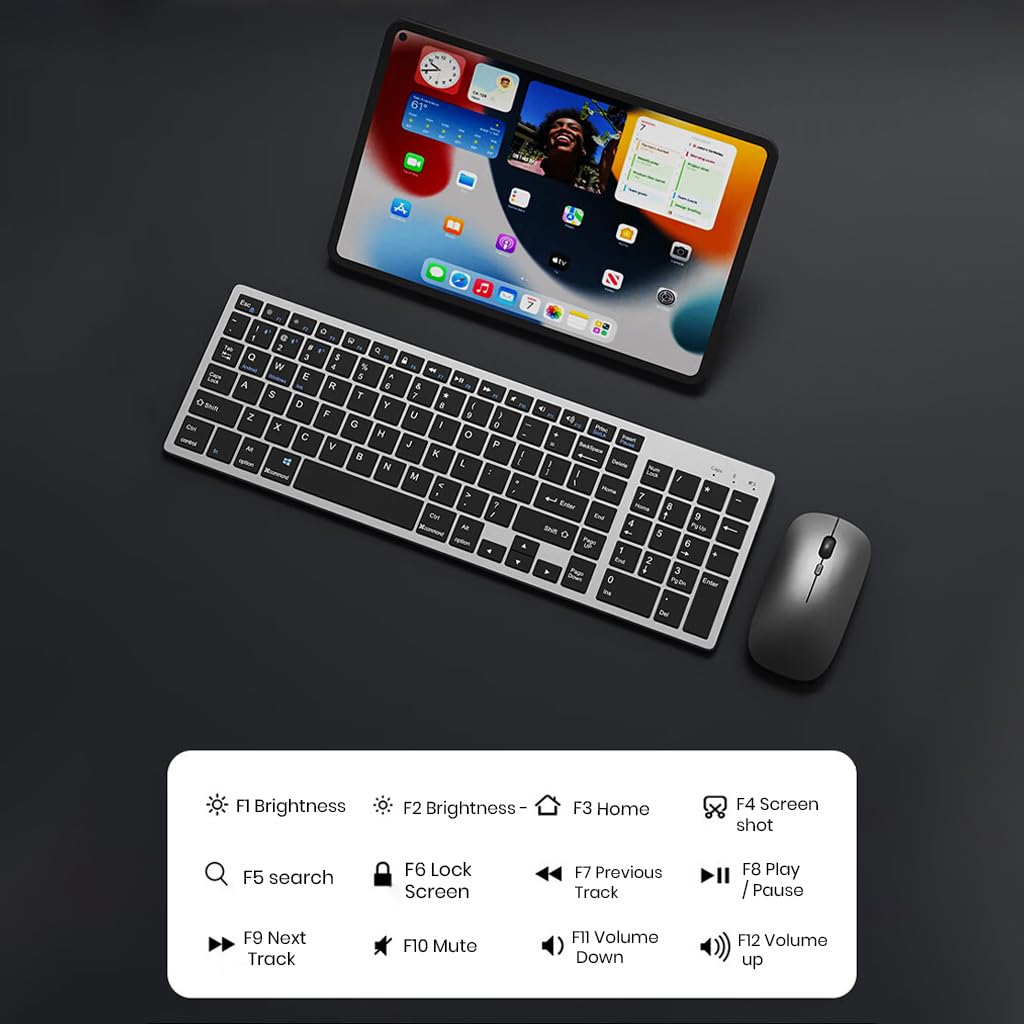
Imatge 5.1: The keyboard displaying its function keys and their associated actions, such as brightness control, home, screen shot, search, lock screen, media playback, and volume control.
- Fn+F1: Brillantor avall
- Fn+F2: Brillantor cap amunt
- Fn+F3: Casa
- Fn+F4: Captura de pantalla
- Fn+F5: Cerca
- Fn+F6: Pantalla de bloqueig
- Fn+F7: Pista anterior
- Fn+F8: Reproduir/Pausa
- Fn+F9: Pista següent
- Fn+F10: Silenciar
- Fn+F11: Baixa el volum
- Fn+F12: Puja el volum
5.4 Mode d'estalvi d'energia
The keyboard and mouse are equipped with an automatic sleep mode to conserve battery life. If inactive for 10 minutes, the devices will enter sleep mode. To wake them up, simply press any key on the keyboard or move/click the mouse.

Imatge 5.2: Diagram illustrating the auto-sleep mode and how to reactivate the keyboard and mouse by pressing any key.
6. Manteniment
- Neteja: Feu servir un drap suau i sec per netejar el teclat i el ratolí. Per a la brutícia persistent, feu servir un drap lleugerament sec.amp es pot fer servir un drap, assegurant-se que no entri líquid al dispositiu.
- Funda protectora: Utilize the included transparent protective cover for the keyboard to guard against dust and accidental spills.
- Emmagatzematge: Guardeu els dispositius en un lloc fresc i sec, allunyat de la llum solar directa i de temperatures extremes.
- Càrrega: Always use a 5V/1A power adapter for charging to prevent damage and ensure battery longevity.

Imatge 6.1: The keyboard shown with its transparent protective keyskin, designed to prevent dust and spills.
7. Solució De Problemes
| Problema | Causa possible | Solució |
|---|---|---|
| Keyboard/Mouse not connecting via 2.4GHz USB. | USB receiver not properly inserted, low battery, incorrect mode selected. |
|
| El teclat/ratolí no es connecta per Bluetooth. | Not in pairing mode, device's Bluetooth is off, already connected to max devices, low battery. |
|
| Connexió amb retard o intermitent. | Interferències, distància del receptor/dispositiu, bateria baixa. |
|
| Les tecles del teclat no responen. | Low battery, device in sleep mode, connection issue. |
|
8. Especificacions
| Característica | Detall |
|---|---|
| Marca | TECFILE |
| Model | K936 |
| Tecnologia de connectivitat | Keyboard: 3 x Bluetooth 5.0, 1 x 2.4GHz USB; Mouse: 1 x Bluetooth, 1 x 2.4GHz USB |
| Dispositius compatibles | Ordinador portàtil, ordinador personal, telèfon intel·ligent, tauleta |
| Sistema operatiu | Android, iOS, Windows, macOS |
| Bateria del teclat | Ió de liti de 300 mAh (recarregable) |
| Port de càrrega | USB tipus C |
| Temps de càrrega | 2-4 hores (aprox.) |
| Temps d'espera | Fins a 180 dies |
| Dimensions del teclat (L x A x A) | 36 x 13 x 1.5 cm |
| Mouse Dimensions (LxWxH) | 11 x 6.3 x 3 cm (aprox.) |
| Pes de l'article | 661 g (combo) |
| Tecnologia de detecció de moviment | Òptic |
| Orientació de la mà | Ambidextre |
9. Garantia i Suport
TECPHILE products come with a standard warranty. For warranty claims, technical support, or any product-related inquiries, please contact TECPHILE customer service through the retailer where the product was purchased or visit the official TECPHILE weblloc per obtenir informació de contacte.
Si us plau, conserveu el comprovant de compra per motius de garantia.
Manufacturer/Importer: TECPHILE, 2nd Floor, A36, Block B, Naraina Industrial Area Phase 2, Naraina, New Delhi, Delhi, 110028


