1. Introducció
Gràcies per la compraasing the XO F41 Mirror Bluetooth Speaker. This device combines a digital clock display with a portable Bluetooth speaker, offering multiple playback options including Bluetooth, TF card, and FM radio. Please read this manual carefully before use to ensure proper operation and to maximize your experience with the product.

Image 1.1: The XO F41 Mirror Bluetooth Speaker in use, showing its digital clock display.
2. Característiques del producte
- Connectivitat Bluetooth 5.3: Per a una transmissió d'àudio sense fil estable i eficient.
- Mirror Display: Clear digital time display with adjustable brightness.
- Múltiples modes de reproducció: Supports Bluetooth, TF card, and FM radio.
- Micròfon integrat: Per a trucades amb mans lliures.
- Temps de reproducció llarg: Up to 8 hours at 50% volume, 5 hours at 100% volume.
- Disseny compacte i portàtil: Easy to carry and place anywhere.
- Càrrega USB-C: Port de càrrega modern i pràctic.
3. Contingut del paquet
Si us plau, comproveu el paquet per veure si hi ha els elements següents:
- XO F41 Mirror Bluetooth Speaker
- Cable de càrrega USB-C
- Manual d'usuari

Image 3.1: The XO F41 Mirror Bluetooth Speaker packaging.
4. Disseny i controls del dispositiu
Familiarize yourself with the speaker's buttons and ports:
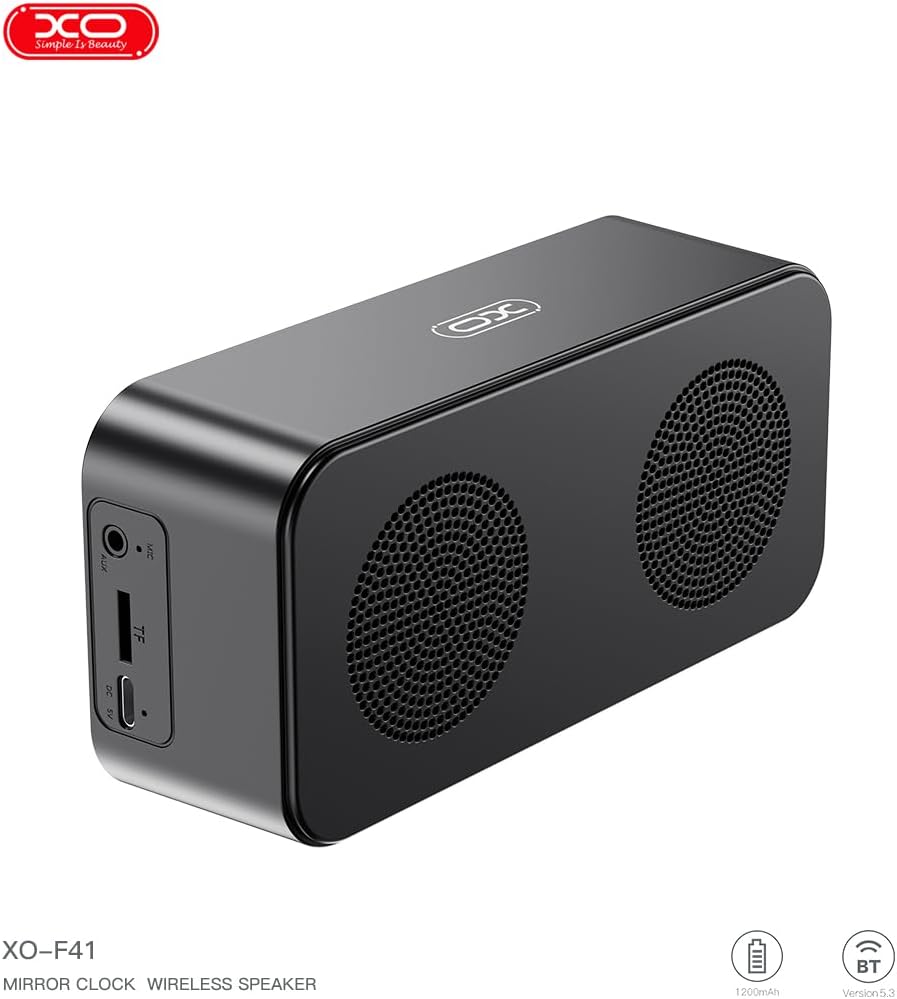
Imatge 4.1: Lateral view of the XO F41 with ports labeled.
- Botó d'encesa: Premeu i manteniu premut per encendre/apagar. Premeu breument per canviar de mode.
- Botó Reproduir/Pausa: Reprodueix o pausa l'àudio. Respon/finalitza trucades.
- Augment de volum / pista següent: Premeu curt per pujar el volum, premeu llargament per passar a la següent pista.
- Baixada de volum / pista anterior: Premeu curt per baixar el volum, premeu llargament per anar a la pista anterior.
- Port USB-C: Per carregar el dispositiu.
- Ranura per a targetes TF: Insert a TF (MicroSD) card for local music playback.
- Port AUX: Per a entrada d'àudio amb cable.
5. Configuració
5.1 Càrrega de l'altaveu
- Connecteu el cable USB-C proporcionat al port de càrrega de l'altaveu.
- Connecteu l'altre extrem del cable a un adaptador de corrent USB (no inclòs) o al port USB d'un ordinador.
- The charging indicator will illuminate. It takes approximately 3 hours for a full charge.
- The indicator will turn off or change color once fully charged.
5.2 Encès/Apagat
- Per encendre: Press and hold the Power button for approximately 3 seconds. You will hear an audible prompt.
- Per apagar: Press and hold the Power button for approximately 3 seconds. You will hear an audible prompt.
6. Instruccions de funcionament
6.1 Vinculació Bluetooth
- Ensure the speaker is powered on and in Bluetooth mode. If not, short press the Power button to cycle through modes until "BT" or a Bluetooth icon appears on the display.
- Al dispositiu mòbil, activeu el Bluetooth i cerqueu els dispositius disponibles.
- Select "XO-F41" from the list of devices.
- Un cop emparellat, l'altaveu indicarà una connexió correcta i podràs començar a reproduir àudio des del dispositiu.
6.2 Mode de targeta TF
- Inseriu una targeta TF (MicroSD) amb àudio MP3 files a la ranura de la targeta TF.
- The speaker will automatically switch to TF card mode and begin playing music. If not, short press the Power button to cycle to TF card mode.
- Use the Volume Up/Down buttons for track navigation and the Play/Pause button for playback control.
6.3 Mode de ràdio FM
- Short press the Power button to switch to FM radio mode. The display will show the FM frequency.
- Premeu llargament el botó Reproduir/Pausa per escanejar i desar automàticament les emissores de FM disponibles.
- Short press the Volume Up/Down buttons to switch between saved stations.
6.4 Configuració del rellotge i l'alarma
The XO F41 features a digital clock display. Specific instructions for setting the time and alarm are typically found in the detailed manual included with the product. Generally, a dedicated 'M' (Mode) or 'Set' button is used to enter time/alarm setting mode, and volume buttons are used to adjust values.

Image 6.1: The XO F41 speaker functioning as a bedside clock.
6.5 Ajust de la brillantor de la pantalla
The display brightness is adjustable. Look for a dedicated button (often labeled with a sun icon or similar) or a combination of button presses (e.g., double-pressing the Power button) to cycle through brightness levels. Refer to the included quick start guide for exact steps.
7. Manteniment
- Neteja: Feu servir un drap suau i sec per netejar la superfície de l'altaveu. No utilitzeu productes de neteja abrasius ni dissolvents.
- Emmagatzematge: Guardeu l'altaveu en un lloc fresc i sec, allunyat de la llum solar directa i de temperatures extremes quan no l'utilitzeu durant períodes prolongats.
- Resistència a l'aigua: Aquest dispositiu no és impermeable. Eviteu l'exposició a l'aigua o a una humitat excessiva.
- Cura de la bateria: Per allargar la durada de la bateria, eviteu descarregar-la completament amb freqüència. Carregueu el dispositiu regularment, fins i tot si no l'utilitzeu constantment.
8. Solució De Problemes
| Problema | Causa possible | Solució |
|---|---|---|
| L'altaveu no s'encén. | Bateria baixa. | Carregueu l'altaveu durant almenys 30 minuts. |
| No es pot emparellar per Bluetooth. | Speaker not in pairing mode; Bluetooth disabled on device; too far from device. | Ensure speaker is in Bluetooth mode. Enable Bluetooth on your device. Move speaker closer to your device (within 10 meters). |
| No sound from TF card. | Targeta TF no inserida correctament; no compatible file format; no audio files on card. | Reinsert TF card. Ensure files are in MP3 format. Verify audio files are present on the card. |
| Mala recepció de ràdio FM. | Senyal feble; interferències ambientals. | Move the speaker to a different location. Re-scan for stations. |
9. Especificacions
| Característica | Detall |
|---|---|
| Número de model | XO-F41 |
| Versió Bluetooth | Bluetooth V5.3 |
| Freqüència Bluetooth | 2.402 GHz-2.480 GHz |
| Capacitat de la bateria | 1200 mAh |
| Entrada de càrrega | USB-C, DC5V/0.5A |
| Temps de càrrega | Aproximadament 3 hores |
| Hora de jugar | 8H (50% volume); 5H (100% volume) |
| Distància efectiva | A menys de 10 metres |
| Potència màxima | 5W |
| Unitat d'altaveus | 52 mm |
| Ràtio senyal / soroll | > 80 dB |
| Dimensions del producte | 15 x 3.81 x 11 cm (aprox. 150 x 45 x 72 mm) |
| Pes del producte | 320 g (approx. 0.28 kg) |
| Material | Plàstic |
| Característica especial | Brillantor ajustable |

Image 9.1: Detailed product parameters.
10. Informació de la garantia
The XO F41 Mirror Bluetooth Speaker comes with a standard manufacturer's warranty. Please refer to the warranty card included in your package for specific terms, conditions, and duration. Keep your purchase receipt as proof of purchase for any warranty claims.
11. Atenció al client
For further assistance, technical support, or inquiries regarding your XO F41 Mirror Bluetooth Speaker, please contact the retailer or manufacturer's customer service department. Contact details are typically provided on the product packaging or the official brand weblloc.