Introducció
The Pulsar Axion Compact Thermal Imaging Monocular XG30 is a state-of-the-art device designed for enhanced observation in various conditions. Its compact and lightweight design makes it highly portable, while advanced thermal imaging capabilities provide clear visuals for a range of applications, including scouting, hunting, and monitoring livestock. This manual provides essential information for setting up, operating, and maintaining your device.

Figure 1: The Pulsar Axion Compact Thermal Imaging Monocular XG30, showcasing its sleek, dark grey design with prominent Pulsar branding and control buttons.
Configuració
Instal·lació i càrrega de la bateria
The Axion XG30 uses an APS 3 Battery. To install or replace the battery, locate the battery compartment on the device. Insert the APS 3 battery pack, ensuring proper orientation, until it clicks securely into place. For charging, connect the provided power adapter to the USB-C charging port located on the front of the device. A full charge ensures optimal operating time.

Figure 2: The Pulsar Axion monocular with its APS 5 Li-Ion battery pack removed, illustrating the easy battery replacement process. The device is designed for up to 7 hours of continuous use.
Engegada inicial
Press and hold the power button (usually the central blue button) until the display illuminates. Allow a few moments for the device to initialize. Adjust the diopter on the eyepiece for clear focus according to your vision.
Funcionament del monocular
Controls bàsics i navegació
The Axion XG30 features intuitive controls for easy operation. The main buttons on the top panel allow for power on/off, menu navigation, and digital zoom adjustments. Familiarize yourself with the button layout for quick access to functions.
Magnification and Field of View
The monocular offers a 2-16x magnification range, allowing for detailed observation of distant objects. Its 14.6° wide field of view is ideal for scanning large areas efficiently, ensuring you don't miss any details.
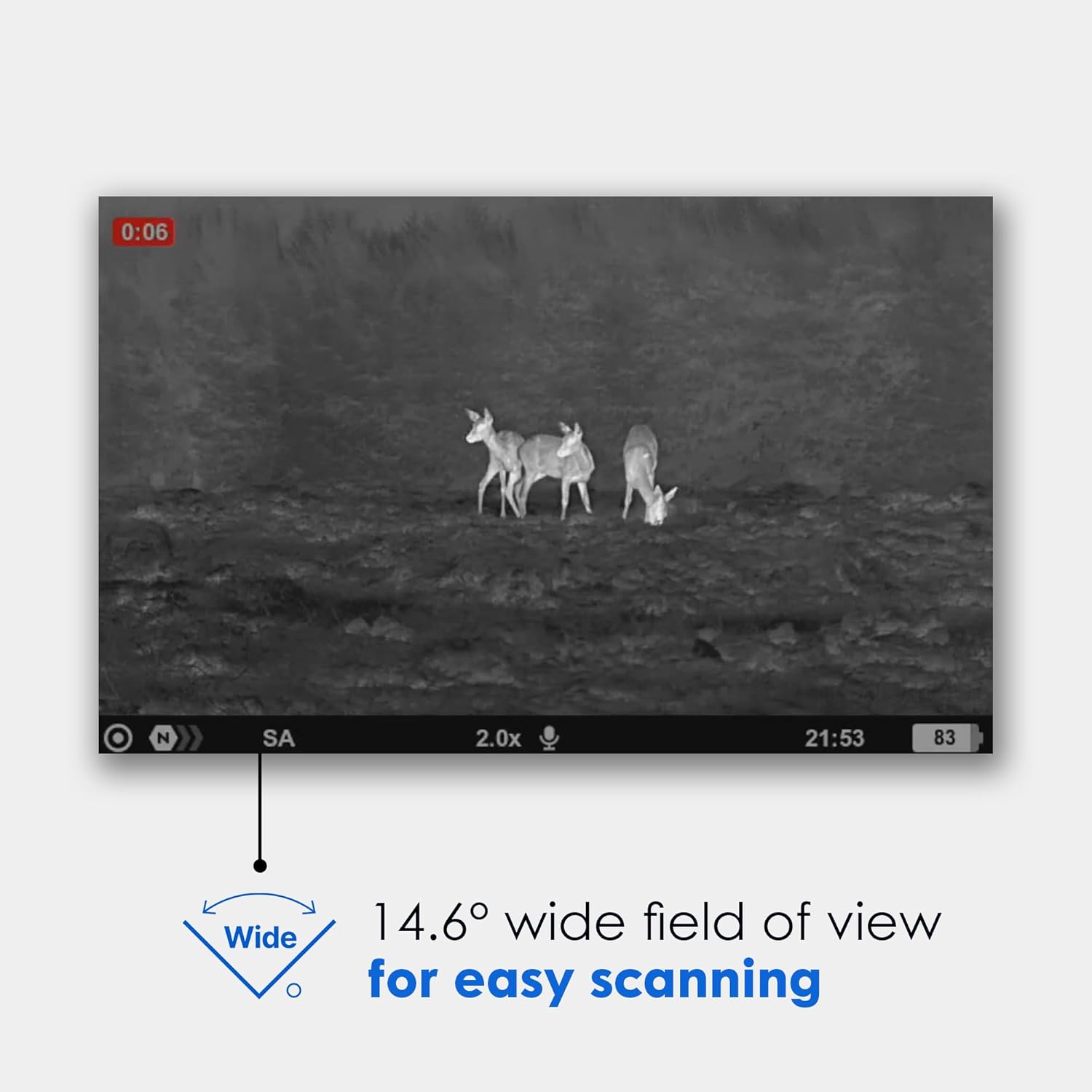
Figure 3: A thermal image captured through the Pulsar Axion, demonstrating its 14.6° wide field of view, which is excellent for easy scanning and observing multiple subjects.
Modes de color
The Axion XG30 provides eight distinct color modes to adapt to various environments and preferences, enhancing visibility and target identification. These modes include:
- Blanc calent: Hotter objects appear white.
- Negre calent: Hotter objects appear black.
- Roent: Highlights the hottest areas in red.
- Red Monochrome: Displays a red-tinted monochrome image.
- Arc de Sant Martí: Uses a spectrum of colors to represent temperature differences.
- Ultramarine: A blue-dominant color palette.
- violeta: A purple-dominant color palette.
- Sèpia: Provides a warm, brown-toned image.

Figure 4: Visual representation of the eight different color palette options available on the Pulsar Axion, demonstrating how temperature differences are displayed.
Stream Vision 2 App Support
Enhance your experience by connecting your Axion XG30 to the Stream Vision 2 app, available for iOS and Android devices. The app allows for remote control, live streaming, and recording of thermal footage directly to your smartphone or tablet.

Figure 5: A smartphone screen displaying the Stream Vision 2 app interface, highlighting its support for iOS and Android devices for remote control and media management.
Manteniment
Neteja i cura
To ensure the longevity and optimal performance of your monocular, regularly clean the lenses with a soft, lint-free cloth designed for optics. Avoid using abrasive materials or harsh chemicals. Keep the device free from dust and debris, and store it in its protective carrying case when not in use.
Emmagatzematge
Store the monocular in a cool, dry place, away from direct sunlight and extreme temperatures. Ensure the battery is partially charged (around 50%) if storing for extended periods to maintain battery health.
Resolució de problemes
Problemes comuns i solucions
- Sense energia: Assegureu-vos que la bateria estigui completament carregada i inserida correctament.
- Imatge borrosa: Adjust the diopter on the eyepiece and the objective lens focus ring.
- Image Freezing/Lagging: Try restarting the device. If using the app, ensure a stable connection.
- El dispositiu no respon: Perform a hard reset by holding the power button for an extended period (e.g., 10-15 seconds).
For persistent issues, refer to the detailed troubleshooting section in the full manual or contact Pulsar customer support.
Especificacions
| Característica | Detall |
|---|---|
| Nom del model | Axion |
| Color | XG30 |
| Sensor | 12-Micron Microbolometer, 640x480 Uncooled |
| Mostra | 640x400 AMOLED HD |
| Ampliació | 2 - 16x |
| Interval de detecció | 1400 iardes |
| Temperatura de funcionament | -13 °F a +104 °F |
| Classificació impermeable | IPX7 (Submersion Waterproof Rated) |
| Tipus de bateria | Bateria APS 3 |
| Material | Aliatge de magnesi |
| Pes de l'article | 0.68 lliures |
| Dimensions de l'article LxWxH | 5.7 x 1.6 x 2.7 polzades |
Understanding NETD
NETD (Noise Equivalent Temperature Difference) is a key measure of sensitivity in thermal imaging devices. It indicates the smallest temperature difference a sensor can detect—lower NETD values mean clearer, more detailed images, especially in low-contrast environments like fog or darkness. This makes NETD essential for evaluating the performance of thermal scopes, monoculars, and cameras.
Understanding Pixel Pitch
Pixel pitch (µm) in Pulsar thermal devices refers to the space between pixels on the sensor. Smaller pixel pitch delivers higher image resolution and finer detail, ideal for close-range clarity. Larger pixel pitch gathers more thermal energy, enhancing detection range and sensitivity. It plays a crucial role in thermal image quality and performance.
Garantia i Suport
The Pulsar Axion Compact Thermal Imaging Monocular XG30 comes with a 5 anys de garantia del fabricant. For warranty claims, technical support, or any inquiries regarding your device, please contact Pulsar customer service through their official weblloc web o la informació de contacte que es proporciona a l'embalatge del producte.
EXPORT CONTROL NOTICE: This product is controlled for export and in-country transfer under the Export Administration Regulations (EAR). Diversion contrary to U.S. law prohibited.


