Introducció
This manual provides instructions for the ZdalaMit Voice Replacement Remote Control, designed for use with Sony Bravia 8 OLED 4K HDR Google TVs. This remote offers voice control functionality and is compatible with various Sony TV models, ensuring seamless integration and operation.
Compatible Sony TV Models: K-55XR80, K-65XR80, K-85XR80, K-75XR80, K-77XR80, K55XR80, K65XR80, K85XR80, K75XR80, K77XR80, K-55XR80C, K-65XR80C, K-77XR80C, K-85XR80C, K-75XR80C, K55XR80C, K65XR80C, K77XR80C, K85XR80C, K75XR80C, K-55XR83, K-55XR84, K-65XR83, K-65XR84, K-77XR83, K-77XR84.
Contingut del paquet
- 1x ZdalaMit Voice Replacement Remote Control
- Note: 2x 1.5V AAA Alkaline Batteries are not included and must be purchased separately.
Configuració
1. Instal·lació de la bateria
Open the battery compartment cover on the back of the remote control. Insert two (2) 1.5V AAA alkaline batteries, ensuring correct polarity (+ and -) as indicated inside the compartment. Close the battery cover securely.
2. Emparellament amb el televisor
Before using the voice function and certain other features, the remote must be paired with your Sony Bravia TV. Follow these steps:
- Encendre el televisor: Press the power button on your TV or an existing remote to turn on your television.
- Inicia l'aparellament: On the ZdalaMit remote, simultaneously hold down the VOL- (Volume Down) button i el Google Assistant key (microphone icon) for approximately 3 to 5 seconds.
- Confirmació: The indicator light on the remote will go out once pairing is successful.
- Configuració automàtica: All pairing transactions occur automatically in the background. No further manual setup is required after successful pairing.
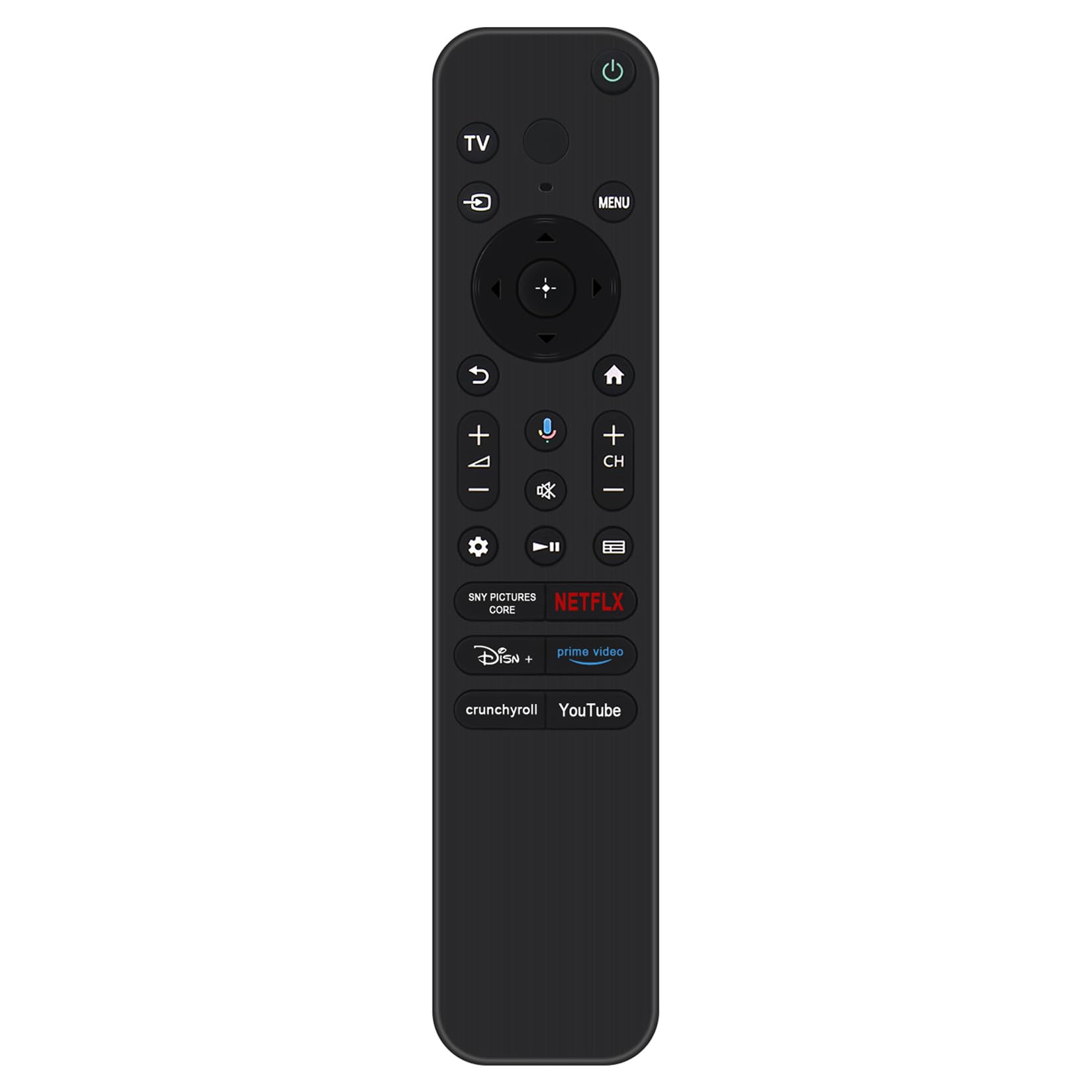
Imatge: Frontal view of the ZdalaMit Voice Replacement Remote Control. This image displays the layout of all buttons, including the power, TV input, navigation, volume, channel, Google Assistant (microphone), and dedicated app buttons like Netflix and YouTube.
Instruccions de funcionament
The ZdalaMit Voice Replacement Remote provides full functionality for your Sony Bravia Google TV. Below is a guide to its primary buttons and their functions:
- Power Button (Green Circle with Line): Encén o apaga el televisor.
- TV Input Button: Canvia entre diferents fonts d'entrada (HDMI, AV, etc.).
- Navigation Pad (Circular with Arrows): Use the directional arrows (Up, Down, Left, Right) to navigate menus and select items. The central button confirms selections.
- Botó Enrere (fletxa corba): Torna a la pantalla o menú anterior.
- Botó Inici (icona de casa): Accesses the TV's home screen or main menu.
- Pujar/Baixar el volum (VOL+/-): Ajusta el volum d'àudio.
- Mute Button (Speaker with Cross): Silencia o activa l'àudio del televisor.
- Google Assistant Key (Microphone Icon): Activates the voice control feature. Press and hold to speak commands or search queries.
- Canal amunt/avall (CH+/-): Canvia els canals de televisió.
- Botó de configuració (icona d'engranatge): Obre el menú de configuració del televisor.
- Playback Controls (Play, Pause, Fast Forward, Rewind): Controla la reproducció de suports.
- Botons d'aplicació dedicats: Provides quick access to popular streaming services such as Netflix, Prime Video, Disney+, Crunchyroll, YouTube, and SNY Pictures Core.
Manteniment
Canvi de bateria
When the remote's performance degrades or it stops responding, replace the batteries. Always replace both AAA batteries simultaneously with new ones. Do not mix old and new batteries, or different types of batteries.
Neteja
Per netejar el comandament a distància, feu servir un drap suau i sec. No utilitzeu netejadors líquids, esprais ni materials abrasius, ja que poden danyar la superfície o els components interns del comandament a distància.
Resolució de problemes
- El comandament a distància no respon:
- Comproveu si les piles estan correctament inserides i tenen prou càrrega. Substituïu-les si cal.
- Assegureu-vos que no hi hagi obstacles entre el comandament a distància i el receptor d'infrarojos del televisor.
- Re-pair the remote with the TV following the "Pairing with Your TV" steps in the Setup section.
- El control per veu no funciona:
- Confirm that the remote is successfully paired with your TV. Voice functionality requires pairing.
- Ensure your TV is connected to the internet, as Google Assistant requires an active internet connection.
- Speak clearly and hold the remote closer to your mouth when using the Google Assistant key.
- Buttons Require Hard Pressing:
- This can sometimes indicate low battery power. Try replacing the batteries.
- Ensure the remote is clean and free from debris that might obstruct button presses.
Especificacions
| Dimensions del producte | 6.95 x 1.51 x 0.55 polzades |
| Pes de l'article | 1.41 unces |
| Font d'alimentació | 2x 1.5V AAA Alkaline Battery (Not Included) |
| Característica especial | Cerca per veu |
| Dispositius compatibles | Television (Sony Bravia 8 OLED 4K HDR Google TV series) |

Image: The ZdalaMit Voice Replacement Remote Control shown with its approximate dimensions: 6.9 inches in length and 1.5 inches in width.
Garantia i Suport
For any questions, technical assistance, or warranty inquiries regarding your ZdalaMit Voice Replacement Remote Control, please contact the manufacturer or your point of purchase. Keep your purchase receipt for warranty purposes.


