1. Introducció
Thank you for choosing the EPOMAKER TH99 Tri-Mode Wireless Mechanical Keyboard. This manual provides detailed instructions on how to set up, operate, and maintain your new keyboard. The TH99 is designed for versatility and performance, featuring tri-mode connectivity, a gasket-mounted structure, hot-swappable switches, and dynamic RGB backlighting.

Figure 1: EPOMAKER TH99 Tri-Mode Wireless Mechanical Keyboard (Blue&White)
2. Contingut del paquet
Si us plau, assegureu-vos que tots els articles estiguin presents al vostre paquet:
- Teclat mecànic EPOMAKER TH99
- Detachable USB-C Keyboard Cable
- Switch & Keycap Puller Tool
- Multilingual User Manual (this document)
- Additional Switches (2 pieces)
3. Característiques clau
- Connectivitat trimodal: Seamlessly switch between wired USB-C, 2.4GHz wireless, and Bluetooth 5.0 connections for maximum flexibility across various devices.
- Gasket-Mounted Structure: Experience a soft, flexible, and acoustically pleasing typing feel with the advanced gasket mount design, complemented by 5 layers of sound-dampmaterials d'envelliment.
- Interruptors intercanviables en calent: Customize your typing experience without soldering. The PCB supports 3/5-pin mechanical switches, allowing for easy switch replacement. The keyboard comes pre-installed with EPOMAKER Creamy Jade switches.
- Retroil·luminació RGB dinàmica: Personalize your setup with 102 south-facing per-key RGB LEDs, offering a wide range of lighting effects and colors.
- Tecles PBT: Durable, grease-resistant PBT keycaps with Cherry profile ensure longevity and a comfortable typing experience.
- 1800 Compact Layout: A space-saving 96% layout that retains a full Numpad and dedicated function keys for enhanced productivity.
- Bateria de llarga durada: Equipped with an 8000mAh battery, providing extended usage in wireless modes.
- Low Latency Performance: Enjoy responsive input with 2-5ms latency in wired and 2.4G modes, ideal for gaming and fast-paced tasks.
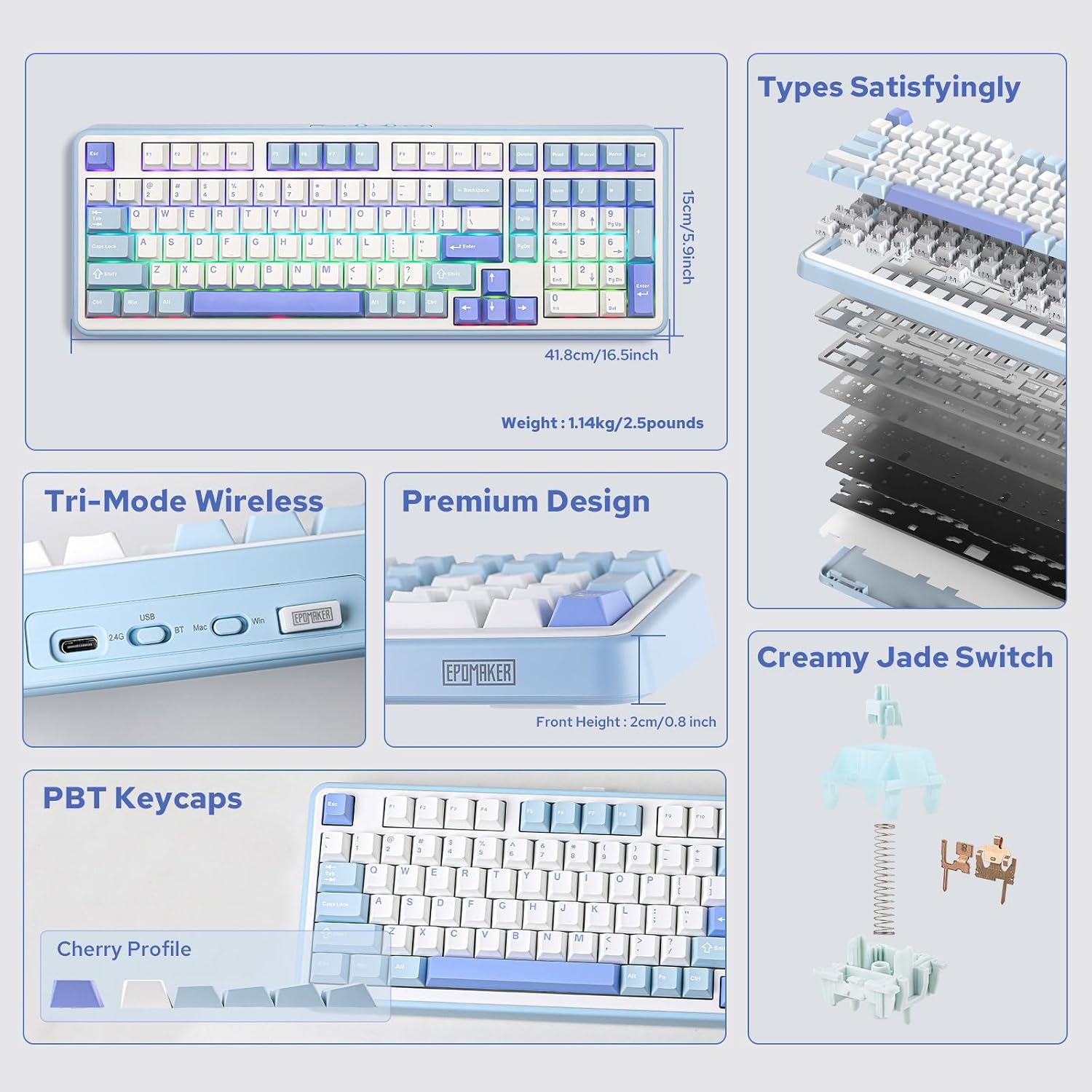
Figura 2: Mésview of EPOMAKER TH99 features and internal structure.
4. Configuració
4.1. Connexió del teclat
The EPOMAKER TH99 offers three connection methods:
- Mode amb cable (USB-C):
- Connecteu el cable USB-C proporcionat al port USB-C del teclat.
- Connecteu l'altre extrem del cable a un port USB disponible de l'ordinador.
- Ensure the mode switch on the back of the keyboard is set to 'USB'.
- El sistema reconeixerà automàticament el teclat.
- Mode sense fil de 2.4 GHz:
- Locate the 2.4GHz USB dongle (usually stored in a slot on the keyboard).
- Connecteu el dongle a un port USB disponible de l'ordinador.
- Set the mode switch on the back of the keyboard to '2.4G'.
- El teclat s'hauria de connectar automàticament. Si no, premeu Fn + R per iniciar l'aparellament.
- Mode Bluetooth:
- Set the mode switch on the back of the keyboard to 'BT'.
- On your device (PC, Mac, tablet, smartphone), enable Bluetooth and search for new devices.
- Mantén premut Fn + Q, Fn + W, o Fn + E for 3-5 seconds to enter pairing mode for one of the three Bluetooth channels. The corresponding key (Q, W, or E) will flash rapidly.
- Select 'EPOMAKER TH99' from the list of available Bluetooth devices on your host device.
- Once paired, the key will stop flashing and remain steadily lit.
- You can switch between paired Bluetooth devices by pressing Fn + Q/W/E.

Figure 3: Tri-mode connectivity options for the TH99 keyboard.
4.2. Compatibilitat del sistema operatiu
The TH99 keyboard is compatible with both Windows and Mac operating systems.
- Use the 'Win/Mac' toggle switch on the back of the keyboard to select the appropriate operating system mode.
- In Mac mode, the 'Alt' key functions as 'Option' and the 'Win' key functions as 'Command'.

Figure 4: Multi-system compatibility of the TH99 keyboard.
5. Funcionament
5.1. Control de retroil·luminació RGB
The TH99 keyboard features extensive RGB backlighting customization:
- Canvia l'efecte d'il·luminació: Premeu Fn + Ins to cycle through various pre-programmed RGB lighting effects.
- Toggle Backlight On/Off: Premeu Fn + Retrocés to turn the backlighting on or off.
- Ajusta la brillantor: Premeu Fn + ↑ (up arrow) to increase brightness, and Fn + ↓ (down arrow) to decrease brightness.
- Ajustar velocitat: Premeu Fn + ← (left arrow) to slow down the effect speed, and Fn + → (right arrow) to speed up the effect.
- Change Color (for static effects): Premeu Fn + Del to cycle through different static colors.

Figure 5: RGB and single color backlight controls.
Video 1: EPOMAKER TH99 RGB Effect Show.
5.2. Function Key Combinations
The TH99 keyboard utilizes the Fn key for various secondary functions:
- Fn + F1-F12: Access multimedia controls and system functions (e.g., volume, play/pause, brightness). Refer to the keycap legends for specific functions.
- Fn + R: Initiate 2.4G pairing.
- Fn + Q/W/E: Switch between Bluetooth channels 1, 2, and 3, respectively. Hold for 3-5 seconds to enter pairing mode.
- Fn + Win: Lock/Unlock the Windows key.
- Fn + Alt: Switch between Mac and Windows layout (also controlled by the physical switch on the back).
5.3. Customization Software
For advanced customization, including key remapping, macro settings, and detailed backlight configuration, please download the official EPOMAKER software from the manufacturer's website. The software allows for a personalized user experience beyond the onboard controls.
6. Manteniment
6.1. Neteja del teclat
Per mantenir l'aspecte i la funcionalitat del teclat:
- Desconnecta el teclat del dispositiu abans de netejar-lo.
- Utilitzeu un drap suau i sense pelusa lleugerament dampEsbandiu amb aigua o una solució netejadora suau per netejar les tecles i la carcassa.
- Per a una neteja més profunda, feu servir l'extractor de tecles inclòs per treure les tecles i netegeu-les per sota amb aire comprimit o un raspall petit.
- Eviteu utilitzar productes químics o materials abrasius.
6.2. Replacing Keycaps and Switches
The TH99 features hot-swappable switches, allowing for easy replacement:
- Use the provided keycap puller to gently remove the desired keycap by hooking it onto the keycap and pulling upwards.
- Once the keycap is removed, use the switch puller to grasp the switch firmly from the top and bottom clips, then pull upwards to remove it.
- To install a new switch, align its pins with the holes on the PCB. Ensure the pins are straight to avoid bending. Gently push the switch down until it clicks into place.
- Place the keycap back onto the new switch, ensuring it is securely seated.

Figure 6: Hot-swappable PCB and tools for switch replacement.
Video 2: Creamy Jade Switch VS Sea Salt Silent Switch sound test.
Video 3: EPOMAKER TH99 Typing with Creamy Jade Switch.
6.3. Cura de la bateria
Per maximitzar la durada de la bateria i garantir un funcionament segur:
- Charge the keyboard using the provided USB-C cable connected to a standard USB power source (e.g., computer USB port, wall adapter).
- Eviteu exposar el teclat a temperatures extremes.
- Si guardeu el teclat durant un període prolongat, carregueu-lo aproximadament al 50% i guardeu-lo en un lloc fresc i sec.
7. Solució De Problemes
- El teclat no respon:
- Assegureu-vos que el teclat estigui carregat.
- Check the connection mode switch (USB, 2.4G, BT) is correctly set.
- For wireless modes, ensure the dongle is properly inserted or Bluetooth is paired.
- Prova de connectar-te mitjançant un cable USB-C per descartar problemes sense fil.
- RGB backlighting not working:
- Assegureu-vos que la retroiluminació no estigui apagada (Fn + Retrocés).
- Check brightness levels (Fn + ↑/↓).
- If using customization software, ensure no conflicting settings are applied.
- Claus que no es registren o s'escriuen dues vegades:
- This could indicate a faulty switch. Use the provided tools to replace the affected switch.
- Ensure keycaps are properly seated.
- Connectivity issues (2.4G/Bluetooth):
- Assegureu-vos que el teclat estigui dins de l'abast del receptor/dispositiu.
- Eviteu interferències d'altres dispositius sense fil.
- Torna a emparellar el teclat amb el dispositiu.
8. Especificacions
| Característica | Detall |
|---|---|
| Dimensions del producte | 16.46 cm de llargada x 5.91 cm d'amplada x 1.65 cm d'alçada |
| Pes de l'article | 2.51 lliures |
| Tecnologia de connectivitat | Sense fil de 2.4 GHz, Bluetooth 5.0, USB-C amb cable |
| Descripció del teclat | Mecànica |
| Característiques especials | Backlit, Creamy Sound, Hot-Swappable, Programmable Keys, Three Modes of Connectivity |
| Il·luminació del teclat | RGB |
| Capacitat de la bateria | 8000 mAh |
| Dispositius compatibles | Consola de jocs, ordinador portàtil, PC, telèfon intel·ligent, tauleta |
| Material de claus | PBT |
| Tipus de canvi | Creamy Jade (Linear, Pre-lubed) |
9. Garantia i Suport
EPOMAKER products come with a standard manufacturer's warranty. For detailed warranty information, technical support, or to download the latest customization software and firmware updates, please visit the official EPOMAKER weblloc web o contacteu directament amb el servei d'atenció al client. Conserveu el rebut de compra com a comprovant de compra per a reclamacions de garantia.


