1. Introducció
This manual provides detailed instructions for the installation, operation, and maintenance of your Xigmatek Aqua V AIR Arctic Mid-Tower PC Case. Please read this manual thoroughly before beginning any installation to ensure proper setup and safe operation. Retain this manual for future reference.
2. Informació de seguretat
Observeu les següents precaucions de seguretat durant la instal·lació i el funcionament:
- Desconnecteu sempre l'alimentació de la presa de corrent abans d'instal·lar o treure qualsevol component.
- Porteu una polsera antiestàtica per evitar danys per descàrrega electrostàtica (ESD) als components sensibles.
- Handle components carefully. Avoid touching pins or circuit boards directly.
- Assegureu-vos que hi hagi una ventilació adequada al voltant de la carcassa de l'ordinador per evitar el sobreescalfament.
- Mantingueu les peces petites i les eines lluny dels nens.
- No intenteu modificar la carcassa ni els seus components, ja que això podria anul·lar la garantia i suposar riscos per a la seguretat.
3. Contingut del paquet
Verifiqueu que tots els elements siguin presents al paquet:
- Xigmatek Aqua V AIR Arctic Mid-Tower PC Case
- Accessory kit (screws, standoffs, cable ties)
- Manual d'usuari (aquest document)
If any items are missing or damaged, contact your retailer or Xigmatek support.
4. Producte acabatview
The Xigmatek Aqua V AIR Arctic is a mid-tower PC case designed for high-performance gaming configurations. It features tempered glass panels for component visibility and optimized airflow with pre-installed ARGB fans.

Figura 4.1: Frontal esquerre view of the Xigmatek Aqua V AIR Arctic PC case, showcasing the tempered glass front and side panels, and the pre-installed ARGB fans.

Figura 4.2: posterior view of the PC case, showing the I/O shield cutout, expansion slots, and rear fan mount.
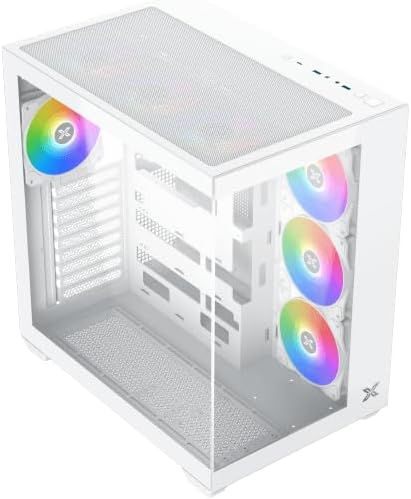
Figura 4.3: Angle de dalt a baix view, highlighting the top mesh panel for additional cooling and the internal layout.
5. Configuració i instal·lació
Follow these steps to install your PC components into the Xigmatek Aqua V AIR Arctic case.
5.1. Preparació del cas
- Col·loqueu la caixa sobre una superfície plana i estable.
- Remove the tempered glass side panel by unscrewing the thumb screws at the rear and carefully sliding it off. Place it on a soft, non-abrasive surface to prevent scratches.
- Remove the opposite steel side panel by unscrewing the thumb screws and sliding it off.
5.2. Instal·lació de la placa base
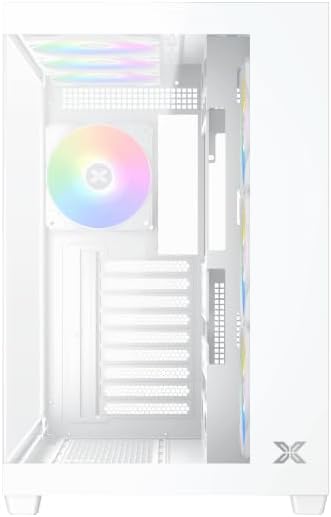
Figura 5.1: Interior view of the case, illustrating the motherboard mounting area and cable routing cutouts.
- Instal·leu la protecció d'E/S al retall de la part posterior de la carcassa.
- Align your motherboard with the pre-installed standoffs. Ensure the standoffs match your motherboard's form factor (ATX, Micro ATX).
- Secure the motherboard using the provided screws from the accessory kit. Do not overtighten.
5.3. Instal·lació de la font d'alimentació (PSU)
- Locate the PSU mounting bracket at the bottom rear of the case.
- Slide your PSU into the designated compartment from the rear of the case.
- Secure the PSU to the case using the screws provided with your power supply.
5.4. Instal·lació de la unitat d'emmagatzematge
La caixa admet diverses unitats d'emmagatzematge:
- SSD de 2.5 polzades: Mount directly to the SSD trays located behind the motherboard tray. Secure with screws.
- Discs durs de 3.5 polzades: Install into the drive cage located beneath the PSU shroud. Slide the drive into the tray and secure with screws.
5.5. Instal·lació de la targeta gràfica (GPU) i la targeta d'expansió
- Traieu les cobertes de les ranures d'expansió necessàries a la part posterior de la carcassa.
- Inseriu la targeta gràfica o altres targetes d'expansió a les ranures PCIe corresponents de la placa base.
- Secure the cards with the provided screws.
5.6. Gestió de cables
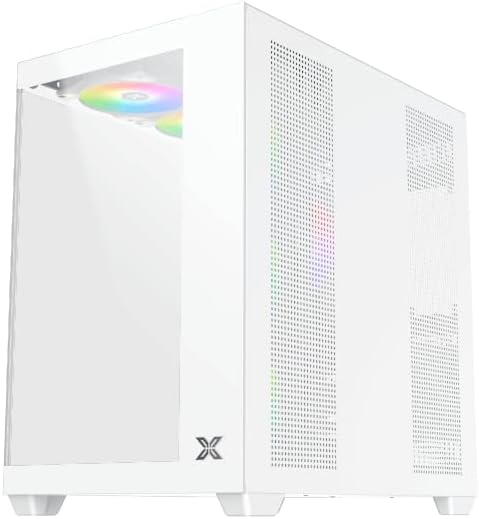
Figura 5.2: View behind the motherboard tray, illustrating the ample space and tie-down points for effective cable management.
Aprofita els retalls de cables i els punts d'amarratge que hi ha darrere de la safata de la placa base per organitzar els cables. Això millora la circulació del flux i l'estètica.
- Connect all necessary power cables from the PSU to the motherboard, GPU, and storage drives.
- Connect front panel cables (USB, audio, power/reset switches, LED indicators) to the corresponding headers on your motherboard. Refer to your motherboard manual for specific header locations.
- Connect the ARGB fan cables to the integrated fan controller or directly to your motherboard's ARGB headers if available.
5.7. Suport per a ventiladors i radiadors
The Xigmatek Aqua V AIR Arctic comes with 7 pre-installed 120mm ARGB fans. Additional cooling options are available:
- Davant: Supports up to 3 x 120mm or 2 x 140mm fans / 240mm, 280mm, 360mm radiators.
- A dalt: Supports up to 3 x 120mm or 2 x 140mm fans / 240mm, 280mm, 360mm radiators.
- posterior: Admet 1 ventilador de 120 mm.
- A baix: Supports up to 3 x 120mm fans.
Ensure proper fan orientation for optimal airflow (intake at front/bottom, exhaust at rear/top).
6. Funcionament
Once all components are installed and cables are connected, replace the side panels. Connect your monitor, keyboard, mouse, and power cable. Press the power button on the front panel to start your system.
The pre-installed ARGB fans can be controlled via the integrated controller (if present) or through compatible motherboard software, allowing customization of lighting effects and fan speeds.
7. Manteniment
Un manteniment regular ajuda a garantir un rendiment òptim i una llarga vida útil dels components del teu PC.
- Neteja de pols: Periodically clean dust filters (top, front, bottom) to maintain good airflow. Use compressed air to remove dust from inside the case and components.
- Neteja exterior: Netegeu les superfícies exteriors amb un damp drap. Eviteu productes de neteja o dissolvents abrasius.
- Comprovació de la gestió de cables: De tant en tant, comproveu el cablejat per assegurar-vos que no hi hagi cables que obstrueixin els ventiladors o el flux d'aire.
8. Solució De Problemes
Si teniu problemes, consulteu els passos habituals següents per a la resolució de problemes:
- El sistema no s'encén:
- Assegureu-vos que la font d'alimentació estigui engegada i connectada correctament a la presa de corrent.
- Verify all power cables (24-pin ATX, 8-pin CPU, PCIe, SATA) are securely connected.
- Comproveu les connexions de l'interruptor d'alimentació del panell frontal a la placa base.
- Sense sortida de pantalla:
- Ensure the monitor cable is connected to the graphics card (not the motherboard I/O if using a dedicated GPU).
- Torneu a col·locar els mòduls de la targeta gràfica i de la RAM.
- Fans not spinning or ARGB not working:
- Comproveu les connexions d'alimentació del ventilador a la placa base o al controlador del ventilador.
- Verify ARGB connections to the controller or motherboard headers.
- Ensure any fan control software or BIOS settings are correctly configured.
For more complex issues, consult your component manuals or contact Xigmatek technical support.
9. Especificacions
| Característica | Detall |
|---|---|
| Nom del model | Aqua V AIR Arctic |
| Número de model | EN45837 |
| Tipus de cas | Mitjana Torre |
| Compatibilitat amb la placa base | ATX, Micro ATX |
| Material | Steel Alloy, Tempered Glass |
| Color | Blanc |
| Ventiladors preinstal·lats | 7 ventiladors ARGB de 120 mm |
| Longitud màxima de la GPU | 410 mm |
| Ports USB | 3 |
| Pes | 8.8 quilos |
10. Garantia i Suport
Xigmatek products are manufactured to high quality standards. For warranty information, please refer to the warranty card included with your product or visit the official Xigmatek website. For technical support or inquiries, please contact Xigmatek customer service through their official channels.
Oficial Weblloc: www.xigmatek.com


