Introducció
Thank you for choosing the RORSOU B8 Bluetooth Headphones. These over-ear headphones are designed to provide a superior audio experience with deep bass and Hi-Fi stereo sound, powered by a 40mm audio driver and advanced Bluetooth 5.4 technology. Enjoy extended listening with up to 50 hours of playtime and versatile connectivity options. This manual will guide you through the setup, operation, and maintenance of your new headphones.

Figure 1: RORSOU B8 Bluetooth Headphones (Beige White)
The RORSOU B8 headphones feature a sleek beige white finish with gold accents, designed for comfort and portability.
Què hi ha a la caixa
- Manual d'usuari
- Coixins per a les orelles (preinstal·lats)
- Protective Case (Drawstring Bag)
- Cable de càrrega USB-C
- Cable d'àudio AUX de 3.5 mm

Figure 2: Included accessories with the RORSOU B8 Headphones.
The box contains the headphones, a user manual, a USB-C charging cable, a 3.5mm AUX cable, and a soft drawstring protective case.
Producte acabatview & Controls
Familiarize yourself with the buttons and ports on your RORSOU B8 headphones for optimal use.

Figura 3: Detallada view dels controls i ports dels auriculars.
The right earcup features the main controls including the EQ button, USB-C charging port, 3.5mm audio jack, and power/playback buttons.
- Botó d'engegada/reproducció/pausa: Premeu llargament per encendre/apagar. Premeu curtament per reproduir/pausar música o respondre/finalitzar trucades.
- Botó per pujar el volum (+): Premeu curtament per augmentar el volum. Premeu llargament per saltar a la pista següent.
- Botó per baixar el volum (-): Premeu curt per baixar el volum. Premeu llargament per anar a la pista anterior.
- Botó EQ: Press to cycle through 6 preset EQ modes (Standard, Classical, Metal, Jazz, Rock, Bass).
- Port de càrrega USB-C: Per carregar els auriculars.
- Conector d'àudio de 3.5 mm: Per a la connexió amb cable mitjançant el cable AUX.
- Micròfon: Per trucades mans lliures.
Configuració
Carregant els teus auriculars
- Connect the USB-C charging cable to the headphone's charging port.
- Connecteu l'altre extrem del cable USB a una font d'alimentació USB compatible (per exemple, un port USB de l'ordinador, un adaptador de paret).
- L'indicador LED mostrarà l'estat de càrrega. Una càrrega completa triga aproximadament 2 hores.
- Once fully charged, the headphones provide up to 50 hours of playtime.
Emparellament Bluetooth
- Assegureu-vos que els auriculars estiguin apagats.
- Long press the Power/Play/Pause button until the LED indicator flashes blue and red alternately. This indicates pairing mode.
- Al dispositiu (telèfon intel·ligent, tauleta, PC), activeu el Bluetooth i cerqueu els dispositius disponibles.
- Select "RORSOU B8" from the list of found devices.
- Un cop s'hagi emparellat correctament, l'indicador LED s'il·luminarà de color blau fix o parpellejarà lentament en blau.
- The headphones can be paired with two devices simultaneously and seamlessly switch between them.
Wired Connection (AUX)
If your headphones run out of battery or you prefer a wired connection, you can use the included 3.5mm AUX cable.
- Connect one end of the 3.5mm AUX cable to the headphone's 3.5mm audio jack.
- Connecteu l'altre extrem a la sortida d'àudio del vostre dispositiu.
- Els auriculars canviaran automàticament al mode amb cable.
Instruccions de funcionament
Encès/Apagat
- Encès: Long press the Power/Play/Pause button until the LED indicator lights up.
- Apagar: Long press the Power/Play/Pause button until the LED indicator turns off. The headphones will automatically shut down after 5 minutes if no device is connected.
Control de volum
- Augmenta el volum: Premeu breument el botó d'apujar el volum (+).
- Disminueix el volum: Premeu breument el botó per baixar el volum (-).
Control de reproducció
- Reproduir/pausa: Premeu breument el botó d'engegada/reproducció/pausa.
- Pista següent: Premeu llargament el botó d'apujar el volum (+).
- Pista anterior: Premeu llargament el botó per baixar el volum (-).
Gestió de trucades
- Respon a la trucada entrant: Premeu breument el botó d'engegada/reproducció/pausa.
- Finalitzar la trucada: Premeu breument el botó d'engegada/reproducció/pausa durant una trucada.
- Rebutja la trucada: Long press the Power/Play/Pause button when a call is incoming.
- Call Back Last Number: Double click the Power/Play/Pause button.
Modes EQ
The RORSOU B8 headphones offer 6 preset EQ modes to optimize your listening experience for different music genres.
- Mode estàndard: So equilibrat professionalfile.
- Classical Mode: Enhanced for classical music.
- Mode de metall: Optimized for heavy metal and rock.
- Mode Jazz: Tailored for jazz music.
- Mode Rock: Boosted for rock music.
- Mode de baix: Enhanced bass for powerful low-end sound.
To switch between modes, press the EQ button on the right earcup.
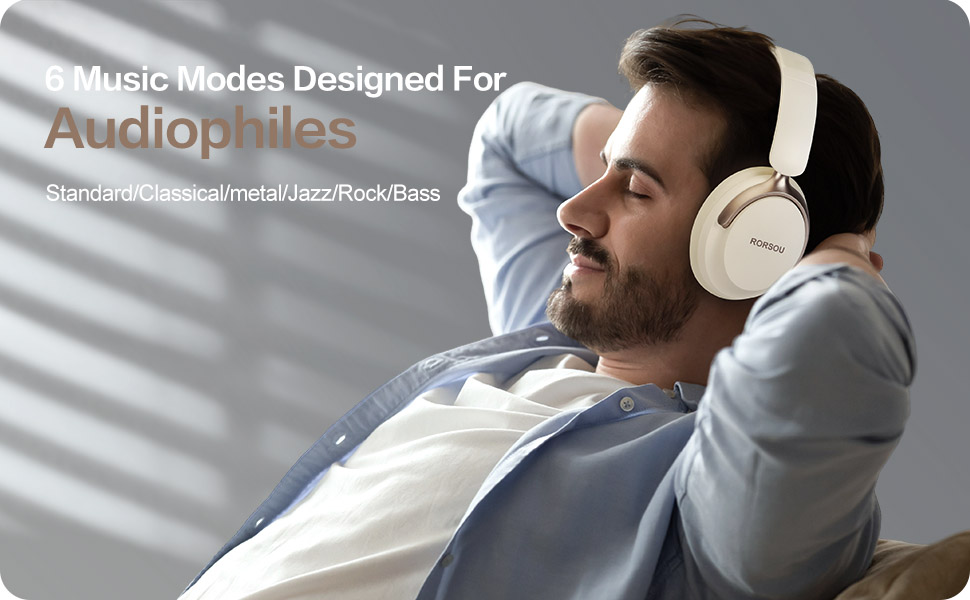
Figure 4: Experience optimized sound with 6 EQ modes.
The EQ modes allow users to customize the audio output to match their preferred music style.
Comoditat i disseny
The RORSOU B8 headphones are engineered for all-day comfort and portability. They feature ultra-soft protein leather earcups that provide a comfortable fit without discomfort, even during extended use. The earmuffs automatically adjust to suit different head shapes, ensuring a snug fit. The foldable and lightweight design allows for easy storage in the included carrying bag, making them ideal for travel, sports, or everyday use.

Figure 5: Key comfort and design elements of the headphones.
Features include soft earcups, an adjustable headband, and a foldable design for enhanced portability.

Figure 6: Headphones being used in outdoor, transport, and study environments.
The versatile design makes these headphones suitable for various activities and environments.
Manteniment i cura
- Mantingueu els auriculars nets netejant-los amb un drap suau i sec.
- Eviteu exposar els auriculars a temperatures extremes, humitat o líquids.
- Store the headphones in the provided protective case when not in use to prevent scratches and damage.
- No intenteu desmuntar ni reparar els auriculars vosaltres mateixos, ja que això podria anul·lar la garantia.
Resolució de problemes
| Problema | Causa possible | Solució |
|---|---|---|
| Els auriculars no s'encenen | Bateria baixa | Carregueu els auriculars completament. |
| No es pot emparellar amb el dispositiu | Headphones not in pairing mode / Bluetooth off on device | Ensure headphones are flashing blue/red. Turn on Bluetooth on your device. |
| Sense so | Volume too low / Not connected / Incorrect audio source | Increase volume. Re-pair Bluetooth or check AUX cable connection. Select correct audio output on device. |
| Mala qualitat del so | Interference / Low battery / EQ setting | Move closer to your device. Charge headphones. Try a different EQ mode. |
Especificacions
| Característica | Detall |
|---|---|
| Nom del model | B8 |
| Marca | RORSOU |
| Tecnologia de connectivitat | Wireless, Wired, Bluetooth 5.4 |
| Conector d'auriculars | 3.5 mm Jack |
| Col·locació de l'orella | Sobre l'orella |
| Mida del controlador d'àudio | 40 mil·límetres |
| Durada de la bateria | 50 hores |
| Temps de càrrega | 2 hores |
| Tipus de control | Volume Control, Button |
| Control de soroll | Aïllament acústic |
| Material | Plàstic |
| Pes de l'article | 7.7 unces |
| Dimensions del producte | 5.91 x 3.15 x 7.87 polzades |
Garantia i Suport
RORSOU is dedicated to providing high-quality products with excellent after-sale service. Your RORSOU B8 headphones come with a 180-days Hassle Free limited Protection.
If you have any questions, concerns, or require technical assistance, please contact RORSOU customer service. We aim to provide quick response customer service and will get back to you within 24 hours.
For support, please refer to the contact information provided on the product packaging or the official RORSOU weblloc.


