Introducció
Welcome to the boAt Airdopes 111v2 TWS Earbuds instruction manual. This guide provides detailed information on how to set up, operate, maintain, and troubleshoot your new wireless earbuds. Please read this manual carefully to ensure optimal performance and longevity of your device.
Què hi ha a la caixa
- Auriculars TWS
- Cable de càrrega
- Manual d'usuari
- Additional Earbuds (Ear Tips)
Configuració
1. Càrrega inicial
Before first use, fully charge your Airdopes 111v2. Place the earbuds into the charging case and connect the case to a power source using the provided cable. A full charge takes approximately 1.5 hours.

Image: The boAt Airdopes 111v2 charging case held in a hand, highlighting its 50 hours of total playback time.
The earbuds offer up to 50 hours of total playback time. With ASAP Charge, a 10-minute charge provides 120 minutes of playtime.

Image: boAt Airdopes 111v2 earbuds and charging case illustrating the ASAP Charge feature: 10 minutes of charging provides 120 minutes of playback.
2. Vinculació amb un dispositiu
The Airdopes 111v2 feature IWP (Insta Wake N' Pair) Technology. Simply open the lid of the charging case, and the earbuds will automatically enter pairing mode. Look for "Airdopes 111v2" in your device's Bluetooth settings (Bluetooth v5.4) and select it to connect.

Image: A visual representation of the IWP Technology, showing a smartphone connected to the Airdopes 111v2 upon opening the case lid. Also depicts Bluetooth v5.4, Voice Assistant compatibility, and IPX4 resistance.
3. Connectivitat multipunt
The Airdopes 111v2 supports multipoint Bluetooth connectivity, allowing you to pair with two devices simultaneously. You can stay connected to both devices at once and switch between them without the need for re-pairing.
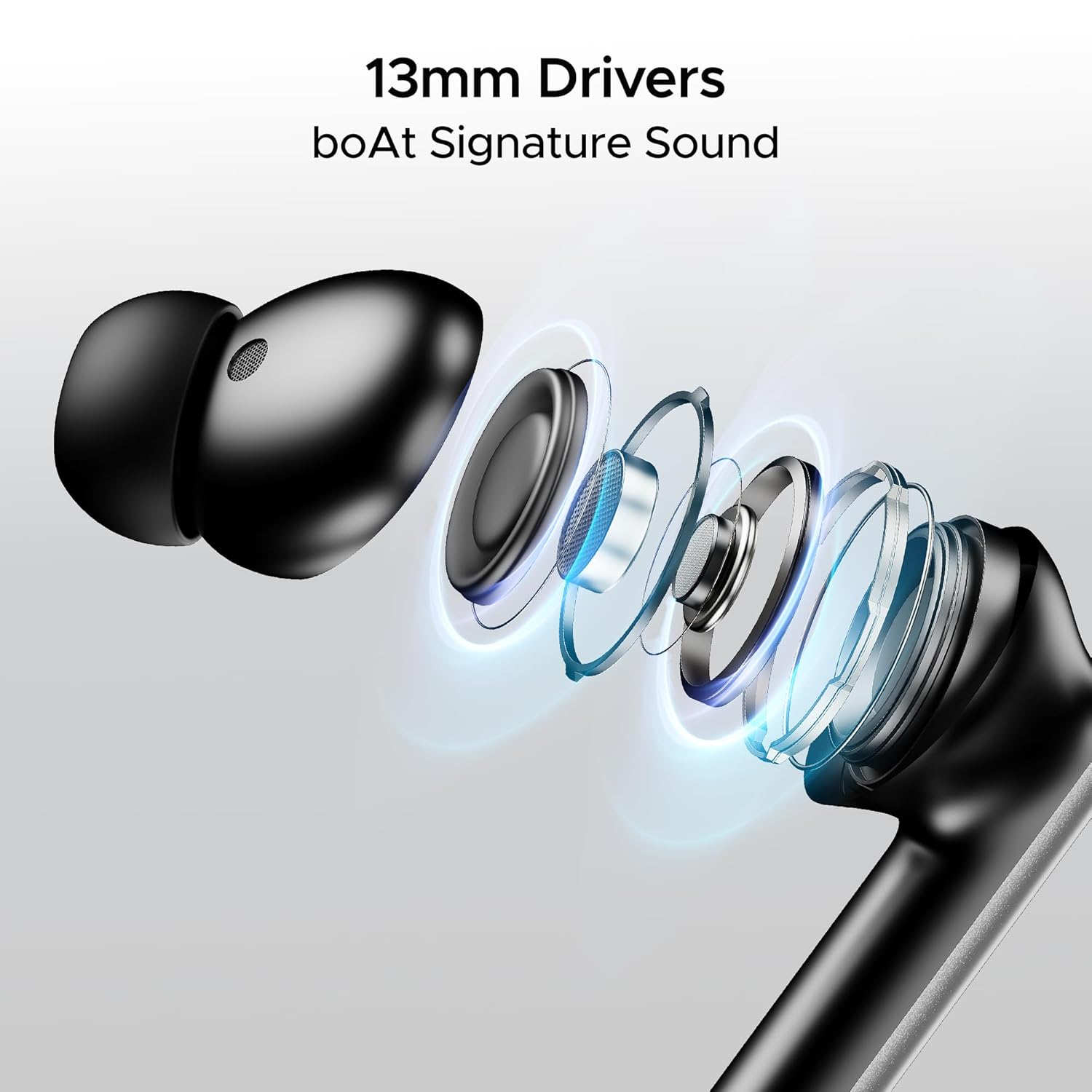
Image: The Airdopes 111v2 earbuds and case positioned between a smartphone and a laptop, illustrating the ability to connect and switch between two devices simultaneously.
Instruccions de funcionament
1. Toqueu Controls
The earbuds feature intuitive touch controls for managing calls, music playback, and activating your voice assistant. Refer to the quick start guide included in the box for specific touch gestures.
2. Assistent de veu
Activate your device's voice assistant (e.g., Siri, Google Assistant) directly from the earbuds using the designated touch control. This allows for hands-free control of your smartphone or other compatible devices.
Image: Icons representing Siri and Google Assistant, confirming the earbuds' compatibility with voice assistant features.
3. Modes d'equalització dual
The Airdopes 111v2 offers two distinct EQ modes for a customized listening experience: Signature Mode for enhanced bass and Mode equilibrat for optimized, clear audio. Switch between these modes to suit your preference.

Image: A graphic demonstrating the Dual EQ Modes, showing a waveform split into 'Signature Mode for Thumping Beats' and 'Balanced Mode for Optimized Sound', with the earbuds and case.
4. Trucades
Equipped with Quad Mics and ENx Technology, the Airdopes 111v2 ensures clear call quality by canceling out background noise. This allows for crystal-clear conversations even in noisy environments.

Image: An internal diagram of an earbud illustrating the 4 Mics with ENx Technology, designed to eliminate background noise for clear conversations.
5. Reproducció de música
Experience immersive audio with the 13mm dynamic drivers, delivering boAt Signature Sound. These drivers are engineered to reproduce highs, mids, and lows with clarity and punch.

Imatge: Una explosió view of an earbud, detailing the 13mm drivers and other internal components responsible for delivering boAt Signature Sound.
Manteniment
1. Neteja
Regularly clean your earbuds and charging case with a soft, dry cloth. Avoid using abrasive materials or harsh chemicals. Ensure the charging contacts are free from dust and debris.
2. Resistència a l'aigua
The Airdopes 111v2 are IPX4 rated for sweat and splash resistance. This means they can withstand light splashes of water and sweat, making them suitable for workouts. However, they are not designed for submersion in water. Avoid exposing them to heavy rain or swimming.
Image: Earbuds shown with water droplets, signifying their IPX4 rating for sweat and splash resistance.
Resolució de problemes
- Auriculars que no s'emparellan: Assegura't que els auriculars estiguin carregats i dins de l'abast del dispositiu. Desactiva i activa el Bluetooth del dispositiu i, a continuació, intenta emparellar-los de nou.
- Sense so: Comprova els nivells de volum tant del dispositiu com dels auriculars. Assegura't que els auriculars estiguin connectats correctament.
- Problemes de càrrega: Verify the charging cable and adapter are working correctly. Ensure the charging contacts on both the earbuds and case are clean.
- Qualitat de trucada baixa: Ensure the microphones are not obstructed. Move to a quieter environment if experiencing excessive background noise.
Especificacions
| Característica | Especificació |
|---|---|
| Nom del model | Airdopes 111v2 |
| Tecnologia de connectivitat | Bluetooth |
| Versió Bluetooth | 5.4 |
| Interval Bluetooth | 10 metres |
| Mida del controlador d'àudio | 13 Mil·límetres |
| Durada de la bateria | Fins a 50 hores (amb estoig de càrrega) |
| Temps de càrrega | 1.5 hores |
| Nivell de resistència a l'aigua | IPX4 (resistent a la suor i a les esquitxades) |
| Pes de l'article | 50 grams |
| Material | Plàstic |
| Components inclosos | TWS Earbuds, Cable, User Manual, Additional Earbuds |
Garantia i Suport
For warranty information and further support, please refer to the official boAt website or the contact details provided in your product packaging. You can also access the boAt Hearables App for additional user guides and support resources.


