1. Introducció
Thank you for choosing the OKP Life K5 Robot Vacuum. This intelligent cleaning device is designed to provide efficient and convenient floor cleaning for your home. Featuring Wi-Fi connectivity and remote control capabilities, the K5 offers multiple cleaning modes and smart navigation to ensure a thorough clean. Please read this manual carefully before using the product to ensure proper operation and maintenance.
2. Contingut del paquet
Verifiqueu que tots els articles siguin presents i en bon estat en desempaquetar-los.
- OKP Life K5 Robot Vacuum Cleaner (1 unit)
- Comandament a distància (1 unitat)
- Base de càrrega (1 unitat)
- Adaptador de corrent (1 unitat)
- Side Brushes (4 units, 2 for immediate use, 2 spares)
- Cleaning Tool (1 unit)
- Manual d'usuari (Aquest document)

Image: The OKP Life K5 Robot Vacuum, its remote control, and a set of four side brushes, illustrating the typical package contents.
3. Producte acabatview
3.1 Components del robot aspirador
Familiarize yourself with the main parts of your K5 Robot Vacuum.

Imatge: Vista de dalt a baix view of the OKP Life K5 Robot Vacuum, highlighting its sleek, disc-shaped design and central power button.
- Main Body: Contains the motor, dustbin, and navigation sensors.
- Power Button/Indicator Light: For manual operation and status indication.
- Dustbin: 550ml capacity for collecting debris.
- Side Brushes: Two rotating brushes to sweep debris into the suction path.
- Driving Wheels: For movement across various floor types.
- Charging Contacts: For automatic recharging at the charging dock.
- Sensors: Anti-drop and anti-collision sensors for safe navigation.
3.2 Control remot
The remote control provides convenient access to various cleaning functions.

Image: A close-up of the white remote control for the OKP Life K5 Robot Vacuum, showing its various function buttons for control and mode selection.
- Power Button: Turns the robot on/off or starts/pauses cleaning.
- Directional Buttons: Manually control the robot's movement.
- Home Button: Sends the robot back to the charging dock.
- Mode Selection Buttons: Switch between Auto, Spot, Edge, and Zigzag cleaning modes.
- Suction Power Adjustment: Adjusts the vacuum's suction strength.
4. Configuració
4.1 Preparació del robot
- Remove all protective films and stickers from the robot and charging dock.
- Attach the side brushes by pressing them onto the square posts until they click into place.
4.2 Col·locació de la base de càrrega
- Col·loca la base de càrrega contra una paret sobre una superfície dura i anivellada.
- Assegureu-vos que hi hagi com a mínim 0.5 metres (1.6 peus) d'espai lliure a banda i banda del moll i 1.5 metres (4.9 peus) davant seu.
- Plug the power adapter into the charging dock and then into a wall outlet.
4.3 Càrrega inicial
For optimal performance, fully charge the robot before its first use.
- Manually place the robot onto the charging dock, ensuring the charging contacts align.
- The indicator light on the robot will show charging status (e.g., breathing light).
- Normalment, una càrrega completa triga entre 4 i 5 hores.

Image: The OKP Life K5 Robot Vacuum automatically navigating back to its charging dock, demonstrating its self-charging capability when the battery is low.
4.4 Connexió a la Wi-Fi i a l'aplicació
The OKP Life App allows for advanced control and scheduling.
- Download the "OKP Life" app from the App Store (iOS) or Google Play Store (Android).
- Registreu un compte i inicieu sessió.
- Follow the in-app instructions to add your K5 robot vacuum. Ensure your Wi-Fi network is 2.4GHz.
- The robot can also be connected to Amazon Alexa and Google Assistant for voice control. Refer to the app for detailed instructions on integrating with these smart home platforms.

Image: A user interacting with the OKP Life K5 Robot Vacuum via a smartphone app, with icons indicating compatibility with Google Assistant and Amazon Alexa, and a note about 2.4GHz Wi-Fi connectivity.
5. Instruccions de funcionament
5.1 Inici d'una neteja
- Del robot: Press the power button on the robot once.
- From Remote Control: Premeu el botó d'engegada del comandament a distància.
- Des de l'aplicació: Tap the "Start Cleaning" button in the OKP Life app.
- Comandament de veu: Use a connected smart assistant (e.g., "Alexa, turn on Robot Vacuum").
5.2 Pausing/Resuming a Clean
- Press the power button on the robot or remote, or use the app/voice command.
- Press again to resume cleaning.
5.3 Sending Robot to Charging Dock
- Press the "Home" button on the remote control or in the app.
- The robot will automatically return to its charging dock when the battery is low.
5.4 modes de neteja
The K5 offers multiple cleaning modes to suit different needs, selectable via the remote control or app.
- Neteja automàtica: The robot intelligently navigates and cleans the entire accessible area. This is the default mode.
- Neteja de punts: The robot cleans a concentrated area in a spiral pattern, ideal for localized dirt or spills.
- Neteja de vores: El robot neteja les parets i les vores dels mobles per garantir una cobertura completa.
- Neteja en ziga-zaga: The robot cleans in a systematic back-and-forth pattern, covering the maximum area and reducing missed spots.

Image: The OKP Life K5 Robot Vacuum cleaning a room, with an overlay illustrating its efficient Z-Shape (zigzag) cleaning path, designed to maximize coverage and minimize missed areas.
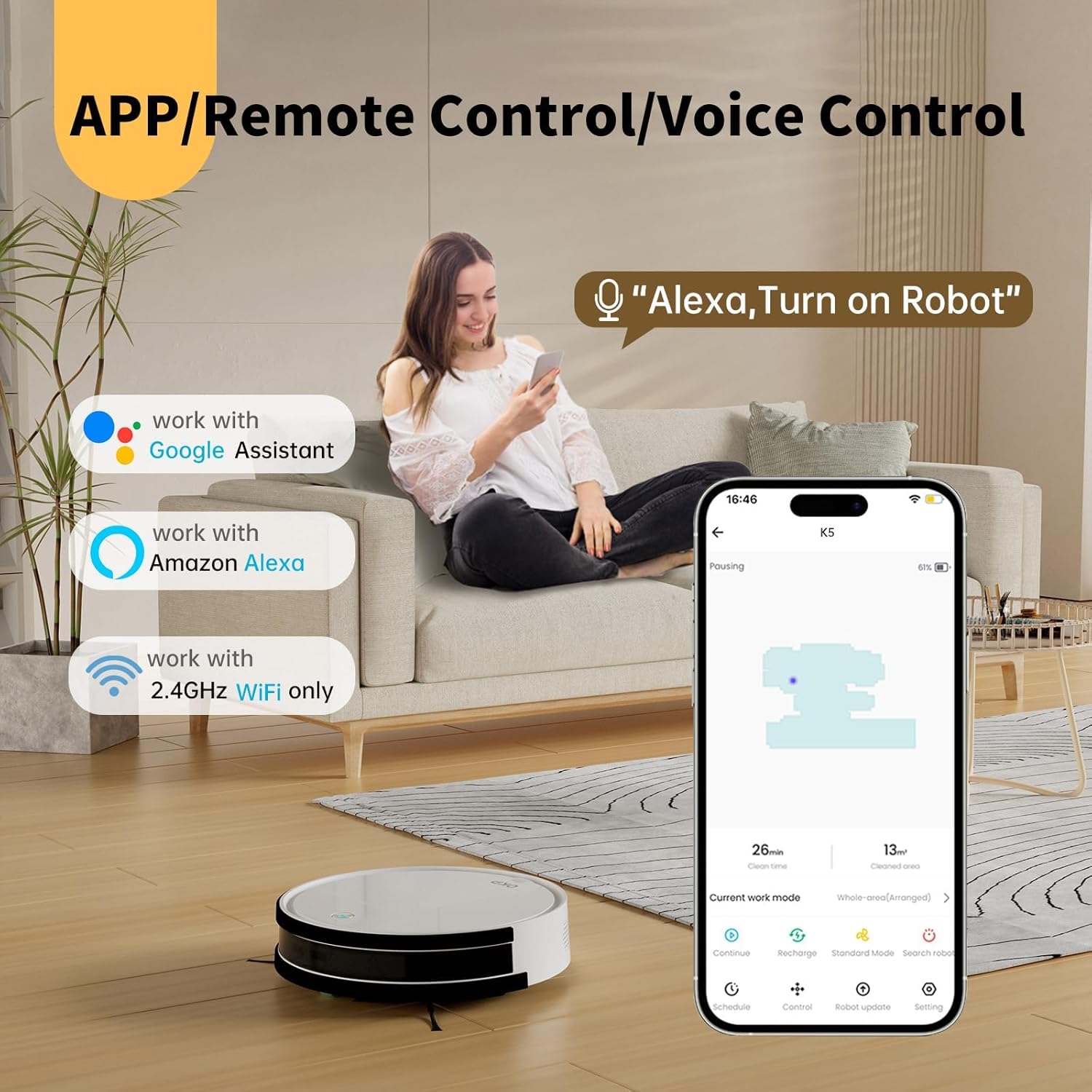
Image: The OKP Life K5 Robot Vacuum demonstrating its suction power, with illustrations of various debris types (debris, dust, beans, hair) being effectively vacuumed, indicating its versatility for different cleaning scenarios.
6. Manteniment
Un manteniment regular garanteix un rendiment òptim i allarga la vida útil del teu robot aspirador.
6.1 Buidar el contenidor d'escombraries
- Premeu el botó d'alliberament del contenidor de pols i traieu-lo.
- Obriu la tapa de la paperera i buideu-ne el contingut en una paperera.
- Esbandiu el contenidor de pols amb aigua si cal (assegureu-vos que estigui completament sec abans de tornar-lo a introduir).
6.2 Neteja del filtre
- Traieu el filtre del contenidor de pols.
- Colpegeu suaument el filtre per eliminar la pols. No renteu el filtre HEPA amb aigua.
- Canvieu el filtre cada 3-6 mesos, depenent de l'ús.
6.3 Neteja dels raspalls laterals
- Traieu els raspalls laterals estirant-los cap amunt.
- Remove any hair or debris wrapped around the brushes.
- Reattach the brushes. Replace if worn or damaged.
6.4 Neteja dels sensors i els contactes de càrrega
- Netegeu els sensors anti-caiguda, els sensors anticol·lisió i els contactes de càrrega tant del robot com de la base de càrrega amb un drap net i sec.
- Keep these areas clean to ensure proper navigation and charging.
7. Solució De Problemes
If your robot vacuum encounters issues, refer to the following common problems and solutions.
| Problema | Causa possible | Solució |
|---|---|---|
| El robot no s'encén. | Bateria baixa; interruptor apagat. | Charge the robot; Ensure the main power switch (if present) is ON. |
| El robot no es pot carregar. | Contactes de càrrega bruts; la base de càrrega no està alimentada. | Clean charging contacts; Ensure charging dock is plugged in and has power. |
| El robot es queda encallat sovint. | Obstacles; Sensors dirty. | Clear cables, rugs, or small objects; Clean sensors. |
| Mal rendiment de neteja. | Full dustbin; Clogged filter; Worn brushes. | Empty dustbin; Clean/replace filter; Clean/replace side brushes. |
| No es pot connectar a la Wi-Fi/aplicació. | Banda Wi-Fi incorrecta (només s'admet 2.4 GHz); Contrasenya incorrecta; Robot massa lluny del router. | Ensure 2.4GHz Wi-Fi; Re-enter password; Move robot closer to router. |
Si el problema persisteix, poseu-vos en contacte amb l'atenció al client.
8. Especificacions
| Marca | OKP Vida |
| Nom del model | K5 |
| Potència d'aspiració | 2100 PA |
| Capacitat de la paperera | 550 ml |
| Font d'alimentació | Funciona amb bateria |
| Factor de forma | En forma de disc |
| Característiques especials | Smart, Edge Cleaning, Obstacle Avoidance, Selective Room Cleaning, Bagless, Wi-Fi Connectivity, Remote Control, Voice Control (Alexa, Google Assistant), Automatic Charging, Multiple Cleaning Modes (Auto/Spot/Edge/Zigzag) |
| Dimensions (aprox.) | 280mm (width) x 77mm (height) / 11.02 inches (width) x 3 inches (height) |
9. Garantia i Suport
OKP Life products come with a standard manufacturer's warranty. Please refer to the warranty card included in your package or visit the official OKP Life weblloc web per obtenir informació detallada sobre els termes i condicions de la garantia.
For technical support, troubleshooting assistance, or to order replacement parts, please contact OKP Life customer service through the contact information provided on their official website or within the OKP Life app.
Weblloc: Visit the OKP Life Store on Amazon


